Member Management
Registering and managing members
1. Overview
A member is a customer record. Every loan, deposit and collection in MicroFin belongs to a member, so registering the member correctly is the first step of all other work.
In this chapter you will register a member, understand how KYC status works, correct a member's details, and stop or restart a member's borrowing. Centres and loans are covered in later chapters.
2. Navigation
- Register:
Customers > Members > Membersthen + Add Member. - Edit:
Customers > Members > Members, then Edit on the member's row. - Member list for microfinance profiles:
Customers > Members > MFI Members. - Full customer page: click the member's name (Customer 360°).
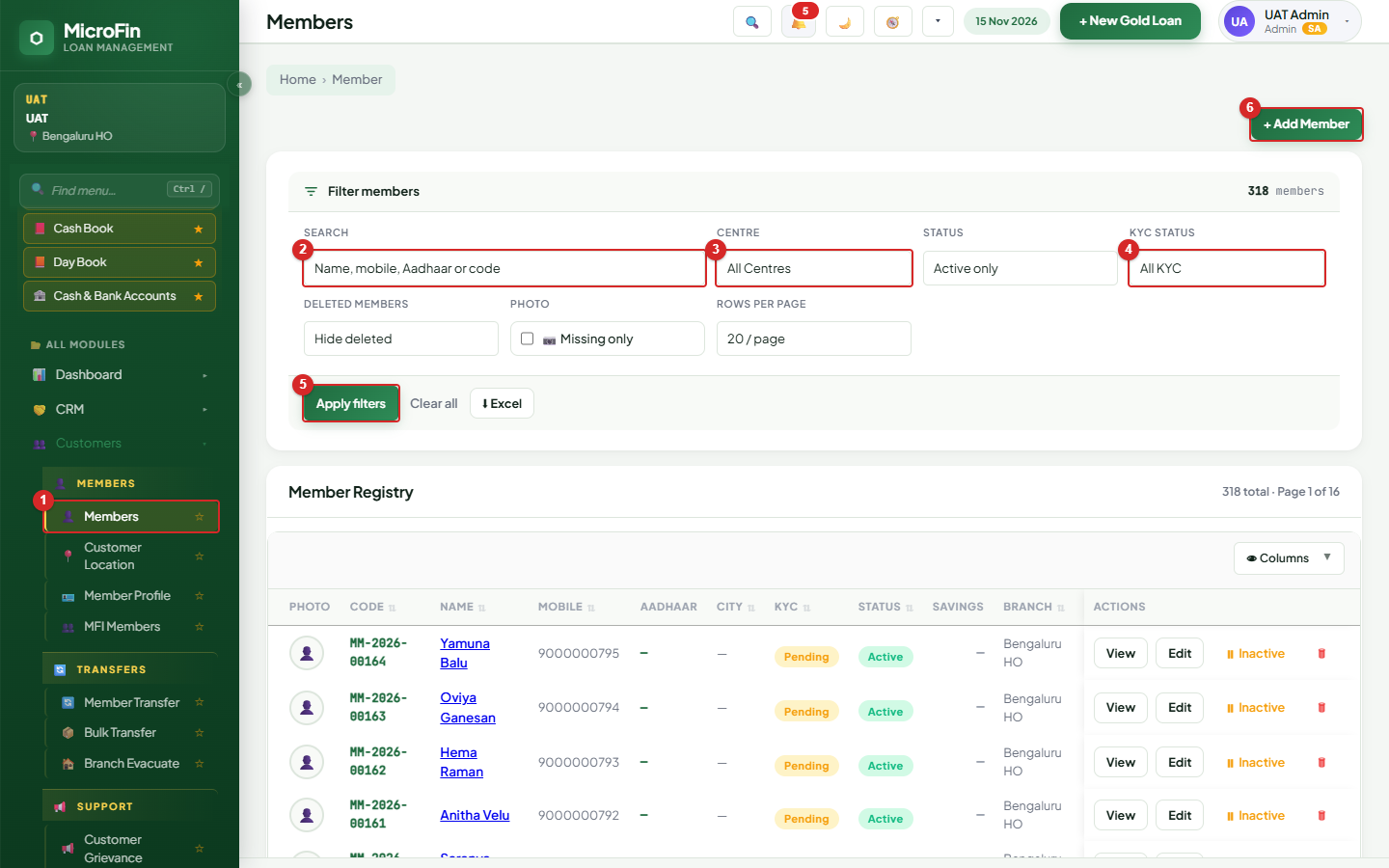
- Customers > Members in the left menu
- Search by name, mobile, Aadhaar or code
- Centre filter
- KYC status filter
- Apply filters
- Add Member
3. Before you start
- Permission: you need the loan-management right (
CanManageLoans). An HO (head-office) user chooses the branch; a branch user always works in their own branch. - Plan limit: your MicroFin plan has a member quota. If it is full you are sent to the add-on page.
- Company settings your administrator may have switched on: which boxes are mandatory or hidden (Settings > Member Form Fields), identity verification cards, mobile OTP, a one-time subscription fee, and approval before a member is created.
- Have the member's identity documents and a working mobile number ready.
4. Step-by-step instructions
Register a new member
- Open
Customers > Members > Membersand click + Add Member. - (Optional) If your company has identity checks on, use the cards at the top. Scan Aadhaar QR needs the member's tick for consent, then a scan of the QR; it fills name, date of birth, gender, address and PIN for you to review. It does not fill the Aadhaar number.
- Fill Personal Information: Full Name, Mobile, Date of Birth, Gender and the other boxes you have.
- Choose the Branch (HO users) and, if the member already belongs to a centre, the Centre.
- Fill KYC Documents (Aadhaar, PAN, Voter ID), Address and Income & Bank Details.
- Upload Photos & Documents (member photo, Aadhaar front/back, PAN copy, passbook and so on).
- Set KYC Status. See section 7 — this is your choice; the software does not work it out.
- If your company asks for mobile OTP, click Send OTP, enter the code and click Verify.
- If a Subscription Fee block is shown, enter the amount, payment mode and account.
- Click ✓ Register Member.
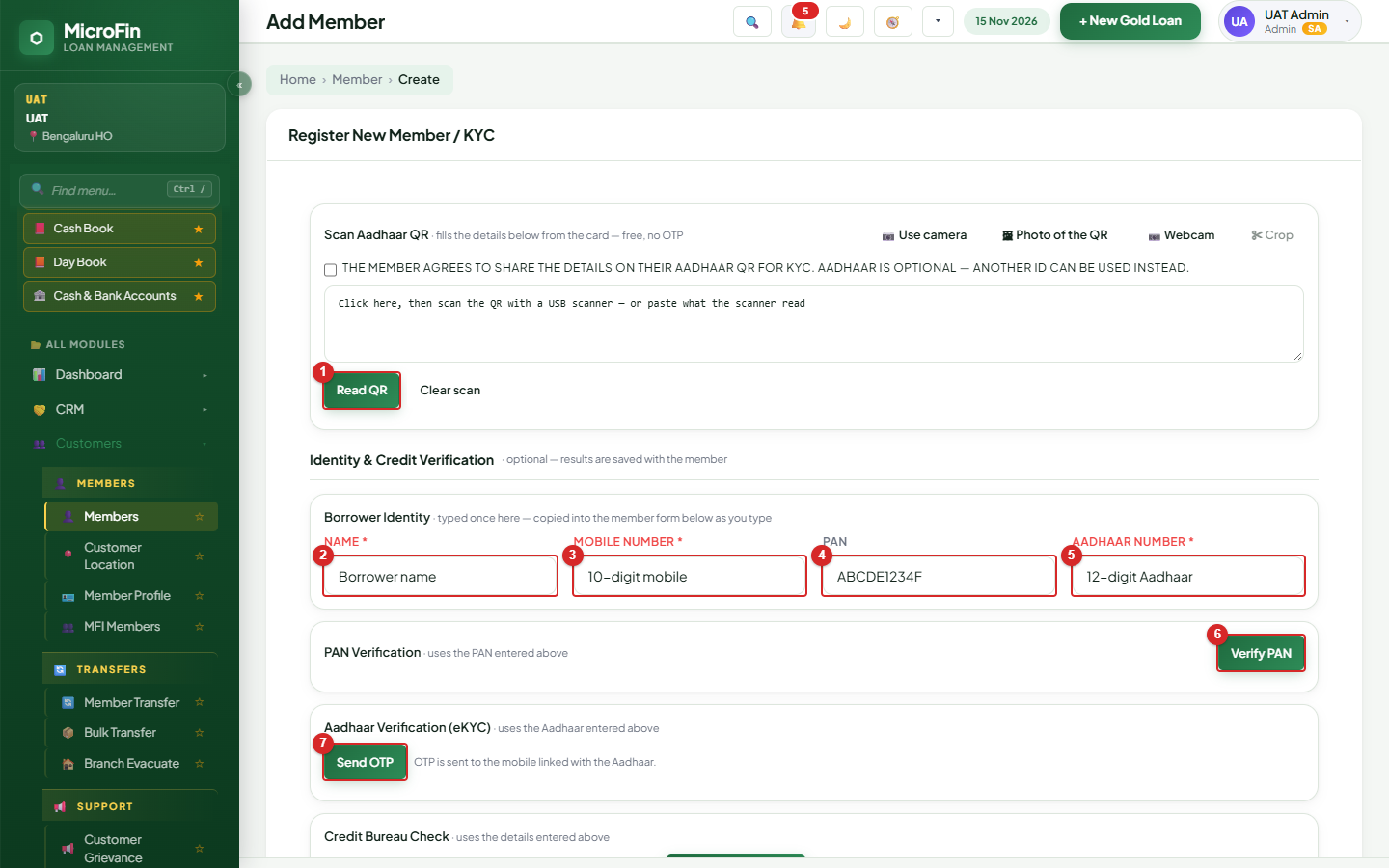
- Read QR: fills the details from the Aadhaar QR (the member must agree first)
- Borrower name
- Mobile number (10 digits)
- PAN (optional)
- Aadhaar number (12 digits)
- Verify PAN
- Send OTP for Aadhaar verification
Edit a member
- Open
Customers > Members > Membersand click Edit on the row. - Change what you need and save. Every box on the form is saved again, so do not clear a box unless you mean to.
Stop or restart borrowing
- On the Members list click ⏸ Inactive (or ▶ Activate to restart), or use Mark inactive on the Customer 360° page.
- Confirm the message. An inactive member cannot take new loans but stays in reports and history.
Remove a member entered in error
Only an Admin can use the delete icon. It sends a deletion request for approval; the member is removed only after approval.
5. Field explanation
| Field | Purpose | Required? | Expected input | Validation | Example |
|---|---|---|---|---|---|
| Full Name | The member's legal name | Yes | 2–150 characters | Required | Lakshmi Devi |
| Mobile | Main contact; also used for OTP and messages | Yes | 10 digits starting 6, 7, 8 or 9 | Format checked; must not belong to another member of your company | 9XXXXXXXXX |
| Branch | Branch that owns the member | Yes | Pick from list (HO users); fixed for branch users | Active branch | Main Branch |
| KYC Status | Your decision on the member's KYC | Yes (default Pending) | Pending / Verified / Rejected | None enforced between values | Pending |
| Date of Birth | Age check | Depends on settings | Date | Not in the future; member must be at least 18 | 14-03-1990 |
| Joining Date | When the member joined | Optional | Date | Not in the future; not before date of birth | — |
| Aadhaar Number | Identity | Depends on settings | 12 digits | Format checked; duplicate refused | — |
| PAN Number | Identity | Depends on settings | 5 letters, 4 digits, 1 letter | Format checked | — |
| Pin Code | Address | Optional | 6 digits | Format checked | 6XXXXX |
| Alternative Mobile | Second contact | Optional | 10 digits starting 6–9 | Must differ from the main mobile | — |
| Nominee Name / Mobile / Relation / Aadhaar / Date of Birth / Address | Person who will receive benefits | Depends on settings | As labelled | Nominee Aadhaar 12 digits; nominee birth date not in the future; nominee Aadhaar must not equal the member's own | — |
| Family / Working / Dependent Members | Household details | Optional | Whole numbers 0–50 | Range checked | 4 |
| Centre | Place the member in a centre now | Optional | Pick from list | Must be an active centre of the member's branch with room | — |
| Subscription Fee | One-time fee | Only if shown | Amount, mode, account | One live fee per member | — |
6. Buttons and actions
| Button | What it does |
|---|---|
| + Add Member | Opens the registration form. |
| Scan Aadhaar QR / Read QR | Reads the signed QR and fills personal details (needs consent tick). |
| Send OTP / Verify | Sends and checks a one-time code to the member's mobile (only when switched on). |
| 📍 Capture Location | Saves the device's location with the address. |
| ✓ Register Member | Checks everything and saves the member. |
| ✕ Cancel | Leaves the form without saving. |
| Edit | Opens the member for correction. |
| ⏸ Inactive / ▶ Activate | Stops or restarts new borrowing. |
| Collect fee (Member Details) | Collects a subscription fee that was not collected at registration. |
7. Business rules and validations
8. Expected result
- The member is saved with a member code like
M2026nnnn, status active, and your chosen KYC status. - The Member Details page (or Customer 360°) opens with a success message.
- If a centre was chosen, the member appears on that centre's roster.
- If a subscription fee was collected, a receipt
MSF-year-numberis issued. If it could not be collected you see “The subscription fee was NOT collected … Collect it from the member's page.” - A welcome SMS / WhatsApp message may be sent if your company has it on.
- With approval switched on you see “Member submitted for approval — it will be created once the approval chain signs off.”
9. Troubleshooting
| Message or problem | Likely cause | What to do |
|---|---|---|
| “A member with mobile … already exists in this company” | The mobile or Aadhaar is already registered | Search the Members list; use the existing member. |
| “Member must be at least 18 years old.” | Date of birth gives age under 18 | Check the date; under-18 members cannot be registered. |
| “<Label> is required.” | A mandatory field is empty | Fill the box named in the message. |
| Form returns with an error and photos are still there | Normal: nothing was saved | Fix the message; your picked photos are kept for the retry. |
| Redirected to the add-on page | Plan member quota is full | Ask your administrator to add capacity. |
| “Cannot inactivate — member has active loans. Close or foreclose them first.” | The member has an open loan | Close the loan first. |
| Member saved but not on the centre roster | The centre was full or invalid | Add the member from the centre's page. |
| Cannot change branch on Edit | Only HO users can; and not with open loans | Ask an Admin to use Transfer branch. |
11. Related modules
- Next in the workflow: Centre Management (put members into a centre), then CGT and GRT.
- Loans: a member's KYC is checked again when a loan is requested and when an MFI loan is disbursed.
- Customer 360° shows the member's loans, documents and savings in one place.
உறுப்பினர் மேலாண்மை
உறுப்பினர்களைப் பதிவு செய்தல் மற்றும் நிர்வகித்தல்
1. அறிமுகம்
உறுப்பினர் என்பது ஒரு வாடிக்கையாளரின் பதிவு. MicroFin-இல் ஒவ்வொரு கடனும், வைப்பும், வசூலும் ஓர் உறுப்பினரின் பெயரிலேயே பதிவாகும்; எனவே உறுப்பினரைச் சரியாகப் பதிவு செய்வதே மற்ற எல்லாப் பணிகளுக்கும் முதல் படி.
இந்த அத்தியாயத்தில் உறுப்பினரைப் பதிவு செய்வது, KYC நிலை எப்படிச் செயல்படுகிறது என்பது, உறுப்பினரின் விவரங்களைத் திருத்துவது, உறுப்பினர் கடன் பெறுவதை நிறுத்துவது அல்லது மீண்டும் தொடங்குவது ஆகியவற்றைக் கற்றுக்கொள்வீர்கள். மையங்களும் கடன்களும் அடுத்த அத்தியாயங்களில் விளக்கப்படுகின்றன.
2. வழிசெலுத்தல்
- பதிவு செய்ய:
Customers > Members > Members, பின்னர் + Add Member. - திருத்த:
Customers > Members > Members, பின்னர் உறுப்பினரின் வரியில் Edit. - மைக்ரோஃபைனான்ஸ் (MFI) உறுப்பினர் விவரங்களின் பட்டியல்:
Customers > Members > MFI Members. - முழு வாடிக்கையாளர் பக்கம்: உறுப்பினரின் பெயரைச் சொடுக்குங்கள் (Customer 360°).
- இடது மெனுவில் வாடிக்கையாளர்கள் > உறுப்பினர்கள்
- பெயர், கைபேசி, ஆதார் அல்லது குறியீடு மூலம் தேடு
- மைய வடிகட்டி
- KYC நிலை வடிகட்டி
- வடிகட்டிகளைப் பயன்படுத்து
- உறுப்பினரைச் சேர்
3. தொடங்குவதற்கு முன்
- அனுமதி: கடன் மேலாண்மை அனுமதி (
CanManageLoans) உங்களுக்கு இருக்க வேண்டும். தலைமை அலுவலக (HO) பயனர் கிளையைத் தேர்ந்தெடுப்பார்; கிளைப் பயனர் எப்போதும் தம் சொந்தக் கிளையிலேயே பணிபுரிவார். - சந்தாத் திட்ட வரம்பு: உங்கள் MicroFin சந்தாத் திட்டத்தில் (plan) உறுப்பினர் எண்ணிக்கைக்கு வரம்பு உண்டு. அது நிரம்பிவிட்டால் add-on பக்கத்துக்கு அனுப்பப்படுவீர்கள்.
- உங்கள் நிர்வாகி இயக்கியிருக்கக்கூடிய நிறுவன அமைப்புகள்: எந்தப் புலங்கள் கட்டாயம், எவை மறைக்கப்பட்டவை (Settings > Member Form Fields), அடையாளச் சரிபார்ப்பு அட்டைகள் (cards), கைபேசி OTP, ஒருமுறை மட்டும் செலுத்தும் சந்தாக் கட்டணம், உறுப்பினரை உருவாக்கும் முன் ஒப்புதல்.
- உறுப்பினரின் அடையாள ஆவணங்களையும், பயன்பாட்டில் உள்ள கைபேசி எண்ணையும் தயாராக வைத்திருங்கள்.
4. படிப்படியான வழிமுறைகள்
புதிய உறுப்பினரைப் பதிவு செய்ய
Customers > Members > Membersதிறந்து + Add Member சொடுக்குங்கள்.- (விருப்பம்) உங்கள் நிறுவனத்தில் அடையாளச் சரிபார்ப்பு இயக்கத்தில் இருந்தால், மேலே உள்ள அட்டைகளைப் பயன்படுத்துங்கள். Scan Aadhaar QR-க்கு முதலில் உறுப்பினரின் சம்மதத்துக்கான டிக் தேவை; பிறகு QR-ஐ ஸ்கேன் செய்தால் பெயர், பிறந்த தேதி, பாலினம், முகவரி, அஞ்சல் குறியீடு (PIN) ஆகியவை தானாக நிரப்பப்படும்; அவற்றை நீங்கள் சரிபார்க்க வேண்டும். ஆதார் எண் மட்டும் நிரப்பப்படாது.
- Personal Information பகுதியை நிரப்புங்கள்: Full Name, Mobile, Date of Birth, Gender மற்றும் உங்கள் திரையில் உள்ள பிற புலங்கள்.
- Branch (HO பயனர்) தேர்ந்தெடுங்கள்; உறுப்பினர் ஏற்கெனவே ஒரு மையத்தைச் சேர்ந்தவர் என்றால் Centre-ஐயும் தேர்ந்தெடுங்கள்.
- KYC Documents (ஆதார், PAN, வாக்காளர் அடையாள அட்டை), Address, Income & Bank Details ஆகிய பகுதிகளை நிரப்புங்கள்.
- Photos & Documents பகுதியில் கோப்புகளைப் பதிவேற்றுங்கள் (உறுப்பினர் புகைப்படம், ஆதார் முன்பக்கம்/பின்பக்கம், PAN நகல், பாஸ்புக் முதலியன).
- KYC Status-ஐத் தேர்ந்தெடுங்கள். பிரிவு 7-ஐப் பாருங்கள் — இது நீங்கள் எடுக்கும் முடிவு; மென்பொருள் இதைத் தானாகத் தீர்மானிக்காது.
- உங்கள் நிறுவனத்தில் கைபேசி OTP கட்டாயம் என்றால் Send OTP சொடுக்கி, குறியீட்டை உள்ளிட்டு Verify சொடுக்குங்கள்.
- Subscription Fee பகுதி தெரிந்தால் தொகை, பணம் செலுத்தும் முறை, கணக்கு ஆகியவற்றை உள்ளிடுங்கள்.
- ✓ Register Member சொடுக்குங்கள்.
- QR படி: ஆதார் QR இலிருந்து விவரங்களை நிரப்பும் (உறுப்பினர் முதலில் ஒப்புக்கொள்ள வேண்டும்)
- கடன் பெறுபவர் பெயர்
- கைபேசி எண் (10 இலக்கம்)
- PAN (விருப்பம்)
- ஆதார் எண் (12 இலக்கம்)
- PAN சரிபார்
- ஆதார் சரிபார்ப்புக்கு OTP அனுப்பு
உறுப்பினர் விவரங்களைத் திருத்த
Customers > Members > Membersதிறந்து உறுப்பினரின் வரியில் Edit சொடுக்குங்கள்.- தேவையானதை மாற்றிச் சேமியுங்கள். படிவத்தின் ஒவ்வொரு புலமும் மீண்டும் சேமிக்கப்படும்; எனவே வேண்டுமென்றே நீக்க நினைத்தால் தவிர எந்தப் புலத்தையும் காலியாக்காதீர்கள்.
கடன் பெறுவதை நிறுத்த அல்லது மீண்டும் தொடங்க
- Members பட்டியலில் ⏸ Inactive (மீண்டும் தொடங்க ▶ Activate) சொடுக்குங்கள்; அல்லது Customer 360° பக்கத்தில் Mark inactive பயன்படுத்துங்கள்.
- வரும் செய்தியை உறுதிப்படுத்துங்கள். செயலற்ற (inactive) உறுப்பினர் புதிய கடன் பெற முடியாது; ஆனால் அறிக்கைகளிலும் பழைய பதிவுகளிலும் தொடர்ந்து இருப்பார்.
தவறுதலாகப் பதிவு செய்த உறுப்பினரை நீக்க
நீக்கும் ஐகானை Admin மட்டுமே பயன்படுத்த முடியும். அது நீக்கக் கோரிக்கையை ஒப்புதலுக்கு அனுப்பும்; ஒப்புதல் கிடைத்த பிறகே உறுப்பினர் நீக்கப்படுவார்.
5. புல விளக்கம்
| புலம் | நோக்கம் | கட்டாயமா? | உள்ளீடு | சரிபார்ப்பு | எடுத்துக்காட்டு |
|---|---|---|---|---|---|
| Full Name | ஆவணங்களில் உள்ளபடி உறுப்பினரின் முழுப் பெயர் | ஆம் | 2–150 எழுத்துகள் | கட்டாயம் | Lakshmi Devi |
| Mobile | முதன்மைத் தொடர்பு எண்; OTP-க்கும் செய்திகளுக்கும் பயன்படும் | ஆம் | 6, 7, 8 அல்லது 9-இல் தொடங்கும் 10 இலக்கங்கள் | வடிவம் சரிபார்க்கப்படும்; உங்கள் நிறுவனத்தின் வேறு உறுப்பினருடைய எண்ணாக இருக்கக் கூடாது | 9XXXXXXXXX |
| Branch | உறுப்பினர் சேர்ந்த கிளை | ஆம் | பட்டியலிலிருந்து தேர்வு (HO பயனர்); கிளைப் பயனருக்கு மாற்ற முடியாது | செயலில் உள்ள கிளை | Main Branch |
| KYC Status | உறுப்பினரின் KYC பற்றிய உங்கள் முடிவு | ஆம் (இயல்பு Pending) | Pending / Verified / Rejected | ஒரு மதிப்பிலிருந்து மற்றொன்றுக்கு மாற்ற எந்தக் கட்டுப்பாடும் இல்லை | Pending |
| Date of Birth | வயதைச் சரிபார்க்க | அமைப்பைப் பொறுத்தது | தேதி | எதிர்காலத் தேதியாக இருக்கக் கூடாது; உறுப்பினருக்குக் குறைந்தது 18 வயது இருக்க வேண்டும் | 14-03-1990 |
| Joining Date | உறுப்பினர் சேர்ந்த நாள் | விருப்பம் | தேதி | எதிர்காலத் தேதியாக இருக்கக் கூடாது; பிறந்த தேதிக்கு முந்தையதாக இருக்கக் கூடாது | — |
| Aadhaar Number | அடையாளம் | அமைப்பைப் பொறுத்தது | 12 இலக்கங்கள் | வடிவம் சரிபார்க்கப்படும்; ஏற்கெனவே பதிவான எண் ஏற்கப்படாது | — |
| PAN Number | அடையாளம் | அமைப்பைப் பொறுத்தது | 5 எழுத்து, 4 இலக்கம், 1 எழுத்து | வடிவம் சரிபார்க்கப்படும் | — |
| Pin Code | முகவரி | விருப்பம் | 6 இலக்கங்கள் | வடிவம் சரிபார்க்கப்படும் | 6XXXXX |
| Alternative Mobile | இரண்டாவது தொடர்பு எண் | விருப்பம் | 6–9-இல் தொடங்கும் 10 இலக்கங்கள் | முதன்மைக் கைபேசி எண்ணிலிருந்து வேறுபட்டதாக இருக்க வேண்டும் | — |
| Nominee Name / Mobile / Relation / Aadhaar / Date of Birth / Address | பயன்களைப் பெறப்போகும் நபர் (நாமினி) | அமைப்பைப் பொறுத்தது | புலத்தின் பெயரில் உள்ளபடி | நாமினியின் ஆதார் 12 இலக்கங்கள்; நாமினியின் பிறந்த தேதி எதிர்காலத் தேதியாக இருக்கக் கூடாது; நாமினியின் ஆதார் உறுப்பினரின் சொந்த ஆதாராக இருக்கக் கூடாது | — |
| Family / Working / Dependent Members | குடும்ப விவரங்கள் | விருப்பம் | 0–50 வரையிலான முழு எண்கள் | வரம்பு சரிபார்க்கப்படும் | 4 |
| Centre | உறுப்பினரை இப்போதே ஒரு மையத்தில் சேர்க்க | விருப்பம் | பட்டியலிலிருந்து தேர்வு | உறுப்பினரின் கிளையைச் சேர்ந்த, செயலில் உள்ள, இடம் உள்ள மையமாக இருக்க வேண்டும் | — |
| Subscription Fee | ஒருமுறை மட்டும் செலுத்தும் கட்டணம் | திரையில் தெரிந்தால் மட்டும் | தொகை, செலுத்தும் முறை, கணக்கு | ஓர் உறுப்பினருக்கு நடப்பில் ஒரே ஒரு கட்டணம் | — |
6. பொத்தான்களும் செயல்களும்
| பொத்தான் | செயல் |
|---|---|
| + Add Member | பதிவுப் படிவத்தைத் திறக்கும். |
| Scan Aadhaar QR / Read QR | டிஜிட்டல் கையொப்பமிட்ட QR-ஐப் படித்துத் தனிப்பட்ட விவரங்களை நிரப்பும் (சம்மதத்துக்கான டிக் தேவை). |
| Send OTP / Verify | உறுப்பினரின் கைபேசிக்கு OTP (ஒருமுறை குறியீடு) அனுப்பி, அதைச் சரிபார்க்கும் (இயக்கத்தில் இருந்தால் மட்டும்). |
| 📍 Capture Location | சாதனத்தின் GPS இடத்தை முகவரியுடன் சேர்த்துச் சேமிக்கும். |
| ✓ Register Member | அனைத்தையும் சரிபார்த்து உறுப்பினரைச் சேமிக்கும். |
| ✕ Cancel | சேமிக்காமல் படிவத்தை விட்டு வெளியேறும். |
| Edit | உறுப்பினரின் விவரங்களைத் திருத்துவதற்குத் திறக்கும். |
| ⏸ Inactive / ▶ Activate | புதிய கடன் பெறுவதை நிறுத்தும் அல்லது மீண்டும் தொடங்கும். |
| Collect fee (Member Details) | பதிவின்போது வசூலிக்கப்படாத சந்தாக் கட்டணத்தை வசூலிக்கும். |
7. வணிக விதிகளும் சரிபார்ப்புகளும்
8. எதிர்பார்க்கும் முடிவு
- உறுப்பினர்,
M2026nnnnபோன்ற உறுப்பினர் குறியீட்டுடனும், செயலில் (active) என்ற நிலையுடனும், நீங்கள் தேர்ந்தெடுத்த KYC நிலையுடனும் சேமிக்கப்படுவார். - "வெற்றிகரமாகச் சேமிக்கப்பட்டது" என்ற செய்தியுடன் Member Details பக்கம் (அல்லது Customer 360°) திறக்கும்.
- மையம் தேர்ந்தெடுத்திருந்தால், உறுப்பினர் அந்த மையத்தின் உறுப்பினர் பட்டியலில் தோன்றுவார்.
- சந்தாக் கட்டணம் வசூலிக்கப்பட்டிருந்தால்
MSF-ஆண்டு-எண்என்ற ரசீது வழங்கப்படும். வசூலிக்க முடியாமல் போனால் “The subscription fee was NOT collected … Collect it from the member's page.” என்று காட்டப்படும். - உங்கள் நிறுவனத்தில் இயக்கத்தில் இருந்தால் வரவேற்பு SMS / WhatsApp செய்தி அனுப்பப்படலாம்.
- ஒப்புதல் இயக்கத்தில் இருந்தால் “Member submitted for approval — it will be created once the approval chain signs off.” என்று காட்டப்படும்.
9. சிக்கல் தீர்வு
| செய்தி அல்லது சிக்கல் | சாத்தியமான காரணம் | செய்ய வேண்டியது |
|---|---|---|
| “A member with mobile … already exists in this company” | அந்தக் கைபேசி எண் அல்லது ஆதார் ஏற்கெனவே பதிவாகியுள்ளது | Members பட்டியலில் தேடி, ஏற்கெனவே உள்ள உறுப்பினர் பதிவையே பயன்படுத்துங்கள். |
| “Member must be at least 18 years old.” | பிறந்த தேதியின்படி வயது 18-க்குக் குறைவு | தேதியைச் சரிபாருங்கள்; 18 வயது நிரம்பாதவரைப் பதிவு செய்ய முடியாது. |
| “<Label> is required.” | ஒரு கட்டாயப் புலம் காலியாக உள்ளது | செய்தியில் குறிப்பிடப்பட்ட புலத்தை நிரப்புங்கள். |
| படிவம் பிழைச் செய்தியுடன் திரும்பி வருகிறது; புகைப்படங்கள் அப்படியே உள்ளன | இது இயல்பானதே: எதுவும் சேமிக்கப்படவில்லை | செய்தியில் சொல்லப்பட்டதைச் சரிசெய்யுங்கள்; நீங்கள் தேர்ந்தெடுத்த புகைப்படங்கள் மறுமுயற்சிக்காக அப்படியே வைக்கப்பட்டிருக்கும். |
| add-on பக்கத்துக்கு அனுப்பப்படுகிறீர்கள் | சந்தாத் திட்டத்தின் உறுப்பினர் வரம்பு நிரம்பிவிட்டது | வரம்பை உயர்த்துமாறு நிர்வாகியிடம் கேளுங்கள். |
| “Cannot inactivate — member has active loans. Close or foreclose them first.” | உறுப்பினருக்கு முடிக்கப்படாத கடன் உள்ளது | முதலில் கடனை முடியுங்கள். |
| உறுப்பினர் சேமிக்கப்பட்டார்; ஆனால் மையத்தின் உறுப்பினர் பட்டியலில் இல்லை | மையம் நிரம்பியிருந்தது, அல்லது அந்த மையம் பொருந்தாதது | மையத்தின் பக்கத்திலிருந்து உறுப்பினரைச் சேருங்கள். |
| Edit-இல் கிளையை மாற்ற முடியவில்லை | HO பயனர் மட்டுமே மாற்ற முடியும்; அதுவும் முடிக்கப்படாத கடன் இல்லாதபோது மட்டுமே | Transfer branch பயன்படுத்துமாறு Admin-இடம் கேளுங்கள். |
10. தமிழ் விளக்கம்
இந்த அத்தியாயத்தின் முழுத் தமிழ் வடிவம் இதுவே. ஆங்கிலப் பகுதியில் மேலே உள்ள அதே பிரிவுகள் (1–9, 11) இங்கு தமிழில் தரப்பட்டுள்ளன.
11. தொடர்புடைய தொகுதிகள்
- பணி வரிசையில் அடுத்தது: மைய மேலாண்மை (உறுப்பினர்களை மையத்தில் சேர்த்தல்), பின்னர் CGT, GRT.
- கடன்கள்: கடன் கோரிக்கை பதிவு செய்யும்போதும், MFI கடன் வழங்கும்போதும் உறுப்பினரின் KYC மீண்டும் சரிபார்க்கப்படும்.
- Customer 360° உறுப்பினரின் கடன்கள், ஆவணங்கள், சேமிப்பு ஆகியவற்றை ஒரே இடத்தில் காட்டும்.