Gold Loans
Gold loan: schemes and new pledge
1. Overview
A gold loan is a loan given against a customer's ornaments. The ornaments are weighed, valued at the day's gold rate, and the company lends up to a percentage of that value (the LTV). Each ornament is then tracked as a packet in the safe (see chapter 62).
This chapter covers the rules a gold loan is booked under (Gold Loan Schemes), and the New Gold Loan (pledge) entry: picking the member, keying the ornaments, setting the terms, the processing fee and GST, the optional advance-interest cut, the second-person approval for larger loans, and the pledge receipt. Collecting interest, closing, renewing and correcting loans are in chapter 61.
2. Navigation
- Loan list and new loan:
Loan Management > Gold Loans > Gold Loans, then + New Loan. - Rules:
Loan Management > Gold Loans > Gold Loan Schemes. - Fixed offers (only if switched on):
Loan Management > Gold Loans > Gold Loan Products. - Daily gold rate:
Administration > UI & Settings > Gold Rate(card Daily Gold Rate Update, button Update Today's Rate; the card Appraisal Defaults holds the default Less %). - Pending loan to approve: open the loan from
Loan Management > Gold Loans > Gold Loanswith View.
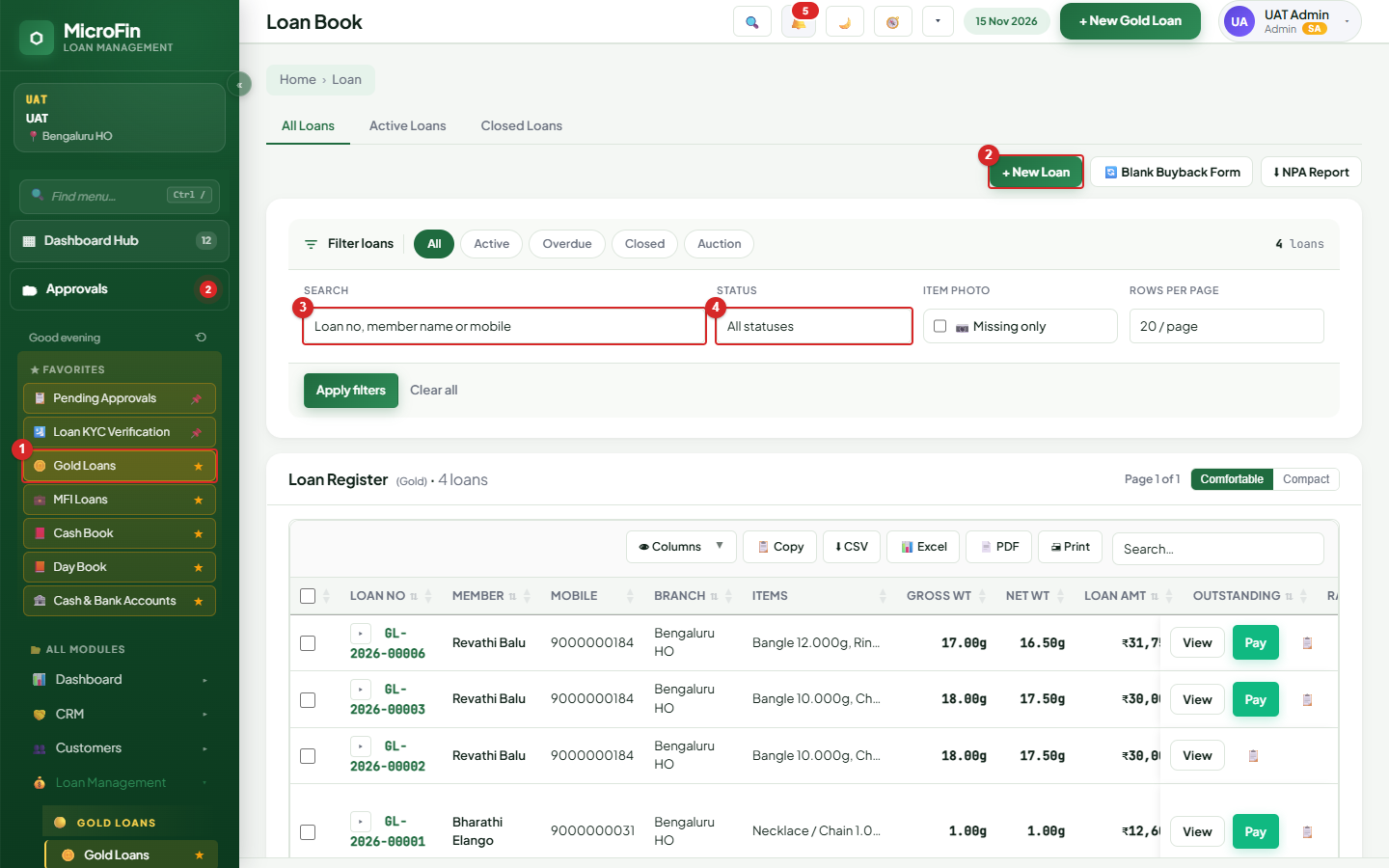
- Loan Management > Gold Loans
- New Loan
- Search by loan number, member or mobile
- Status filter
3. Before you start
- Permission:
CanManageLoansto create, approve or reject a gold loan. Schemes needCanManageSettings; Products needCanManageCompany. The gold rate screen is for Admin / SuperAdmin. - Today's gold rate must be set. Without it the value is zero and the loan is refused.
- A Loan Scheme must exist and be active (an inactive scheme is not offered).
- Branch: a branch user always works in their own branch. A head-office (HO) user must switch into the lending branch first; the member list shows only that branch's members.
- The member must be active, not deleted and not blacklisted.
- Know the Cash / Bank Account the money will be paid from and the staff member who handles the loan.
- Check the drawer: the net payout must be available in the chosen account.
4. Step-by-step instructions
A. Set up a Gold Loan Scheme (once, by an authorised user)
- Open
Loan Management > Gold Loans > Gold Loan Schemesand click + New Scheme. - Give a unique name, the default Interest Rate, Interest Type, penalty, grace days, LTV Ratio (%), Processing Fee (Rs Fixed or % of Loan), GST on the fee, Pre-Closure Charge (%) and Minimum Lock-In (days).
- (Optional) Tick Enable Slab-Based Interest and add the age slabs (From, To, rate). A slab must start below where it ends and must not overlap another active slab.
- (Optional) Set Collect Interest In Advance (months) if the first months of interest are to be taken at pay-out.
- Click Create Scheme. Success message: “Scheme 'X' created.”
B. Book a new gold loan (pledge)
- Open
Loan Management > Gold Loans > Gold Loansand click + New Loan. The page title is “New Gold Loan Entry”. - Select Member. Only active members of your branch are listed. If your company asks for OTP, click Send OTP to Member, enter the code and click Verify.
- Under Gold Items Pledged click + Add Item for each ornament. For every ornament choose Item Type, Purity, enter Gross Weight (g), Stone Wt (g), Less (g), Pieces, Hallmark No and a Description. Net Weight (g) is worked out for you. Add an Item Photo (or use the webcam). You may also add All Ornaments - One Combined Photo. Use Manage Item Types to add a missing ornament type.
- Under Loan Terms choose the Loan Scheme, Loan Date, Maturity Date (or the Maturity (Months) helper: 3, 6, 9, 12 or Custom), Loan Amount (Rs) and LTV Applied (%). Interest rate, calculation method, penalty rate, fee and GST fill from the scheme; change them only if your policy allows.
- If your company has Predefined Products switched on, choose Predefined Product instead of Custom Loan; the product's amount, rate and instalments then replace what you typed and the loan becomes an EMI loan.
- Choose Handled By Staff, Payment Mode and the Cash / Bank Account. If the payout is split between accounts, add the split lines; they must add up to the net payout.
- Check the Gold Value, the loan amount and the net payout on screen, then click Create Loan & Print Ticket.
- If the amount is below ₹50,000 the loan is Active and the cash is paid out at once: “Loan {no} created successfully!”. At ₹50,000 or more the loan is held for approval (section C).
- Print the PDF Receipt (pledge receipt) and hand it to the customer. Agreement and Buyback Agreement are also available on the loan page.
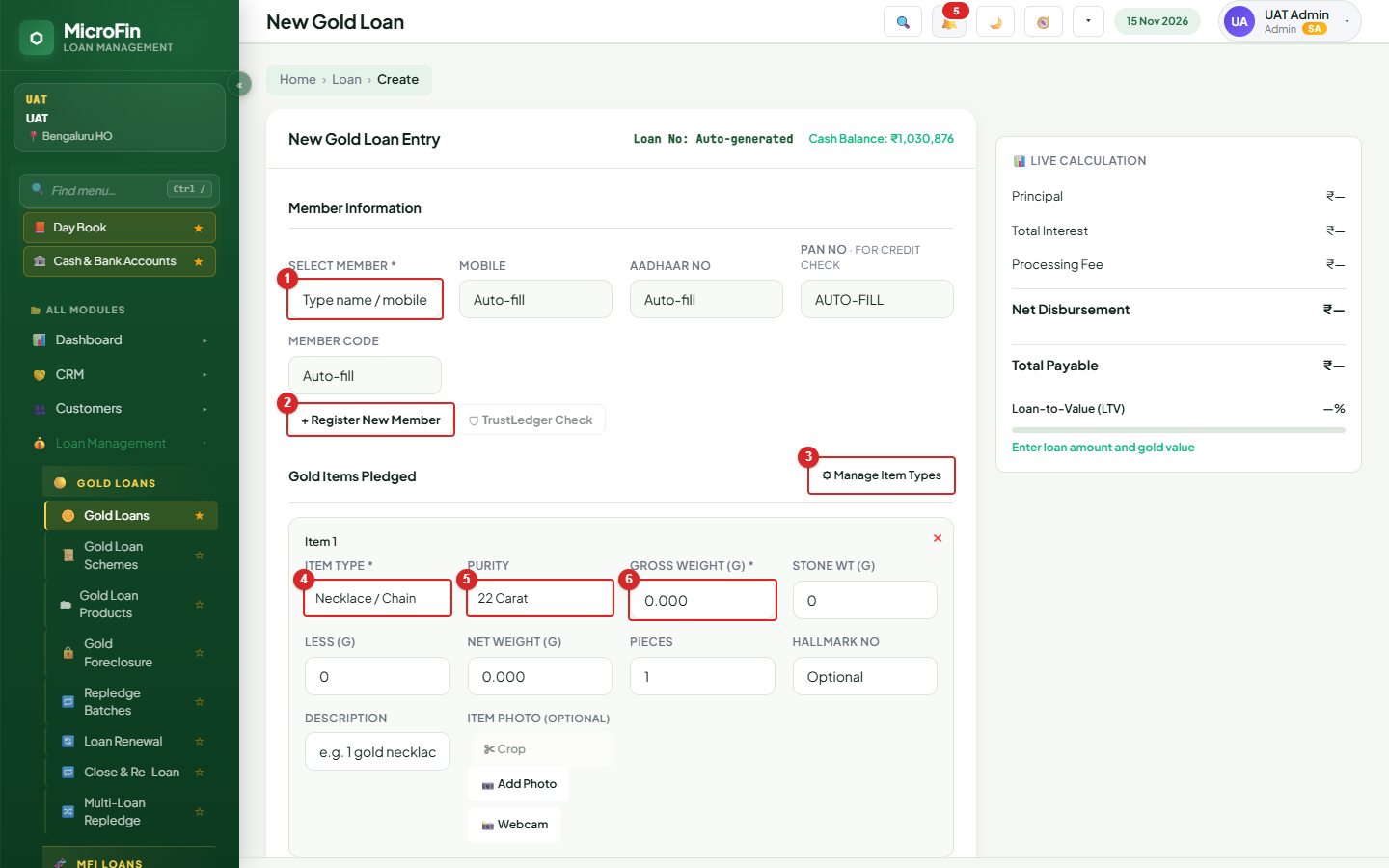
- Search the customer by name, mobile or code
- Register a new member
- Manage item types
- Item type
- Purity
- Gross weight (grams)
C. Approve or reject a loan of ₹50,000 or more
- Open the pending loan with View. A banner says the loan is waiting for approval; no cash, fee or GST has been posted yet.
- A second user with
CanManageLoansreviews the ornaments and terms. - To approve, click Approve & Disburse and confirm “Approving this gold loan RELEASES THE CASH now”. If an identical loan exists you must also tick Separate loan - approve & disburse this one anyway. Message: “Gold Loan {no} approved and disbursed.”
- To refuse, type a reason of at least 5 characters in Rejection reason and click Reject. Message: “Loan {no} rejected - gold released.” No money moved.
- The borrower receives an approval or rejection message by SMS / WhatsApp.
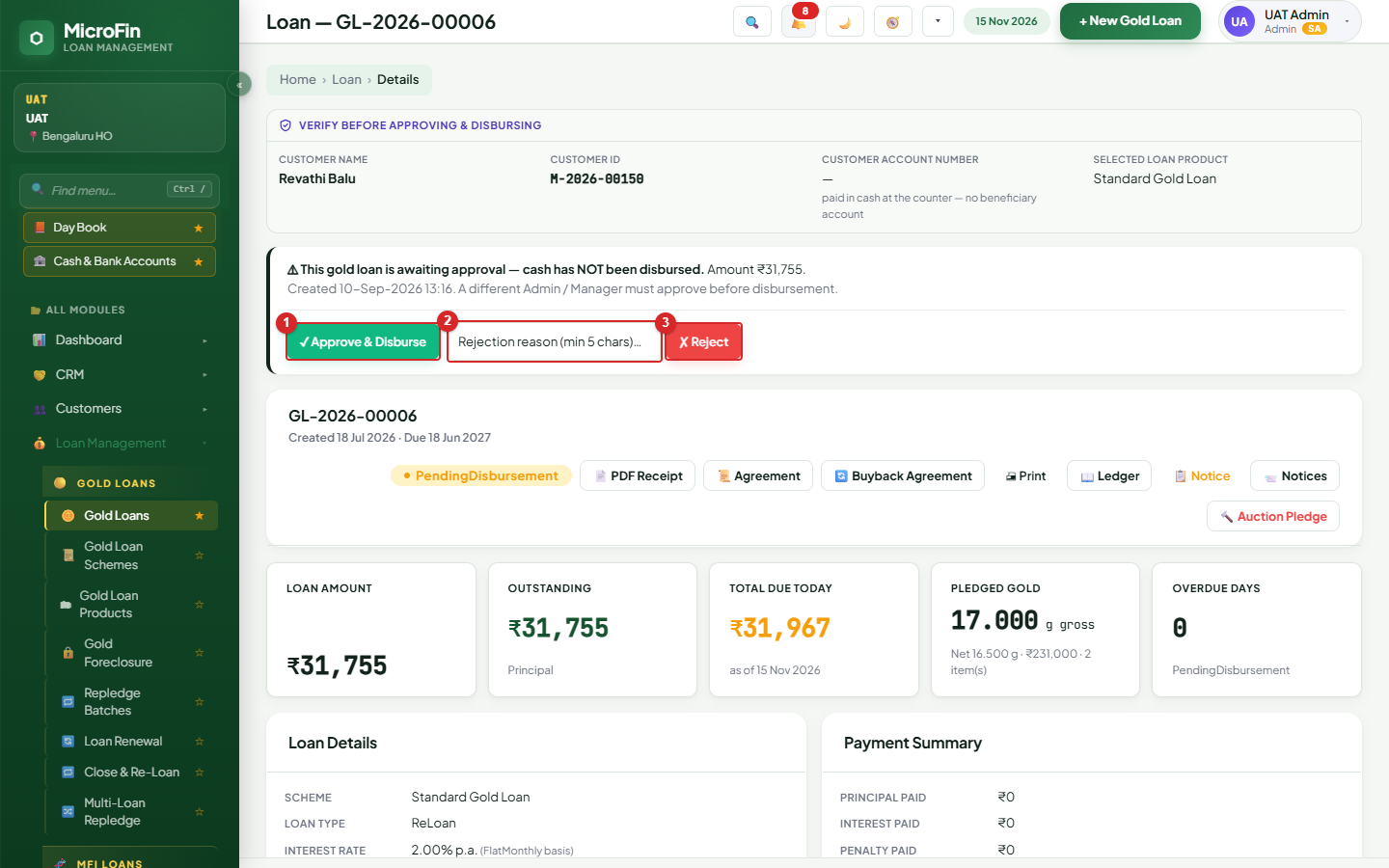
- Approve & Disburse: sanctions and pays the loan in one step
- Rejection reason (at least 5 characters)
- Reject
5. Field explanation
| Field | Purpose | Required? | Expected input | Validation | Example |
|---|---|---|---|---|---|
| Select Member | Borrower | Yes | Pick from list | Active, not blacklisted, must belong to this branch | Lakshmi Devi |
| Loan Scheme | Rules the loan follows | Yes | Pick from list | Active scheme: “Disbursement blocked - please pick a Loan Scheme.” | Gold 12% |
| Item Type | Kind of ornament | Yes (each item) | Pick from list | At least one item with gross weight above zero | Chain |
| Purity | Carat or hallmark class | Optional | 24 / 22 / 20 / 18 Carat, 916 Hallmark, Mixed | — | 22 Carat |
| Gross Weight (g) | Weighed ornament | Yes | Grams | Greater than 0 | 20.000 |
| Stone Wt (g) | Stones to deduct | Optional | Grams | — | 1.500 |
| Less (g) | Further deduction (pre-filled by company default %) | Optional | Grams | Held between 0 and (Gross − Stone) | 0.900 |
| Net Weight (g) | Weight the loan is valued on | Auto | Calculated | Gross − Stone − Less | 17.600 |
| Gold Rate at Pledge (Rs/g) | Today's rate used for value | Yes | From the rate screen | Gold value must be above zero | — |
| Loan Date | Pledge date | Yes | Date | Not in the future; within the back-date window (default 30 days) and an open working day for the branch | 15-11-2026 |
| Maturity Date | Due date | Yes | Date | Must be after Loan Date | 15-05-2027 |
| Loan Amount (Rs) | Amount lent | Yes | Amount | Not more than Gold Value × LTV ÷ 100 | 40,000 |
| LTV Applied (%) | Percentage of value lent | Optional (default 75) | Percent | You set it; see rules below | 75 |
| Interest Rate / Calculation Method / Penalty Rate | How interest and penalty are billed | Optional (from scheme) | Percent; method list | Method must be a recognised type | 12 |
| Processing Fee | Fee withheld at pay-out | Optional (from scheme) | Rupees or % | Fee plus GST may not exceed the loan amount | 400 |
| GST on Processing Fee (%) | Tax on the fee | Optional (from scheme) | Percent | Rupee GST is worked out by the system | 18 |
| Pre-Closure Charge (%) / Minimum Lock-In (days) | Per-loan overrides | Optional | Blank = scheme value | — | — |
| Enable EMI / No. of EMIs / EMI Amount / Due Start Date (1st EMI) | Make it an EMI loan | Optional | As labelled | — | — |
| Handled By Staff | Staff responsible | Yes | Pick from list | “…please assign a Handled-By Staff member.” | — |
| Payment Mode and Cash / Bank Account | Where the money is paid from | Yes | Mode and matching account | Mode must match the account kind | Cash / Main Cash |
| Item Photo / One Combined Photo | Evidence | Optional | Image | A rejected photo does not undo the loan | — |
6. Buttons and actions
| Button | What it does |
|---|---|
| + New Loan | Opens New Gold Loan Entry. |
| + Add Item | Adds an ornament row. |
| Manage Item Types | Adds or removes entries in the ornament type list. |
| Send OTP to Member / Verify | Checks the member's mobile (only if your company switched it on). |
| Create Loan & Print Ticket | Saves the loan; pays out below ₹50,000, otherwise holds it for approval. |
| Approve & Disburse | Second person approves and the cash goes out in the same action. |
| Reject | Cancels a pending loan (reason of 5+ characters); gold is released. |
| PDF Receipt / Print | Pledge receipt for the customer. |
| Agreement / Buyback Agreement | Prints the agreement package. |
| Create Scheme / Save Changes | Saves a scheme. |
7. Business rules and validations
Administration > UI & Settings > Accounting Policy (“Gold Loan — Predefined Products”).CanManageLoans may approve. The person who created the loan should not approve it. [TBC] The software lets an Admin or SuperAdmin approve a loan they created themselves; do not rely on that. Ask your management whether a second person must always approve.8. Expected result
- A loan number from the branch's gold sequence, ornaments saved, one packet per ornament created “In Our Locker”.
- Below ₹50,000: status Active, cash paid out; fee, GST and advance interest recorded as income-side entries in the cash ledger.
- ₹50,000 or more: status pending, packets created, no money posted until approval. A rejected loan returns the packets and posts nothing.
- A pledge receipt (layout set in
Settings> Pledge Receipt Template, Classic by default) showing the slab ladder, branch phone, loan number and customer ID, and the gross − fee = final disbursement breakdown. Aadhaar prints masked to the last four digits.
9. Troubleshooting
| Message or problem | Likely cause | What to do |
|---|---|---|
| “Disbursement blocked — please pick a Loan Scheme.” | No scheme chosen or scheme inactive | Pick an active scheme or ask an authorised user to create one. |
| “…exceeds the LTV cap of N%…” | Loan amount above Gold Value × LTV | Lower the amount or correct weights / LTV with the appraiser's agreement. |
| “Set a Gold Rate (₹/g)…” | No rate set for today | Ask an Admin to use Update Today's Rate. |
| “This member belongs to X, not Y…” | Member of another branch | Switch to that branch (HO) or pick a local member. |
| Member not in the picker | Inactive, blacklisted or other branch | Reactivate on the Member screen or switch branch. |
| “…please pick a Cash / Bank account on the form.” or “Payment Mode 'X' does not match the picked account” | No account, or mode and account disagree | Choose an account of the same kind as the mode. |
| “…processing fee ₹N plus GST ₹N exceeds the loan amount…” | Fee too high | Correct the fee. |
| “Please verify member identity with OTP before creating the loan.” | OTP is on and not verified | Send and verify the OTP. |
| Save refused for an existing loan | Identical live loan | Open the existing loan; do not book a duplicate. |
| Date refused | Outside back-date window, future, or branch EOD missed | Use an allowed date or ask a manager about the end-of-day block. |
| Loan stays pending | ₹50,000 or more | Ask a second authorised user to open the loan and click Approve & Disburse. |
| A photo did not upload | Photo rejected after the loan was saved | Add it again from the loan page; the loan itself is saved. |
| Loan keyed wrongly and still pending | Mistake before approval | Reject with a reason, then raise a correct loan. |
| Loan keyed wrongly and already paid out | Mistake after cash-out | See chapter 61 (Amend, Void). A loan cannot be deleted. |
11. Related modules
- Collecting interest, closing, renewing and correcting: chapter 61 (Gold loan payments and servicing).
- Packets, repledge and auctions: chapter 62.
- Member registration and KYC: chapter 05 (member management).
- Approvals for renewals and re-loans: Approval Inbox.
தங்கக் கடன்கள்
தங்கக் கடன்: திட்டங்களும் புதிய அடமானமும்
1. அறிமுகம்
தங்கக் கடன் என்பது வாடிக்கையாளரின் நகைகளை அடமானமாக வைத்துக் கொடுக்கப்படும் கடன். நகைகள் எடை போடப்பட்டு, அன்றைய தங்க விலையில் மதிப்பிடப்பட்டு, அந்த மதிப்பின் ஒரு சதவீதம் (LTV) வரை கடன் வழங்கப்படும். ஒவ்வொரு நகையும் பாதுகாப்புப் பெட்டகத்தில் ஒரு packet ஆகக் கண்காணிக்கப்படும் (அத்தியாயம் 62).
இந்த அத்தியாயம் தங்கக் கடனின் விதிகளான Gold Loan Schemes மற்றும் New Gold Loan (அடமானப் பதிவு) பற்றியது: உறுப்பினரைத் தேர்வு செய்தல், நகைகளைப் பதிவு செய்தல், விதிமுறைகள், செயலாக்கக் கட்டணம், GST, முன்கூட்டிய வட்டிப் பிடித்தம், பெரிய கடனுக்கான இரண்டாம் நபர் ஒப்புதல், அடமான ரசீது. வட்டி வசூல், முடித்தல், புதுப்பித்தல், திருத்தம் ஆகியவை அத்தியாயம் 61-இல் உள்ளன.
2. வழிசெலுத்தல்
- கடன் பட்டியல் மற்றும் புதிய கடன்:
Loan Management > Gold Loans > Gold Loans, பின் + New Loan. - விதிகள்:
Loan Management > Gold Loans > Gold Loan Schemes. - நிலையான சலுகைகள் (இயக்கியிருந்தால் மட்டும்):
Loan Management > Gold Loans > Gold Loan Products. - தினசரி தங்க விலை:
Administration > UI & Settings > Gold Rate(Daily Gold Rate Update அட்டை, Update Today's Rate பொத்தான்; Appraisal Defaults அட்டையில் இயல்பு Less %). - ஒப்புதலுக்குக் காத்திருக்கும் கடன்:
Loan Management > Gold Loans > Gold Loansபட்டியலில் View மூலம் கடனைத் திறக்கவும்.
- கடன் மேலாண்மை > தங்கக் கடன்கள்
- புதிய கடன்
- கடன் எண், உறுப்பினர் அல்லது கைபேசி மூலம் தேடு
- நிலை வடிகட்டி
3. தொடங்கும் முன்
- அனுமதி: தங்கக் கடனை உருவாக்க, ஒப்புதல் அளிக்க அல்லது நிராகரிக்க
CanManageLoansதேவை. Scheme-க்குCanManageSettings; Product-க்குCanManageCompany. தங்க விலைத் திரை Admin / SuperAdmin-க்கு மட்டும். - இன்றைய தங்க விலை அமைக்கப்பட்டிருக்க வேண்டும்; இல்லையெனில் மதிப்பு பூஜ்யமாகி, கடன் மறுக்கப்படும்.
- செயலில் உள்ள ஒரு Loan Scheme இருக்க வேண்டும் (செயலற்ற scheme பட்டியலில் வராது).
- கிளை: கிளைப் பயனர் தன் கிளையில் மட்டுமே பணிபுரிவார். HO பயனர் முதலில் கடன் வழங்கும் கிளைக்கு மாற வேண்டும்; அப்போது அந்தக் கிளையின் உறுப்பினர்கள் மட்டுமே தெரிவர்.
- உறுப்பினர் செயலில் இருக்க வேண்டும்; நீக்கப்பட்டவர் அல்லது blacklist செய்யப்பட்டவர் கூடாது.
- பணம் எந்த Cash / Bank Account-இலிருந்து வழங்கப்படும், கடனைக் கையாளும் ஊழியர் யார் என்பதைத் தெரிந்து வைத்திருங்கள்.
- கையிருப்பைச் சரிபாருங்கள்: தேர்ந்தெடுத்த கணக்கில் நிகர வழங்கல் தொகை (net payout) இருக்க வேண்டும்.
4. படிப்படியான வழிமுறைகள்
அ. Gold Loan Scheme அமைத்தல் (ஒருமுறை; அனுமதி பெற்ற பயனர் செய்வது)
Loan Management > Gold Loans > Gold Loan Schemesதிறந்து + New Scheme அழுத்தவும்.- வேறு scheme-க்கு இல்லாத தனிப் பெயர், இயல்பு Interest Rate, Interest Type, அபராதம், சலுகை நாட்கள், LTV Ratio (%), Processing Fee (Rs Fixed அல்லது % of Loan), கட்டணத்தின் மீது GST, Pre-Closure Charge (%), Minimum Lock-In (days) ஆகியவற்றை உள்ளிடவும்.
- (விருப்பம்) Enable Slab-Based Interest டிக் செய்து, கடன் நாட்களின் அடிப்படையிலான slab-களை (From, To, rate) சேர்க்கவும். ஒரு slab-இன் தொடக்கம் அதன் முடிவைவிடக் குறைவாக இருக்க வேண்டும்; செயலில் உள்ள வேறொரு slab-உடன் அது ஒன்றின் மேல் ஒன்றாக (overlap) வரக் கூடாது.
- (விருப்பம்) முதல் சில மாதங்களின் வட்டியைக் கடன் வழங்கும்போதே பிடித்துக்கொள்ள வேண்டுமெனில் Collect Interest In Advance (months) அமைக்கவும்.
- Create Scheme அழுத்தவும். செய்தி: “Scheme 'X' created.”
ஆ. புதிய தங்கக் கடனைப் பதிவு செய்தல் (அடமானம்)
Loan Management > Gold Loans > Gold Loansதிறந்து + New Loan அழுத்தவும். பக்கத் தலைப்பு “New Gold Loan Entry”.- Select Member: உங்கள் கிளையின் செயலில் உள்ள உறுப்பினர்கள் மட்டும் தெரிவர். நிறுவனம் OTP கேட்டால் Send OTP to Member அழுத்தி, குறியீட்டை உள்ளிட்டு Verify அழுத்தவும்.
- Gold Items Pledged பகுதியில் ஒவ்வொரு நகைக்கும் + Add Item அழுத்தவும். ஒவ்வொரு நகைக்கும் Item Type, Purity தேர்ந்தெடுத்து, Gross Weight (g), Stone Wt (g), Less (g), Pieces, Hallmark No, Description உள்ளிடவும். Net Weight (g) தானாகக் கணக்கிடப்படும். Item Photo சேர்க்கவும் (அல்லது webcam பயன்படுத்தவும்); All Ornaments - One Combined Photo-வையும் சேர்க்கலாம். தேவையான நகை வகை பட்டியலில் இல்லையெனில் Manage Item Types மூலம் சேர்க்கவும்.
- Loan Terms பகுதியில் Loan Scheme, Loan Date, Maturity Date (அல்லது Maturity (Months) உதவி: 3, 6, 9, 12 அல்லது Custom), Loan Amount (Rs), LTV Applied (%) ஆகியவற்றை அமைக்கவும். வட்டி விகிதம், கணக்கீட்டு முறை, அபராத விகிதம், கட்டணம், GST ஆகியவை scheme-இலிருந்து தானாக நிரம்பும்; உங்கள் நிறுவனக் கொள்கை அனுமதித்தால் மட்டுமே அவற்றை மாற்றவும்.
- உங்கள் நிறுவனத்தில் Predefined Products இயக்கப்பட்டிருந்தால், Custom Loan-க்குப் பதிலாக Predefined Product தேர்ந்தெடுக்கவும்; அப்போது product-இன் தொகை, வட்டி விகிதம், தவணைகள் ஆகியவை நீங்கள் உள்ளிட்டவற்றுக்குப் பதிலாக அமையும்; கடன் EMI கடனாக மாறும்.
- Handled By Staff, Payment Mode, Cash / Bank Account தேர்ந்தெடுக்கவும். பணம் பல கணக்குகளிலிருந்து பிரித்து வழங்கப்பட்டால் split வரிகளைச் சேர்க்கவும்; அவற்றின் கூட்டுத்தொகை நிகர வழங்கல் தொகைக்குச் சமமாக இருக்க வேண்டும்.
- திரையில் Gold Value, கடன் தொகை, நிகர வழங்கல் தொகை ஆகியவற்றைச் சரிபார்த்து, Create Loan & Print Ticket அழுத்தவும்.
- தொகை ₹50,000-க்குக் குறைவெனில் கடன் Active ஆகி, பணம் உடனே வழங்கப்படும்: “Loan {no} created successfully!”. ₹50,000 அல்லது அதற்கு மேல் எனில் கடன் ஒப்புதலுக்காக நிறுத்தி வைக்கப்படும் (பிரிவு இ).
- PDF Receipt (அடமான ரசீது) அச்சிட்டு வாடிக்கையாளரிடம் கொடுக்கவும். கடன் பக்கத்தில் Agreement, Buyback Agreement-உம் உள்ளன.
- பெயர், கைபேசி அல்லது குறியீடு மூலம் வாடிக்கையாளரைத் தேடு
- புதிய உறுப்பினரைப் பதிவு செய்
- பொருள் வகைகளை நிர்வகி
- பொருள் வகை
- தூய்மை
- மொத்த எடை (கிராம்)
இ. ₹50,000 அல்லது அதற்கு மேற்பட்ட கடனுக்கு ஒப்புதல் அளித்தல் அல்லது நிராகரித்தல்
- View மூலம் காத்திருக்கும் கடனைத் திறக்கவும். கடன் ஒப்புதலுக்காகக் காத்திருக்கிறது என்று ஒரு பட்டை காட்டும்; பணம், கட்டணம், GST எதுவும் இன்னும் பதிவாகவில்லை.
CanManageLoansஉள்ள இரண்டாவது பயனர் நகைகளையும் விதிமுறைகளையும் சரிபார்ப்பார்.- ஒப்புதல் அளிக்க Approve & Disburse அழுத்தி, “Approving this gold loan RELEASES THE CASH now” என்பதை உறுதிப்படுத்தவும். அதே போன்ற இன்னொரு கடன் ஏற்கெனவே இருந்தால் Separate loan - approve & disburse this one anyway என்பதையும் டிக் செய்ய வேண்டும். செய்தி: “Gold Loan {no} approved and disbursed.”
- நிராகரிக்க, Rejection reason-இல் குறைந்தது 5 எழுத்துகள் கொண்ட காரணத்தை எழுதி Reject அழுத்தவும். செய்தி: “Loan {no} rejected - gold released.” பணம் எதுவும் நகராது.
- கடன் பெறுபவருக்கு ஒப்புதல் அல்லது நிராகரிப்புச் செய்தி SMS / WhatsApp மூலம் செல்லும்.
- Approve & Disburse: கடனை அனுமதித்து ஒரே படியில் வழங்கும்
- நிராகரிப்புக் காரணம் (குறைந்தது 5 எழுத்துகள்)
- Reject
5. புலங்களின் விளக்கம்
| புலம் | நோக்கம் | கட்டாயமா? | உள்ளீடு | சரிபார்ப்பு | எடுத்துக்காட்டு |
|---|---|---|---|---|---|
| Select Member | கடன் பெறுபவர் | ஆம் | பட்டியலிலிருந்து தேர்வு | செயலில் உள்ளவர்; blacklist செய்யப்படாதவர்; இந்தக் கிளையைச் சேர்ந்தவர் | Lakshmi Devi |
| Loan Scheme | கடன் பின்பற்றும் விதிகள் | ஆம் | பட்டியலிலிருந்து தேர்வு | செயலில் உள்ள scheme: “Disbursement blocked - please pick a Loan Scheme.” | Gold 12% |
| Item Type | நகை வகை | ஆம் (ஒவ்வொரு நகைக்கும்) | பட்டியலிலிருந்து தேர்வு | மொத்த எடை (gross) பூஜ்யத்துக்கு மேல் உள்ள ஒரு நகையாவது வேண்டும் | Chain |
| Purity | காரட் அல்லது hallmark வகை | விருப்பம் | 24 / 22 / 20 / 18 Carat, 916 Hallmark, Mixed | — | 22 Carat |
| Gross Weight (g) | எடை போட்ட நகையின் மொத்த எடை | ஆம் | கிராம் | 0-க்கு மேல் | 20.000 |
| Stone Wt (g) | கழிக்க வேண்டிய கல் எடை | விருப்பம் | கிராம் | — | 1.500 |
| Less (g) | கூடுதல் கழிவு (நிறுவனத்தின் இயல்பு % முன்பே நிரப்பப்படும்) | விருப்பம் | கிராம் | 0 முதல் (Gross − Stone) வரை | 0.900 |
| Net Weight (g) | கடனுக்கு மதிப்பிடப்படும் எடை | தானாக | கணக்கிடப்படும் | Gross − Stone − Less | 17.600 |
| Gold Rate at Pledge (Rs/g) | மதிப்பீட்டுக்குப் பயன்படும் இன்றைய விலை | ஆம் | தங்க விலைத் திரையிலிருந்து | தங்க மதிப்பு பூஜ்யத்துக்கு மேல் இருக்க வேண்டும் | — |
| Loan Date | அடமானத் தேதி | ஆம் | தேதி | எதிர்காலத் தேதி கூடாது; பின்தேதி வரம்புக்குள் (இயல்பு 30 நாள்); கிளையின் திறந்த வேலை நாள் | 15-11-2026 |
| Maturity Date | முதிர்வுத் தேதி | ஆம் | தேதி | Loan Date-க்குப் பின் இருக்க வேண்டும் | 15-05-2027 |
| Loan Amount (Rs) | வழங்கும் தொகை | ஆம் | தொகை | Gold Value × LTV ÷ 100-ஐ மிஞ்சக் கூடாது | 40,000 |
| LTV Applied (%) | மதிப்பில் எத்தனை சதவீதம் கடனாக வழங்கப்படுகிறது | விருப்பம் (இயல்பு 75) | சதவீதம் | நீங்களே அமைக்கிறீர்கள்; கீழே உள்ள விதிகளைப் பார்க்கவும் | 75 |
| Interest Rate / Calculation Method / Penalty Rate | வட்டியும் அபராதமும் கணக்கிடப்படும் விதம் | விருப்பம் (scheme-இலிருந்து) | சதவீதம்; முறைப் பட்டியல் | முறை, மென்பொருள் ஏற்கும் வகையாக இருக்க வேண்டும் | 12 |
| Processing Fee | கடன் வழங்கும்போது பிடிக்கப்படும் கட்டணம் | விருப்பம் (scheme-இலிருந்து) | ரூபாய் அல்லது % | கட்டணம் + GST கடன் தொகையை மிஞ்சக் கூடாது | 400 |
| GST on Processing Fee (%) | கட்டணத்தின் மீதான வரி | விருப்பம் (scheme-இலிருந்து) | சதவீதம் | GST ரூபாய்த் தொகையை மென்பொருளே கணக்கிடும் | 18 |
| Pre-Closure Charge (%) / Minimum Lock-In (days) | அந்தக் கடனுக்கு மட்டுமான மாற்று மதிப்புகள் | விருப்பம் | காலி = scheme மதிப்பு | — | — |
| Enable EMI / No. of EMIs / EMI Amount / Due Start Date (1st EMI) | கடனை EMI கடனாக்க | விருப்பம் | புலப் பெயரில் உள்ளபடி | — | — |
| Handled By Staff | பொறுப்பான ஊழியர் | ஆம் | பட்டியலிலிருந்து தேர்வு | “…please assign a Handled-By Staff member.” | — |
| Payment Mode, Cash / Bank Account | பணம் எங்கிருந்து வழங்கப்படுகிறது | ஆம் | முறை, அதற்குப் பொருந்தும் கணக்கு | முறையும் கணக்கு வகையும் பொருந்த வேண்டும் | Cash / Main Cash |
| Item Photo / One Combined Photo | சான்று | விருப்பம் | படம் | படம் நிராகரிக்கப்பட்டாலும் கடன் ரத்தாகாது | — |
6. பொத்தான்களும் செயல்களும்
| பொத்தான் | செயல் |
|---|---|
| + New Loan | New Gold Loan Entry-ஐத் திறக்கும். |
| + Add Item | ஒரு நகை வரியைச் சேர்க்கும். |
| Manage Item Types | நகை வகைப் பட்டியலில் வகைகளைச் சேர்க்கும் அல்லது நீக்கும். |
| Send OTP to Member / Verify | உறுப்பினரின் மொபைல் எண்ணைச் சரிபார்க்கும் (நிறுவனம் இயக்கியிருந்தால் மட்டும்). |
| Create Loan & Print Ticket | கடனைச் சேமிக்கும்; ₹50,000-க்குக் கீழ் எனில் பணம் வழங்கும், இல்லையெனில் ஒப்புதலுக்காக நிறுத்தி வைக்கும். |
| Approve & Disburse | இரண்டாம் நபர் ஒப்புதல் அளிப்பார்; அதே செயலில் பணமும் வழங்கப்படும். |
| Reject | காத்திருக்கும் கடனை ரத்து செய்யும் (5 அல்லது அதற்கு மேற்பட்ட எழுத்துகள் கொண்ட காரணம்); நகை விடுவிக்கப்படும். |
| PDF Receipt / Print | வாடிக்கையாளருக்கான அடமான ரசீது. |
| Agreement / Buyback Agreement | ஒப்பந்த ஆவணங்களை அச்சிடும். |
| Create Scheme / Save Changes | scheme-ஐச் சேமிக்கும். |
7. வணிக விதிகளும் சரிபார்ப்புகளும்
Administration > UI & Settings > Accounting Policy-இல் (“Gold Loan — Predefined Products”) இதை இயக்கலாம்.CanManageLoans உள்ள எந்தப் பயனரும் ஒப்புதல் அளிக்கலாம். கடனை உருவாக்கியவரே அதற்கு ஒப்புதல் அளிக்கக் கூடாது. [TBC] Admin அல்லது SuperAdmin தான் உருவாக்கிய கடனுக்குத் தானே ஒப்புதல் அளிக்க மென்பொருள் அனுமதிக்கிறது; அதை நம்பியிருக்க வேண்டாம். எப்போதும் இரண்டாம் நபர்தான் ஒப்புதல் அளிக்க வேண்டுமா என்பதை உங்கள் நிர்வாகத்திடம் கேளுங்கள்.8. எதிர்பார்க்கும் முடிவு
- கிளையின் தங்கக் கடன் எண் வரிசையிலிருந்து ஒரு கடன் எண் கிடைக்கும்; நகைகள் சேமிக்கப்படும்; ஒவ்வொரு நகைக்கும் “In Our Locker” நிலையில் ஒரு packet உருவாகும்.
- ₹50,000-க்குக் கீழ்: நிலை Active; பணம் வழங்கப்படும்; கட்டணம், GST, முன்கூட்டிய வட்டி ஆகியவை பணப் பேரேட்டில் வரவுப் பதிவுகளாகப் பதிவாகும்.
- ₹50,000 அல்லது அதற்கு மேல்: நிலை ஒப்புதலுக்காகக் காத்திருப்பு; packets உருவாகும்; ஒப்புதல் கிடைக்கும் வரை பணம் எதுவும் பதிவாகாது. நிராகரிக்கப்பட்ட கடனில் packets திரும்ப அளிக்கப்படும்; எதுவும் பதிவாகாது.
- அடமான ரசீது (
Settings> Pledge Receipt Template; இயல்பு Classic): slab அட்டவணை, கிளைத் தொலைபேசி எண், கடன் எண், வாடிக்கையாளர் ID, மொத்தம் − கட்டணம் = இறுதி வழங்கல் தொகை என்ற விவரம் ஆகியவற்றைக் காட்டும். ஆதார் எண்ணில் கடைசி நான்கு இலக்கங்கள் மட்டும் அச்சாகும்; மற்றவை மறைக்கப்படும்.
9. சிக்கல் தீர்வு
| செய்தி அல்லது சிக்கல் | சாத்தியமான காரணம் | செய்ய வேண்டியது |
|---|---|---|
| “Disbursement blocked — please pick a Loan Scheme.” | scheme தேர்ந்தெடுக்கப்படவில்லை, அல்லது scheme செயலற்றது | செயலில் உள்ள scheme-ஐத் தேர்ந்தெடுக்கவும்; அல்லது அனுமதி பெற்ற பயனரிடம் ஒன்றை உருவாக்கச் சொல்லவும். |
| “…exceeds the LTV cap of N%…” | கடன் தொகை Gold Value × LTV-ஐ மிஞ்சியது | தொகையைக் குறைக்கவும்; அல்லது மதிப்பீட்டாளரின் ஒப்புதலுடன் எடை / LTV-ஐத் திருத்தவும். |
| “Set a Gold Rate (₹/g)…” | இன்றைய விலை அமைக்கப்படவில்லை | Admin-இடம் Update Today's Rate பயன்படுத்தச் சொல்லுங்கள். |
| “This member belongs to X, not Y…” | வேறு கிளையின் உறுப்பினர் | அந்தக் கிளைக்கு மாறவும் (HO); அல்லது இந்தக் கிளையின் உறுப்பினரைத் தேர்ந்தெடுக்கவும். |
| தேர்வுப் பட்டியலில் உறுப்பினர் இல்லை | செயலற்றவர், blacklist செய்யப்பட்டவர், அல்லது வேறு கிளை | Member திரையில் மீண்டும் செயல்படுத்தவும்; அல்லது கிளையை மாற்றவும். |
| “…please pick a Cash / Bank account on the form.” / “Payment Mode 'X' does not match the picked account” | கணக்கு இல்லை அல்லது முறையும் கணக்கும் பொருந்தவில்லை | Payment Mode-க்குப் பொருந்தும் வகைக் கணக்கைத் தேர்ந்தெடுக்கவும். |
| “…processing fee ₹N plus GST ₹N exceeds the loan amount…” | கட்டணம் அதிகம் | கட்டணத்தைத் திருத்தவும். |
| “Please verify member identity with OTP before creating the loan.” | OTP on நிலையில் உள்ளது; சரிபார்க்கப்படவில்லை | OTP அனுப்பிச் சரிபார்க்கவும் (Verify). |
| ஏற்கெனவே உள்ள கடன் காரணமாகச் சேமிக்க முடியவில்லை | அதே போன்ற, செயலில் உள்ள கடன் உள்ளது | ஏற்கெனவே உள்ள கடனைத் திறந்து பாருங்கள்; நகல் கடனைப் பதிவு செய்ய வேண்டாம். |
| தேதி மறுக்கப்படுகிறது | பின்தேதி வரம்புக்கு வெளியே, எதிர்காலத் தேதி, அல்லது கிளை EOD-ஐத் தவறவிட்டுள்ளது | அனுமதிக்கப்பட்ட தேதியைப் பயன்படுத்தவும்; அல்லது EOD தடை பற்றி மேலாளரிடம் கேளுங்கள். |
| கடன் காத்திருப்பிலேயே உள்ளது | ₹50,000 அல்லது அதற்கு மேல் | அனுமதி பெற்ற இரண்டாவது பயனரிடம் கடனைத் திறந்து Approve & Disburse அழுத்தச் சொல்லுங்கள். |
| புகைப்படம் பதிவேறவில்லை | கடன் சேமிக்கப்பட்ட பின் படம் நிராகரிக்கப்பட்டது | கடன் பக்கத்திலிருந்து மீண்டும் சேர்க்கவும்; கடன் சேமிக்கப்பட்டுவிட்டது. |
| கடன் தவறாகப் பதிவானது; இன்னும் காத்திருப்பில் உள்ளது | ஒப்புதலுக்கு முன் ஏற்பட்ட தவறு | காரணத்துடன் Reject செய்து, சரியான கடனைப் புதிதாகப் பதிவு செய்யவும். |
| கடன் தவறாகப் பதிவானது; பணம் ஏற்கெனவே வழங்கப்பட்டுவிட்டது | பணம் வழங்கிய பின் கண்டறிந்த தவறு | அத்தியாயம் 61 (Amend, Void) பார்க்கவும். கடனை நீக்க (Delete) முடியாது. |
10. தமிழ் விளக்கம்
இந்த அத்தியாயத்தின் முழுத் தமிழ் வடிவம் இதுவே. ஆங்கிலப் பகுதியில் மேலே உள்ள அதே பிரிவுகள் (1–9, 11) இங்கு தமிழில் தரப்பட்டுள்ளன.
11. தொடர்புடைய தொகுதிகள்
- வட்டி வசூல், முடித்தல், புதுப்பித்தல், திருத்தம்: அத்தியாயம் 61 (தங்கக் கடன் செலுத்துதல்களும் பராமரிப்பும்).
- Packets, மறு அடமானம், ஏலம்: அத்தியாயம் 62.
- உறுப்பினர் பதிவும் KYC-உம்: அத்தியாயம் 05 (உறுப்பினர் மேலாண்மை).
- புதுப்பித்தல், Re-Loan ஒப்புதல்கள்: ஒப்புதல் உள்பெட்டி (Approval Inbox).