DCB
DCB — Demand, Collection and Balance
1. Overview
The DCB report (Demand Collection Balance) sets what fell due in a period against what was received in the same period, and shows the difference.
- Demand = the instalments (principal + interest) whose due date falls in the period.
- Collection = every non-reversed receipt dated in the period, including closure receipts and advance payments.
- Balance = Demand − Collection.
DCB is a period difference. It is not a list of who still owes money; for that, use the Collection Sheet (chapter 30). It also differs from DCR (chapter 34), which lists receipts only and leaves out closures.
This chapter covers MFI loans.
2. Navigation
Reports & Analytics > Portfolio > DCB Reportopens the Center-wise page (one row per active centre).- Click Member-wise -> for one row per loan.
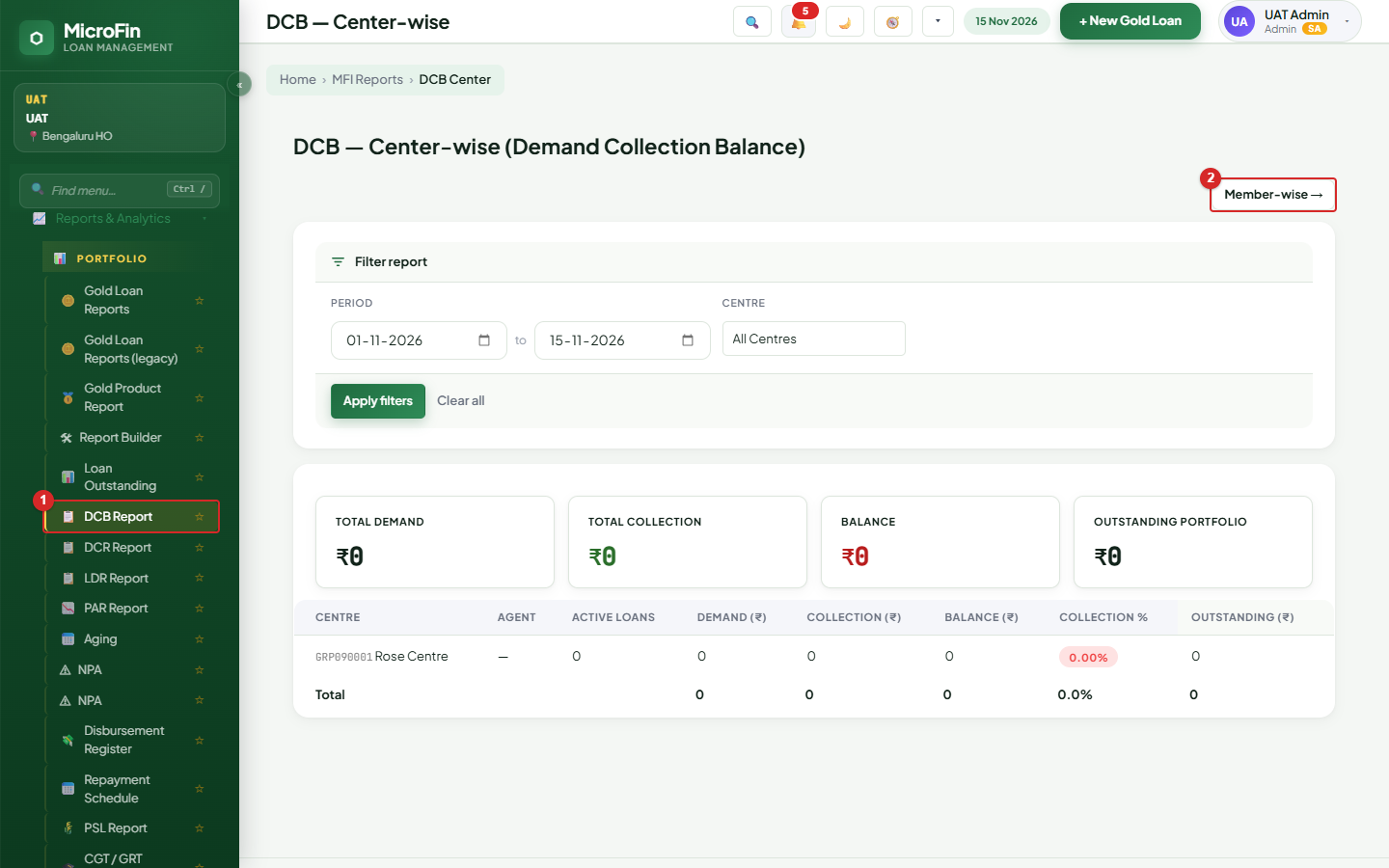
- Reports & Analytics > Portfolio > DCB Report
- Switch to the member-wise report
3. Before you start
- Permission:
CanViewReportsand the MFI module on your plan. - Branch: a branch user sees their own branch. An HO user sees the sidebar branch unless another is picked.
- Know the period you want. DCB opens on the 1st of this month to today.
- [PERM] No field-officer restriction: anyone who can open the page sees the whole branch.
4. Step-by-step instructions
- Open
Reports & Analytics > Portfolio > DCB Report. - Set the Period (from, to).
- Choose Branch (HO users) and, optionally, Centre. Because this page has one row per centre, the Centre filter narrows it to that one row.
- Click Apply filters (Clear all resets).
- Read the tiles: Total Demand, Total Collection, Balance, Total Outstanding, and, when your loans collect savings, Savings Demand / Collected / Balance.
- Read the grid, then click Member-wise -> to find the loans behind a centre's balance. Individual loans with no centre appear only on the member-wise page.
- Export with the table toolbar (Copy, CSV, Excel, PDF, Print). There is no server Excel button.
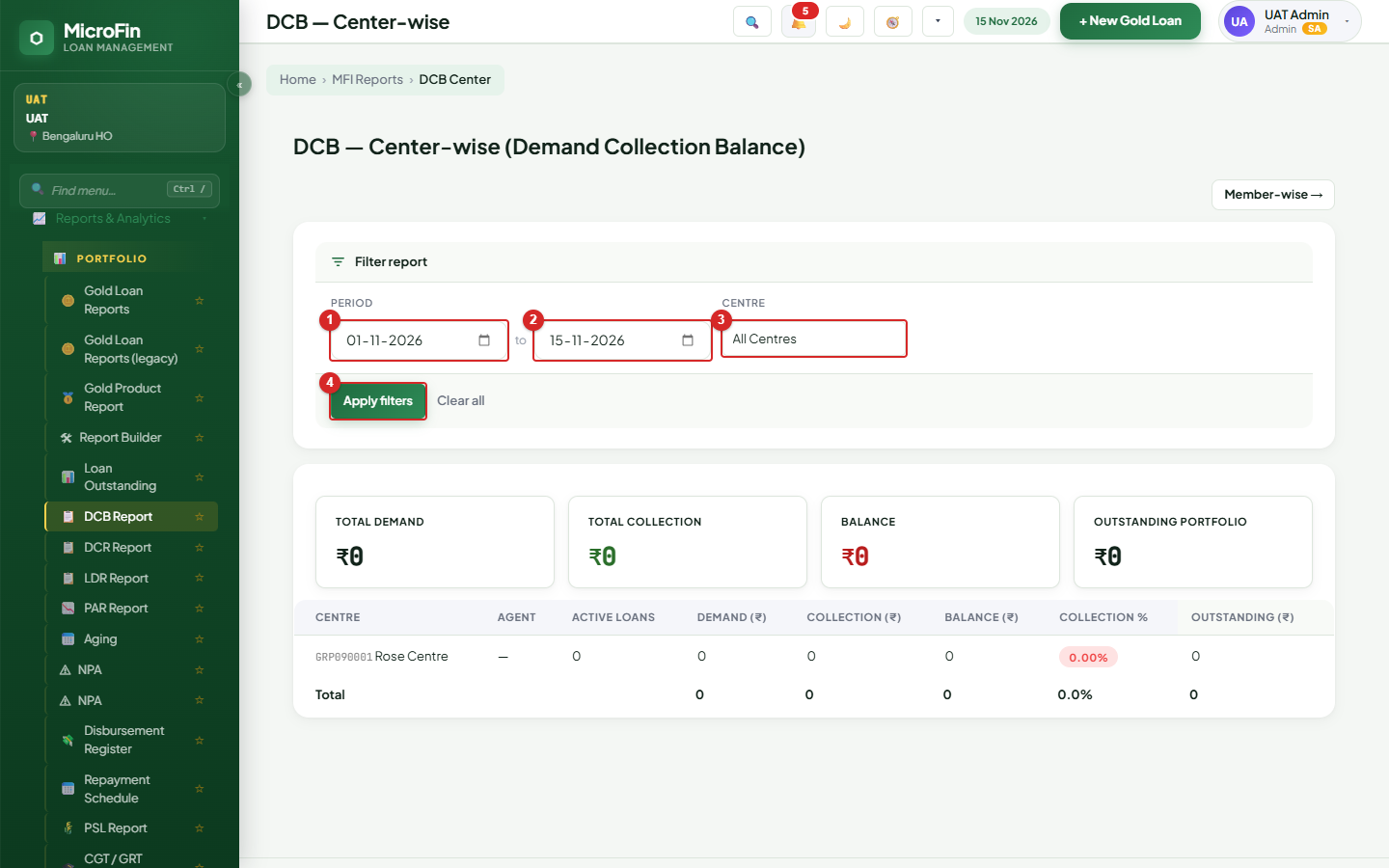
- From date
- To date
- Centre
- Apply filters
Worked reading (fictional numbers)
Rose Centre has 20 loans, each with an instalment of ₹1,000 due on 16 November 2026. No penalty and no savings. You run DCB for 16-11-2026 to 16-11-2026.
| What happened that day | Members | Receipt |
|---|---|---|
| Paid exactly the instalment | 16 | ₹16,000 |
| Paid the instalment plus one earlier overdue instalment | 1 | ₹2,000 |
| Paid the instalment plus the next one in advance | 1 | ₹2,000 |
| Closed the whole loan at the counter (full closure) | 1 | ₹9,000 |
| Paid nothing | 1 | ₹0 |
- Demand = 20 × ₹1,000 = ₹20,000. The closed loan still counts: its instalment fell due on or before the closure day.
- Collection = 16,000 + 2,000 + 2,000 + 9,000 = ₹29,000. Arrears, advance and the closure are all included.
- Balance = 20,000 − 29,000 = −₹9,000. A negative balance means more came in than fell due today; it does not mean nobody owes anything.
- Collection % = 29,000 × 100 ÷ 20,000 = 145.0. The badge is green at 90 or more, amber at 70 or more, red below.
Now compare the same day on the other reports:
- DCR Collected for Rose Centre = ₹20,000 (the ₹9,000 closure is moved to the Foreclosures & settlements table). Of that, ₹19,000 paid dues and ₹1,000 is Advance.
- Collection Sheet still lists the member who paid nothing, with ₹1,000 to collect. That is a position; DCB is a difference over the period.
5. Field explanation
Filters:
| Field | Purpose | Required? | Expected input | Validation | Example |
|---|---|---|---|---|---|
| Period (from / to) | Window for demand and collection | Yes (default 1st of month to today) | Two dates | — | 01-11-2026 to 16-11-2026 |
| Branch | Limit to a branch | HO only | Pick from list | Non-HO users held to own branch | Main Branch |
| Centre | Narrow to one centre | Optional | Pick from list | A loan is in the centre by its own centre or its borrower's active membership | Rose Centre |
Columns:
| Column | Meaning |
|---|---|
| Demand | Sum of instalment amounts (principal + interest) due in the period, for live loans, or for a loan closed on or after that due date. An instalment due after an early closure owes nothing. Penalty is not in Demand |
| Collection | Sum of everything paid in the period (principal + interest + penalty), whatever the receipt type. Includes advance and closure receipts |
| Balance | Demand − Collection. Can be negative |
| Collection % | Collection ÷ Demand, one decimal; 0 when Demand is 0 |
| Active Loans | Loans of the centre that are Active, Default or NPA |
| Outstanding | Principal outstanding of those loans today (not as of the period end) |
| Savings Demand / Collected / Balance | Shown only if any loan collects savings |
| Member-wise: EMI Amt, EMIs Due | The loan's instalment and how many fell due in the period |
The Total row adds the columns; the overall % is total collection ÷ total demand.
6. Buttons and actions
| Button | What it does |
|---|---|
| Apply filters / Clear all | Run or reset the filters |
| Member-wise -> | One row per loan; it also lists Individual loans and loans closed on or after the period start |
| Table toolbar | Copy, CSV, Excel, PDF, Print of the table as shown |
7. Business rules and validations
8. Expected result
For each centre or loan you get Demand, Collection, Balance and Collection %, and a Total row. The Member-wise totals equal the Center-wise totals for loans that belong to a centre.
9. Troubleshooting
| Message or problem | Likely cause | What to do |
|---|---|---|
| Collection % is above 100 | Arrears, advance, penalty or a closure were received in the period | Normal. Open Member-wise to see which loans |
| Balance is negative | More came in than fell due | Normal; do not read it as "nothing owed" |
| DCB Collection is higher than DCR Collected | DCB includes closures (and DCR excludes them) | Add DCR's foreclosure total |
| A loan is missing on Center-wise | It has no centre | Open Member-wise |
| Outstanding does not match an earlier date | Outstanding is today's figure | Use Loan Outstanding with an As of date |
| Savings columns are missing | No loan in view collects savings | Normal |
10. Tamil explanation
The full Tamil version of this chapter follows in the Tamil block below.
11. Related modules
- Chapter 34: DCR.
- Chapter 30: The Collection Sheet (position still to collect).
- Chapter 33: Collection reports (Collection Progress, Agent Performance).
- Chapter 40: Accounting (Cash Book, End of Day).
DCB
DCB — தேவை, வசூல், மீதம்
1. அறிமுகம்
DCB (Demand Collection Balance) அறிக்கை, ஒரு காலத்தில் செலுத்த வேண்டியிருந்த தொகையை அதே காலத்தில் பெறப்பட்ட தொகையுடன் ஒப்பிட்டு, வித்தியாசத்தைக் காட்டுகிறது.
- Demand = செலுத்த வேண்டிய தேதி அந்தக் காலத்துக்குள் வரும் தவணைகள் (அசல் + வட்டி).
- Collection = அந்தக் காலத்தில் தேதியிட்ட, திருப்பிக் கழிக்கப்படாத (not reversed) அனைத்து ரசீதுகளும்; முடிப்பு ரசீதுகளும் முன்கூட்டிய செலுத்துதல்களும் இதில் சேரும்.
- Balance = Demand − Collection.
DCB என்பது ஒரு காலத்துக்கான வித்தியாசம். யார் இன்னும் பணம் செலுத்த வேண்டும் என்ற பட்டியல் அல்ல; அதற்கு வசூல் தாளைப் (அத்தியாயம் 30) பயன்படுத்துங்கள். ரசீதுகளை மட்டும் பட்டியலிட்டு முடிப்புகளை விலக்கும் DCR-இலிருந்தும் (அத்தியாயம் 34) இது வேறுபடும்.
இந்த அத்தியாயம் MFI கடன்களுக்கானது.
2. வழிசெலுத்தல்
Reports & Analytics > Portfolio > DCB Report— Center-wise பக்கத்தைத் திறக்கும் (செயலில் உள்ள ஒவ்வொரு மையத்துக்கும் ஒரு வரி).- Member-wise -> அழுத்தினால் ஒவ்வொரு கடனுக்கும் ஒரு வரி கிடைக்கும்.
- அறிக்கைகள் & பகுப்பாய்வு > போர்ட்ஃபோலியோ > DCB அறிக்கை
- உறுப்பினர் வாரியான அறிக்கைக்கு மாறு
3. தொடங்கும் முன்
- அனுமதி:
CanViewReports, உங்கள் திட்டத்தில் (plan) MFI தொகுதி. - கிளை: கிளைப் பயனர் தன் கிளையை மட்டும் காண்பார். HO பயனர் வேறு கிளையைத் தேர்ந்தெடுக்காத வரை, பக்கப்பட்டியில் உள்ள கிளை தெரியும்.
- உங்களுக்கு வேண்டிய காலத்தை முன்பே தீர்மானித்துக்கொள்ளுங்கள். DCB இந்த மாதம் 1-ஆம் தேதி முதல் இன்று வரை என்ற காலத்துடன் திறக்கும்.
- [PERM] களப்பணி அலுவலருக்கான கட்டுப்பாடு இல்லை: பக்கத்தைத் திறக்கக்கூடிய எவரும் முழுக் கிளையையும் காண்பார்.
4. படிப்படியான வழிமுறைகள்
Reports & Analytics > Portfolio > DCB Reportதிறக்கவும்.- Period (தொடக்கத் தேதி, முடிவுத் தேதி) அமைக்கவும்.
- Branch (HO பயனர்கள்), தேவையெனில் Centre தேர்ந்தெடுக்கவும். இந்தப் பக்கத்தில் மையத்துக்கு ஒரு வரி என்பதால், Centre வடிகட்டி அந்த ஒரு வரியை மட்டும் காட்டும்.
- Apply filters அழுத்தவும் (Clear all மீட்டமைக்கும்).
- அட்டைகளைப் படியுங்கள்: Total Demand, Total Collection, Balance, Total Outstanding; உங்கள் கடன்களில் சேமிப்பு வசூலிக்கப்பட்டால் Savings Demand / Collected / Balance ஆகியவையும்.
- அட்டவணையைப் படித்த பின், ஒரு மையத்தின் மீதத்துக்குக் காரணமான கடன்களைக் கண்டறிய Member-wise -> அழுத்தவும். மையம் இல்லாத Individual கடன்கள் உறுப்பினர் வாரியான பக்கத்தில் மட்டுமே வரும்.
- அட்டவணைக் கருவிப்பட்டி (Copy, CSV, Excel, PDF, Print) மூலம் ஏற்றுமதி செய்யவும். சர்வர் Excel பொத்தான் இல்லை.
- தொடக்கத் தேதி
- முடிவுத் தேதி
- மையம்
- வடிகட்டிகளைப் பயன்படுத்து
எடுத்துக்காட்டுடன் படித்தல் (கற்பனை எண்கள்)
Rose Centre-இல் 20 கடன்கள் உள்ளன; ஒவ்வொன்றுக்கும் ₹1,000 தவணை 16 நவம்பர் 2026 அன்று செலுத்த வேண்டும். அபராதமும் சேமிப்பும் இல்லை. DCB-ஐ 16-11-2026 முதல் 16-11-2026 வரை இயக்குகிறீர்கள்.
| அன்று என்ன நடந்தது | உறுப்பினர்கள் | ரசீது |
|---|---|---|
| சரியாகத் தவணைத் தொகையை மட்டும் செலுத்தினர் | 16 | ₹16,000 |
| தவணையுடன் முந்தைய நிலுவைத் தவணை ஒன்றையும் செலுத்தினார் | 1 | ₹2,000 |
| தவணையுடன் அடுத்த தவணையையும் முன்கூட்டியே செலுத்தினார் | 1 | ₹2,000 |
| கவுண்டரில் கடன் முழுவதையும் முடித்தார் (full closure) | 1 | ₹9,000 |
| எதுவும் செலுத்தவில்லை | 1 | ₹0 |
- Demand = 20 × ₹1,000 = ₹20,000. முடிக்கப்பட்ட கடனும் இதில் சேரும்: அதன் தவணை, முடிப்பு நாளிலோ அதற்கு முன்போ செலுத்த வேண்டியதாக இருந்தது.
- Collection = 16,000 + 2,000 + 2,000 + 9,000 = ₹29,000. முந்தைய நிலுவை, முன்கூட்டிய செலுத்துதல், முடிப்பு ஆகிய அனைத்தும் இதில் சேரும்.
- Balance = 20,000 − 29,000 = −₹9,000. மீதம் எதிர்மறையாக இருந்தால், இன்று செலுத்த வேண்டியதைவிட அதிகப் பணம் வந்துள்ளது என்று பொருள்; யாரும் எதுவும் செலுத்த வேண்டியதில்லை என்று பொருள் அல்ல.
- Collection % = 29,000 × 100 ÷ 20,000 = 145.0. 90 அல்லது அதற்கு மேல் எனில் பச்சை, 70 அல்லது அதற்கு மேல் எனில் amber (மஞ்சள்), அதற்குக் கீழ் சிவப்பு.
இப்போது அதே நாளை மற்ற அறிக்கைகளில் ஒப்பிட்டுப் பாருங்கள்:
- Rose Centre-க்கான DCR Collected = ₹20,000 (₹9,000 முடிப்புத் தொகை Foreclosures & settlements அட்டவணைக்கு மாற்றப்படும்). இதில் ₹19,000 செலுத்த வேண்டிய தவணைகளுக்குச் சென்றது; ₹1,000 Advance.
- வசூல் தாள், எதுவும் செலுத்தாத உறுப்பினரை ₹1,000 வசூலிக்க வேண்டியவராக இன்னும் பட்டியலிடும். அது ஒரு நிலை; DCB என்பது காலத்துக்கான வித்தியாசம்.
5. புலங்களின் விளக்கம்
வடிகட்டிகள்:
| புலம் | நோக்கம் | கட்டாயமா? | உள்ளீடு | சரிபார்ப்பு | எடுத்துக்காட்டு |
|---|---|---|---|---|---|
| Period (from / to) | தேவை, வசூல் இரண்டுக்குமான காலம் | ஆம் (இயல்பு: மாதத்தின் 1-ஆம் தேதி முதல் இன்று வரை) | இரண்டு தேதிகள் | — | 01-11-2026 முதல் 16-11-2026 |
| Branch | ஒரு கிளைக்கு மட்டும் சுருக்க | HO மட்டும் | பட்டியலிலிருந்து தேர்வு | HO அல்லாத பயனர் தன் கிளைக்குள் மட்டும் | Main Branch |
| Centre | ஒரு மையத்துக்கு மட்டும் சுருக்க | விருப்பம் | பட்டியலிலிருந்து தேர்வு | கடனின் சொந்த மையம் அல்லது கடன் பெற்றவரின் செயலில் உள்ள மைய உறுப்பினர் நிலையைக் கொண்டு கடன் அந்த மையத்தைச் சேரும் | Rose Centre |
நெடுவரிசைகள்:
| நெடுவரிசை | பொருள் |
|---|---|
| Demand | அந்தக் காலத்தில் செலுத்த வேண்டிய தவணைத் தொகைகளின் (அசல் + வட்டி) கூட்டுத்தொகை; செயலில் உள்ள கடன்களுக்கும், அந்தத் தவணைத் தேதியன்றோ அதற்குப் பின்போ முடிக்கப்பட்ட கடன்களுக்கும் மட்டும். முன்கூட்டியே முடிக்கப்பட்ட கடனில், முடிப்புக்குப் பிந்தைய தவணைக்கு எதுவும் செலுத்த வேண்டியதில்லை. அபராதம் Demand-இல் சேராது |
| Collection | அந்தக் காலத்தில் செலுத்தப்பட்ட அனைத்தின் (அசல் + வட்டி + அபராதம்) கூட்டுத்தொகை; ரசீது வகை எதுவாயினும். முன்கூட்டிய செலுத்துதல், முடிப்பு ரசீதுகளும் சேரும் |
| Balance | Demand − Collection. எதிர்மறையாகவும் இருக்கலாம் |
| Collection % | Collection ÷ Demand, ஒரு தசம இடம்; Demand 0 எனில் 0 |
| Active Loans | மையத்தின் Active, Default அல்லது NPA நிலையிலுள்ள கடன்கள் |
| Outstanding | அந்தக் கடன்களின் இன்றைய நிலுவை அசல் (காலத்தின் இறுதி நிலவரப்படி அல்ல) |
| Savings Demand / Collected / Balance | ஏதேனும் ஒரு கடனில் சேமிப்பு வசூலிக்கப்பட்டால் மட்டுமே காட்டப்படும் |
| Member-wise: EMI Amt, EMIs Due | கடனின் தவணைத் தொகையும், அந்தக் காலத்தில் செலுத்த வேண்டியிருந்த தவணைகளின் எண்ணிக்கையும் |
Total வரி நெடுவரிசைகளைக் கூட்டும்; ஒட்டுமொத்த % = மொத்த வசூல் ÷ மொத்தத் தேவை.
6. பொத்தான்களும் செயல்களும்
| பொத்தான் | செயல் |
|---|---|
| Apply filters / Clear all | வடிகட்டிகளை இயக்கும் / மீட்டமைக்கும் |
| Member-wise -> | கடனுக்கு ஒரு வரி; Individual கடன்களும், காலத் தொடக்க நாளன்றோ அதற்குப் பின்போ முடிக்கப்பட்ட கடன்களும் இதில் வரும் |
| அட்டவணைக் கருவிப்பட்டி | திரையில் உள்ளபடி அட்டவணையை Copy, CSV, Excel, PDF, Print செய்யும் |
7. வணிக விதிகளும் சரிபார்ப்புகளும்
8. எதிர்பார்க்கும் முடிவு
ஒவ்வொரு மையம் அல்லது கடனுக்கும் Demand, Collection, Balance, Collection % ஆகியவையும் ஒரு Total வரியும் கிடைக்கும். மையத்தைச் சேர்ந்த கடன்களுக்கு Member-wise மொத்தம் Center-wise மொத்தத்துக்குச் சமமாக இருக்கும்.
9. சிக்கல் தீர்வு
| செய்தி அல்லது சிக்கல் | சாத்தியமான காரணம் | செய்ய வேண்டியது |
|---|---|---|
| Collection % 100-க்கு மேல் உள்ளது | அந்தக் காலத்தில் முந்தைய நிலுவை, முன்கூட்டிய செலுத்துதல், அபராதம் அல்லது முடிப்புத் தொகை பெறப்பட்டுள்ளது | இது இயல்பே. எந்தக் கடன்கள் என்பதை Member-wise-இல் பாருங்கள் |
| Balance எதிர்மறையாக உள்ளது | செலுத்த வேண்டியதைவிட அதிகப் பணம் வந்துள்ளது | இது இயல்பே; "யாரும் எதுவும் செலுத்த வேண்டியதில்லை" என்று புரிந்துகொள்ளாதீர்கள் |
| DCB Collection, DCR Collected-ஐவிட அதிகமாக உள்ளது | DCB முடிப்புகளையும் சேர்க்கும் (DCR அவற்றை விலக்கும்) | DCR-இன் முன்கூட்டிய முடிப்பு மொத்தத்தைக் கூட்டிப் பாருங்கள் |
| Center-wise-இல் ஒரு கடன் வரவில்லை | அந்தக் கடனுக்கு மையம் இல்லை | Member-wise பக்கத்தைத் திறக்கவும் |
| Outstanding முந்தைய தேதியுடன் பொருந்தவில்லை | Outstanding என்பது இன்றைய தொகை | As of தேதியுடன் Loan Outstanding அறிக்கையைப் பயன்படுத்துங்கள் |
| சேமிப்பு நெடுவரிசைகள் இல்லை | பார்வையில் உள்ள எந்தக் கடனிலும் சேமிப்பு வசூலிக்கப்படுவதில்லை | இது இயல்பே |
10. தமிழ் விளக்கம்
இந்த அத்தியாயத்தின் முழுத் தமிழ் வடிவம் இதுவே. ஆங்கிலப் பகுதியில் மேலே உள்ள அதே பிரிவுகள் (1–9, 11) இங்கு தமிழில் தரப்பட்டுள்ளன.
11. தொடர்புடைய தொகுதிகள்
- அத்தியாயம் 34: DCR.
- அத்தியாயம் 30: வசூல் தாள் (இன்னும் வசூலிக்க வேண்டிய நிலை).
- அத்தியாயம் 33: வசூல் அறிக்கைகள் (Collection Progress, Agent Performance).
- அத்தியாயம் 40: கணக்கியல் (Cash Book, நாள் முடிவு).