Loan Servicing and Closure
Servicing and closing an MFI loan
1. Overview
After a loan is disbursed (chapter 22) it is collected on (see the collection chapters) and, in the end, closed. In between, staff sometimes need to correct a loan, move its dates, restructure it, close it early, top it up, write it off or record an insurance claim. This chapter lists each of these, who may do it and what to expect.
Quick guide:
| I need to… | Use | Who |
|---|---|---|
| Fix a wrong amount, rate, tenure or fee | Amend Loan | Admin / SuperAdmin |
| Fix the compulsory savings per instalment | Amend, Savings per instalment card | Admin / SuperAdmin |
| Move every unpaid due date | Change EMI Date | Admin / SuperAdmin / a "manager" role |
| Restructure the remaining instalments | Reschedule | Maker + a different approver |
| Cancel a loan paid out by mistake | Void Disbursement | Admin / SuperAdmin (setting must be on) |
| Close one loan before its last instalment | Pre-closure / Foreclosure | See section 4 |
| Close loans of one centre, one member, or an Excel list | Centre / Multi-Loan / Bulk closure | See section 4 |
| Give a further loan to a repaying member | Top-Up or Top-Up / Merge | Loan managers |
| Move a bad loan off the active book | Write-Off | Maker + a different approver |
| Record an insurer's claim | Insurance Claims | Loan managers |
2. Navigation
- Loan page:
Loan Management > MFI Loans > MFI Loans, then open the loan. Actions are under the More menu (Amend Loan, Change EMI Date, Reschedule, Void Disbursement, Close Loan) and in the Instalment schedule card (⟲ Rebuild Schedule, ⟲ Rebuild live schedule). - Foreclosure:
Loan Management > MFI Loans > Foreclosure. - Top-Up:
Loan Management > MFI Loans > Top-UpandTop-Up History. Top-Up / Merge: Customer 360° (Customers > Member Profile) > Top-Up / Merge. - Rescheduling list:
NBFC & MFI Plus > Operations > Loan Rescheduling. - Write-offs:
NBFC & MFI Plus > Portfolio Analytics > Write-Off Register (RBI). - Insurance:
NBFC & MFI Plus > Operations > Insurance Claims. - Multi-Loan Foreclosure: Customer 360° > Foreclose. Bulk Close from an Excel list: the ✖ Bulk Close MFI Loans button on the Data Import page (Admin).
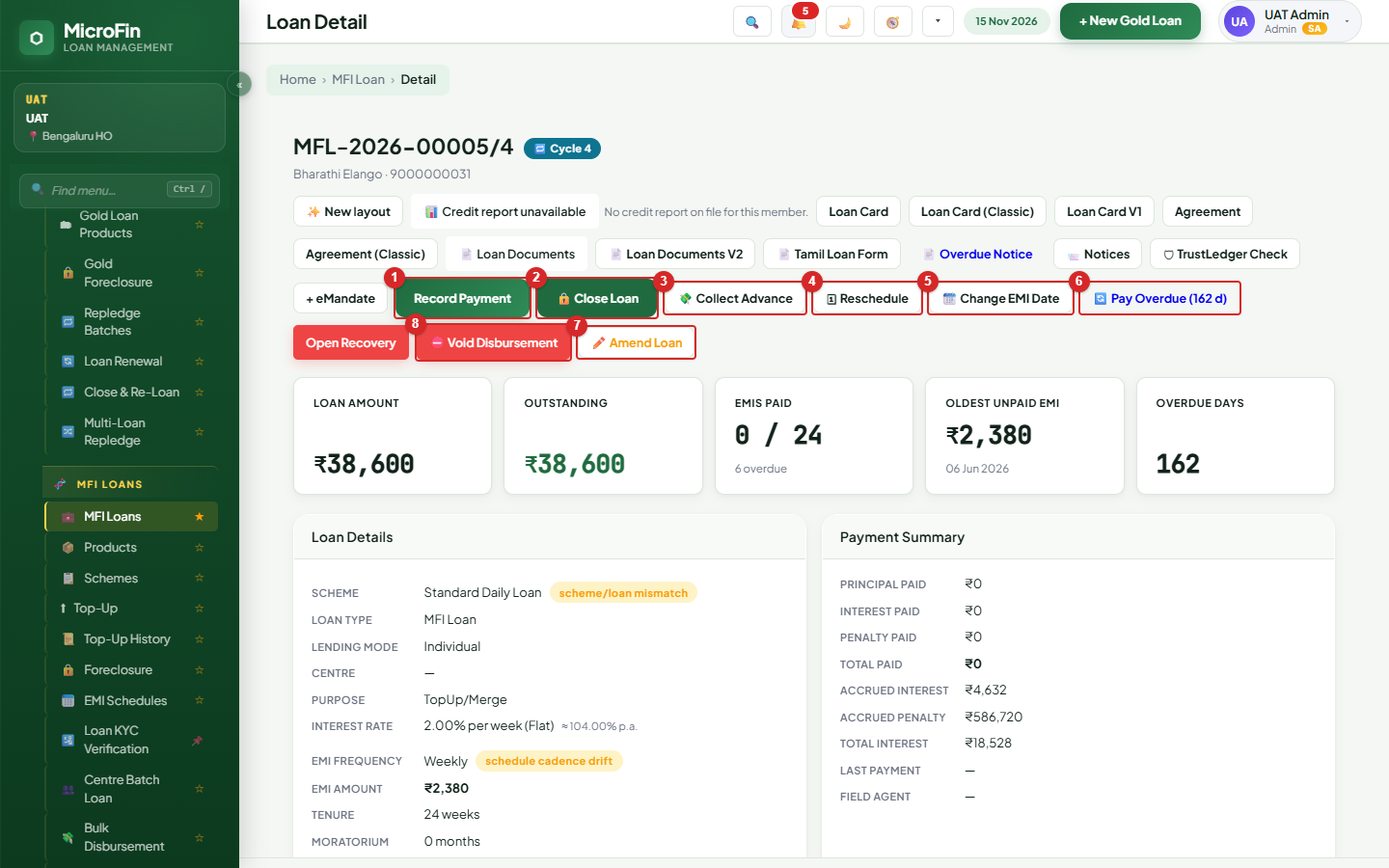
- Record Payment
- Close Loan
- Collect Advance
- Reschedule
- Change EMI Date
- Pay Overdue
- Amend Loan
- Void Disbursement
3. Before you start
- Check the loan's status on the Loan Detail page; many actions need Active or Overdue.
- Work out whether anything is already collected against the loan. Many corrections are limited or blocked once a payment exists.
- Check that the end-of-day for the date you will use is not locked.
- Know who your approver is; most of these actions need a second person.
4. Step-by-step instructions
Amend a loan (wrong amount, rate, tenure or fee)
- Open the loan, More > Amend Loan (title "Amend MFI Loan"). Only an Admin or SuperAdmin sees this.
- Change the figure and save. If nothing differs you see "Nothing was changed — those are the figures already recorded."
- On success: "Loan amended. The cash ledger and GL were adjusted by the difference." If the core terms changed the instalments are rebuilt.
Savings per instalment. On the same page, the Savings per instalment card sets the compulsory savings a loan collects. The message is "Savings set: this loan now collects ₹X an instalment. No cash or journal entry was made."
Change the EMI date
- Open More > Change EMI Date.
- Enter the new date for the next unpaid instalment. All later unpaid instalments move with it; the amount and number of instalments stay the same.
- You see "EMI due dates updated."
If the live schedule is missing after a reschedule and nothing is paid, ⟲ Rebuild live schedule restores it ("Rebuilt N live EMI row(s) from the last approved reschedule."). ⟲ Rebuild Schedule (any loan manager) repairs a schedule saved as all zeros and is shown only then; it is refused if any instalment has a payment.
Reschedule (restructure)
- Open More > Reschedule, or
NBFC & MFI Plus > Operations > Loan Rescheduling, and fill the Request Loan Rescheduling form (extension, payment holiday or lower EMI). Preview the new schedule. - Submit. You see "Rescheduling request submitted (ID #N). Awaiting approval." The request number looks like
RS-year-00001. - A different person approves it under
Administration > Approvals > Pending Approvals(type "Rescheduling") or on the rescheduling page: "Rescheduling approved. EMI schedule regenerated." or "Rescheduling rejected."
Void a disbursement
- Open More > Void Disbursement ("Void Loan Disbursement"), type the reason, confirm.
- You see "Loan disbursement voided." If your company needs a second person, a request goes to
/LoanVoid(Loan Void Approvals), and "Void request rejected." if declined.
Settings > Accounting Policy > Loan Void ("Allow loan disbursement Void"; and optionally "Require approval before a Void takes effect"). Otherwise: "Loan Void is switched off for this company. An Admin can enable it in Settings → Accounting Policy → Loan Void."Close one loan early (Pre-closure / Foreclosure)
- Open
Loan Management > MFI Loans > Foreclosure, or More > Close Loan on the loan. Choose the loan and the closure date. - The screen quotes the settlement: outstanding principal, unpaid interest, overdue penalty and the pre-closure charge (waived once the loan is older than the lock-in days).
- Click to create the closure: "Pre-closure #N created (Pending Approval)."
- A different manager approves it, and the payment is collected: "Pre-closure #N completed (Payment #M)." The loan becomes Closed.
- To undo before payment use Cancel: "Pre-closure #N cancelled." To undo a completed one, an Admin uses Revert: "Foreclosure #N reverted — loan re-opened, payment reversed, ledger unwound."
Other ways to close. All use the same closure engine:
- Centre Foreclosure (from the Foreclosure page): tick the loans of one centre; each becomes an ordinary Pending pre-closure and the money moves only when the counter completes the round on its day (it re-quotes if the day is later). A loan can be dropped: "Closure cancelled — the loan stays open."
- Multi-Loan Foreclosure (Customer 360° > Foreclose): closes the member's Active / Overdue loans together. Result: "Successfully foreclosed N loan(s). Total settled: ₹X." If some fail: "Foreclosed N of M loan(s). STILL OPEN: …".
- Bulk Close MFI Loans (Admin, from Data Import): upload an Excel list; preview shows what will close and why a row is held. Closing is done 25 loans per step and pressing Close is itself the approval; settlement is Cash into the loan's own branch drawer and savings are not settled.
Top-Up and Top-Up / Merge
- Top-Up / Merge (Customer 360°): closes several old loans through pre-closure and issues one new loan. Two modes: Clean (new loan equals the fresh cash) and CarryForward (fresh cash plus what the old loans closed at, with no cash moving for the carried part). Result: "Merge complete. N loan(s) closed. New loan created." and a Merge Receipt. [CFG] Needs the TOP_UP plan feature for your company.
- MFI Top-Up (
Loan Management > MFI Loans > Top-Up): lists loans eligible for a further loan (Active, not more than 30 days overdue, at least 50% of instalments paid, no open top-up). You enter the amount and confirm "Disburse a top-up of ₹… on this loan?"
Write-Off
- Request from the loan or the NPA screens: Request Write-Off with a reason of at least 10 characters. "Write-off request submitted (ID #N). Awaiting approval." Number
WO-year-00001. - A different user approves in
Administration > Approvals > Pending Approvals(type "Write-Off"): "Write-off approved. Loan marked as WrittenOff." - Later recoveries are recorded against the write-off: "Recovery of ₹X recorded."
- An Admin can reverse an approved write-off that has no recoveries: "Write-off reversed — loan restored to Active."
Insurance claim
- Open
NBFC & MFI Plus > Operations > Insurance Claimsand choose New Insurance Claim for the loan. "Insurance claim submitted (#N). Status: Submitted." - Move the claim along: Submitted, UnderReview, Sanctioned, then Settled, Partial or Rejected. "Claim moved to X."
- When it is Settled or Partial, the settled amount reduces the loan's principal outstanding (and "Loan outstanding reduced." is shown). At zero the loan closes.
5. Field explanation
| Field | Purpose | Required? | Expected input | Validation | Example |
|---|---|---|---|---|---|
| Amend: amount, rate, tenure, fee | New loan figures | At least one changes | Numbers | Amount above 0; locked after payments | 30000 |
| Savings per instalment | Compulsory savings | Optional | Amount | — | 50 |
| Change EMI Date: new date | New next due date | Yes | Date | Different from the current date; not earlier than the allowed minimum | 22-12-2026 |
| Reschedule: type, new tenure / holiday / EMI | Restructure | Yes | As on form | One pending request per loan | Extend 6 |
| Void reason | Why the disbursement is cancelled | Yes | Text | — | Paid in error |
| Closure date | Date the loan closes | Yes | Date | Not before loan date, not in future, not in a locked day | 15-11-2026 |
| Amount received / Mode / Ref / Remarks | Settlement payment | Yes | Amount, mode | Must cover the full settlement | — |
| Waiver (interest, penalty, charge) | Reduce what is charged | Optional | Amount | Only downward | — |
| Top-up amount | Further loan | Yes | Amount | "Top-up amount must be positive."; "Top-up exceeds cycle limit (max ₹X)" | 10000 |
| Write-off reason | Why the loan is written off | Yes | At least 10 characters | Length checked | Borrower untraceable |
| Recovery amount | Money recovered after write-off | Yes | Above 0 | Approved write-off only | 500 |
| Claim details and status | Insurance claim | Yes | As on screen | — | — |
6. Buttons and actions
| Button | What it does |
|---|---|
| More > Amend Loan | Opens the amend page (Admin / SuperAdmin). |
| More > Change EMI Date | Shifts all unpaid due dates. |
| More > Reschedule | Opens a rescheduling request. |
| More > Void Disbursement | Cancels a wrongly disbursed loan (if switched on). |
| More > Close Loan | Starts a pre-closure for the loan. |
| ⟲ Rebuild Schedule | Rebuilds a schedule that saved as all zeros (only if nothing is paid). |
| ⟲ Rebuild live schedule | Restores the live schedule after a reschedule. |
| Create / Approve / Cancel / Revert (Foreclosure) | The closure steps in section 4. |
| Confirm Loan Top-Up / Merge | Runs the merge. |
| Request Write-Off, approve, record recovery, reverse | The write-off steps. |
| New Insurance Claim | Opens a claim. |
7. Business rules and validations
8. Expected result
- Amend: the loan shows the new figures; the cash ledger and books are adjusted by the difference.
- Change EMI Date: every unpaid instalment shows the new dates; amounts unchanged.
- Reschedule (approved): old unpaid instalments show Rescheduled; new Pending ones follow; penalty forgiven.
- Void: the loan is Cancelled and marked voided, with reversing entries.
- Pre-closure (completed): the loan is Closed; a settlement receipt exists with entries for principal, interest, penalty and charge on the chosen account; savings are adjusted or paid out as set up.
- Write-off (approved): the loan shows WrittenOff; nothing is posted automatically.
- Insurance (settled): principal outstanding is reduced; nothing is posted automatically.
9. Troubleshooting
| Message or problem | Likely cause | What to do |
|---|---|---|
| "Only an Active or Overdue loan can be amended (current status: X)." | Loan is Closed, Pending, etc. | Check the status; pending loans use Edit Terms. |
| Amend allows fees only | The loan has payments, a top-up, a write-off request, accrued interest or a rescheduling, or is on a product | Use Void (if allowed) or a pre-closure and a new loan. |
| "Loan Void is switched off for this company…" | Setting is off | Ask an Admin to enable it, or use pre-closure. |
| Void refused | A payment, top-up, rescheduling, write-off or locked day exists | Void is not possible; use pre-closure or reversal of the payment first. |
| "A pending rescheduling request already exists for this loan." | Earlier request waiting | Approve or reject it first. |
| "Maker-checker rule: requester cannot approve their own reschedule." | You raised it | Ask another manager. |
| "A pending or approved write-off already exists for this loan." | Duplicate request | Open the existing request. |
| "…requires ₹X to foreclose in full, but only ₹Y was tendered." | Amount short | Collect the full settlement, or waive charges downward if allowed. |
| "Cannot rebuild — at least one EMI has a payment posted against it." | Payments exist | Rebuild is not allowed; use Reschedule. |
| "Top-up exceeds cycle limit (max ₹X)" | Amount above the limit | Lower the amount. |
| Top-Up loan has EMI 0 / no schedule | MFI Top-Up does not build a schedule | Ask your administrator; consider Top-Up / Merge. |
| Revert fails | A required database script is missing | Contact support. |
11. Related modules
- Chapter 22 — Loan disbursement.
- Collection chapters (payments, reversals, overdue).
- Approvals engine chapter.
- Cash Book / Day Book and End of Day chapters.
- Customer 360° chapter (Foreclose, Top-Up / Merge).
- Reports: Write-Off Register (RBI), NPA reports.
கடன் பராமரிப்பு மற்றும் முடிப்பு
MFI கடன் பராமரிப்பும் முடிப்பும்
1. அறிமுகம்
கடன் வழங்கப்பட்ட பிறகு (அத்தியாயம் 22) அதன் தவணைகள் வசூலிக்கப்பட்டு (வசூல் அத்தியாயங்களைப் பார்க்கவும்), இறுதியில் கடன் முடிக்கப்படுகிறது. இடையில் பணியாளர்கள் சில சமயம் கடனைத் திருத்த, அதன் தேதிகளை நகர்த்த, மறுசீரமைக்க, முன்கூட்டியே முடிக்க, கூடுதல் கடன் (top-up) வழங்க, தள்ளுபடி (write-off) செய்ய அல்லது காப்பீட்டுக் கோரிக்கையைப் பதிவு செய்ய வேண்டியிருக்கும். இவை ஒவ்வொன்றையும், யார் செய்யலாம், என்ன எதிர்பார்க்கலாம் என்பதையும் இந்த அத்தியாயம் விளக்குகிறது.
விரைவு வழிகாட்டி:
| நான் செய்ய வேண்டியது… | பயன்படுத்த வேண்டியது | யார் |
|---|---|---|
| தவறான தொகை, வட்டி விகிதம், தவணை எண்ணிக்கை அல்லது கட்டணத்தைத் திருத்த | Amend Loan | Admin / SuperAdmin |
| ஒவ்வொரு தவணையின் கட்டாயச் சேமிப்பைத் திருத்த | Amend-ல் Savings per instalment அட்டை | Admin / SuperAdmin |
| செலுத்தப்படாத அனைத்துத் தவணைத் தேதிகளையும் நகர்த்த | Change EMI Date | Admin / SuperAdmin / "manager" பணிப்பொறுப்பு |
| மீதமுள்ள தவணைகளை மறுசீரமைக்க | Reschedule | உருவாக்குபவர் + வேறொரு அங்கீகாரி |
| தவறாக வழங்கிய கடனை ரத்து செய்ய | Void Disbursement | Admin / SuperAdmin (அமைப்பு இயக்கத்தில் இருக்க வேண்டும்) |
| ஒரு கடனைக் கடைசித் தவணைக்கு முன்பே முடிக்க | Pre-closure / Foreclosure | பிரிவு 4-ஐப் பாருங்கள் |
| ஒரு மையத்தின், ஒரு உறுப்பினரின் அல்லது Excel பட்டியலில் உள்ள கடன்களை முடிக்க | Centre / Multi-Loan / Bulk closure | பிரிவு 4-ஐப் பாருங்கள் |
| தவணை செலுத்திவரும் உறுப்பினருக்குக் கூடுதல் கடன் வழங்க | Top-Up அல்லது Top-Up / Merge | கடன் மேலாண்மை உரிமை உள்ளவர்கள் |
| வாராக் கடனை நடப்புக் கடன் புத்தகத்திலிருந்து நீக்க | Write-Off | உருவாக்குபவர் + வேறொரு அங்கீகாரி |
| காப்பீட்டு நிறுவனக் கோரிக்கையைப் (claim) பதிவு செய்ய | Insurance Claims | கடன் மேலாண்மை உரிமை உள்ளவர்கள் |
2. வழிசெலுத்தல்
- கடன் பக்கம்:
Loan Management > MFI Loans > MFI Loans, பிறகு கடனைத் திறக்கவும். செயல்கள் More மெனுவில் (Amend Loan, Change EMI Date, Reschedule, Void Disbursement, Close Loan) மற்றும் Instalment schedule அட்டையில் (⟲ Rebuild Schedule, ⟲ Rebuild live schedule) உள்ளன. - Foreclosure:
Loan Management > MFI Loans > Foreclosure. - Top-Up:
Loan Management > MFI Loans > Top-Up,Top-Up History. Top-Up / Merge: Customer 360° (Customers > Member Profile) > Top-Up / Merge. - Rescheduling பட்டியல்:
NBFC & MFI Plus > Operations > Loan Rescheduling. - Write-off:
NBFC & MFI Plus > Portfolio Analytics > Write-Off Register (RBI). - காப்பீடு:
NBFC & MFI Plus > Operations > Insurance Claims. - Multi-Loan Foreclosure: Customer 360° > Foreclose. Excel பட்டியல் Bulk Close: Data Import பக்கத்தில் ✖ Bulk Close MFI Loans பொத்தான் (Admin).
- கட்டணம் பதிவு
- கடனை முடி
- முன்கூட்டியே வசூல்
- மறு அட்டவணை
- EMI தேதி மாற்று
- நிலுவை செலுத்து
- கடனைத் திருத்து
- வழங்கலை ரத்து செய்
3. தொடங்கும் முன்
- Loan Detail பக்கத்தில் கடனின் நிலையைப் பாருங்கள்; பல செயல்களுக்கு Active அல்லது Overdue நிலை தேவை.
- கடனில் ஏற்கனவே ஏதேனும் வசூல் ஆகியுள்ளதா என்று பாருங்கள். ஒரு தொகை செலுத்தப்பட்டுவிட்டால் பல திருத்தங்கள் கட்டுப்படுத்தப்படும் அல்லது தடுக்கப்படும்.
- நீங்கள் பயன்படுத்தும் தேதிக்கான End of Day பூட்டப்படவில்லை என்பதைச் சரிபாருங்கள்.
- உங்கள் அங்கீகாரி யார் என்று தெரிந்திருங்கள்; இவற்றில் பெரும்பாலானவற்றுக்கு இரண்டாவது நபர் தேவை.
4. படிப்படியான வழிமுறைகள்
கடனைத் திருத்துதல் — Amend (தவறான தொகை, வட்டி விகிதம், தவணை எண்ணிக்கை அல்லது கட்டணம்)
- கடனைத் திறந்து More > Amend Loan செல்லவும் (தலைப்பு "Amend MFI Loan"). இது Admin அல்லது SuperAdmin-க்கு மட்டுமே தெரியும்.
- தொகையை மாற்றிச் சேமிக்கவும். எதுவும் மாறவில்லை எனில் "Nothing was changed — those are the figures already recorded." என்று வரும்.
- வெற்றி பெற்றால்: "Loan amended. The cash ledger and GL were adjusted by the difference." முக்கிய விதிமுறைகள் மாறியிருந்தால் தவணைகள் மீண்டும் உருவாகும்.
ஒவ்வொரு தவணைக்குமான சேமிப்பு. அதே பக்கத்தில் உள்ள Savings per instalment அட்டையில் கடனுடன் வசூலிக்கப்படும் கட்டாயச் சேமிப்பை அமைக்கலாம். செய்தி: "Savings set: this loan now collects ₹X an instalment. No cash or journal entry was made."
EMI தேதியை மாற்றுதல்
- More > Change EMI Date திறக்கவும்.
- செலுத்தப்படாத அடுத்த தவணைக்கான புதிய தேதியை உள்ளிடவும். அதற்குப் பிந்தைய செலுத்தப்படாத தவணைகள் அனைத்தும் அதனுடன் நகரும்; தொகையும் தவணை எண்ணிக்கையும் மாறாது.
- "EMI due dates updated." என்று தெரியும்.
மறுசீரமைப்புக்குப் பின் live அட்டவணை காணாமல் போயிருந்து, எதுவும் செலுத்தப்படாமலும் இருந்தால் ⟲ Rebuild live schedule அதை மீட்கும் ("Rebuilt N live EMI row(s) from the last approved reschedule."). ⟲ Rebuild Schedule (கடன் மேலாண்மை உரிமை உள்ள எவரும்) முழுவதும் பூஜ்யமாகச் சேமிக்கப்பட்ட அட்டவணையைச் சரிசெய்யும்; அப்படி இருக்கும்போது மட்டுமே இந்தப் பொத்தான் தெரியும்; ஏதேனும் ஒரு தவணையில் பணம் செலுத்தப்பட்டிருந்தால் மறுக்கப்படும்.
மறுசீரமைப்பு (Reschedule)
- More > Reschedule அல்லது
NBFC & MFI Plus > Operations > Loan Reschedulingதிறந்து Request Loan Rescheduling படிவத்தை (நீட்டிப்பு, payment holiday, குறைந்த EMI) நிரப்பவும். புதிய அட்டவணையை முன்னோட்டம் பார்க்கவும். - சமர்ப்பிக்கவும். "Rescheduling request submitted (ID #N). Awaiting approval." கோரிக்கை எண்
RS-year-00001போல இருக்கும். - வேறொருவர்
Administration > Approvals > Pending Approvals(வகை "Rescheduling") அல்லது rescheduling பக்கத்தில் ஒப்புதல் தருவார்: "Rescheduling approved. EMI schedule regenerated." அல்லது "Rescheduling rejected."
வழங்கலை ரத்து செய்தல் (Void)
- More > Void Disbursement ("Void Loan Disbursement") திறந்து காரணத்தை எழுதி உறுதிசெய்யவும்.
- "Loan disbursement voided." என்று தெரியும். உங்கள் நிறுவனத்தில் இரண்டாவது நபரின் ஒப்புதல் தேவையென்றால் கோரிக்கை
/LoanVoid(Loan Void Approvals)-க்குச் செல்லும்; அது மறுக்கப்பட்டால் "Void request rejected." என்று வரும்.
Settings > Accounting Policy > Loan Void-ல் ("Allow loan disbursement Void"; விருப்பமாக "Require approval before a Void takes effect") இயக்க வேண்டும். இல்லையெனில்: "Loan Void is switched off for this company. An Admin can enable it in Settings → Accounting Policy → Loan Void."ஒரு கடனை முன்கூட்டியே முடித்தல் (Pre-closure / Foreclosure)
Loan Management > MFI Loans > Foreclosureஅல்லது கடனில் More > Close Loan திறக்கவும். கடனையும் முடிப்புத் தேதியையும் தேர்வு செய்யவும்.- திரை தீர்வுத் தொகையைக் காட்டும்: நிலுவை அசல், செலுத்தப்படாத வட்டி, நிலுவை அபராதம், முன்கூட்டிய முடிப்புக் கட்டணம் (கடன் lock-in நாட்களைக் கடந்துவிட்டால் இந்தக் கட்டணம் தள்ளுபடியாகும்).
- முடிப்பை உருவாக்கப் பொத்தானை அழுத்தவும்: "Pre-closure #N created (Pending Approval)."
- வேறொரு மேலாளர் ஒப்புதல் தருவார்; பணம் வசூலிக்கப்படும்: "Pre-closure #N completed (Payment #M)." கடன் Closed ஆகும்.
- பணம் பெறும் முன் ரத்து செய்ய Cancel பயன்படுத்தவும்: "Pre-closure #N cancelled." முடிந்துவிட்ட முடிப்பைத் திரும்பப் பெற Admin Revert பயன்படுத்துவார்: "Foreclosure #N reverted — loan re-opened, payment reversed, ledger unwound."
முடிப்பதற்கான பிற வழிகள். அனைத்தும் ஒரே முடிப்பு முறையையே பயன்படுத்துகின்றன:
- Centre Foreclosure (Foreclosure பக்கத்திலிருந்து): ஒரு மையத்தின் கடன்களை டிக் செய்யவும்; ஒவ்வொன்றும் சாதாரண Pending pre-closure ஆகும்; கவுண்டரில் அந்தச் சுற்று அதன் நாளில் முடிக்கப்படும்போதுதான் பணம் நகரும் (நாள் பிந்தினால் தீர்வுத் தொகை மீண்டும் கணக்கிடப்படும்). ஒரு கடனை விலக்கலாம்: "Closure cancelled — the loan stays open."
- Multi-Loan Foreclosure (Customer 360° > Foreclose): உறுப்பினரின் Active / Overdue கடன்களை ஒன்றாக முடிக்கும். முடிவு: "Successfully foreclosed N loan(s). Total settled: ₹X." சில தோல்வியடைந்தால்: "Foreclosed N of M loan(s). STILL OPEN: …".
- Bulk Close MFI Loans (Admin, Data Import-இலிருந்து): Excel பட்டியலைப் பதிவேற்றவும்; எவை முடிக்கப்படும், ஒரு வரி ஏன் நிறுத்தி வைக்கப்பட்டது என்பதை முன்னோட்டம் காட்டும். ஒரு படிக்கு 25 கடன்கள் வீதம் முடிக்கப்படும்; Close அழுத்துவதே ஒப்புதல்; தீர்வுத் தொகை கடனின் சொந்தக் கிளைப் பணப்பெட்டியில் Cash ஆகச் சேரும்; சேமிப்பு தீர்க்கப்படாது.
Top-Up மற்றும் Top-Up / Merge
- Top-Up / Merge (Customer 360°): பல பழைய கடன்களை pre-closure வழியாக முடித்து ஒரு புதிய கடனை வழங்கும். இரு முறைகள்: Clean (புதிய கடன் = புதிய பணம்) மற்றும் CarryForward (புதிய பணம் + பழைய கடன்கள் முடிந்த தொகை; முன்கொண்டு செல்லப்படும் அந்தப் பகுதிக்குப் பணம் நகராது). முடிவு: "Merge complete. N loan(s) closed. New loan created." மற்றும் Merge Receipt. [CFG] உங்கள் நிறுவனத்தின் plan-ல் TOP_UP வசதி இருக்க வேண்டும்.
- MFI Top-Up (
Loan Management > MFI Loans > Top-Up): கூடுதல் கடனுக்குத் தகுதியான கடன்களைப் பட்டியலிடும் (Active, 30 நாளுக்கு மேல் நிலுவை இல்லை, குறைந்தது 50% தவணைகள் செலுத்தப்பட்டவை, திறந்த top-up இல்லை). தொகையை உள்ளிட்டு "Disburse a top-up of ₹… on this loan?" என்பதை உறுதிசெய்யவும்.
Write-Off (தள்ளுபடி)
- கடன் பக்கம் அல்லது NPA திரைகளிலிருந்து குறைந்தது 10 எழுத்துக் காரணத்துடன் Request Write-Off மூலம் கோரவும். "Write-off request submitted (ID #N). Awaiting approval." எண்
WO-year-00001. - வேறொரு பயனர்
Administration > Approvals > Pending Approvals(வகை "Write-Off")-ல் ஒப்புதல் தருவார்: "Write-off approved. Loan marked as WrittenOff." - பின்னர் மீட்கப்படும் தொகைகள் (recovery) write-off-க்கு எதிராகப் பதிவு செய்யப்படும்: "Recovery of ₹X recorded."
- மீட்புத் தொகை எதுவும் பதிவாகாத, ஒப்புதல் பெற்ற write-off-ஐ Admin திருப்பிக் கழிக்கலாம் (reverse): "Write-off reversed — loan restored to Active."
காப்பீட்டுக் கோரிக்கை
NBFC & MFI Plus > Operations > Insurance Claimsதிறந்து கடனுக்கு New Insurance Claim தேர்வு செய்யவும். "Insurance claim submitted (#N). Status: Submitted."- கோரிக்கையை அடுத்தடுத்த நிலைக்கு நகர்த்தவும்: Submitted, UnderReview, Sanctioned, பிறகு Settled, Partial அல்லது Rejected. "Claim moved to X."
- Settled அல்லது Partial ஆனதும் தீர்வுத் தொகை கடனின் நிலுவை அசலைக் குறைக்கும் ("Loan outstanding reduced." என்று காட்டும்). நிலுவை பூஜ்யமானால் கடன் முடிக்கப்படும்.
5. புல விளக்கம்
| புலம் | நோக்கம் | கட்டாயமா? | உள்ளீடு | சரிபார்ப்பு | எடுத்துக்காட்டு |
|---|---|---|---|---|---|
| Amend: தொகை, வட்டி விகிதம், தவணை எண்ணிக்கை, கட்டணம் | கடனின் புதிய விவரங்கள் | குறைந்தது ஒன்று மாற வேண்டும் | எண்கள் | தொகை 0-க்கு மேல்; பணம் செலுத்தப்பட்ட பின் பூட்டப்படும் | 30000 |
| Savings per instalment | கட்டாயச் சேமிப்பு | விருப்பம் | தொகை | — | 50 |
| Change EMI Date: புதிய தேதி | புதிய அடுத்த தவணைத் தேதி | ஆம் | தேதி | தற்போதைய தேதியிலிருந்து வேறுபட வேண்டும்; அனுமதிக்கப்பட்ட குறைந்தபட்சத் தேதிக்கு முந்தையதாக இருக்கக்கூடாது | 22-12-2026 |
| Reschedule: வகை, புதிய தவணை எண்ணிக்கை / holiday / EMI | மறுசீரமைப்பு | ஆம் | படிவத்தின்படி | ஒரு கடனுக்கு ஒரு நிலுவைக் கோரிக்கை | Extend 6 |
| Void காரணம் | வழங்கல் ஏன் ரத்து | ஆம் | உரை | — | தவறாக வழங்கப்பட்டது |
| Closure date | கடன் முடிக்கப்படும் தேதி | ஆம் | தேதி | கடன் தேதிக்கு முந்தையதாகவோ, எதிர்காலத் தேதியாகவோ, பூட்டிய நாளாகவோ இருக்கக்கூடாது | 15-11-2026 |
| பெற்ற தொகை / Mode / Ref / Remarks | தீர்வுத் தொகை செலுத்துதல் | ஆம் | தொகை, முறை | முழுத் தீர்வுத் தொகைக்கும் போதுமானதாக இருக்க வேண்டும் | — |
| Waiver (வட்டி, அபராதம், கட்டணம்) | விதிக்கப்படும் தொகையைக் குறைக்க | விருப்பம் | தொகை | குறைக்க மட்டுமே முடியும் | — |
| Top-up தொகை | கூடுதல் கடன் | ஆம் | தொகை | "Top-up amount must be positive."; "Top-up exceeds cycle limit (max ₹X)" | 10000 |
| Write-off காரணம் | ஏன் தள்ளுபடி | ஆம் | குறைந்தது 10 எழுத்துகள் | நீளம் சரிபார்க்கப்படும் | கடன் பெறுபவரைத் தொடர்புகொள்ள முடியவில்லை |
| Recovery தொகை | write-off-க்குப் பின் மீட்கப்பட்ட பணம் | ஆம் | 0-க்கு மேல் | ஒப்புதல் பெற்ற write-off-க்கு மட்டும் | 500 |
| கோரிக்கை விவரம், நிலை | காப்பீட்டுக் கோரிக்கை | ஆம் | திரையின்படி | — | — |
6. பொத்தான்களும் செயல்களும்
| பொத்தான் | செய்வது |
|---|---|
| More > Amend Loan | திருத்தப் பக்கத்தைத் திறக்கும் (Admin / SuperAdmin). |
| More > Change EMI Date | செலுத்தப்படாத அனைத்துத் தேதிகளையும் நகர்த்தும். |
| More > Reschedule | மறுசீரமைப்புக் கோரிக்கையைத் திறக்கும். |
| More > Void Disbursement | தவறாக வழங்கிய கடனை ரத்து செய்யும் (இயக்கத்தில் இருந்தால்). |
| More > Close Loan | கடனுக்கு முன்கூட்டிய முடிப்பைத் (pre-closure) தொடங்கும். |
| ⟲ Rebuild Schedule | முழுவதும் பூஜ்யமாகச் சேமித்த அட்டவணையை மீண்டும் உருவாக்கும் (பணம் எதுவும் இல்லாதபோது மட்டும்). |
| ⟲ Rebuild live schedule | மறுசீரமைப்புக்குப் பின் live அட்டவணையை மீட்கும். |
| Create / Approve / Cancel / Revert (Foreclosure) | பிரிவு 4-ல் உள்ள முடிப்புப் படிகள். |
| Confirm Loan Top-Up / Merge | இணைப்பை இயக்கும். |
| Request Write-Off, ஒப்புதல், recovery பதிவு, திருப்பிக் கழித்தல் | Write-off படிகள். |
| New Insurance Claim | புதிய காப்பீட்டுக் கோரிக்கையைத் திறக்கும். |
7. வணிக விதிகளும் சரிபார்ப்புகளும்
8. எதிர்பார்க்கும் முடிவு
- Amend: கடன் புதிய விவரங்களைக் காட்டும்; பணப் பேரேடும் கணக்குகளும் வேறுபாட்டுத் தொகையால் சரிசெய்யப்படும்.
- Change EMI Date: செலுத்தப்படாத ஒவ்வொரு தவணையும் புதிய தேதியைக் காட்டும்; தொகை மாறாது.
- Reschedule (ஒப்புதல்): பழைய செலுத்தப்படாத தவணைகள் Rescheduled; புதிய Pending தவணைகள் தொடரும்; அபராதம் தள்ளுபடி.
- Void: கடன் Cancelled என்றும் voided என்றும் குறிக்கப்பட்டு எதிர்ப் பதிவுகள் இருக்கும்.
- Pre-closure (முடிந்தது): கடன் Closed ஆகும்; தேர்ந்தெடுத்த கணக்கில் அசல், வட்டி, அபராதம், கட்டணத்துக்கான பதிவுகளுடன் தீர்வு ரசீது இருக்கும்; சேமிப்பு, அமைக்கப்பட்டபடி கடனில் சரிக்கட்டப்படும் அல்லது திருப்பித் தரப்படும்.
- Write-off (ஒப்புதல்): கடன் WrittenOff; தானாக எதுவும் பதிவாகாது.
- காப்பீடு (Settled): நிலுவை அசல் குறையும்; தானாக எதுவும் பதிவாகாது.
9. சிக்கல் தீர்வு
| செய்தி / சிக்கல் | சாத்தியக் காரணம் | செய்ய வேண்டியது |
|---|---|---|
| "Only an Active or Overdue loan can be amended (current status: X)." | கடன் Closed, Pending முதலியன | நிலையைச் சரிபாருங்கள்; Pending கடனுக்கு Edit Terms. |
| Amend கட்டணங்களை மட்டும் அனுமதிக்கிறது | கடனில் பணம், top-up, write-off கோரிக்கை, திரண்ட வட்டி, மறுசீரமைப்பு உள்ளது; அல்லது product கடன் | Void (அனுமதி இருந்தால்) அல்லது pre-closure செய்து புதிய கடன் வழங்குங்கள். |
| "Loan Void is switched off for this company…" | அமைப்பு அணைந்துள்ளது | Admin-இடம் இயக்கச் சொல்லுங்கள்; அல்லது pre-closure பயன்படுத்துங்கள். |
| Void மறுக்கப்பட்டது | பணம், top-up, மறுசீரமைப்பு, write-off அல்லது பூட்டிய நாள் உள்ளது | Void முடியாது; pre-closure பயன்படுத்துங்கள், அல்லது முதலில் அந்தப் பணம் செலுத்துதலைத் திருப்பிக் கழியுங்கள். |
| "A pending rescheduling request already exists for this loan." | முந்தைய கோரிக்கை காத்திருக்கிறது | முதலில் அதற்கு ஒப்புதல் தரவும் அல்லது அதை நிராகரிக்கவும். |
| "Maker-checker rule: requester cannot approve their own reschedule." | நீங்களே கோரினீர்கள் | வேறு மேலாளரிடம் கேளுங்கள். |
| "A pending or approved write-off already exists for this loan." | இரட்டைக் கோரிக்கை | ஏற்கனவே உள்ள கோரிக்கையைத் திறக்கவும். |
| "…requires ₹X to foreclose in full, but only ₹Y was tendered." | தொகை குறைவு | முழுத் தீர்வுத் தொகையையும் வசூலிக்கவும்; அல்லது அனுமதி இருந்தால் கட்டணங்களைக் குறைக்கவும் (waive). |
| "Cannot rebuild — at least one EMI has a payment posted against it." | பணம் செலுத்தப்பட்டுள்ளது | Rebuild முடியாது; Reschedule பயன்படுத்தவும். |
| "Top-up exceeds cycle limit (max ₹X)" | தொகை வரம்பை மீறுகிறது | தொகையைக் குறைக்கவும். |
| Top-Up கடனில் EMI 0 / அட்டவணை இல்லை | MFI Top-Up அட்டவணை உருவாக்குவதில்லை | நிர்வாகியிடம் கேளுங்கள்; Top-Up / Merge-ஐப் பரிசீலிக்கவும். |
| Revert தோல்வி | தேவையான தரவுத்தள ஸ்கிரிப்ட் நிறுவப்படவில்லை | ஆதரவைத் தொடர்பு கொள்ளவும். |
10. தமிழ் விளக்கம்
இந்த அத்தியாயத்தில் உள்ள "[TBC]" குறிப்புகளை முக்கியமாகக் கவனியுங்கள்: Write-Off மற்றும் காப்பீட்டுத் தீர்வு தானாகக் கணக்குப் பதிவு செய்யாது; MFI Top-Up கடனின் தவணை அட்டவணையைச் சரிபார்க்க வேண்டும்; Void செய்யும்போது பொருள் மதிப்பு திருப்பிக் கழிக்கப்படாது.
11. தொடர்புடைய தொகுதிகள்
- அத்தியாயம் 22 — கடன் வழங்கல்.
- வசூல் அத்தியாயங்கள் (பணம் செலுத்துதல், திருப்பிக் கழித்தல், நிலுவை).
- ஒப்புதல்கள் அத்தியாயம்.
- Cash Book / Day Book, End of Day அத்தியாயங்கள்.
- Customer 360° அத்தியாயம் (Foreclose, Top-Up / Merge).
- அறிக்கைகள்: Write-Off Register (RBI), NPA அறிக்கைகள்.