Demand Sheet
The Collection Sheet
1. Overview
The Collection Sheet is the page an officer prints or carries before going out to collect. It lists, centre by centre and member by member, what is due, what is overdue and what is still to collect.
Two things surprise new staff, so read them first:
- There is no "generate demand" step. MicroFin does not create demand rows overnight. The amount due is worked out again, from each loan's instalment schedule, every time you open the sheet (or any collection screen). Nothing needs to be run first.
- The sheet is a report, not a step. The collection screens (chapter 31) work out the same demand on their own. You do not have to print the sheet before you enter a collection.
The only overnight work is a job (default 00:05) that marks unpaid instalments past their due date as Overdue and refreshes overdue days and accrued penalty. It creates no demand.
This chapter covers MFI loans. Gold loans have their own collection screens.
2. Navigation
Reports & Analytics > Collection > Collection Sheet(the same page is also underReporting > Collection Reporting).- Printouts: the Print button on the sheet.
- Excel: the Excel and Excel (list) buttons on the sheet.
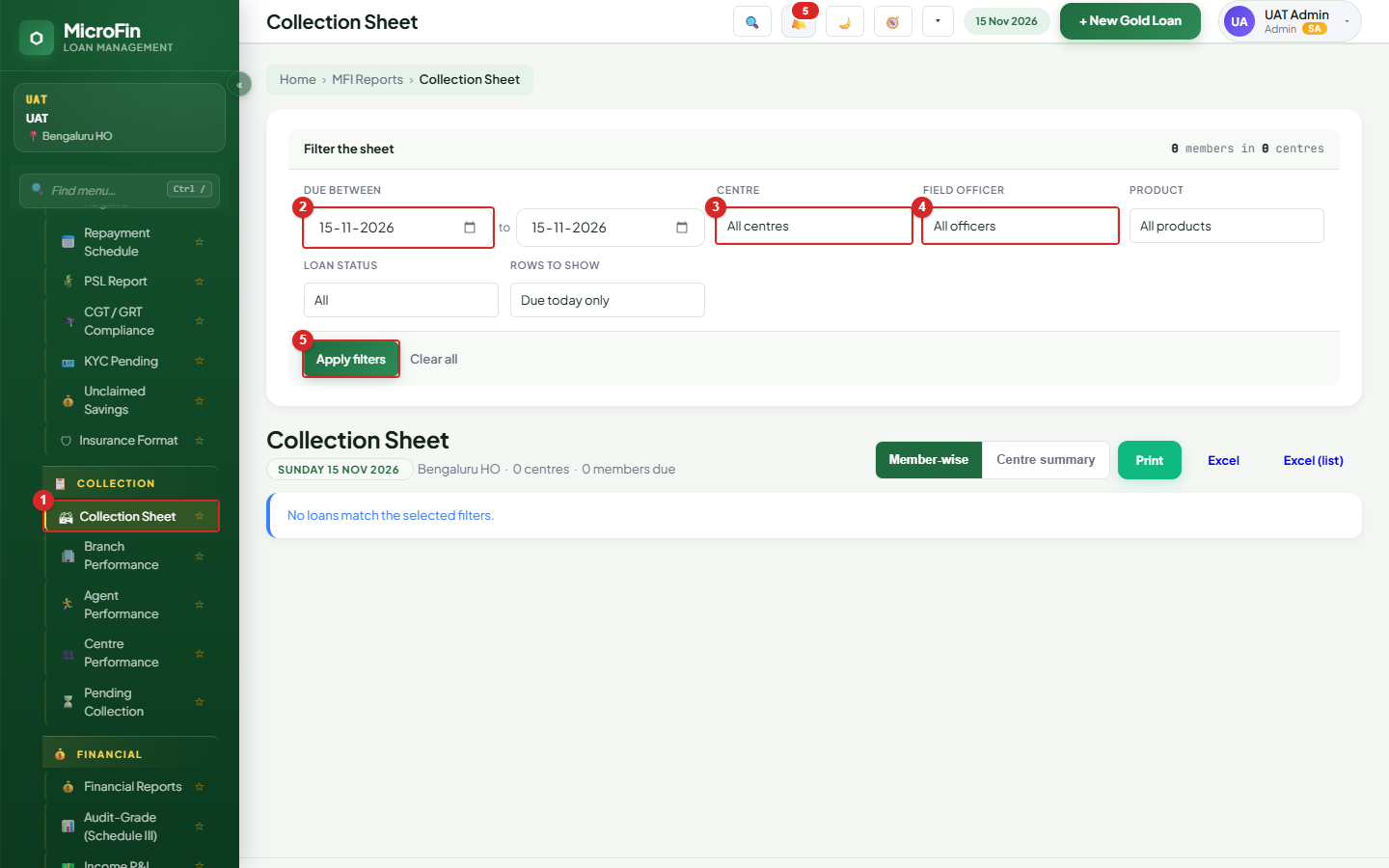
- Reports & Analytics > Collection > Collection Sheet
- From date
- Centre
- Field officer
- Apply filters
3. Before you start
- Permission: the reports right (
CanViewReports) and the MFI module on your plan. - Branch: a branch user sees only their own branch. An HO user sees the branch chosen in the sidebar on first visit and can change it.
- Field staff: an officer whose role sees only their own work sees only the centres they are the Field Officer of.
- Loans appear only if they are Active (or Overdue) and belong to an active centre. A loan with no centre is not listed, so a loan you expect may be missing because it has no centre.
4. Step-by-step instructions
Open the sheet for a day
- Open
Reports & Analytics > Collection > Collection Sheet. - In Due between, leave today's date (a single date means one day) or pick a From and To.
- Narrow it if you wish: Branch, Centre, Field officer, Product, Loan status.
- Choose Rows to show (see section 7).
- Click Apply filters. Centres appear as blocks; use Expand all / Collapse all to open or close them.
- Tick Centre summary to see one roll-up line per centre.
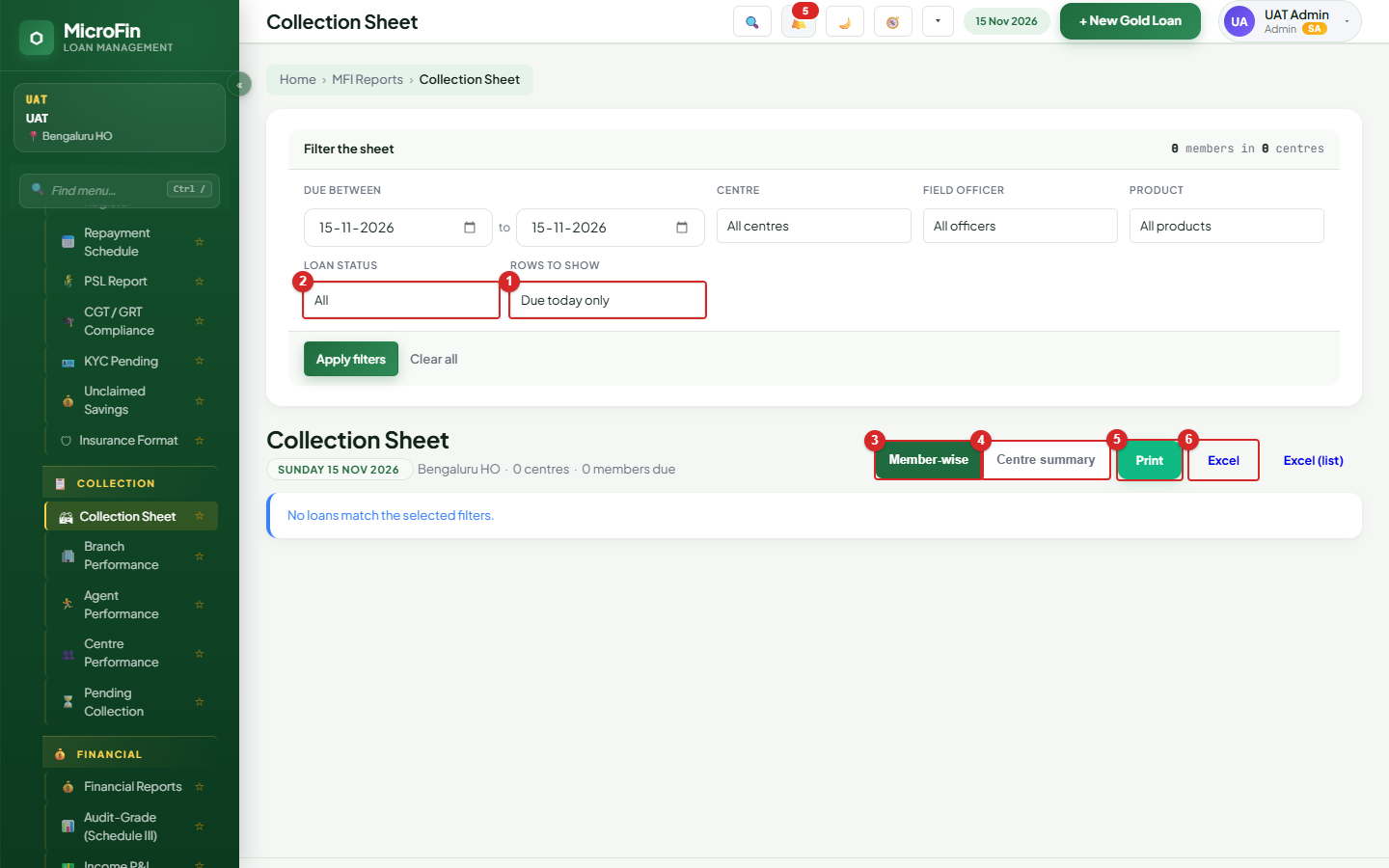
- Which rows to show (due today, and so on)
- Loan status filter
- Member-wise view
- Centre summary view
- Excel download
Print it
- Set the filters and click Print. A new window opens and the browser print dialog appears by itself about a third of a second later.
- Use the layout buttons on the print page to switch layout. The page reloads in the new layout without printing again.
- Pick the paper and print.
| Layout | What it looks like |
|---|---|
| Compact register (default) | A4 landscape, 23 columns, one row per member. Also used if a layout name is not recognised. |
| Field sheet | A4 portrait with boxes for RECEIVED, RECEIPT NO and SIGNATURE to fill in on the road. |
| One centre per page | One centre on each page with its own denomination count and signature block. |
| GL-ML | A special pivot made for one customer's Gold-Loan / Micro-Loan format. [TBC] Check with your administrator whether it is in use for your company. |
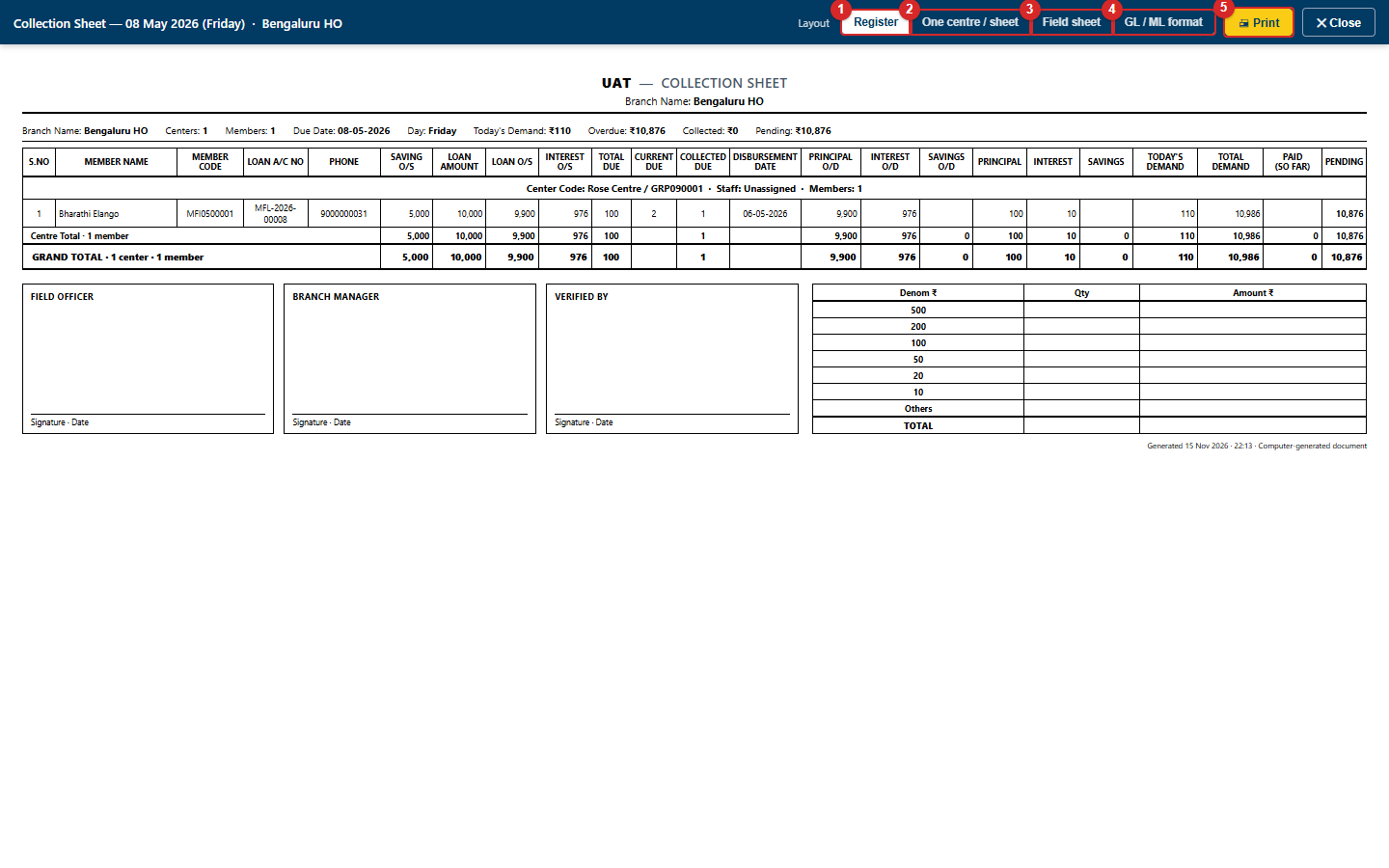
- Register layout (compact, landscape)
- One centre per sheet
- Field sheet (portrait)
- GL / ML format
Export to Excel
- Click Excel for a file grouped by centre with a TOTAL line under each centre, or Excel (list) for one row per member with no subtotals and a filter row.
- The files are named
CollectionSheet_<date>.xlsxandCollectionSheet_<date>_List.xlsx. They use the same filters as the screen, so an HO user never exports more than the page shows.
5. Field explanation
| Field | Purpose | Required? | Expected input | Validation | Example |
|---|---|---|---|---|---|
| Due between | The day or range whose instalments are the demand | No (defaults to today) | From and To dates | If To is before From, To is set equal to From | 15-11-2026 to 15-11-2026 |
| Branch | Which branch | No | Pick (HO users) | Non-HO users are fixed to their branch | Main Branch |
| Centre | One centre only | No | "All centres" or a centre | — | Lakshmi Centre |
| Field officer | One officer's centres | No | "All officers" or a name | — | — |
| Product | One loan product / scheme | No | "All products" or a product | — | — |
| Loan status | Filter by lateness | No | All / Active / Overdue | "Overdue" means days past due above 0, worked out from the schedule (an MFI loan's own status is never "Overdue", only its instalments are) | Overdue |
| Rows to show | Which members to list | No | Due today only / Due today + arrears / Arrears only | See section 7 | Due today + arrears |
| Centre summary | One roll-up line per centre | No | Tick | Adds the summary to every print link | — |
| Search box | Find a member | No | Member name, code or loan number | — | — |
Columns on screen: #, Member, Loan, EMI, Loan O/S, Due today, Overdue, To collect, Last paid. The Excel file has 38 columns (including loan, phone, scheme, EMI number, EMIs left, DPD, Risk, savings columns, branch, staff and nominee details).
6. Buttons and actions
| Button | What it does |
|---|---|
| Apply filters | Rebuilds the sheet for the chosen filters. |
| Expand all / Collapse all | Opens or closes every centre block. |
| Opens the print window (auto-prints). | |
| Excel | Downloads the centre-grouped workbook. |
| Excel (list) | Downloads the flat list workbook. |
The table also carries the standard toolbar (Copy, CSV, Excel, PDF, Print) added to most tables in MicroFin.
7. Business rules and validations
How the figures are read:
- Due today = principal + interest of instalments due in the chosen window, plus the loan's compulsory savings for each of those instalments.
- Overdue = the unpaid scheduled principal, interest and penalty of instalments already past due.
- To collect = what is still unpaid: the amount due, less what has already been paid against it, less savings already handed over, never below zero. It is a position ("how much is still open"), not a day-by-day difference. It will match a DCB "Balance" only for a single day with no arrears or advance.
- DPD = days since the oldest unpaid instalment. Risk is shown as Standard, Sub-Std, Doubtful or Loss at 30, 90 and 180 days.
- Savings still to collect is read from what was actually paid before, so an instalment that has already paid its savings does not ask again.
Rows to show:
- Due today only lists members with an instalment in the window.
- Due today + arrears adds members who are carrying earlier unpaid amounts.
- Arrears only lists only members carrying earlier unpaid amounts.
8. Expected result
You get the day's demand by centre and member, an on-paper copy in the layout you need, or a workbook. Nothing in MicroFin changes: opening, printing or exporting the sheet writes no data.
9. Troubleshooting
| Message or problem | Likely cause | What to do |
|---|---|---|
| A loan or member is missing | The loan has no centre, the centre is inactive, the loan is not Active, or no instalment falls in the dates (with "Due today only") | Check the loan's centre and status; try "Due today + arrears". |
| Fewer centres than expected | You are field staff (own centres only) or a branch user (own branch only) | Ask a manager or HO user to run it. |
| "To collect" is higher than expected | A collection is still waiting for approval, or a receipt was reversed | Open the Approvals inbox or the loan's payment history. |
| Print window did not open | Pop-up blocked | Allow pop-ups for MicroFin. |
| Printed twice or never auto-printed | The page was reloaded in another layout (it does not auto-print again) | Use the browser's Print. |
| Totals differ from DCR or DCB | They answer different questions (see chapters 34 and 35) | Compare like with like: one day, no arrears or advance. |
11. Related modules
- Chapter 31 — entering collections, which re-works the same demand on its own.
- Chapter 32 — correcting a wrong receipt.
- Chapters 33–35 — collection reports, DCR and DCB.
- Chapter 81 — End of Day.
தேவைத் தாள்
வசூல் தாள் (Collection Sheet)
1. அறிமுகம்
Collection Sheet என்பது வசூலுக்குச் செல்வதற்கு முன் அலுவலர் அச்சிட்டுக் கொண்டு செல்லும் தாள். மையம் வாரியாகவும் உறுப்பினர் வாரியாகவும் எவ்வளவு செலுத்த வேண்டும், எவ்வளவு நிலுவை, இன்னும் எவ்வளவு வசூலிக்க வேண்டும் என்பதைக் காட்டும்.
புதியவர்கள் அடிக்கடி தவறாகப் புரிந்துகொள்ளும் இரண்டு விஷயங்கள்:
- "தேவையை உருவாக்கு" (generate demand) என்ற படியே இல்லை. MicroFin இரவில் தேவைப் பதிவுகளை உருவாக்குவதில்லை. ஒவ்வொரு கடனின் தவணை அட்டவணையிலிருந்து, நீங்கள் தாளை (அல்லது எந்த வசூல் திரையையும்) திறக்கும் ஒவ்வொரு முறையும் செலுத்த வேண்டிய தொகை புதிதாகக் கணக்கிடப்படுகிறது. முன்கூட்டியே எதையும் இயக்கத் தேவையில்லை.
- இந்தத் தாள் ஒரு அறிக்கை; வசூலுக்கான கட்டாயப் படி அல்ல. வசூல் பதிவுத் திரைகள் (அத்தியாயம் 31) தாங்களாகவே அதே தேவையைக் கணக்கிடும். தாளை அச்சிடாமலும் வசூலைப் பதிவு செய்யலாம்.
இரவு வேலை ஒன்று மட்டுமே உண்டு (இயல்பாக 00:05): செலுத்தப்படாத, தேதி கடந்த தவணைகளை Overdue என்று குறித்து, நிலுவை நாட்களையும் திரண்ட அபராதத்தையும் புதுப்பிக்கும். அது தேவைப் பதிவுகளை உருவாக்காது.
இந்த அத்தியாயம் MFI கடன்களுக்கானது. தங்கக் கடன்களுக்குத் தனித் திரைகள் உண்டு.
2. வழிசெலுத்தல்
Reports & Analytics > Collection > Collection Sheet(அதே பக்கம்Reporting > Collection Reportingஇலும் உள்ளது).- அச்சு: தாளில் உள்ள Print பொத்தான்.
- Excel: தாளில் உள்ள Excel, Excel (list) பொத்தான்கள்.
- அறிக்கைகள் & பகுப்பாய்வு > வசூல் > வசூல் தாள்
- தொடக்கத் தேதி
- மையம்
- கள அலுவலர்
- வடிகட்டிகளைப் பயன்படுத்து
3. தொடங்கும் முன்
- அனுமதி: அறிக்கைகளைப் பார்க்கும் உரிமை (
CanViewReports); உங்கள் நிறுவனத்தின் plan-இல் MFI தொகுதி இருக்க வேண்டும். - கிளை: கிளைப் பயனர் தம் கிளையை மட்டுமே பார்ப்பார். HO பயனர் முதல் முறை திறக்கும்போது பக்கப்பட்டியில் தேர்ந்தெடுத்த கிளையைப் பார்ப்பார்; பின்னர் மாற்றிக்கொள்ளலாம்.
- களப்பணி அலுவலர்: தம் சொந்தப் பணியை மட்டுமே பார்க்கும் பணிப்பொறுப்பில் உள்ள அலுவலருக்கு, அவர் Field Officer ஆக உள்ள மையங்கள் மட்டுமே தெரியும்.
- Active (அல்லது Overdue) ஆகவும் செயலில் உள்ள மையத்தைச் சேர்ந்ததாகவும் இருக்கும் கடன்கள் மட்டுமே வரும். மையம் இல்லாத கடன் பட்டியலில் வராது; எனவே நீங்கள் எதிர்பார்க்கும் கடன் தெரியவில்லை என்றால் அதற்கு மையம் இல்லாதது காரணமாக இருக்கலாம்.
4. படிப்படியான வழிமுறைகள்
ஒரு நாளுக்கான தாளைத் திறத்தல்
Reports & Analytics > Collection > Collection Sheetஐத் திறக்கவும்.- Due between இல் இன்றைய தேதியை அப்படியே விடவும் (ஒரே தேதி = ஒரு நாள்) அல்லது From, To தேதிகளைத் தேர்வு செய்யவும்.
- தேவைப்பட்டால் Branch, Centre, Field officer, Product, Loan status மூலம் சுருக்கவும்.
- Rows to show ஐத் தேர்வு செய்யவும் (பிரிவு 7).
- Apply filters ஐ அழுத்தவும். மையங்கள் தொகுதிகளாகத் தோன்றும்; Expand all / Collapse all மூலம் திறக்கவோ மூடவோ செய்யலாம்.
- ஒரு மையத்திற்கு ஒரு சுருக்க வரி வேண்டுமெனில் Centre summary ஐ டிக் செய்யவும்.
- எந்த வரிசைகளைக் காட்ட வேண்டும் (இன்று செலுத்த வேண்டியவை, முதலியன)
- கடன் நிலை வடிகட்டி
- உறுப்பினர் வாரியான பார்வை
- மைய சுருக்கப் பார்வை
- அச்சிடு
- Excel பதிவிறக்கம்
அச்சிடுதல்
- வடிகட்டிகளை அமைத்து Print ஐ அழுத்தவும். புதிய சாளரம் திறந்து, சுமார் மூன்றில் ஒரு நொடிக்குப் பின் உலாவியின் அச்சு உரையாடல் தானாக வரும்.
- அச்சுப் பக்கத்தில் உள்ள வடிவமைப்புப் பொத்தான்களால் வடிவமைப்பை மாற்றலாம்; பக்கம் புதிய வடிவமைப்பில் மீண்டும் ஏற்றப்படும், ஆனால் மீண்டும் தானாக அச்சிடாது.
- தாளின் அளவைத் தேர்ந்தெடுத்து அச்சிடவும்.
| வடிவமைப்பு | விளக்கம் |
|---|---|
| Compact register (இயல்பு) | A4 படுக்கை வடிவம், 23 நெடுவரிசைகள், ஒரு உறுப்பினருக்கு ஒரு வரி. வடிவமைப்புப் பெயர் அடையாளம் காணப்படாவிட்டாலும் இதுவே வரும். |
| Field sheet | A4 நிமிர்வு வடிவம்; களத்தில் நிரப்புவதற்கு RECEIVED, RECEIPT NO, SIGNATURE பெட்டிகள். |
| One centre per page | ஒரு பக்கத்திற்கு ஒரு மையம்; ஒவ்வொன்றுக்கும் தனியாகப் பணத்தாள் வகை எண்ணிக்கையும் (denomination) கையொப்பப் பகுதியும். |
| GL-ML | ஒரு வாடிக்கையாளரின் Gold-Loan / Micro-Loan வடிவத்திற்காக உருவாக்கப்பட்ட சிறப்பு pivot. [TBC] உங்கள் நிறுவனத்தில் பயன்பாட்டில் உள்ளதா என நிர்வாகியிடம் உறுதிசெய்யவும். |
- Register அமைப்பு (சுருக்கம், படுக்கை)
- ஒரு தாளுக்கு ஒரு மையம்
- Field sheet (நிலைப்படு)
- GL / ML வடிவம்
- அச்சிடு
Excel ஏற்றுமதி
- மையம் வாரியாகத் தொகுத்து, ஒவ்வொரு மையத்தின் கீழும் TOTAL வரியுடன் வேண்டுமெனில் Excel அழுத்தவும்; ஒரு உறுப்பினருக்கு ஒரு வரியாக, இடைக்கூட்டுத்தொகை இல்லாமல், வடிகட்டி வரியுடன் வேண்டுமெனில் Excel (list) அழுத்தவும்.
- கோப்புகள்
CollectionSheet_<date>.xlsx,CollectionSheet_<date>_List.xlsxஎன்ற பெயரில் வரும். திரையில் உள்ள அதே வடிகட்டிகள் பொருந்தும்; எனவே HO பயனரும் பக்கம் காட்டுவதை விட அதிகமாக ஏற்றுமதி செய்ய முடியாது.
5. புல விளக்கம்
| புலம் | நோக்கம் | கட்டாயமா? | உள்ளீடு | சரிபார்ப்பு | எடுத்துக்காட்டு |
|---|---|---|---|---|---|
| Due between | எந்த நாளின் / காலத்தின் தவணைகள் தேவையாக எடுக்கப்படும் | இல்லை (இயல்பாக இன்று) | From, To தேதிகள் | To, From க்கு முன் இருந்தால் To = From ஆக மாற்றப்படும் | 15-11-2026 to 15-11-2026 |
| Branch | எந்தக் கிளை | இல்லை | தேர்வு (HO பயனர்) | HO அல்லாத பயனர் தம் கிளைக்கு மட்டும் | Main Branch |
| Centre | ஒரு மையம் மட்டும் | இல்லை | "All centres" அல்லது ஒரு மையம் | — | Lakshmi Centre |
| Field officer | ஒரு அலுவலரின் மையங்கள் | இல்லை | "All officers" அல்லது ஒரு பெயர் | — | — |
| Product | ஒரு கடன் தயாரிப்பு / திட்டம் | இல்லை | "All products" அல்லது ஒரு தயாரிப்பு | — | — |
| Loan status | தாமதத்தின்படி வடிகட்டல் | இல்லை | All / Active / Overdue | "Overdue" = அட்டவணையிலிருந்து கணக்கிட்ட தாமத நாட்கள் 0 க்கு மேல் (MFI கடனின் சொந்த நிலை ஒருபோதும் "Overdue" ஆகாது; அதன் தவணைகள் மட்டுமே Overdue ஆகும்) | Overdue |
| Rows to show | எந்த உறுப்பினர்களைப் பட்டியலிட வேண்டும் | இல்லை | Due today only / Due today + arrears / Arrears only | பிரிவு 7 ஐப் பார்க்கவும் | Due today + arrears |
| Centre summary | ஒரு மையத்திற்கு ஒரு சுருக்க வரி | இல்லை | டிக் | ஒவ்வொரு அச்சு இணைப்பிலும் சுருக்கத்தைச் சேர்க்கும் | — |
| Search box | உறுப்பினரைத் தேட | இல்லை | பெயர், குறியீடு, கடன் எண் | — | — |
திரையின் நெடுவரிசைகள்: #, Member, Loan, EMI, Loan O/S, Due today, Overdue, To collect, Last paid. Excel கோப்பில் 38 நெடுவரிசைகள் உள்ளன (கடன், தொலைபேசி, திட்டம், EMI எண், மீதமுள்ள EMI-கள், DPD, Risk, சேமிப்பு நெடுவரிசைகள், கிளை, பணியாளர், நாமினி விவரங்கள் உட்பட).
6. பொத்தான்களும் செயல்களும்
| பொத்தான் | செயல் |
|---|---|
| Apply filters | தேர்ந்த வடிகட்டிகளுடன் தாளை மீண்டும் உருவாக்கும். |
| Expand all / Collapse all | எல்லா மையங்களையும் திறக்கும் / மூடும். |
| அச்சுச் சாளரத்தைத் திறந்து தானாக அச்சிடும். | |
| Excel | மையம் வாரியாகத் தொகுத்த கோப்பைப் பதிவிறக்கும். |
| Excel (list) | தொகுக்கப்படாத நேர் பட்டியல் கோப்பைப் பதிவிறக்கும். |
MicroFin இன் பெரும்பாலான அட்டவணைகளில் உள்ள வழக்கமான கருவிப்பட்டியும் (Copy, CSV, Excel, PDF, Print) இந்த அட்டவணையில் உண்டு.
7. வணிக விதிகளும் சரிபார்ப்புகளும்
தொகைகளை எப்படிப் புரிந்துகொள்வது:
- Due today = தேர்ந்தெடுத்த காலத்தில் வரும் தவணைகளின் அசல் + வட்டி, மேலும் அந்தத் தவணைகள் ஒவ்வொன்றுக்குமான கட்டாயச் சேமிப்பு.
- Overdue = ஏற்கெனவே தேதி கடந்த தவணைகளில் செலுத்தப்படாத அசல், வட்டி, அபராதம்.
- To collect = இன்னும் செலுத்தப்படாத தொகை: செலுத்த வேண்டியதிலிருந்து ஏற்கெனவே செலுத்தியதையும் கொடுத்த சேமிப்பையும் கழித்தது; பூஜ்யத்துக்குக் கீழ் போகாது. இது "இன்னும் எவ்வளவு பாக்கி உள்ளது" என்ற நிலை; நாள்வாரி வேறுபாடு அல்ல. முந்தைய நிலுவையோ முன்கூட்டிய செலுத்துதலோ இல்லாத ஒரே ஒரு நாளுக்கு மட்டுமே இது DCB இன் "Balance" உடன் பொருந்தும்.
- DPD = மிகப் பழைய செலுத்தப்படாத தவணையிலிருந்து கடந்த நாட்கள். Risk 30, 90, 180 நாட்களில் Standard, Sub-Std, Doubtful, Loss என்று காட்டும்.
- இன்னும் வசூலிக்க வேண்டிய சேமிப்பு, முன்பு உண்மையில் செலுத்தப்பட்டதைப் பார்த்துக் கணக்கிடப்படும்; சேமிப்பு ஏற்கெனவே செலுத்தப்பட்ட தவணைக்கு மீண்டும் கேட்காது.
Rows to show:
- Due today only — தேர்ந்த காலத்தில் தவணை உள்ளவர்கள் மட்டும்.
- Due today + arrears — முந்தைய நிலுவை உள்ளவர்களையும் சேர்க்கும்.
- Arrears only — முந்தைய நிலுவை உள்ளவர்கள் மட்டும்.
8. எதிர்பார்க்கும் முடிவு
நாளின் தேவை மையம், உறுப்பினர் வாரியாகத் தெரியும்; தேவையான வடிவமைப்பில் அச்சுப் பிரதி அல்லது Excel கோப்பு கிடைக்கும். தாளைத் திறப்பதாலோ அச்சிடுவதாலோ ஏற்றுமதி செய்வதாலோ MicroFin இல் எந்தத் தரவும் மாறாது.
9. சிக்கல் தீர்வு
| செய்தி / சிக்கல் | காரணம் | செய்ய வேண்டியது |
|---|---|---|
| கடன் அல்லது உறுப்பினர் வரவில்லை | கடனுக்கு மையம் இல்லை / மையம் செயலில் இல்லை / கடன் Active இல்லை / ("Due today only" எனில்) தேதிகளுக்குள் தவணை இல்லை | கடனின் மையம், நிலையைப் பார்க்கவும்; "Due today + arrears" முயலவும். |
| எதிர்பார்த்ததை விடக் குறைவான மையங்கள் | நீங்கள் களப்பணி அலுவலர் (சொந்த மையங்கள் மட்டும்) அல்லது கிளைப் பயனர் (சொந்தக் கிளை மட்டும்) | மேலாளர் அல்லது HO பயனரிடம் இயக்கச் சொல்லவும். |
| "To collect" அதிகமாக உள்ளது | ஒப்புதலுக்குக் காத்திருக்கும் வசூல், அல்லது திருப்பிக் கழித்த ரசீது | Approvals inbox அல்லது கடனின் payment history ஐப் பார்க்கவும். |
| அச்சுச் சாளரம் திறக்கவில்லை | Pop-up தடுக்கப்பட்டுள்ளது | MicroFin க்கு pop-up ஐ அனுமதிக்கவும். |
| இரு முறை அச்சானது, அல்லது தானாக அச்சாகவில்லை | பக்கம் வேறு வடிவமைப்பில் மீண்டும் ஏற்றப்பட்டது (அப்போது மீண்டும் தானாக அச்சிடாது) | உலாவியின் Print ஐப் பயன்படுத்தவும். |
| DCR / DCB உடன் மொத்தங்கள் வேறுபடுகின்றன | அவை வெவ்வேறு கேள்விகளுக்குப் பதில் சொல்கின்றன (அத்தியாயம் 34, 35) | ஒரே வகையானவற்றை ஒப்பிடவும்: ஒரே நாள், முந்தைய நிலுவையோ முன்கூட்டிய செலுத்துதலோ இல்லாதபோது. |
10. தமிழ் விளக்கம்
Collection Sheet என்பது சேமித்த தேவையைக் காட்டுவதல்ல; ஒவ்வொரு முறையும் தவணை அட்டவணையிலிருந்து புதிதாகக் கணக்கிடும் அறிக்கை. அதைத் திறப்பதும் அச்சிடுவதும் எதையும் மாற்றாது.
11. தொடர்புடைய தொகுதிகள்
- அத்தியாயம் 31 — வசூலைப் பதிவு செய்தல்; அது அதே தேவையைத் தானாகவே மீண்டும் கணக்கிடும்.
- அத்தியாயம் 32 — தவறான ரசீதைத் திருத்துதல்.
- அத்தியாயம் 33–35 — வசூல் அறிக்கைகள், DCR, DCB.
- அத்தியாயம் 81 — நாள் முடிவு (End of Day).