Collection Entry
Entering collections
1. Overview
MicroFin has several collection screens. They all end in the same posting step, but they differ in what they show, which amounts are prefilled, what they check and whether they ask for a cash or bank account. Use the table in section 4 to pick the right one, then read that screen's steps.
What always happens when a collection is posted (unless approval is switched on, section 7):
- The receipt (number
MFR…) is created at the same moment as the instalment update and the cash entries. They all succeed together or none is written. - The instalment becomes Paid or PartialPaid; the loan's balances update; a loan whose principal reaches zero closes by itself.
- The member gets an SMS / WhatsApp message if your company has the
EMI_COLLECTIONmessage switched on. - The Cash Book, Day Book and monitoring screens show it the next time they load.
This chapter is for MFI loans. Gold loans have their own screens.
2. Navigation
| Screen | Where |
|---|---|
| Regular Collection Entry (one row per loan) | Collections > Collection Entry > Regular Collection Entry |
| Regular Collection Entry grid (one row per instalment) | Not in the sidebar. From the Home page: the Collect MFI button and the Collection sheet → card, plus global search "MFI Collections". [TBC] Its two menu rows are inactive on the reference database, so your company's menu may or may not show it. |
| Overdue Collection Entry | Collections > Collection Entry > Overdue Collection Entry |
| OD Collection & Savings | Collections > Collection Entry > OD Collection & Savings [TBC] needs menu script 384 |
| Advance Collection & Savings | Collections > Collection Entry > Advance Collection & Savings [TBC] needs menu script 384 |
| Savings Collection | Collections > Collection Entry > Savings Collection [TBC] needs menu script 384 |
| Record Payment | Record Payment button on the MFI loan page |
| MFI Collection (field batches) | Collections > Collection Entry > MFI Collection |
| Receipts register | Collections > Collection Entry > Receipts |
| ₹0 Collection Register | Collections > Collection Entry > ₹0 Collection Register |
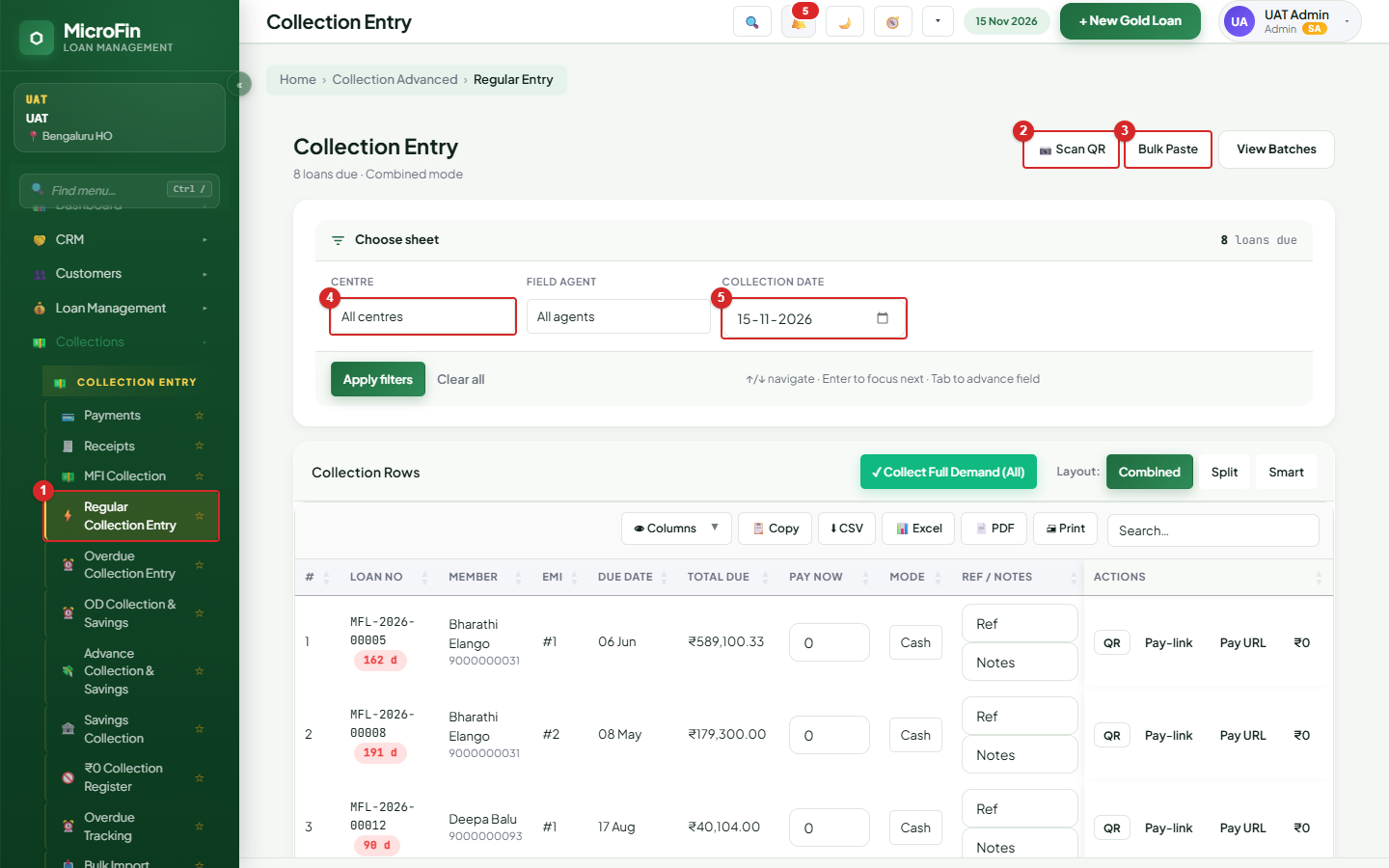
- Collections > Collection Entry
- Scan QR
- Bulk Paste
- Centre
- Collection date
3. Before you start
- Permission: the loan-management right (
CanManageLoans) and the MFI module. Receipts register needs the vouchers right. - Role list [CFG]:
Settings > Role Access Ruleshas a list of roles allowed to enter collections on the web. An empty list means every role. If yours is not on it you can open the screen but saving is refused with "Your role (x) cannot enter collections in this company. Collections are entered by: …". - Branch: non-HO users work in their own branch. The one-row-per-loan sheet always uses the branch chosen in the sidebar, even for HO users. A receipt and its cash entries are always stamped with the loan's branch, not yours.
- Field staff: staff who see only their own work see only loans where they are the Field Officer.
- Cash / bank account: some screens ask you to pick one (grid, Overdue Entry, Record Payment). It must be an account your branch can use; otherwise the post is refused with "Collection blocked — …".
- End of Day: if your company blocks entries after a missed End of Day, every save is refused until the missed day is closed or an approved reopen pass exists (chapter 81).
4. Step-by-step instructions
Which screen, and what it starts with
| Screen | One row is | Amounts when it opens | Penalty can be keyed? | Savings can be keyed? | Account to pick? |
|---|---|---|---|---|---|
| Regular Collection Entry (sidebar) | a loan, on its oldest open instalment due on or before the date (arrears folded in) | all start at 0 | Yes | No | No (taken from the payment mode and the branch) |
| Regular Collection Entry grid | an instalment due in the date range | prefilled with what is due (principal, interest, savings); rows start unticked | No (always 0) | Yes | Yes, required |
| Overdue Collection Entry | an overdue loan | all start at 0; "Fill all = full overdue" fills them | Yes | Yes | Yes (row or batch default) |
| OD Collection & Savings | one loan | the whole overdue amount plus savings due, not editable except savings | Included in the overdue figure | Yes | No |
| Advance Collection & Savings | one loan, next N instalments | EMIs to prepay starts at 1; savings prefilled | No | Yes | No |
| Savings Collection | one loan | savings due prefilled | No | Only savings | No |
| Record Payment | one loan, any payment type | prefilled with the first open instalment's principal and interest plus accrued penalty | Yes (with waiver) | Yes | Yes, required |
| MFI Collection batch | an entry typed into a draft batch | Collected is prefilled with Expected | Yes | Yes | No (posts as Cash) |
A. Regular Collection Entry (sidebar)
- Open
Collections > Collection Entry > Regular Collection Entry. - In Choose sheet pick Centre, Field agent and Collection date (today by default) and click Apply filters.
- Each row shows #, Loan No, Member, EMI, Due Date, Total Due and the amount boxes. Every amount box starts at 0.
- Fill the amounts. Choose the layout with Combined (one Pay Now box), Split (Principal, Interest, Penalty) or Smart (behaves as Combined). In Combined, a typed amount is split penalty first, then interest, then principal.
- Or click ✓ Collect Full Demand (All) to fill every unlocked row with its dues. This only fills; it does not post.
- For each row you may choose a Mode (Cash, UPI, NEFT, IMPS, Cheque) and a Ref / Notes.
- Click Post Collections. A Confirm payment box says "Post these collections, totalling ₹x? Every row with an amount is recorded as received." Click Post collections.
- The screen reports "Posted n collections totalling ₹x." or "Posted n, failed m." with the loan-wise reasons. A failed row does not stop the others.
Extras on this screen: 📷 Scan QR, Bulk Paste, View Batches, a pay-link dialog (Generate Link, Copy, Send on WhatsApp) and a ₹0 button (section 7). A row marked 🔒 Pending Approval has its boxes disabled.
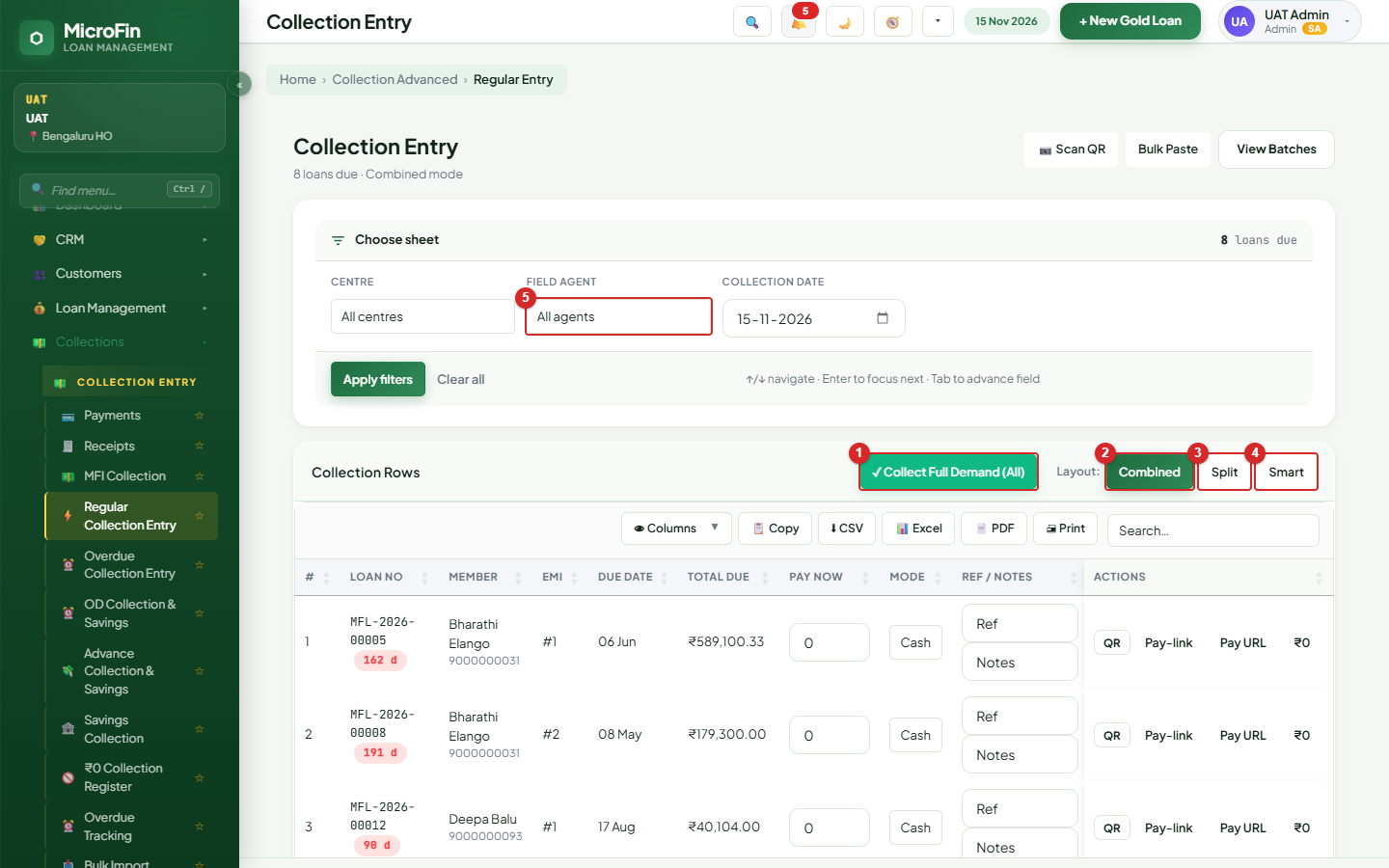
- Collect the full demand for every row
- Combined amount mode
- Split mode
- Smart mode
- Field agent filter
B. Regular Collection Entry grid
- Open it from the Home page Collect MFI button.
- Set Due Date (and To for a range), Status (Pending, Paid, All), filters such as Centre, Collection Staff, and click Apply. Tick Include overdue to add one extra row for each loan that is behind but has nothing due in the range. [TBC] Include overdue is described in developer notes as not yet deployed everywhere.
- Pick Cash / Bank Account \* at the top (or on each row). The account decides the mode: Cash or Petty Cash gives Cash; any other account gives BankTransfer.
- Every row is prefilled with its due principal, interest and savings, but the row's tick-box is unticked. Only ticked rows are saved. Pressing Save All with nothing ticked says "Nothing selected to save."
- Tick the rows you collected. Change an amount if the member paid differently. Use ⚡ Mark all selected as fully paid to restore ticked rows to their prefilled dues.
- Centre-wise entry: type one centre amount (cash including savings) and a Distribute by rule — Equal EMI, Proportional or FIFO — then Distribute. These rules only spread a centre's lump sum over its rows; they are not the company's allocation order (section 7).
- Click 💾 Save All Collection (or a row's 💾). A confirm box asks "Save ₹x? Into: account" or "Save n collection rows on date? Into: account". Confirm.
- After saving, the sheet refreshes (if no other row has unsaved amounts), a toast offers the group receipt, and each saved row shows 🧾 for a thermal receipt. 🧾 Print All Receipts prints every paid row.
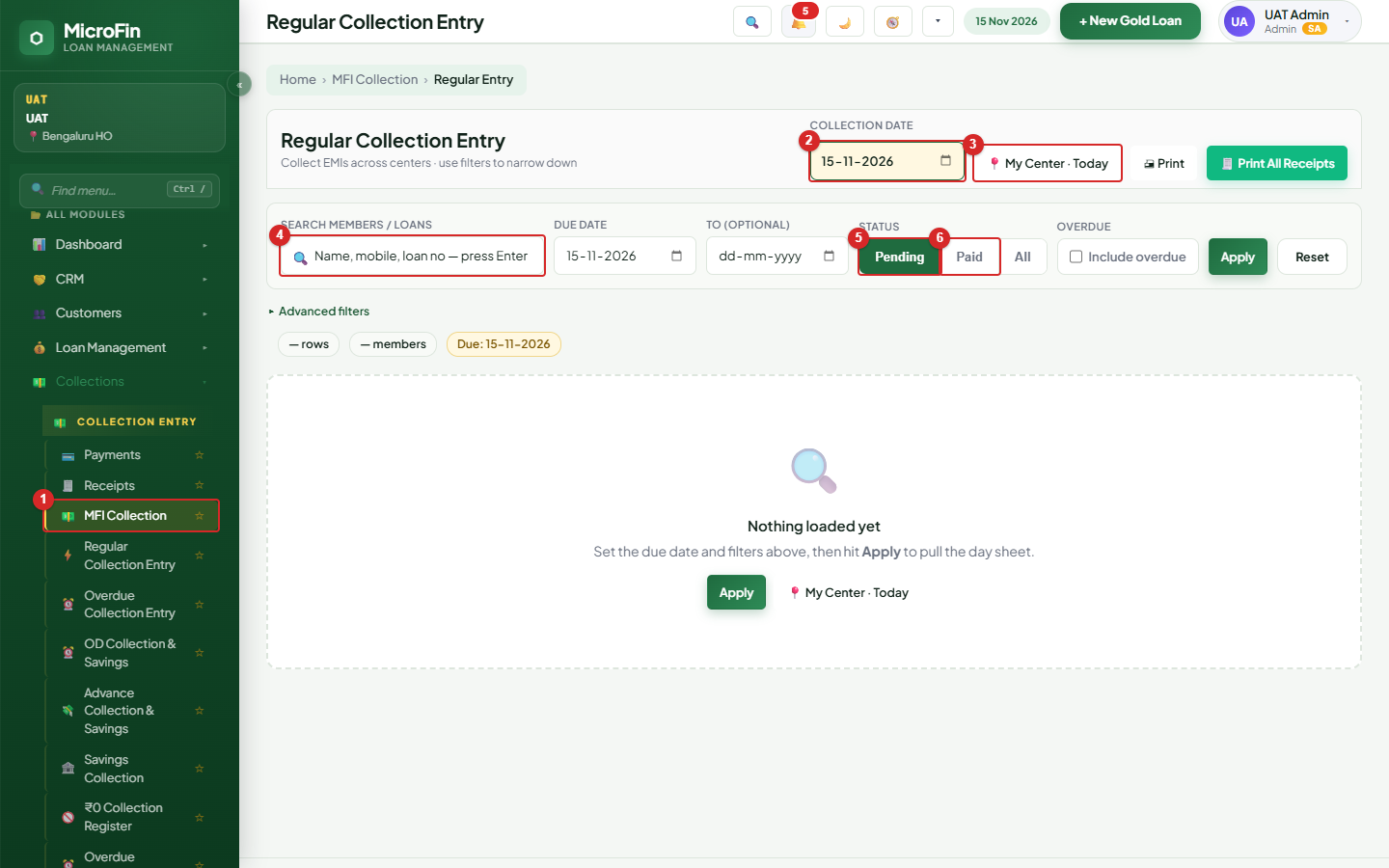
- Collections > Regular Collection Entry (grid)
- Collection date
- My Centre, Today
- Search by name, mobile or loan number
- Pending filter
- Paid filter
C. Overdue Collection Entry
- Open it and choose Branch, Centre, Member, Field Agent and DPD Bucket (All, 1-30 d, 31-60 d, 60+ d). The list stays empty until you click Apply filters.
- Overdue days are recalculated for the loans in view first, so a loan that went overdue this morning still appears.
- Boxes Principal ₹, Interest ₹, Penalty ₹, Savings ₹ start at 0. Fill all = full overdue fills them with the overdue figures; Clear all empties them.
- Pick a Default Mode and Default Account (or set them per row). A row with an amount and no account fails.
- Click 💾 Post All Collections. With nothing keyed you get "Nothing to post". Otherwise the box "Post entered overdue collections for n loan(s)? This cannot be undone in batch." appears; confirm with Post Collections.
- Only rows with an amount are sent. This screen does collect penalty.
D. OD Collection & Savings (one overdue loan)
- Pick the overdue loan from the loan picker ("Search the overdue loan the member is paying against."), or open it from the loan page. The page title is Pay Overdue Only.
- Set Payment Date, Payment Mode, optionally Reference, Collected By (Agent) and Narration.
- Savings to collect (₹) is prefilled with the savings due; change it if needed.
- The button reads Post ₹x. Confirm "Collect ₹x overdue on loan … by …?".
- This screen takes the whole overdue amount; you cannot reduce it. For a part payment use Record Payment or Overdue Collection Entry.
E. Advance Collection & Savings (one loan)
- Pick the loan. The page is titled Collect Advance and shows EMIs Available and Single EMI.
- If the loan has any overdue instalment, a banner says to collect the overdue first, and the Confirm & Post button stays disabled.
- Enter EMIs to Prepay \* (1 up to the number available) and Payment Date \*. Total Advance updates; Savings (₹) fills with savings per instalment times the EMIs; Total to Collect is the sum.
- Click Confirm & Post and confirm "Collect advance of ₹x for n EMI(s) …?". The receipt is a Prepayment with no penalty.
- The preview rounds Total Advance to a whole rupee; the receipt itself is exact, so it can differ by paise.
F. Savings Collection (one loan)
- Pick the loan. Savings to collect (₹) \, Payment Date \ and Payment Mode \* are required; the amount is prefilled.
- The button reads Collect ₹x and stays disabled at 0. Confirm "Collect savings of ₹x on loan …?".
- This makes a savings-only receipt: no instalment is settled, and the amount is not part of Total Paid.
G. Record Payment (one loan, any type)
- On the MFI loan page click Record Payment.
- Choose Payment Type: EMI, Prepayment, PartialPrepayment, FullClosure or Penalty. Changing it re-assigns the amounts.
- The form is prefilled with the first open instalment's principal and interest and the accrued penalty. Total Paid (₹) is read-only: principal + interest + penalty, at least 1.
- Choose Payment Mode \* and Cash / Bank Account \* ("Pick the Cash / Bank account the collection lands in."). Add references, Collected By (Agent) and Remarks if needed. A payment can be settled across several accounts under How is it settled?.
- Penalty: Penalty Accrued shows what has built up; you may enter Penalty Waived (₹) and a Waiver Reason. Changing Payment Date re-fetches the accrued penalty and overwrites any penalty you typed.
- Savings: Savings with this payment (₹) (for loans that collect savings). On a full closure, Savings — remaining instalments (₹) and Closure interest basis appear.
- Click Save Payment and confirm "Collect ₹x by … on loan …?". The button locks for 20 seconds after a valid submit.
- If you tick Settle member savings in this closure on a FullClosure, the button becomes Review closure with savings → and sends you to the foreclosure review instead of posting here.
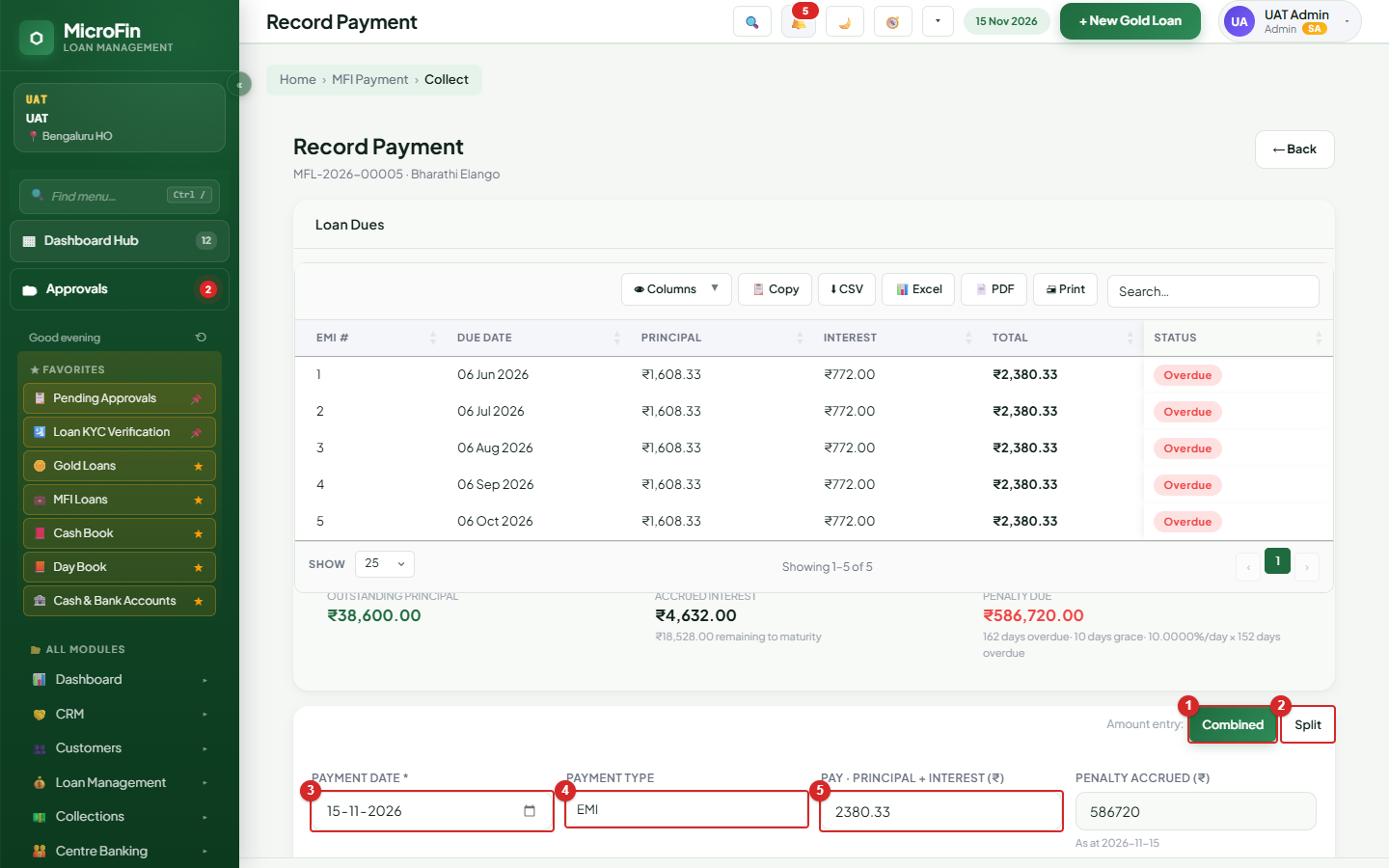
- Combined amount mode
- Split mode (principal, interest, penalty typed separately)
- Payment date
- Payment type
- Amount
H. MFI Collection (field batches)
- Open
Collections > Collection Entry > MFI Collectionand click + New Batch. - Choose Field Agent \, optionally a Centre ("— All Active Loans —"), Collection Date \ and Remarks.
- For each loan, Collected (₹) is prefilled with Expected (₹); add Penalty (₹) and Savings (₹) if any. Click Save Batch (no confirm). It is only a draft.
- Open the batch and click Post Payments; confirm "Post all collections in this batch?". Each entry with Collected above 0 posts as an EMI paid in Cash to the loan's branch.
- [TBC] This is an older screen. Ask your administrator whether your branches still use it: it has no approval step, no pending-approval check and no over-collection check.
I. Receipts
- After a post, open the receipt from the loan page, the grid (🧾) or
Collections > Collection Entry > Receipts. - The register defaults to this month. Filter by Receipt date between, Receipt type, Branch, Centre and click Apply filters.
- Formats: A4 PDF, 80 mm thermal slip, group receipt for a centre. A missing receipt shows "Receipt unavailable — MFI payment #n was not found."
5. Field explanation
| Field | Purpose | Required? | Expected input | Validation | Example |
|---|---|---|---|---|---|
| Collection date (sheets) / Payment Date (single-loan screens) | Date the cash was taken | Yes | Date | See section 7 | 15-11-2026 |
| Pay Now (sidebar, Combined) | One amount for the row | One row at least | Number, min 0, 0.01 steps | No client limit; server checks (section 7) | 1,250.00 |
| Principal / Interest / Penalty | Split amounts | As needed | Numbers | Penalty cannot exceed accrued less waiver | — |
| Savings | Compulsory savings with the instalment | Optional | Number | Only for loans that collect savings: "<loan> does not collect compulsory savings — set the savings to ₹0." | 50.00 |
| Cash / Bank Account \* | Where the money lands | Grid, Overdue Entry, Record Payment | Pick | "A Cash / Bank Account must be selected before saving the collection." | Main Branch Cash |
| Payment Mode | How it was paid | Yes (single-loan screens) | Cash, UPI, NEFT, IMPS, RTGS, Cheque, etc. | On the grid it follows the account | Cash |
| Reference / Cheque No | Reference | Optional | Text | — | — |
| Collected By (Agent) | Who took the money | Optional | Staff, or "— Office —" | — | — |
| Penalty Waived / Waiver Reason | Write off penalty | Optional | Amount up to accrued; text | Cut back to accrued. [TBC] No role check and no approval; the reason is not enforced by the server | — |
| EMIs to Prepay | Advance count | Yes (Advance) | 1 to EMIs available | Refused while any instalment is overdue | 2 |
| DPD Bucket | Filter overdue loans | Optional | All, 1-30 d, 31-60 d, 60+ d | — | 31-60 d |
6. Buttons and actions
| Button | Screen | Effect |
|---|---|---|
| Post Collections | Sidebar sheet | Posts all rows that have an amount, after confirm. |
| ✓ Collect Full Demand (All) | Sidebar sheet | Fills every unlocked row; posts nothing. |
| 💾 Save All Collection / row 💾 | Grid | Saves ticked rows / one row, after confirm. |
| ⚡ Mark all selected as fully paid | Grid | Restores ticked rows to their prefilled dues. |
| ↺ | Grid | Clears one row. |
| 🧾 / 🧾 Print All Receipts | Grid | Opens receipt(s) in a new tab. |
| Fill all = full overdue / Clear all | Overdue Entry | Fills / empties amount boxes. |
| 💾 Post All Collections | Overdue Entry | Posts rows that have amounts. |
| Confirm & Post | Advance | Posts the advance. |
| Collect ₹x | Savings Collection | Posts savings. |
| Save Payment | Record Payment | Posts one payment. |
| Post Payments | Batch detail | Posts a draft batch. |
Every posting screen asks "are you sure" first. Cancel changes nothing.
7. Business rules and validations
Dates — where the software checks and where it does not
Role and approval
Settings > Role Access Rules (see section 3).Settings > Approval Workflows, off by default). When it applies to you, saving does not post. The screen says "Collection submitted for approval — ₹x across n row(s) posts once the chain signs off." Nothing is written — no receipt, no cash entry. The default chain is Branch Manager, Area Manager, Divisional Manager, Regional Manager, Admin. Approvers use the Approvals inbox (chapter 80); one click can approve all single-member requests of a centre, each checked on its own. On final approval the system posts using the allocation order and checks as they are at that moment, not when you saved. Rejection posts nothing; re-key if needed. [HARD] Pending-approval lock: while a loan has a pending collection request, every collection screen refuses it: "Blocked — this member is already … No money has posted yet." It clears on approve or reject. Over-collection is checked before parking so you see the error at once. [TBC] A role removed from the role list after you parked a request still posts when approved./MfiCollectionApproval, where an office user confirms the cash / bank account and mode and clicks Approve & post or Reject. [TBC] There is no menu row for this page; ask your administrator whether it applies.Posting checks (all screens)
Settings > Accounting Policy > EMI Collection — Allocation Order): Selected (default: the instalment you picked, else the one due on the payment date, else the oldest) or FIFO (oldest first). Interest is covered before principal inside each instalment. A FullClosure ignores this setting. [HARD] The grid saves each row as its own transaction, so if one fails the rows before it stay saved. It sends one token per page load, so a repeat Save All returns the first result. The sidebar sheet has no such token; a double click is stopped only by the duplicate guard.Savings
Penalty on each screen
₹0 collection
Settings > Approval Workflows); otherwise the screen says it is not switched on. One entry per member per day; the date must fall inside the back-date window; a branch manager then area manager acknowledge it. It moves no money: the instalment stays due and a pending ₹0 never blocks a real collection later. See the ₹0 Collection Register.Online / gateway collections
Closure, recovery and other collection screens
8. Expected result
- A receipt exists (
MFRnumber), printable in A4, thermal or group format. - The instalment shows Paid or PartialPaid; the loan balance is lower; overdue days reset to 0 until the nightly job recalculates them.
- Cash Book and Day Book show the cash the next time they open. With approval on, nothing appears until the final approval.
- A savings amount, if any, is in the member's passbook.
9. Troubleshooting
| Message or problem | Likely cause | What to do |
|---|---|---|
| "Your role (x) cannot enter collections in this company…" | Your role is not on the role list | Ask an Admin to add it under Role Access Rules. |
| "Blocked — this member is already … No money has posted yet." | A collection for this loan is waiting for approval | Ask the approver to approve or reject it, then retry. |
| "Cannot save — loan X: ₹a collected exceeds ₹b owed." | You keyed more than the loan can still take | Reduce the amount. |
| "Nothing selected to save." | Grid rows are unticked | Tick the rows you collected. |
| "A Cash / Bank Account must be selected before saving the collection." | No account picked | Pick one at the top or per row. |
| "Duplicate payment blocked …" | Same payment saved twice within about 3 minutes | Check the receipts register before re-entering. |
| "Nothing to collect — enter an overdue amount or savings." | OD screen with no overdue and no savings | Check the loan; nothing is due. |
| "… has n overdue instalment(s). Collect the overdue first …" | Advance on a loan in arrears | Use OD Collection & Savings first. |
| "Collection blocked — …" | No cash or bank account can carry the money | Ask an Admin to set up the branch's Cash account. |
| Record Payment keeps the loan page with a red message | A server check refused it (see section 7) | Read the message; nothing was posted. |
| Posted n, failed m | Some rows failed their checks | Read the loan-wise reasons and re-key only those rows. |
| Grid row says "Network error — this row may or may not have saved" | Connection dropped | Refresh and check the receipts register before saving again. |
11. Related modules
- Chapter 30 — the Collection Sheet.
- Chapter 32 — reversing and amending receipts, bulk reversal, savings catch-up, cash handover, cheque bounce, recovery.
- Chapter 80 — the Approvals inbox and approval chains.
- Chapter 81 — End of Day, which freezes a day's receipts against reversal.
- Chapter 23 — closure and foreclosure.
வசூல் பதிவு
வசூலைப் பதிவு செய்தல்
1. அறிமுகம்
MicroFin இல் பல வசூல் திரைகள் உள்ளன. எல்லாம் ஒரே இறுதிப் பதிவு நிலையில் முடியும்; ஆனால் எதைக் காட்டுகின்றன, எந்தத் தொகைகள் முன்கூட்டியே நிரப்பப்படுகின்றன, எதைச் சரிபார்க்கின்றன, பணம் / வங்கிக் கணக்கைக் கேட்கின்றனவா என்பதில் வேறுபடும். பிரிவு 4 இல் உள்ள அட்டவணையைப் பார்த்துச் சரியான திரையைத் தேர்ந்தெடுத்து, பிறகு அந்தத் திரைக்கான படிகளைப் படிக்கவும்.
வசூல் பதிவாகும்போது எப்போதும் நடப்பவை (ஒப்புதல் இயக்கத்தில் இல்லையெனில்; பிரிவு 7):
- ரசீது (
MFR…எண்) தவணைப் புதுப்பிப்பு, பணப் பதிவுகள் ஆகியவற்றுடன் ஒரே நேரத்தில் உருவாகும்; அனைத்தும் ஒன்றாக வெற்றி பெறும், இல்லையெனில் எதுவும் பதிவாகாது. - தவணை Paid அல்லது PartialPaid ஆகும்; கடனின் மீதித் தொகைகள் புதுப்பிக்கப்படும்; அசல் பூஜ்யமானால் கடன் தானாக மூடப்படும்.
EMI_COLLECTIONசெய்தி இயக்கத்தில் இருந்தால் உறுப்பினருக்கு SMS / WhatsApp செல்லும்.- Cash Book, Day Book, கண்காணிப்புத் திரைகள் அடுத்த முறை ஏற்றப்படும்போது இதைக் காட்டும்.
இது MFI கடன்களுக்கான அத்தியாயம்; தங்கக் கடன்களுக்குத் தனித் திரைகள் உண்டு.
2. வழிசெலுத்தல்
| திரை | இடம் |
|---|---|
| Regular Collection Entry (ஒரு கடனுக்கு ஒரு வரி) | Collections > Collection Entry > Regular Collection Entry |
| Regular Collection Entry grid (ஒரு தவணைக்கு ஒரு வரி) | பக்கப்பட்டியில் இல்லை. Home பக்கத்தின் Collect MFI பொத்தான், Collection sheet → அட்டை, பொதுத் தேடலில் (global search) "MFI Collections". [TBC] இதன் இரு மெனு வரிகள் மாதிரித் தரவுத்தளத்தில் செயலில் இல்லை; உங்கள் நிறுவன மெனுவில் தெரியலாம் அல்லது தெரியாமல் போகலாம். |
| Overdue Collection Entry | Collections > Collection Entry > Overdue Collection Entry |
| OD Collection & Savings | Collections > Collection Entry > OD Collection & Savings [TBC] மெனு ஸ்கிரிப்ட் 384 தேவை |
| Advance Collection & Savings | Collections > Collection Entry > Advance Collection & Savings [TBC] மெனு ஸ்கிரிப்ட் 384 தேவை |
| Savings Collection | Collections > Collection Entry > Savings Collection [TBC] மெனு ஸ்கிரிப்ட் 384 தேவை |
| Record Payment | MFI கடன் பக்கத்தில் Record Payment பொத்தான் |
| MFI Collection (களத் தொகுதிகள்) | Collections > Collection Entry > MFI Collection |
| Receipts பதிவேடு | Collections > Collection Entry > Receipts |
| ₹0 Collection Register | Collections > Collection Entry > ₹0 Collection Register |
- வசூல் > வசூல் பதிவு
- QR ஸ்கேன்
- மொத்தமாக ஒட்டு
- மையம்
- வசூல் தேதி
3. தொடங்கும் முன்
- அனுமதி: கடன் மேலாண்மை உரிமை (
CanManageLoans), MFI தொகுதி. Receipts பதிவேட்டுக்கு வவுச்சர் உரிமை. - பணிப்பொறுப்புப் பட்டியல் [CFG]:
Settings > Role Access Rulesஇல், இணையத் திரைகளில் வசூலைப் பதிவு செய்ய அனுமதிக்கப்பட்ட பணிப்பொறுப்புகளின் பட்டியல் உள்ளது; பட்டியல் காலியாக இருந்தால் எல்லாப் பணிப்பொறுப்புகளும் அனுமதிக்கப்படும். உங்கள் பணிப்பொறுப்பு அதில் இல்லையெனில் திரையைத் திறக்கலாம், ஆனால் சேமிக்கும்போது "Your role (x) cannot enter collections in this company. Collections are entered by: …" என மறுக்கப்படும். - கிளை: HO அல்லாத பயனர் தம் கிளையில் வேலை செய்வார். ஒரு கடனுக்கு ஒரு வரி உள்ள தாள், HO பயனருக்கும்கூட, பக்கப்பட்டியில் தேர்ந்தெடுத்த கிளையையே பயன்படுத்தும். ரசீதும் அதன் பணப் பதிவுகளும் எப்போதும் உங்கள் கிளையில் அல்ல, கடனின் கிளையில் பதிவாகும்.
- களப்பணி அலுவலர்: சொந்தப் பணியை மட்டுமே பார்க்கும் பணியாளர்கள், தாம் Field Officer ஆக உள்ள கடன்களை மட்டுமே பார்ப்பார்கள்.
- பணம் / வங்கிக் கணக்கு: சில திரைகள் (grid, Overdue Entry, Record Payment) ஒரு கணக்கைத் தேர்ந்தெடுக்கச் சொல்லும். அது உங்கள் கிளை பயன்படுத்தக்கூடிய கணக்காக இருக்க வேண்டும்; இல்லையெனில் "Collection blocked — …" என்று பதிவு மறுக்கப்படும்.
- நாள் முடிவு: தவறவிட்ட End of Day க்குப் பின் பதிவுகளைத் தடுக்கும் அமைப்பு உங்கள் நிறுவனத்தில் இருந்தால், அந்த நாளை முடிக்கும் வரை அல்லது ஒப்புதல் பெற்ற மறுதிறப்பு அனுமதி கிடைக்கும் வரை சேமிக்கும் ஒவ்வொரு முயற்சியும் மறுக்கப்படும் (அத்தியாயம் 81).
4. படிப்படியான வழிமுறைகள்
எந்தத் திரை, எதனுடன் தொடங்கும்
| திரை | ஒரு வரி என்பது | திறக்கும்போது தொகைகள் | அபராதம் உள்ளிடலாமா? | சேமிப்பு உள்ளிடலாமா? | கணக்கு தேர்வு? |
|---|---|---|---|---|---|
| Regular Collection Entry (பக்கப்பட்டி) | ஒரு கடன்; அந்தத் தேதியன்றோ அதற்கு முன்போ செலுத்த வேண்டிய மிகப் பழைய திறந்த தவணை (முந்தைய நிலுவையும் சேர்த்து) | அனைத்தும் 0 இல் தொடங்கும் | ஆம் | இல்லை | இல்லை (பணம் செலுத்தும் முறை, கிளை ஆகியவற்றிலிருந்து எடுக்கப்படும்) |
| Regular Collection Entry grid | தேதி வரம்பில் செலுத்த வேண்டிய ஒரு தவணை | செலுத்த வேண்டிய தொகையால் முன்கூட்டியே நிரப்பப்பட்டிருக்கும் (அசல், வட்டி, சேமிப்பு); வரிகள் டிக் செய்யப்படாமல் இருக்கும் | இல்லை (எப்போதும் 0) | ஆம் | ஆம், கட்டாயம் |
| Overdue Collection Entry | ஒரு நிலுவைக் கடன் | அனைத்தும் 0; "Fill all = full overdue" நிரப்பும் | ஆம் | ஆம் | ஆம் (வரி அல்லது இயல்புக் கணக்கு) |
| OD Collection & Savings | ஒரு கடன் | முழு நிலுவைத் தொகை + செலுத்த வேண்டிய சேமிப்பு; சேமிப்பைத் தவிர எதையும் மாற்ற முடியாது | நிலுவைத் தொகையில் அடங்கும் | ஆம் | இல்லை |
| Advance Collection & Savings | ஒரு கடன், அடுத்த N தவணைகள் | EMIs to Prepay = 1; சேமிப்பு நிரப்பப்படும் | இல்லை | ஆம் | இல்லை |
| Savings Collection | ஒரு கடன் | சேமிப்புத் தொகை நிரப்பப்படும் | இல்லை | சேமிப்பு மட்டும் | இல்லை |
| Record Payment | ஒரு கடன், எந்த வகைப் பணம் செலுத்துதலும் | முதல் திறந்த தவணையின் அசல், வட்டி, திரண்ட அபராதத்துடன் நிரப்பப்படும் | ஆம் (தள்ளுபடியுடன்) | ஆம் | ஆம், கட்டாயம் |
| MFI Collection தொகுதி | வரைவுத் தொகுதியில் தட்டச்சிட்ட பதிவு | Collected = Expected இல் நிரப்பப்படும் | ஆம் | ஆம் | இல்லை (Cash ஆகப் பதிவாகும்) |
A. Regular Collection Entry (பக்கப்பட்டி)
Collections > Collection Entry > Regular Collection Entryஐத் திறக்கவும்.- Choose sheet இல் Centre, Field agent, Collection date (இயல்பாக இன்று) தேர்ந்து Apply filters அழுத்தவும்.
- ஒவ்வொரு வரியிலும் #, Loan No, Member, EMI, Due Date, Total Due, தொகைப் பெட்டிகள் இருக்கும். எல்லாத் தொகைப் பெட்டிகளும் 0 இல் தொடங்கும்.
- தொகைகளை உள்ளிடவும். Combined (ஒரே Pay Now பெட்டி), Split (Principal, Interest, Penalty), Smart (Combined போலச் செயல்படும்) என அமைப்பைத் தேர்ந்தெடுக்கலாம். Combined இல் தட்டச்சிட்ட தொகை முதலில் அபராதம், பிறகு வட்டி, பிறகு அசல் என்று பிரியும்.
- அல்லது ✓ Collect Full Demand (All) ஐ அழுத்திப் பூட்டப்படாத எல்லா வரிகளையும் அவற்றின் செலுத்த வேண்டிய தொகையால் நிரப்பலாம். இது நிரப்ப மட்டுமே செய்யும்; பதிவு செய்யாது.
- ஒவ்வொரு வரிக்கும் Mode (Cash, UPI, NEFT, IMPS, Cheque), Ref / Notes தேர்வு செய்யலாம்.
- Post Collections ஐ அழுத்தவும். Confirm payment பெட்டி "Post these collections, totalling ₹x? Every row with an amount is recorded as received." எனக் கேட்கும்; Post collections ஐ அழுத்தவும்.
- "Posted n collections totalling ₹x." அல்லது "Posted n, failed m." என்று கடன் வாரியான காரணங்களுடன் திரை தெரிவிக்கும். ஒரு வரி தோல்வியடைந்தாலும் மற்ற வரிகள் நிற்காது.
இந்தத் திரையில் உள்ள கூடுதல் வசதிகள்: 📷 Scan QR, Bulk Paste, View Batches, pay-link உரையாடல் (Generate Link, Copy, Send on WhatsApp), ₹0 பொத்தான் (பிரிவு 7). 🔒 Pending Approval எனக் குறிக்கப்பட்ட வரியில் பெட்டிகள் முடக்கப்பட்டிருக்கும்.
- எல்லா வரிசைகளுக்கும் முழுத் தேவையையும் வசூலி
- ஒருங்கிணைந்த தொகை முறை
- பிரிப்பு முறை
- ஸ்மார்ட் முறை
- கள முகவர் வடிகட்டி
B. Regular Collection Entry grid
- Home பக்கத்தின் Collect MFI பொத்தான் வழியாகத் திறக்கவும்.
- Due Date (வரம்புக்கு To), Status (Pending, Paid, All), Centre, Collection Staff போன்ற வடிகட்டிகளை அமைத்து Apply அழுத்தவும். தேதி வரம்பில் தவணை இல்லாத, ஆனால் நிலுவை உள்ள ஒவ்வொரு கடனுக்கும் ஒரு கூடுதல் வரி வேண்டுமெனில் Include overdue ஐ டிக் செய்யவும். [TBC] Include overdue எல்லா இடங்களிலும் இன்னும் வெளியிடப்படவில்லை என்று உருவாக்குநர் குறிப்புகள் சொல்கின்றன.
- மேலே (அல்லது ஒவ்வொரு வரியிலும்) Cash / Bank Account \* ஐத் தேர்வு செய்யவும். கணக்கே முறையைத் தீர்மானிக்கும்: Cash அல்லது Petty Cash = Cash; மற்றவை = BankTransfer.
- ஒவ்வொரு வரியும் செலுத்த வேண்டிய அசல், வட்டி, சேமிப்புடன் முன்கூட்டியே நிரப்பப்பட்டிருக்கும், ஆனால் வரியின் டிக் பெட்டி டிக் செய்யப்படாமல் இருக்கும். டிக் செய்த வரிகள் மட்டுமே சேமிக்கப்படும். எதையும் டிக் செய்யாமல் Save All அழுத்தினால் "Nothing selected to save." என வரும்.
- வசூலித்த வரிகளை டிக் செய்யவும்; உறுப்பினர் வேறு தொகை செலுத்தியிருந்தால் தொகையை மாற்றவும். ⚡ Mark all selected as fully paid, டிக் செய்த வரிகளை முன்பு நிரப்பப்பட்டிருந்த செலுத்த வேண்டிய தொகைக்கே மீட்டெடுக்கும்.
- மையம் வாரியான பதிவு: மையத்திற்கான ஒரே தொகையை (சேமிப்பு உட்பட்ட பணம்) உள்ளிட்டு, Distribute by விதியை (Equal EMI, Proportional அல்லது FIFO) தேர்ந்தெடுத்து Distribute அழுத்தவும். இவை ஒரு மையத்தின் மொத்தத் தொகையை வரிகளுக்குப் பகிரும் விதிகள் மட்டுமே; நிறுவனத்தின் ஒதுக்கீட்டு வரிசை (பிரிவு 7) வேறு.
- 💾 Save All Collection (அல்லது ஒரு வரியின் 💾) அழுத்தவும். "Save ₹x? Into: account" அல்லது "Save n collection rows on date? Into: account" என உறுதிப்படுத்தல் பெட்டி கேட்கும்; உறுதிப்படுத்தவும்.
- சேமித்த பின் (வேறு வரிகளில் சேமிக்கப்படாத தொகை இல்லையெனில்) தாள் புதுப்பிக்கப்படும்; குழு ரசீதைத் திறக்க ஒரு சிறு அறிவிப்பு (toast) வரும்; சேமித்த ஒவ்வொரு வரியிலும் 🧾 தெரியும். 🧾 Print All Receipts செலுத்திய எல்லா வரிகளையும் அச்சிடும்.
- வசூல் > வழக்கமான வசூல் பதிவு (கட்டம்)
- வசூல் தேதி
- என் மையம், இன்று
- பெயர், கைபேசி அல்லது கடன் எண் மூலம் தேடு
- நிலுவை வடிகட்டி
- செலுத்தியவை வடிகட்டி
C. Overdue Collection Entry
- திறந்து Branch, Centre, Member, Field Agent, DPD Bucket (All, 1-30 d, 31-60 d, 60+ d) தேர்வு செய்யவும். Apply filters அழுத்தும் வரை பட்டியல் வெறுமையாக இருக்கும்.
- திரையில் வரும் கடன்களின் நிலுவை நாட்கள் முதலில் மீண்டும் கணக்கிடப்படும்; எனவே இன்று காலைதான் நிலுவையான கடனும் பட்டியலில் தெரியும்.
- Principal ₹, Interest ₹, Penalty ₹, Savings ₹ பெட்டிகள் 0 இல் தொடங்கும். Fill all = full overdue நிலுவைத் தொகைகளால் நிரப்பும்; Clear all வெறுமையாக்கும்.
- Default Mode, Default Account (அல்லது ஒவ்வொரு வரிக்கும்) தேர்வு செய்யவும். தொகை இருந்து கணக்கு இல்லாத வரி தோல்வியடையும்.
- 💾 Post All Collections அழுத்தவும். எதுவும் உள்ளிடாவிட்டால் "Nothing to post" என வரும். இல்லையெனில் "Post entered overdue collections for n loan(s)? This cannot be undone in batch." எனக் கேட்கும்; Post Collections மூலம் உறுதிப்படுத்தவும்.
- தொகை உள்ள வரிகள் மட்டுமே அனுப்பப்படும். இந்தத் திரை அபராதத்தை வசூலிக்கும்.
D. OD Collection & Savings (ஒரு நிலுவைக் கடன்)
- கடன் தேர்வுப் பட்டியலிலிருந்து ("Search the overdue loan the member is paying against.") அல்லது கடன் பக்கத்திலிருந்து நிலுவைக் கடனைத் திறக்கவும். பக்கத் தலைப்பு Pay Overdue Only.
- Payment Date, Payment Mode அமைக்கவும்; விருப்பமாக Reference, Collected By (Agent), Narration.
- Savings to collect (₹) செலுத்த வேண்டிய சேமிப்புடன் நிரப்பப்பட்டிருக்கும்; தேவையெனில் மாற்றவும்.
- பொத்தான் Post ₹x எனக் காட்டும். "Collect ₹x overdue on loan … by …?" ஐ உறுதிப்படுத்தவும்.
- இந்தத் திரை முழு நிலுவைத் தொகையையும் எடுக்கும்; அதைக் குறைக்க முடியாது. பகுதித் தொகை மட்டும் செலுத்தப்பட்டால் Record Payment அல்லது Overdue Collection Entry பயன்படுத்தவும்.
E. Advance Collection & Savings (ஒரு கடன்)
- கடனைத் தேர்ந்தெடுக்கவும். Collect Advance பக்கம் EMIs Available, Single EMI ஐக் காட்டும்.
- கடனில் ஏதேனும் தவணை நிலுவையில் இருந்தால் முதலில் நிலுவையை வசூலிக்கச் சொல்லும் பதாகை வரும்; Confirm & Post பொத்தான் முடக்கப்பட்டே இருக்கும்.
- EMIs to Prepay \* (1 முதல் கிடைக்கும் எண்ணிக்கை வரை), Payment Date \* உள்ளிடவும். Total Advance தானாகப் புதுப்பிக்கப்படும்; Savings (₹) = ஒரு தவணைக்கான சேமிப்பு × தவணைகள்; Total to Collect = கூட்டுத்தொகை.
- Confirm & Post அழுத்தி "Collect advance of ₹x for n EMI(s) …?" ஐ உறுதிப்படுத்தவும். ரசீது Prepayment; அபராதம் இல்லை.
- முன்னோட்டம் Total Advance ஐ முழு ரூபாயாக முழுமைப்படுத்திக் காட்டும்; ரசீதில் துல்லியமான தொகை இருக்கும்; எனவே சில பைசா வேறுபடலாம்.
F. Savings Collection (ஒரு கடன்)
- கடனைத் தேர்ந்தெடுக்கவும். Savings to collect (₹) \, Payment Date \, Payment Mode \* கட்டாயம்; தொகை நிரப்பப்பட்டிருக்கும்.
- பொத்தான் Collect ₹x எனக் காட்டும்; தொகை 0 எனில் முடக்கப்பட்டிருக்கும். "Collect savings of ₹x on loan …?" ஐ உறுதிப்படுத்தவும்.
- இது சேமிப்பு மட்டும் உள்ள ரசீதை உருவாக்கும்; எந்தத் தவணையும் தீர்க்கப்படாது; இந்தத் தொகை Total Paid இல் சேராது.
G. Record Payment (ஒரு கடன், எந்த வகையும்)
- MFI கடன் பக்கத்தில் Record Payment ஐ அழுத்தவும்.
- Payment Type தேர்வு: EMI, Prepayment, PartialPrepayment, FullClosure, Penalty. மாற்றினால் தொகைகள் மீண்டும் ஒதுக்கப்படும்.
- படிவம் முதல் திறந்த தவணையின் அசல், வட்டி, திரண்ட அபராதத்துடன் நிரப்பப்பட்டிருக்கும். Total Paid (₹) ஐ மாற்ற முடியாது (read-only): அது அசல் + வட்டி + அபராதம்; குறைந்தது 1 ஆக இருக்க வேண்டும்.
- Payment Mode \, Cash / Bank Account \ ("Pick the Cash / Bank account the collection lands in.") தேர்வு செய்யவும். தேவையானால் குறிப்பு எண்கள், Collected By (Agent), Remarks சேர்க்கவும். How is it settled? கீழ் ஒரு தொகையைப் பல கணக்குகளில் பிரித்துப் பதிவு செய்யலாம்.
- அபராதம்: Penalty Accrued திரண்ட அபராதத்தைக் காட்டும்; Penalty Waived (₹), Waiver Reason உள்ளிடலாம். Payment Date ஐ மாற்றினால் திரண்ட அபராதம் மீண்டும் கணக்கிடப்பட்டு, நீங்கள் உள்ளிட்ட அபராதத்தின் மேல் எழுதப்பட்டுவிடும்.
- சேமிப்பு: Savings with this payment (₹) (சேமிப்பு வசூலிக்கும் கடனுக்கு). FullClosure இல் Savings — remaining instalments (₹), Closure interest basis தோன்றும்.
- Save Payment அழுத்தி "Collect ₹x by … on loan …?" ஐ உறுதிப்படுத்தவும். சரியாகச் சமர்ப்பித்த பின் பொத்தான் 20 விநாடிகளுக்குப் பூட்டப்படும்.
- FullClosure இல் Settle member savings in this closure ஐ டிக் செய்தால் பொத்தான் Review closure with savings → என மாறி, இங்கே பதிவு செய்யாமல் முன்கூட்டிய முடிப்புப் பரிசீலனைத் திரைக்கு அழைத்துச் செல்லும்.
- ஒருங்கிணைந்த தொகை முறை
- பிரிப்பு முறை (அசல், வட்டி, அபராதம் தனித்தனி)
- செலுத்திய தேதி
- செலுத்தல் வகை
- தொகை
H. MFI Collection (களத் தொகுதிகள்)
Collections > Collection Entry > MFI Collectionஇல் + New Batch அழுத்தவும்.- Field Agent \, விருப்பமாக Centre ("— All Active Loans —"), Collection Date \, Remarks தேர்வு செய்யவும்.
- ஒவ்வொரு கடனுக்கும் Collected (₹) என்பது Expected (₹) உடன் நிரப்பப்பட்டிருக்கும்; தேவையெனில் Penalty (₹), Savings (₹) சேர்க்கவும். Save Batch அழுத்தவும் (உறுதிப்படுத்தல் கேட்காது). இது வரைவு மட்டுமே.
- தொகுதியைத் திறந்து Post Payments அழுத்தி "Post all collections in this batch?" ஐ உறுதிப்படுத்தவும். Collected 0 க்கு மேல் உள்ள ஒவ்வொரு பதிவும், கடனின் கிளையில் Cash ஆகச் செலுத்தப்பட்ட EMI ஆகப் பதிவாகும்.
- [TBC] இது பழைய திரை. உங்கள் கிளைகள் இதை இன்னும் பயன்படுத்துகின்றனவா என நிர்வாகியிடம் கேளுங்கள்: இதில் ஒப்புதல் படி இல்லை; நிலுவை ஒப்புதல் சோதனை இல்லை; அளவுக்கு மீறிய வசூல் சோதனையும் இல்லை.
I. ரசீதுகள்
- பதிவுக்குப் பின் கடன் பக்கம், grid (🧾) அல்லது
Collections > Collection Entry > Receiptsமூலம் ரசீதைத் திறக்கவும். - பதிவேடு இயல்பாக இந்த மாதத்தைக் காட்டும். Receipt date between, Receipt type, Branch, Centre மூலம் வடிகட்டி Apply filters அழுத்தவும்.
- வடிவங்கள்: A4 PDF, 80 mm thermal சீட்டு, மையத்திற்கான குழு ரசீது. ரசீது கிடைக்கவில்லை எனில் "Receipt unavailable — MFI payment #n was not found." என வரும்.
5. புல விளக்கம்
| புலம் | நோக்கம் | கட்டாயமா? | உள்ளீடு | சரிபார்ப்பு | எடுத்துக்காட்டு |
|---|---|---|---|---|---|
| Collection date (தாள்கள்) / Payment Date (ஒரு-கடன் திரைகள்) | பணம் பெற்ற தேதி | ஆம் | தேதி | பிரிவு 7 ஐப் பார்க்கவும் | 15-11-2026 |
| Pay Now (பக்கப்பட்டி, Combined) | ஒரு வரிக்கான ஒரே தொகை | குறைந்தது ஒரு வரி | எண், குறைந்தது 0, 0.01 படிகளில் | உலாவியில் வரம்பு இல்லை; சர்வர் சரிபார்க்கும் (பிரிவு 7) | 1,250.00 |
| Principal / Interest / Penalty | பிரித்த தொகைகள் | தேவைக்கேற்ப | எண்கள் | அபராதம், திரண்ட அபராதத்திலிருந்து தள்ளுபடியைக் கழித்த தொகையை மீறக்கூடாது | — |
| Savings | தவணையுடன் கட்டாயச் சேமிப்பு | விருப்பம் | எண் | சேமிப்பு வசூலிக்கும் கடனுக்கு மட்டும்: "<loan> does not collect compulsory savings — set the savings to ₹0." | 50.00 |
| Cash / Bank Account \* | பணம் சேரும் கணக்கு | grid, Overdue Entry, Record Payment | தேர்வு | "A Cash / Bank Account must be selected before saving the collection." | Main Branch Cash |
| Payment Mode | செலுத்திய முறை | ஆம் (ஒரு-கடன் திரைகள்) | Cash, UPI, NEFT, IMPS, RTGS, Cheque முதலியன | grid இல் கணக்கைப் பொறுத்து அமையும் | Cash |
| Reference / Cheque No | குறிப்பு எண் | விருப்பம் | உரை | — | — |
| Collected By (Agent) | பணம் பெற்றவர் | விருப்பம் | பணியாளர் அல்லது "— Office —" | — | — |
| Penalty Waived / Waiver Reason | அபராதத் தள்ளுபடி | விருப்பம் | திரண்ட அபராதம் வரையிலான தொகை; உரை | அதிகமாக இருந்தால் திரண்ட அபராத அளவுக்குக் குறைக்கப்படும். [TBC] பணிப்பொறுப்புச் சோதனையோ ஒப்புதலோ இல்லை; காரணத்தைச் சர்வர் கட்டாயப்படுத்தாது | — |
| EMIs to Prepay | முன்கூட்டியே செலுத்தும் தவணைகளின் எண்ணிக்கை | ஆம் (Advance) | 1 முதல் கிடைக்கும் EMI-கள் வரை | ஏதேனும் தவணை நிலுவையில் இருந்தால் மறுக்கப்படும் | 2 |
| DPD Bucket | நிலுவைக் கடன்களை வடிகட்ட | விருப்பம் | All, 1-30 d, 31-60 d, 60+ d | — | 31-60 d |
6. பொத்தான்களும் செயல்களும்
| பொத்தான் | திரை | விளைவு |
|---|---|---|
| Post Collections | பக்கப்பட்டித் தாள் | தொகை உள்ள வரிகளை உறுதிப்படுத்தலுக்குப் பின் பதிவு செய்யும். |
| ✓ Collect Full Demand (All) | பக்கப்பட்டித் தாள் | பூட்டப்படாத எல்லா வரிகளையும் நிரப்பும்; எதையும் பதிவு செய்யாது. |
| 💾 Save All Collection / வரி 💾 | Grid | உறுதிப்படுத்தலுக்குப் பின் டிக் செய்த வரிகளை / ஒரு வரியைச் சேமிக்கும். |
| ⚡ Mark all selected as fully paid | Grid | டிக் செய்த வரிகளை முன்பு நிரப்பப்பட்ட தொகைக்கு மீட்கும். |
| ↺ | Grid | ஒரு வரியின் உள்ளீட்டை நீக்கும். |
| 🧾 / 🧾 Print All Receipts | Grid | ரசீது(களை) புதிய தாவலில் திறக்கும். |
| Fill all = full overdue / Clear all | Overdue Entry | பெட்டிகளை நிரப்பும் / காலியாக்கும். |
| 💾 Post All Collections | Overdue Entry | தொகை உள்ள வரிகளைப் பதிவு செய்யும். |
| Confirm & Post | Advance | முன்கூட்டிய தொகையைப் பதிவு செய்யும். |
| Collect ₹x | Savings Collection | சேமிப்பைப் பதிவு செய்யும். |
| Save Payment | Record Payment | ஒரு பணம் செலுத்துதலைப் பதிவு செய்யும். |
| Post Payments | தொகுதி விவரம் | வரைவுத் தொகுதியைப் பதிவு செய்யும். |
பதிவு செய்யும் ஒவ்வொரு திரையும் முதலில் "உறுதியா?" எனக் கேட்கும். Cancel செய்தால் எதுவும் மாறாது.
7. வணிக விதிகளும் சரிபார்ப்புகளும்
தேதிகள் — மென்பொருள் எங்கு சரிபார்க்கிறது, எங்கு சரிபார்ப்பதில்லை
பணிப்பொறுப்பும் ஒப்புதலும்
Settings > Role Access Rules (பிரிவு 3).Settings > Approval Workflows இல் இயக்கப்படும்; இயல்பாக அணைந்தது). இது உங்களுக்குப் பொருந்தினால், சேமித்தாலும் வசூல் பதிவாகாது. "Collection submitted for approval — ₹x across n row(s) posts once the chain signs off." எனத் திரை சொல்லும்; ரசீது, பணப் பதிவு எதுவும் உருவாகாது. இயல்புச் சங்கிலி: Branch Manager, Area Manager, Divisional Manager, Regional Manager, Admin. அங்கீகாரிகள் Approvals inbox ஐப் பயன்படுத்துவர் (அத்தியாயம் 80); ஒரு மையத்தின் ஒற்றை-உறுப்பினர் கோரிக்கைகள் அனைத்தையும் ஒரே கிளிக்கில் ஒப்புதல் தரலாம் (ஒவ்வொன்றும் தனித்தனியாகச் சரிபார்க்கப்படும்). இறுதி ஒப்புதலின்போது, நீங்கள் சேமித்த நேரத்தில் இருந்தபடி அல்ல, அந்த நேரத்தில் உள்ள ஒதுக்கீட்டு வரிசை, சோதனைகளின்படி மென்பொருள் பதிவு செய்யும். நிராகரித்தால் எதுவும் பதிவாகாது; தேவையெனில் மீண்டும் உள்ளிடவும். [HARD] நிலுவை ஒப்புதல் பூட்டு: ஒரு கடனுக்கு வசூல் கோரிக்கை காத்திருக்கும்போது, எல்லா வசூல் திரைகளும் அதை மறுக்கும்: "Blocked — this member is already … No money has posted yet." ஒப்புதல் அல்லது நிராகரிப்புக்குப் பின் பூட்டு நீங்கும். அளவுக்கு மீறிய வசூல் சோதனை, கோரிக்கையை நிறுத்தி வைப்பதற்கு முன்பே நடக்கும்; எனவே பிழை உடனே தெரியும். [TBC] நீங்கள் கோரிக்கையை அனுப்பிய பின் உங்கள் பணிப்பொறுப்பு பட்டியலிலிருந்து நீக்கப்பட்டாலும், ஒப்புதல் கிடைத்ததும் அந்த வசூல் பதிவாகிவிடும்./MfiCollectionApproval இல் காத்திருக்கும்; அலுவலகப் பயனர் பணம்/வங்கிக் கணக்கு, முறையை உறுதிசெய்து Approve & post அல்லது Reject அழுத்துவார். [TBC] இதற்கு மெனு வரி இல்லை; பொருந்துமா என நிர்வாகியிடம் கேளுங்கள்.பதிவுச் சோதனைகள் (எல்லாத் திரைகளிலும்)
Settings > Accounting Policy > EMI Collection — Allocation Order): Selected (இயல்பு: நீங்கள் தேர்ந்தெடுத்த தவணை; இல்லையெனில் பணம் செலுத்தும் தேதியில் வரும் தவணை; இல்லையெனில் மிகப் பழைய தவணை) அல்லது FIFO (பழையது முதலில்). ஒவ்வொரு தவணையிலும் வட்டி முதலில், பிறகு அசல். FullClosure இந்த அமைப்பைப் புறக்கணிக்கும். [HARD] Grid ஒவ்வொரு வரியையும் தனிப் பரிவர்த்தனையாகச் சேமிக்கும்; ஒன்று தோல்வியடைந்தாலும் அதற்கு முந்தைய வரிகள் சேமிக்கப்பட்டே இருக்கும். ஒவ்வொரு பக்க ஏற்றத்திற்கும் ஒரு டோக்கன் அனுப்பப்படுவதால் Save All ஐ மீண்டும் அழுத்தினால் முதல் முடிவே கிடைக்கும். பக்கப்பட்டித் தாளுக்கு இந்த டோக்கன் இல்லை; இரட்டைக் கிளிக்கை இரட்டைக் கட்டணத் தடுப்பு மட்டுமே தடுக்கும்.சேமிப்பு
ஒவ்வொரு திரையிலும் அபராதம்
₹0 வசூல்
Settings > Approval Workflows) மட்டுமே இருக்கும்; இல்லையெனில் இயக்கப்படவில்லை எனத் திரை சொல்லும். ஒரு உறுப்பினருக்கு நாளுக்கு ஒரு பதிவு; தேதி பின்தேதி வரம்புக்குள் இருக்க வேண்டும்; கிளை மேலாளரும் பின்னர் பகுதி மேலாளரும் (Area Manager) அதை ஏற்பார்கள். இது பணத்தை நகர்த்தாது: தவணை செலுத்த வேண்டியதாகவே இருக்கும்; நிலுவையில் உள்ள ₹0 பதிவு, பின்னர் வரும் உண்மையான வசூலை ஒருபோதும் தடுக்காது. ₹0 Collection Register ஐப் பார்க்கவும்.இணைய / கேட்வே வசூல்
முடிப்பு, Recovery மற்றும் பிற வசூல் திரைகள்
8. எதிர்பார்க்கும் முடிவு
MFRஎண் கொண்ட ரசீது உருவாகும்; A4, thermal அல்லது குழு வடிவில் அச்சிடலாம்.- தவணை Paid / PartialPaid ஆகும்; கடன் மீதி குறையும்; நிலுவை நாட்கள் இரவுப் பணி மீண்டும் கணக்கிடும் வரை 0 ஆகும்.
- Cash Book, Day Book அடுத்த முறை திறக்கும்போது பணத்தைக் காட்டும். ஒப்புதல் இயக்கத்தில் இருந்தால் இறுதி ஒப்புதல் வரை எதுவும் தெரியாது.
- சேமிப்பு இருந்தால் உறுப்பினரின் பாஸ்புக்கில் இருக்கும்.
9. சிக்கல் தீர்வு
| செய்தி / சிக்கல் | காரணம் | செய்ய வேண்டியது |
|---|---|---|
| "Your role (x) cannot enter collections in this company…" | உங்கள் பணிப்பொறுப்பு பட்டியலில் இல்லை | Role Access Rules இல் சேர்க்க Admin ஐக் கேளுங்கள். |
| "Blocked — this member is already … No money has posted yet." | இந்தக் கடனின் வசூல் ஒப்புதலுக்குக் காத்திருக்கிறது | அங்கீகாரியிடம் ஒப்புதல் தரவோ நிராகரிக்கவோ சொல்லி, பிறகு மீண்டும் முயலவும். |
| "Cannot save — loan X: ₹a collected exceeds ₹b owed." | கடனில் இன்னும் செலுத்த வேண்டியதை விட அதிகமாக உள்ளிட்டுள்ளீர்கள் | தொகையைக் குறைக்கவும். |
| "Nothing selected to save." | Grid வரிகள் டிக் செய்யப்படவில்லை | வசூலித்த வரிகளை டிக் செய்யவும். |
| "A Cash / Bank Account must be selected before saving the collection." | கணக்கு தேர்ந்தெடுக்கப்படவில்லை | மேலே அல்லது ஒவ்வொரு வரியிலும் ஒரு கணக்கைத் தேர்வு செய்யவும். |
| "Duplicate payment blocked …" | அதே பணம் செலுத்துதல் சுமார் 3 நிமிடத்துக்குள் இரு முறை சேமிக்கப்பட்டது | மீண்டும் உள்ளிடும் முன் ரசீதுப் பதிவேட்டைப் பார்க்கவும். |
| "Nothing to collect — enter an overdue amount or savings." | OD திரையில் நிலுவையும் சேமிப்பும் இல்லை | கடனைச் சரிபார்க்கவும்; செலுத்த வேண்டியது எதுவும் இல்லை. |
| "… has n overdue instalment(s). Collect the overdue first …" | நிலுவையுள்ள கடனில் Advance | முதலில் OD Collection & Savings பயன்படுத்தவும். |
| "Collection blocked — …" | பணத்தை ஏற்கக்கூடிய Cash / Bank கணக்கு எதுவும் இல்லை | கிளையின் Cash கணக்கை அமைக்க Admin ஐக் கேளுங்கள். |
| Record Payment கடன் பக்கத்திலேயே நின்று சிவப்புச் செய்தி காட்டுகிறது | ஒரு சர்வர் சோதனை மறுத்துவிட்டது (பிரிவு 7 ஐப் பார்க்கவும்) | செய்தியைப் படிக்கவும்; எதுவும் பதிவாகவில்லை. |
| Posted n, failed m | சில வரிகள் சோதனைகளில் தோல்வியடைந்தன | கடன் வாரியான காரணங்களைப் படித்து அந்த வரிகளை மட்டும் மீண்டும் உள்ளிடவும். |
| Grid: "Network error — this row may or may not have saved" | இணைப்புத் துண்டிப்பு | பக்கத்தைப் புதுப்பித்து, மீண்டும் சேமிக்கும் முன் ரசீது பதிவேட்டைப் பார்க்கவும். |
10. தமிழ் விளக்கம்
எந்தத் திரையில் தொகைகள் 0 இல் தொடங்குகின்றன (பக்கப்பட்டித் தாள், Overdue Entry), எவற்றில் நிரப்பப்பட்டிருக்கின்றன (grid, Record Payment) என்பதை அட்டவணையில் கவனியுங்கள். Grid இல் வரியை டிக் செய்யாவிட்டால் எதுவும் சேமிக்கப்படாது. தேதியைச் சில திரைகள் மட்டுமே சரிபார்க்கும்; மற்றவற்றில் நீங்களே சரியான தேதியை இட வேண்டும்.
11. தொடர்புடைய தொகுதிகள்
- அத்தியாயம் 30 — Collection Sheet.
- அத்தியாயம் 32 — ரசீதைத் திருப்பிக் கழித்தல், திருத்துதல், Bulk Reverse, Savings Catch-up, Cash Handover, Cheque Bounce, Recovery.
- அத்தியாயம் 80 — Approvals inbox, ஒப்புதல் சங்கிலிகள்.
- அத்தியாயம் 81 — நாள் முடிவு (End of Day); அது ஒரு நாளின் ரசீதுகளைத் திருப்பிக் கழிக்க முடியாதபடி பூட்டும்.
- அத்தியாயம் 23 — முடிப்பு, முன்கூட்டிய முடிப்பு.