Collection Entry
Correcting and reversing collections
1. Overview
A posted collection is a real receipt: it has moved the instalments, the loan balance and the cash book. You cannot simply edit it away. MicroFin gives you these correction tools, from the smallest to the largest:
| Need | Tool | Who |
|---|---|---|
| One wrong receipt | Reverse | Anyone with the loan-management right (with a 4-eyes rule) |
| Wrong figures on the latest receipt | Amend | Admin / SuperAdmin |
| A day's receipts to review and revert | Collection Review | Admin / SuperAdmin |
| A wrongly entered week | Bulk Reverse MFI Collections | Admin / SuperAdmin |
| Savings left out of an import | Savings Catch-up | Admin / SuperAdmin |
| Cash an agent hands to the cashier | Cash Handover | Cashier and agent |
| A returned cheque's charge | Cheque Bounce | Loan-management right |
| A loan that will not pay | Recovery | Loan-management right |
Corrections never delete a receipt. A reversal marks it reversed and posts opposite cash entries; an amend posts only the difference.
2. Navigation
- Reverse: the payment history on the MFI loan page (Reverse); the grid's ↩ Revert Collection; Collection Review.
- Amend: payment history on the MFI loan page (Amend).
- Collection Review:
/CollectionReview(title Daily Collection Review). [TBC] No menu row was found; ask your administrator for the link. - Bulk Reverse and Savings Catch-up: buttons in the header of the Bulk Import page — ↩ Bulk Reverse MFI Collections and + Savings Catch-up (Admin / SuperAdmin only).
- Cash Handover:
/CashHandover. [TBC] No menu row; agents start it from the staff app. - Cheque Bounce: the cheque-bounce card on the MFI loan page.
- Recovery:
Collections > Recovery > Recovery; commissions atCollections > Recovery > Recovery Commission.
3. Before you start
- Know the receipt number (
MFR…) and the receipt's date. - End of Day: if the receipt's day has been locked at End of Day, it cannot be reversed or amended until the day is unlocked (chapter 81).
- 4-eyes: the person who collected a receipt cannot reverse or amend it. Admin and SuperAdmin are exempt. A company can switch the rule off with the setting "Allow the same user to reverse their own payment" under
Settings > Accounting Policy > Payment Reversal(off by default). - Have a clear reason. Reasons are stored in the audit trail.
4. Step-by-step instructions
A. Reverse one receipt
- Open the MFI loan page and find the receipt in the payment history. (On the Regular Collection Entry grid, use ↩ Revert Collection on the paid row; Admin may also use Collection Review.)
- Click Reverse. On the grid, type a Reason for reversal (at least 3 characters) and click Confirm Reversal.
- Read the result message. Nothing is deleted: the receipt is now marked reversed.
What the reversal does:
- Takes back principal, interest, penalty and savings from the loan and the instalments, newest first, using the exact amounts each receipt applied. [TBC] The exact per-instalment unwind depends on a database script (411) that the audit found not yet run on any real database; where it has not run, ask your administrator how reversals behave.
- Re-opens the loan if that receipt had closed it.
- Posts opposite cash entries dated today (not the receipt date), against the original cash or bank account.
- Reverses the passbook credit for any savings, and posts the matching ledger reversal.
- Writes an audit entry. There is no approval step.
B. Amend a receipt (Admin / SuperAdmin)
- Open the receipt's Amend page from the payment history.
- Enter the corrected principal, interest, penalty and savings (none negative, total above 0), optionally mode, reference, remarks, and a reason (at least 3 characters).
- Save. The receipt keeps its number; MicroFin posts only the difference to the cash book and ledger and shows "Receipt amended. The cash ledger and GL were adjusted by the difference."
C. Review a day's collections and revert (Admin / SuperAdmin)
- Open Daily Collection Review. Filter by Collection date, Module (Gold + MFI, Gold only, MFI only), Branch, Payment mode, Collected by, Collected + reversed / Collected only, Centre.
- Each row shows Module, Branch, Date, Receipt, Member, Loan No, Type, Principal, Interest, Penalty, Savings, Total, Mode, Collected By, Time, Status, Action.
- Click the revert action on a row and give a reason (at least 3 characters). All reversal rules above apply.
- The page lists every matching row with no paging, so a very wide date range is capped with a notice.
D. Bulk reverse a wrongly entered period (Admin / SuperAdmin)
Use this when a whole run of receipts was wrong (for example, a week keyed in by mistake), then re-post the right figures.
- Open the Bulk Import page and click ↩ Bulk Reverse MFI Collections.
- Under Which receipts set Receipt date from and to (range up to 31 days, not in the future), optionally Branch and Only these loans (optional) (pasted loan numbers). Receipts posted by a bulk import are left alone unless you tick the option to include them.
- Choose Post the reversal on: Receipt date (each contra entry dated the receipt's own day) or Today.
- Click Preview and check the count and total.
- Type the Reason — written on every receipt reversed (10 to 100 characters).
- Click Reverse n. It works in chunks of 150, newest first; click Continue — reverse the next n until finished.
- A run reference
BR-yyMMdd-HHmmssis written on every reversed receipt's reason.
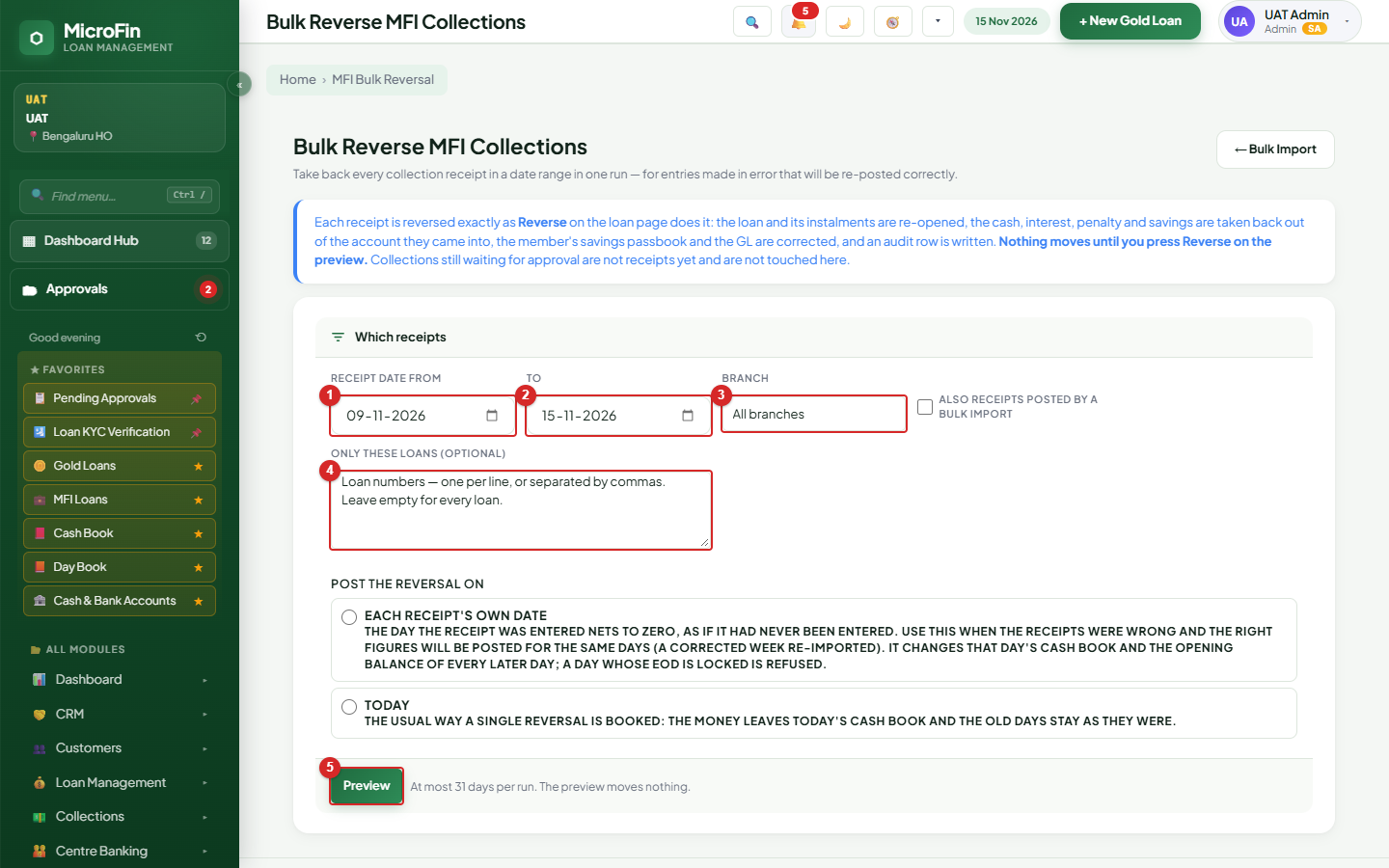
- From date
- To date
- Branch
- Loan numbers, one per line
- Preview before anything is reversed
E. Savings Catch-up (Admin / SuperAdmin)
Use this when compulsory savings was left out of imported receipts.
- Open the Bulk Import page and click + Savings Catch-up.
- Upload the Excel workbook (.xlsx) of loan, day and amount. Set App receipt may be dated (± 0 to 3 days, default 1) and Post the savings on (the day in the workbook, or Today).
- Click Preview. Rows are listed with What happened; rows that cannot be posted are held with a reason (for example loan not on your book, loan does not collect savings, a collection is waiting for approval, posting day is closed, no Cash / Bank account).
- Click Continue — post the next n (100 rows at a time). The count and total must equal the preview.
- Each posting is a savings-only receipt. Running the same file again is safe (it does not post twice). To redo one, reverse the receipt first.
F. Cash Handover
- An agent (staff app) or the cashier on the agent's behalf records the amount handed over under Record a handover on an agent's behalf → Record handover. It becomes Pending.
- A different user counts the cash, enters the Counted amount and clicks Accept, or gives a reason and clicks Reject.
- The Agent cash-in-hand table shows Gold Cash, MFI Cash, Handed Over, In Hand and Pending Handover per agent.
- A handover only records who held how much. It posts no cash entry and no accounting. A shortfall between declared and counted is recorded, not posted.
G. Cheque Bounce
- On the loan page use the cheque-bounce card to Record a bounce: bounce date (not after the business date), cheque amount, and optionally a charge override.
- A charge becomes Due (the product's charge for MFI, else the scheme's; a typed charge overrides it; over ₹1,00,000 is refused). Recording moves no money.
- Collect the charge: pick the Cash / Bank account ("Pick the Cash / Bank account the charge is received into."). This books a normal receipt voucher to the bounce-charge account and shows the voucher number.
- Or Waive it with a reason. A charge that is no longer Due cannot be collected or waived again.
- [CFG] A nightly job can levy the charge automatically on unpaid instalments if the company setting
mfi.autoBounceCharge.enabledis on (off by default; no Settings screen was found).
H. Recovery
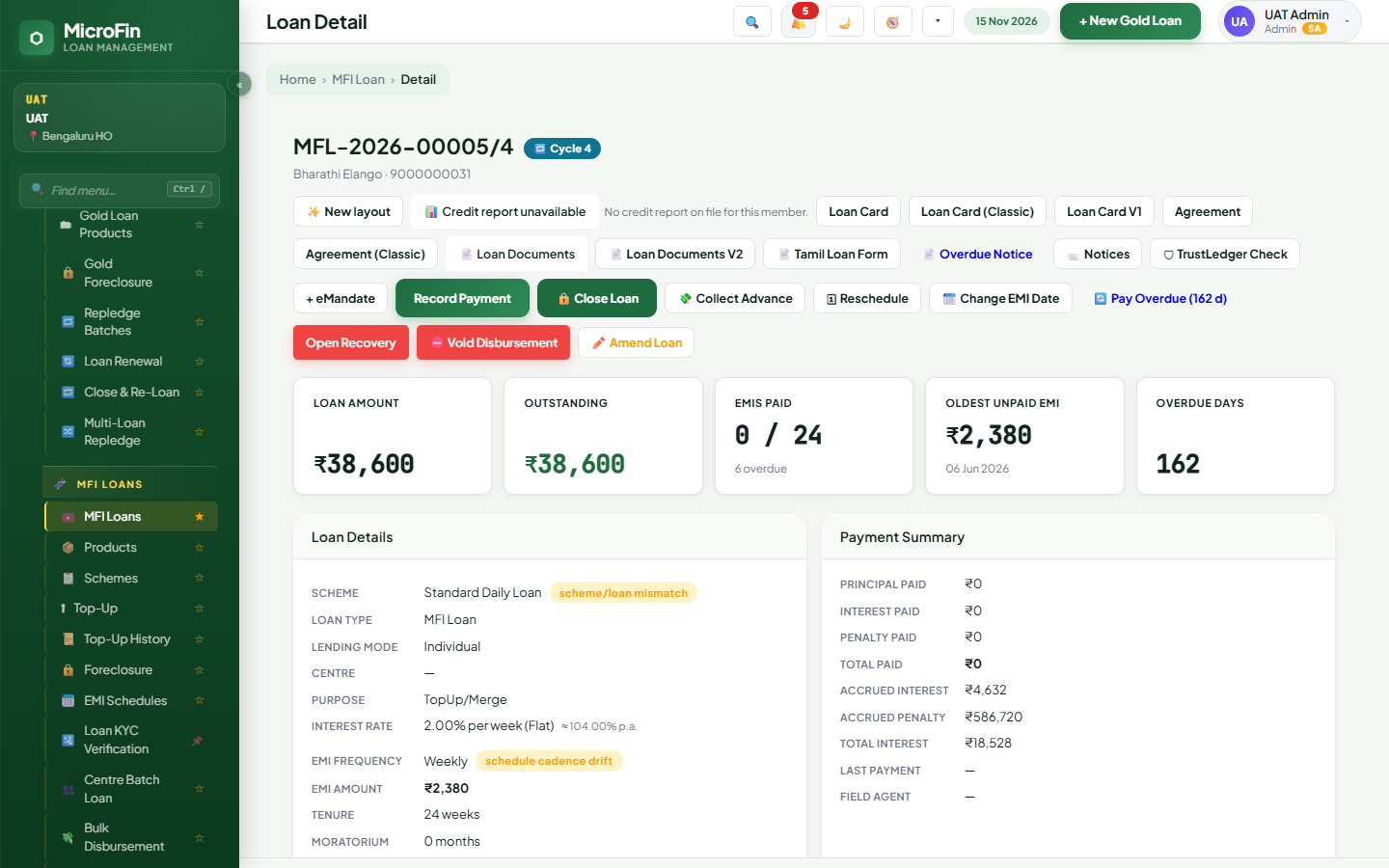
- On a live loan with at least one unpaid instalment past its due date, click Open Recovery Case. (On the newer loan page layout the button appears when overdue days exceed 30.) The loan becomes Default. One open case per loan.
- Open
Collections > Recovery > Recovery. Use Assign Agent, Update and Add Follow-Up (Type: Call, Visit, SMS, Email, LegalNotice; Outcome: NoAnswer, Contacted, PromisedToPay, Refused, Partial; amount collected, next follow-up). The case moves to InProgress. - Settle records the amount and date, marks the case Settled and the loan Closed. It posts no payment. Collect any money separately with Record Payment first.
- Recovery Commission:
Collections > Recovery > Recovery Commission→ Calculate for Month → Approve → Mark Selected as Paid. These only change status; they post no voucher or cash entry. Slabs are set by Admin atAdministration > Masters > Recovery Commission Slabs.
5. Field explanation
| Field | Purpose | Required? | Expected input | Validation | Example |
|---|---|---|---|---|---|
| Reason for reversal | Why the receipt is reversed | Yes | Text, 3+ characters | "Please enter a reason (min 3 characters)." | Wrong member keyed |
| Amend reason | Why the figures change | Yes | Text, 3+ characters | "A reason is required (min 3 characters) — this rewrites a posted cash figure." | Amount mistake |
| Receipt date from / to | Bulk reversal range | Yes | Dates | Max 31 days; not future; To not before From | 19-10-2026 to 24-10-2026 |
| Post the reversal on | Date of the contra entries | Yes | Receipt date / Today | — | Receipt date |
| Reason (bulk) | Written on every receipt | Yes | 10–100 characters | "Give a reason of at least 10 characters …" | Week keyed twice |
| Workbook | Savings Catch-up file | Yes | .xlsx | Loan, day, amount columns | — |
| Counted amount | Cash actually counted | On Accept | Number above 0 | "Counted amount must be greater than zero." | 12,500 |
| Reject reason (handover) | Why rejected | On Reject | Text | "A reason is required to reject a handover." | Short by 500 |
| Bounce date / Cheque amount | The returned cheque | Yes | Date, number (not negative) | Date not after the business date | — |
| Settle amount / date | Recovery settlement | Yes | Number, date | — | — |
6. Buttons and actions
| Button | Effect |
|---|---|
| Reverse / ↩ Revert Collection / Confirm Reversal | Reverses one receipt. |
| Amend | Opens the amend form (Admin). |
| Preview | Shows what bulk reversal / catch-up would do without posting. |
| Reverse n / Continue — reverse the next n | Posts the bulk reversal in chunks of 150. |
| Continue — post the next n | Posts catch-up rows, 100 at a time. |
| Accept / Reject | Decides a cash handover. |
| Collect / Waive | Decides a cheque-bounce charge. |
| Open Recovery Case / Add Follow-Up / Settle | Recovery workflow. |
7. Business rules and validations
8. Expected result
- Reverse: the receipt shows as reversed; the instalment goes back to Paid → PartialPaid or Pending; loan balances return; a closed loan re-opens; opposite cash entries appear dated today.
- Amend: the receipt number is unchanged; only the difference is posted.
- Bulk Reverse / Catch-up: a summary of receipts reversed or savings posted, with held rows and reasons.
- Cash Handover: a decided record; nothing in the cash book.
- Cheque Bounce: a Due charge, then a receipt voucher (Collect) or a waiver.
- Recovery: loan Default while a case is open; Closed after Settle.
9. Troubleshooting
| Message or problem | Likely cause | What to do |
|---|---|---|
| "Already reversed." | The receipt was reversed before | Check the payment history. |
| "Cannot reverse: EOD is locked …" | The receipt's day is locked | Ask for an End of Day unlock (chapter 81), then retry. |
| "4-eyes rule: a different user must reverse this payment …" | You collected it | Ask another user or an Admin. |
| "A later payment exists on this loan — only the most recent live receipt can be amended." | Another receipt came after | Reverse the later ones first, or reverse and re-key. |
| Reverse button missing on a receipt | Migrated receipt, or the closure screens own it | Use Pre-Close > Revert for a pre-closure receipt. |
| Bulk Reverse: "Give a reason of at least 10 characters …" | Reason too short | Type 10–100 characters. |
| Bulk Reverse refuses a receipt | EOD locked, settled a pre-closure, or a later closing receipt stays | Fix that case separately. |
| Catch-up row is "held" | See the reason in What happened | Fix the cause and re-run; the same file is safe. |
| "A pending handover already exists — the cashier must accept or reject it first." | One pending per agent | Decide the existing one. |
| "This bounce charge is already collected / waived." | Not Due any more | Nothing to do. |
| Recovery Settle did not bring any cash | Settle posts no money | Record the payment first. |
11. Related modules
- Chapter 31 — entering collections.
- Chapter 23 — closure and foreclosure (Pre-Close, Revert).
- Chapter 81 — End of Day lock and unlock.
- Chapter 80 — approvals.
- Chapter 40 — Cash Book and accounting.
வசூல் பதிவு
வசூலைத் திருத்துதல், திருப்பிக் கழித்தல்
1. அறிமுகம்
பதிவான வசூல் ஓர் உண்மையான ரசீது: அது தவணைகளையும், கடன் மீதியையும், பணப் புத்தகத்தையும் ஏற்கெனவே மாற்றிவிட்டது. அதை வெறுமனே திருத்தி அழித்துவிட முடியாது. MicroFin இல் சிறியது முதல் பெரியது வரை இந்தத் திருத்தக் கருவிகள் உள்ளன:
| தேவை | கருவி | யார் |
|---|---|---|
| ஒரு தவறான ரசீது | Reverse | கடன் மேலாண்மை உரிமை உள்ளவர் (4-eyes விதியுடன்) |
| கடைசி ரசீதில் தொகைகள் தவறு | Amend | Admin / SuperAdmin |
| ஒரு நாளின் ரசீதுகளைப் பரிசீலித்துத் திருப்ப | Collection Review | Admin / SuperAdmin |
| தவறாக உள்ளிட்ட ஒரு வாரம் | Bulk Reverse MFI Collections | Admin / SuperAdmin |
| இறக்குமதியில் விடுபட்ட சேமிப்பு | Savings Catch-up | Admin / SuperAdmin |
| முகவர் காசாளரிடம் ஒப்படைக்கும் பணம் | Cash Handover | காசாளர், முகவர் |
| திரும்பிய காசோலைக்கான கட்டணம் | Cheque Bounce | கடன் மேலாண்மை உரிமை |
| திருப்பிச் செலுத்தப்படாத கடன் | Recovery | கடன் மேலாண்மை உரிமை |
திருத்தங்கள் ரசீதை ஒருபோதும் அழிப்பதில்லை. திருப்பிக் கழித்தல் (Reverse) ரசீதைத் திருப்பப்பட்டதாகக் குறித்து, எதிர்ப் பணப் பதிவுகளைச் செய்யும்; Amend வேறுபாட்டுத் தொகையை மட்டுமே பதிவு செய்யும்.
2. வழிசெலுத்தல்
- Reverse: MFI கடன் பக்கத்தின் payment history (Reverse); grid இன் ↩ Revert Collection; Collection Review.
- Amend: MFI கடன் பக்கத்தின் payment history (Amend).
- Collection Review:
/CollectionReview(தலைப்பு Daily Collection Review). [TBC] மெனு வரி கண்டறியப்படவில்லை; இணைப்பை நிர்வாகியிடம் கேளுங்கள். - Bulk Reverse, Savings Catch-up: Bulk Import பக்கத் தலைப்பில் உள்ள ↩ Bulk Reverse MFI Collections, + Savings Catch-up பொத்தான்கள் (Admin / SuperAdmin மட்டும்).
- Cash Handover:
/CashHandover. [TBC] மெனு வரி இல்லை; முகவர்கள் Staff செயலியிலிருந்து தொடங்குவர். - Cheque Bounce: MFI கடன் பக்கத்தின் cheque-bounce அட்டை.
- Recovery:
Collections > Recovery > Recovery; கமிஷன்Collections > Recovery > Recovery Commission.
3. தொடங்கும் முன்
- ரசீது எண் (
MFR…), ரசீதின் தேதி தெரிந்திருக்க வேண்டும். - நாள் முடிவு: ரசீதின் நாள் End of Day இல் பூட்டப்பட்டிருந்தால், அந்த நாளைத் திறக்கும் வரை அதைத் திருப்பவோ திருத்தவோ முடியாது (அத்தியாயம் 81).
- 4-eyes: ரசீதை வசூலித்தவரே அதைத் திருப்பவோ திருத்தவோ முடியாது. Admin, SuperAdmin விதிவிலக்கு.
Settings > Accounting Policy > Payment Reversalஇல் "Allow the same user to reverse their own payment" அமைப்பின் மூலம் நிறுவனம் இந்த விதியை நீக்கலாம் (அந்த அமைப்பு இயல்பாக அணைந்திருக்கும்). - தெளிவான காரணத்தைத் தயாராக வைத்திருங்கள்; காரணங்கள் தணிக்கைப் பதிவில் சேமிக்கப்படும்.
4. படிப்படியான வழிமுறைகள்
A. ஒரு ரசீதைத் திருப்புதல்
- MFI கடன் பக்கத்தைத் திறந்து payment history இல் ரசீதைக் கண்டறியவும். (Regular Collection Entry grid இல், செலுத்தப்பட்ட வரியில் உள்ள ↩ Revert Collection ஐப் பயன்படுத்தவும்; Admin Collection Review ஐயும் பயன்படுத்தலாம்.)
- Reverse ஐ அழுத்தவும். grid இல் Reason for reversal (குறைந்தது 3 எழுத்து) உள்ளிட்டு Confirm Reversal அழுத்தவும்.
- முடிவுச் செய்தியைப் படிக்கவும். எதுவும் அழிக்கப்படாது: ரசீது திருப்பப்பட்டதாகக் குறிக்கப்படும்.
திருப்பிக் கழித்தல் செய்வது:
- ஒவ்வொரு ரசீதும் ஒதுக்கிய அதே தொகைகளின்படி, புதியது முதலில் என்ற வரிசையில், அசல், வட்டி, அபராதம், சேமிப்பு ஆகியவற்றைக் கடனிலிருந்தும் தவணைகளிலிருந்தும் திரும்ப எடுக்கும். [TBC] தவணை வாரியான இந்தத் துல்லியமான திருப்பம் ஒரு தரவுத்தள ஸ்கிரிப்டை (411) சார்ந்தது; அது எந்த உண்மையான தரவுத்தளத்திலும் இன்னும் இயக்கப்படவில்லை என்று தணிக்கையில் கண்டறியப்பட்டது; அது இயக்கப்படாத இடத்தில் திருப்பல் எப்படி நடக்கும் என நிர்வாகியிடம் கேளுங்கள்.
- அந்த ரசீது கடனை மூடியிருந்தால் கடனை மீண்டும் திறக்கும்.
- முதலில் பயன்படுத்திய அதே பணம் / வங்கிக் கணக்கில், இன்றைய தேதியில் (ரசீது தேதியில் அல்ல) எதிர்ப் பணப் பதிவுகளைச் செய்யும்.
- சேமிப்பு இருந்தால் அதன் பாஸ்புக் வரவைத் திருப்பி, அதற்கான பேரேட்டுத் திருப்பலையும் பதிவு செய்யும்.
- தணிக்கைப் பதிவை எழுதும். ஒப்புதல் படி எதுவும் இல்லை.
B. ரசீதைத் திருத்துதல் (Admin / SuperAdmin)
- payment history இலிருந்து ரசீதின் Amend பக்கத்தைத் திறக்கவும்.
- திருத்திய அசல், வட்டி, அபராதம், சேமிப்பை (எதுவும் எதிர்மறையாக இருக்கக்கூடாது; மொத்தம் 0 க்கு மேல் இருக்க வேண்டும்) உள்ளிடவும்; விரும்பினால் முறை, குறிப்பு எண், remarks சேர்க்கலாம்; reason (குறைந்தது 3 எழுத்து) கட்டாயம்.
- சேமிக்கவும். ரசீது எண் மாறாது; பணப் புத்தகத்திலும் பேரேட்டிலும் வேறுபாட்டுத் தொகை மட்டுமே பதிவாகி "Receipt amended. The cash ledger and GL were adjusted by the difference." எனக் காட்டும்.
C. ஒரு நாளின் வசூலைப் பரிசீலித்துத் திருப்புதல் (Admin / SuperAdmin)
- Daily Collection Review ஐத் திறக்கவும். Collection date, Module (Gold + MFI, Gold only, MFI only), Branch, Payment mode, Collected by, Collected + reversed / Collected only, Centre மூலம் வடிகட்டவும்.
- ஒவ்வொரு வரியும் Module, Branch, Date, Receipt, Member, Loan No, Type, Principal, Interest, Penalty, Savings, Total, Mode, Collected By, Time, Status, Action ஐக் காட்டும்.
- வரியில் உள்ள திருப்பும் செயலை அழுத்தி, காரணத்தை (குறைந்தது 3 எழுத்து) உள்ளிடவும். மேலே உள்ள திருப்பல் விதிகள் அனைத்தும் இங்கும் பொருந்தும்.
- பொருந்தும் எல்லா வரிகளையும் பக்கம் பிரிக்காமல் ஒரே பக்கத்தில் காட்டும்; எனவே மிக நீண்ட தேதி வரம்பு கொடுத்தால், ஓர் அறிவிப்புடன் வரிகளின் எண்ணிக்கை கட்டுப்படுத்தப்படும்.
D. தவறாக உள்ளிட்ட காலத்தை மொத்தமாகத் திருப்புதல் (Admin / SuperAdmin)
ரசீதுகளின் ஒரு முழுத் தொடரே தவறாக இருந்தால் (எ.கா. தவறுதலாக உள்ளிட்ட ஒரு வாரம்) இதைப் பயன்படுத்தி, பிறகு சரியான தொகைகளை மீண்டும் பதிவு செய்யுங்கள்.
- Bulk Import பக்கத்தில் ↩ Bulk Reverse MFI Collections ஐ அழுத்தவும்.
- Which receipts கீழ் Receipt date from, to அமைக்கவும் (அதிகபட்சம் 31 நாட்கள்; எதிர்காலத் தேதி கூடாது); விரும்பினால் Branch, Only these loans (optional) (ஒட்டிய கடன் எண்கள்) அமைக்கலாம். மொத்த இறக்குமதி (bulk import) மூலம் பதிவான ரசீதுகள், அவற்றைச் சேர்க்கும் தேர்வை டிக் செய்யாவிட்டால், தொடப்படாது.
- Post the reversal on இல் தேர்வு செய்யவும்: Receipt date (ஒவ்வொரு எதிர்ப் பதிவும் அந்த ரசீதின் சொந்த நாளில்) அல்லது Today.
- Preview அழுத்தி எண்ணிக்கையையும் மொத்தத்தையும் சரிபார்க்கவும்.
- Reason — written on every receipt reversed (10 முதல் 100 எழுத்து) உள்ளிடவும்.
- Reverse n ஐ அழுத்தவும். புதியது முதலில் என்ற வரிசையில், ஒரு முறைக்கு 150 ரசீதுகள் வீதம் நடக்கும்; முடியும் வரை Continue — reverse the next n அழுத்தவும்.
- திருப்பிய ஒவ்வொரு ரசீதின் காரணத்திலும்
BR-yyMMdd-HHmmssஎன்ற இயக்கக் குறிப்பு எழுதப்படும்.
- தொடக்கத் தேதி
- முடிவுத் தேதி
- கிளை
- கடன் எண்கள், ஒவ்வொரு வரியிலும் ஒன்று
- எதுவும் திருப்பப்படுவதற்கு முன் முன்னோட்டம்
E. Savings Catch-up (Admin / SuperAdmin)
இறக்குமதி செய்த ரசீதுகளில் கட்டாயச் சேமிப்பு விடுபட்டிருந்தால் இதைப் பயன்படுத்தவும்.
- Bulk Import பக்கத்தில் + Savings Catch-up ஐ அழுத்தவும்.
- கடன், நாள், தொகை ஆகியவை கொண்ட Excel (.xlsx) கோப்பைப் பதிவேற்றவும். App receipt may be dated (± 0 முதல் 3 நாள், இயல்பு 1), Post the savings on (கோப்பிலுள்ள நாள் அல்லது Today) அமைக்கவும்.
- Preview அழுத்தவும். வரிகள் What happened உடன் தெரியும்; பதிவு செய்ய முடியாதவை காரணத்துடன் நிறுத்தி வைக்கப்படும் (எ.கா. கடன் உங்கள் புத்தகத்தில் இல்லை, கடன் சேமிப்பு வசூலிப்பதில்லை, வசூல் ஒப்புதலுக்குக் காத்திருக்கிறது, பதிவு நாள் மூடப்பட்டது, Cash / Bank கணக்கு இல்லை).
- Continue — post the next n அழுத்தவும் (ஒரு முறைக்கு 100 வரிகள்). எண்ணிக்கையும் மொத்தமும் முன்னோட்டத்தில் இருந்ததற்குச் சமமாக இருக்க வேண்டும்.
- ஒவ்வொரு பதிவும் சேமிப்பு மட்டும் உள்ள ரசீது. அதே கோப்பை மீண்டும் இயக்கினாலும் பிரச்சினை இல்லை (இரு முறை பதிவாகாது). ஒரு பதிவை மீண்டும் செய்ய வேண்டுமெனில் முதலில் அந்த ரசீதைத் திருப்பவும்.
F. Cash Handover
- முகவர் (Staff செயலி) அல்லது அவர் சார்பில் காசாளர் Record a handover on an agent's behalf → Record handover மூலம் ஒப்படைத்த தொகையைப் பதிவு செய்வார். அது Pending ஆகும்.
- வேறொரு பயனர் பணத்தை எண்ணி Counted தொகையை உள்ளிட்டு Accept அழுத்துவார்; அல்லது காரணம் தந்து Reject அழுத்துவார்.
- Agent cash-in-hand அட்டவணை ஒவ்வொரு முகவருக்கும் Gold Cash, MFI Cash, Handed Over, In Hand, Pending Handover ஐக் காட்டும்.
- ஒப்படைப்பு, யாரிடம் எவ்வளவு பணம் இருந்தது என்பதை மட்டுமே பதிவு செய்யும். அது பணப் பதிவோ கணக்குப் பதிவோ எதையும் செய்யாது. அறிவித்த தொகைக்கும் எண்ணிய தொகைக்கும் உள்ள பற்றாக்குறை குறித்து வைக்கப்படும்; ஆனால் கணக்கில் பதிவாகாது.
G. Cheque Bounce
- கடன் பக்கத்தின் cheque-bounce அட்டையில் ஒரு bounce ஐ Record செய்யவும்: bounce தேதி (வணிகத் தேதிக்குப் பின் கூடாது), காசோலைத் தொகை; விரும்பினால் கட்டணத்தை மாற்றி உள்ளிடலாம்.
- ஒரு கட்டணம் Due ஆகும் (MFI க்கு product இன் கட்டணம், இல்லையெனில் scheme இன் கட்டணம்; நீங்கள் உள்ளிட்ட கட்டணம் இருந்தால் அதுவே பொருந்தும்; ₹1,00,000 க்கு மேல் மறுக்கப்படும்). பதிவு செய்வதால் பணம் எதுவும் நகராது.
- கட்டணத்தை Collect செய்யவும்: Cash / Bank கணக்கைத் தேர்ந்தெடுக்கவும் ("Pick the Cash / Bank account the charge is received into."). இது bounce-charge கணக்கிற்கு வழக்கமான ரசீது வவுச்சரைப் பதிவு செய்து வவுச்சர் எண்ணைக் காட்டும்.
- அல்லது காரணத்துடன் Waive செய்யவும் (தள்ளுபடி). Due நிலையில் இல்லாத கட்டணத்தை மீண்டும் collect / waive செய்ய முடியாது.
- [CFG] நிறுவன அமைப்பு
mfi.autoBounceCharge.enabledஇயக்கத்தில் இருந்தால் (இயல்பாக அணைந்தது; அமைப்புத் திரை கண்டறியப்படவில்லை) இரவுப் பணி செலுத்தப்படாத தவணைகளுக்குக் கட்டணத்தைத் தானாக விதிக்கும்.
H. Recovery
- தேதி கடந்தும் செலுத்தப்படாத தவணை குறைந்தது ஒன்று உள்ள, நடப்பில் உள்ள கடனில் Open Recovery Case ஐ அழுத்தவும். (புதிய கடன் பக்க அமைப்பில் நிலுவை நாட்கள் 30 ஐ மீறும்போது பொத்தான் தோன்றும்.) கடன் Default ஆகும். ஒரு கடனுக்கு ஒரு திறந்த வழக்கு மட்டுமே.
Collections > Recovery > Recoveryஐத் திறக்கவும். Assign Agent, Update, Add Follow-Up (Type: Call, Visit, SMS, Email, LegalNotice; Outcome: NoAnswer, Contacted, PromisedToPay, Refused, Partial; வசூலித்த தொகை, அடுத்த follow-up). வழக்கு InProgress ஆகும்.- Settle தொகையையும் தேதியையும் பதிவு செய்து, வழக்கை Settled ஆகவும் கடனை Closed ஆகவும் மாற்றும். அது பணம் செலுத்தியதாக எதையும் பதிவு செய்யாது. பெற்ற பணத்தை முதலில் Record Payment மூலம் தனியாகப் பதிவு செய்யுங்கள்.
- Recovery Commission:
Collections > Recovery > Recovery Commission→ Calculate for Month → Approve → Mark Selected as Paid. இவை நிலையை மட்டுமே மாற்றும்; வவுச்சர், பணப் பதிவு இல்லை. Slab களை AdminAdministration > Masters > Recovery Commission Slabsஇல் அமைப்பார்.
5. புல விளக்கம்
| புலம் | நோக்கம் | கட்டாயமா? | உள்ளீடு | சரிபார்ப்பு | எடுத்துக்காட்டு |
|---|---|---|---|---|---|
| Reason for reversal | திருப்புவதற்கான காரணம் | ஆம் | உரை, 3+ எழுத்து | "Please enter a reason (min 3 characters)." | Wrong member keyed |
| Amend reason | திருத்தத்தின் காரணம் | ஆம் | உரை, 3+ எழுத்து | "A reason is required (min 3 characters) — this rewrites a posted cash figure." | Amount mistake |
| Receipt date from / to | மொத்தத் திருப்பல் வரம்பு | ஆம் | தேதிகள் | அதிகபட்சம் 31 நாள்; எதிர்காலம் கூடாது; To, From க்கு முன் கூடாது | 19-10-2026 to 24-10-2026 |
| Post the reversal on | எதிர்ப் பதிவுகளின் தேதி | ஆம் | Receipt date / Today | — | Receipt date |
| Reason (bulk) | ஒவ்வொரு ரசீதிலும் எழுதப்படும் | ஆம் | 10–100 எழுத்து | "Give a reason of at least 10 characters …" | Week keyed twice |
| Workbook | Savings Catch-up கோப்பு | ஆம் | .xlsx | கடன், நாள், தொகை | — |
| Counted amount | உண்மையில் எண்ணிய பணம் | Accept இல் | 0 க்கு மேல் எண் | "Counted amount must be greater than zero." | 12,500 |
| Reject reason (handover) | நிராகரிப்புக் காரணம் | Reject இல் | உரை | "A reason is required to reject a handover." | Short by 500 |
| Bounce date / Cheque amount | திரும்பிய காசோலை | ஆம் | தேதி, எண் (எதிர்மறை இல்லை) | தேதி வணிகத் தேதியைத் தாண்டக்கூடாது | — |
| Settle amount / date | Recovery தீர்வு | ஆம் | எண், தேதி | — | — |
6. பொத்தான்களும் செயல்களும்
| பொத்தான் | விளைவு |
|---|---|
| Reverse / ↩ Revert Collection / Confirm Reversal | ஒரு ரசீதைத் திருப்பும். |
| Amend | திருத்தப் படிவத்தைத் திறக்கும் (Admin). |
| Preview | பதிவு செய்யாமல் மொத்தத் திருப்பல் / catch-up என்ன செய்யும் எனக் காட்டும். |
| Reverse n / Continue — reverse the next n | 150 வீதம் மொத்தத் திருப்பலைப் பதிவு செய்யும். |
| Continue — post the next n | catch-up வரிகளை 100 வீதம் பதிவு செய்யும். |
| Accept / Reject | பணம் ஒப்படைப்பை முடிவு செய்யும். |
| Collect / Waive | காசோலை bounce கட்டணத்தை முடிவு செய்யும். |
| Open Recovery Case / Add Follow-Up / Settle | Recovery செயல்முறை. |
7. வணிக விதிகளும் சரிபார்ப்புகளும்
8. எதிர்பார்க்கும் முடிவு
- Reverse: ரசீது திருப்பப்பட்டதாகத் தெரியும்; தவணை Paid இலிருந்து PartialPaid அல்லது Pending க்குத் திரும்பும்; கடன் மீதிகள் பழைய நிலைக்குத் திரும்பும்; மூடப்பட்ட கடன் மீண்டும் திறக்கப்படும்; இன்றைய தேதியில் எதிர்ப் பணப் பதிவுகள் வரும்.
- Amend: ரசீது எண் மாறாது; வேறுபாடு மட்டும் பதிவாகும்.
- Bulk Reverse / Catch-up: திருப்பிய ரசீதுகள் அல்லது பதிந்த சேமிப்பின் சுருக்கம், நிறுத்திய வரிகளும் காரணங்களும்.
- Cash Handover: முடிவு செய்த பதிவு; பணப் புத்தகத்தில் மாற்றம் இல்லை.
- Cheque Bounce: Due கட்டணம்; பின்னர் ரசீது வவுச்சர் (Collect) அல்லது தள்ளுபடி.
- Recovery: வழக்கு திறந்திருக்கும்போது கடன் Default; Settle க்குப் பின் Closed.
9. சிக்கல் தீர்வு
| செய்தி / சிக்கல் | காரணம் | செய்ய வேண்டியது |
|---|---|---|
| "Already reversed." | ஏற்கெனவே திருப்பப்பட்டது | payment history ஐப் பார்க்கவும். |
| "Cannot reverse: EOD is locked …" | ரசீதின் நாள் பூட்டப்பட்டுள்ளது | End of Day திறப்பைக் கோரி (அத்தியாயம் 81) மீண்டும் முயலவும். |
| "4-eyes rule: a different user must reverse this payment …" | நீங்களே வசூலித்தவர் | வேறு பயனரிடம் அல்லது Admin இடம் கேளுங்கள். |
| "A later payment exists on this loan — only the most recent live receipt can be amended." | பின்னால் வேறு ரசீது உள்ளது | பிந்தையவற்றை முதலில் திருப்பவும்; அல்லது திருப்பி மீண்டும் உள்ளிடவும். |
| ரசீதில் Reverse பொத்தான் இல்லை | Migrated ரசீது, அல்லது முடிப்புத் திரைகளுக்கு உரியது | முன்கூட்டிய முடிப்பு ரசீதுக்கு Pre-Close > Revert. |
| Bulk Reverse: "Give a reason of at least 10 characters …" | காரணம் மிகச் சுருக்கம் | 10–100 எழுத்துகளில் உள்ளிடவும். |
| Bulk Reverse ஒரு ரசீதை மறுக்கிறது | EOD பூட்டப்பட்டுள்ளது, ரசீது ஒரு முன்கூட்டிய முடிப்பைத் தீர்த்தது, அல்லது அதற்குப் பிந்தைய முடிப்பு ரசீது உள்ளது | அந்த ரசீதைத் தனியாகச் சரிசெய்யவும். |
| Catch-up வரி "held" | What happened இல் காரணம் உள்ளது | காரணத்தைச் சரிசெய்து மீண்டும் இயக்கவும்; அதே கோப்பை மீண்டும் இயக்கலாம். |
| "A pending handover already exists — the cashier must accept or reject it first." | ஒரு முகவருக்கு நிலுவையில் ஒரு ஒப்படைப்பு மட்டுமே | ஏற்கெனவே உள்ளதை ஏற்கவும் அல்லது நிராகரிக்கவும். |
| "This bounce charge is already collected / waived." | கட்டணம் இனி Due நிலையில் இல்லை | எதுவும் செய்ய வேண்டியதில்லை. |
| Recovery Settle செய்தும் பணம் கணக்கில் வரவில்லை | Settle பணத்தைப் பதிவு செய்யாது | முதலில் பணம் பெற்றதை (Record Payment) பதிவு செய்யவும். |
10. தமிழ் விளக்கம்
ஒரு தவறான ரசீதுக்கு Reverse; கடைசி ரசீதின் தொகைக்கு Amend (Admin); பல ரசீதுகளுக்கு Bulk Reverse (Admin). எதுவும் ரசீதை அழிக்காது. Recovery Settle, Recovery Commission, Cash Handover ஆகியவை பணப் புத்தகத்தில் எதையும் பதிவு செய்யாது என்பதை நினைவில் கொள்ளுங்கள்.
11. தொடர்புடைய தொகுதிகள்
- அத்தியாயம் 31 — வசூலைப் பதிவு செய்தல்.
- அத்தியாயம் 23 — முடிப்பு, முன்கூட்டிய முடிப்பு (Pre-Close, Revert).
- அத்தியாயம் 81 — நாள் முடிவுப் பூட்டு, திறப்பு.
- அத்தியாயம் 80 — ஒப்புதல்கள்.
- அத்தியாயம் 40 — பணப் புத்தகம், கணக்கியல்.