Gold Loans
Gold custody, repledge, notices and auction
1. Overview
This chapter covers what happens to the gold itself and to loans that are not repaid:
- Gold Inventory: each pledged ornament has a packet. You release a packet when the customer takes the gold back, and an Admin can correct a wrong release.
- Repledge Batches: the company pledges customers' gold onward to a bank to borrow money. Own-Jewel Repledge records the owner's personal gold pledged to a bank.
- Notices and the Auction Pledge register: reminders and legal notices to the borrower, the legal charge, and the register of Notice 1, Notice 2 and Auction Pledge.
- Gold Auction lots: selling the gold of overdue loans and settling the result.
To Be Confirmed The Auction Pledge register, the repledge screens and some custody features depend on database updates whose state on your server has not been confirmed. If a menu or button here is missing, ask your administrator.
2. Navigation
- Packets:
Operations > Gold > Gold Inventory. - Repledge batches:
Loan Management > Gold Loans > Repledge Batches(needs the Repledge feature switched on for your company). - Own-jewel repledge:
Finance & Accounts > Capital & Funding > Own-Jewel Repledge. - Notices:
Collections > Recovery > Notices(Notice Generator); templates atCollections > Notice Templates; activity atCollections > Notice Dashboard. - Auction Pledge register: on the loan page, button Auction Pledge.
- Auction lots:
Operations > Gold > Auction.
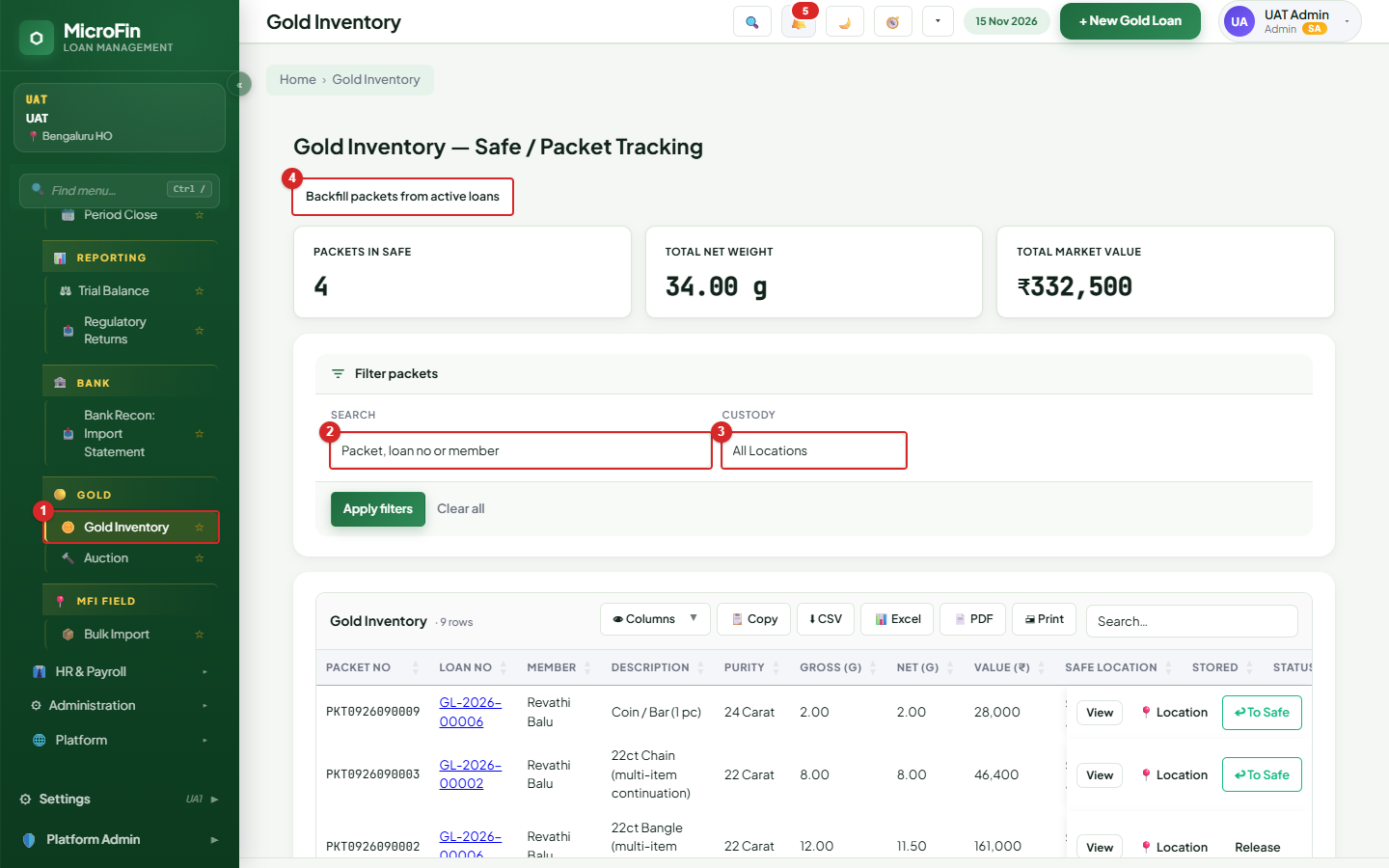
- Operations > Gold > Gold Inventory
- Search by packet, loan number or member
- Packet location filter
- Backfill packets from active loans
3. Before you start
- Permission:
CanManageLoansfor Gold Inventory, Auction lots and the Auction Pledge register.CanRepledgeto create, activate, close, amend or remove loans in a repledge batch. Notices needCanManageNotices. Return to Safe and cancelling someone else's lot are for Admin / SuperAdmin; waiving the legal charge needs a manager or Admin. - The packet is created automatically when a loan is paid out (one per ornament).
- Dates must not fall on an end-of-day (EOD) locked day.
- A branch user sees only their branch; an HO user can filter any branch.
4. Step-by-step instructions
A. Release a packet when the customer takes the gold back
- Confirm the loan is closed and the customer has collected the receipt.
- Open
Operations > Gold > Gold Inventory. Search by packet, loan number or member. - On the packet's row click Release, add optional remarks and confirm in the Confirm Release window.
- Repeat for every packet of the loan.
Recommendation (not enforced) Closing a loan does not release its packets. They stay “In Our Locker” until someone releases them, and the software does not check that the loan is closed before you release. Release only gold that is really being handed over, and check the loan status yourself.
B. Correct a packet released by mistake
- An Admin opens the packet and uses Return to Safe with a reason of at least 10 characters.
- If the gold is held by an open repledge batch it cannot be returned by hand: “…this gold is at a bank. Close the batch, or remove the loan from it.”
Always enforced The custody filter shows At Bank (Released) for every released packet, including gold that went back to the customer. Read it with the loan status in mind.
C. Create and run a Repledge Batch
- Open
Loan Management > Gold Loans > Repledge Batchesand click + New Repledge Batch. - Step 1 - Select Gold Items: tick the packets to send. Only packets that are in the safe, belong to Active or Overdue loans and are not already in an open batch are offered.
- Step 2 - Batch Details: choose or type the Bank Name (auto-fills from Bank Master), Repledge Date, Maturity Date, Bank Interest Rate (% p.a.), Repledge Amount (Rs), and optional fees.
- Either save the batch as Initiated (“Repledge Batch {no} created. Awaiting bank activation.”), or fill the Bank Funding block (amount received, date, mode, reference, account) to create and activate it in one step.
- When the bank pays, open the batch and use Activate with the Disbursed Amount and Date. The bank money is recorded as money in, any fee the bank deducted is recorded as money out, the packets leave the safe and the loans are marked repledged.
- If the disbursed amount was wrong, use Correct Disbursed Amount with a Reason; a different user must do it.
- To take one loan out of a batch use Remove beside the loan, with a reason. You cannot remove the only loan, and a funded batch needs an Admin.
- When the bank is repaid use Close, enter Actual Closure Amount and Date and the account. The principal repaid (up to the amount received) and the rest as bank interest are recorded, the packets return to the safe and the loans are unmarked.
- An Initiated batch can be Cancelled with a reason (not by its creator unless Admin; not on a locked EOD day).
- Report gives the Repledge Batch Report with an Excel export.
Recommendation (not enforced) Check the result after every Activate, Close or Cancel. The screen can print “Batch activated”, “Batch closed” or “Batch cancelled” even when the action was refused (for example by a branch, EOD or two-person check). Open the batch afterwards and confirm its status: Initiated, Active, Closed or Cancelled.
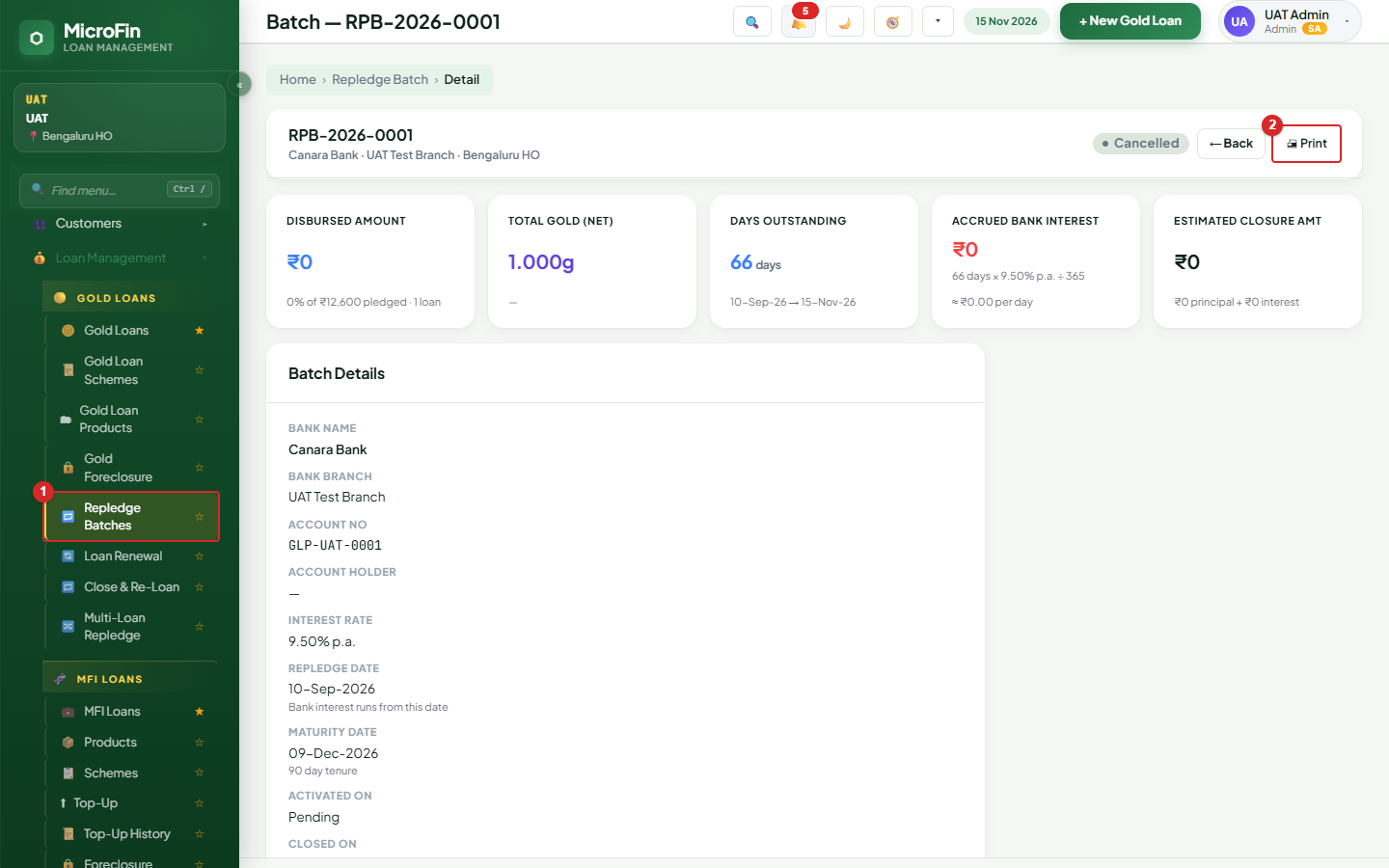
- Loan Management > Gold Loans > Repledge Batches
- Print the batch
D. Own-Jewel Repledge
- Open
Finance & Accounts > Capital & Funding > Own-Jewel Repledge. - Enter Bank Name, Date, Movement Kind (Funding, Repayment or Interest Paid), Amount (Rs), optional gold grams, pledge reference and payment mode, then click Record.
- Each entry is one cash movement. No member or loan is involved.
E. Send notices
- Open
Collections > Recovery > Notices(Notice Generator; gold loans). - Choose Notice Type (Overdue Notice, Due Reminder, Auction Notice, Payment Reminder, Interest Pending (follow-up), No Dues Certificate (NOC), Custom Notice) and Filter By (Due in 7 Days, Due Today, Overdue > 30 / 60 / 90 Days, Custom Date Range). A Ticket Number overrides the other filters.
- Choose the Notice Template (edit it with Edit), then click Preview Notice.
- Tick the loans under Matching Loans (All / None) and use Print, PDF Export, WhatsApp, SMS or Email. Confirm the send.
- Rows without a mobile number or e-mail are logged as skipped. The loan page also has Notice and Notices buttons for one loan.
Always enforced The list shows at most 200 loans. A branch user sees only their branch. SMS sends the template's SMS text without a registered SMS template ID. [TBC] If your SMS provider needs a registered template, check with your administrator before relying on SMS notices.
F. Auction Pledge register (Notice 1, Notice 2, Auction Pledge)
- Open the overdue loan and click Auction Pledge.
- In Stage choose Notice 1, enter the date and remarks, and click Save stage. Then Notice 2, then Auction Pledge; a later stage stays disabled until the earlier one exists.
- The first time a loan reaches Auction Pledge, a Legal Charges amount (₹2,500 by default) is added as an amount due. No money moves at that moment.
- To collect it, open the legal-charge card, enter the Collection date, Payment mode (Cash, UPI, BankTransfer, NEFT, IMPS, Cheque) and Cash / Bank account, and save. A receipt voucher is posted.
- A manager or Admin can Waive it with a reason of at least 5 characters.
Always enforced The register only records the steps. It does not change the loan's status and does not post loan money.
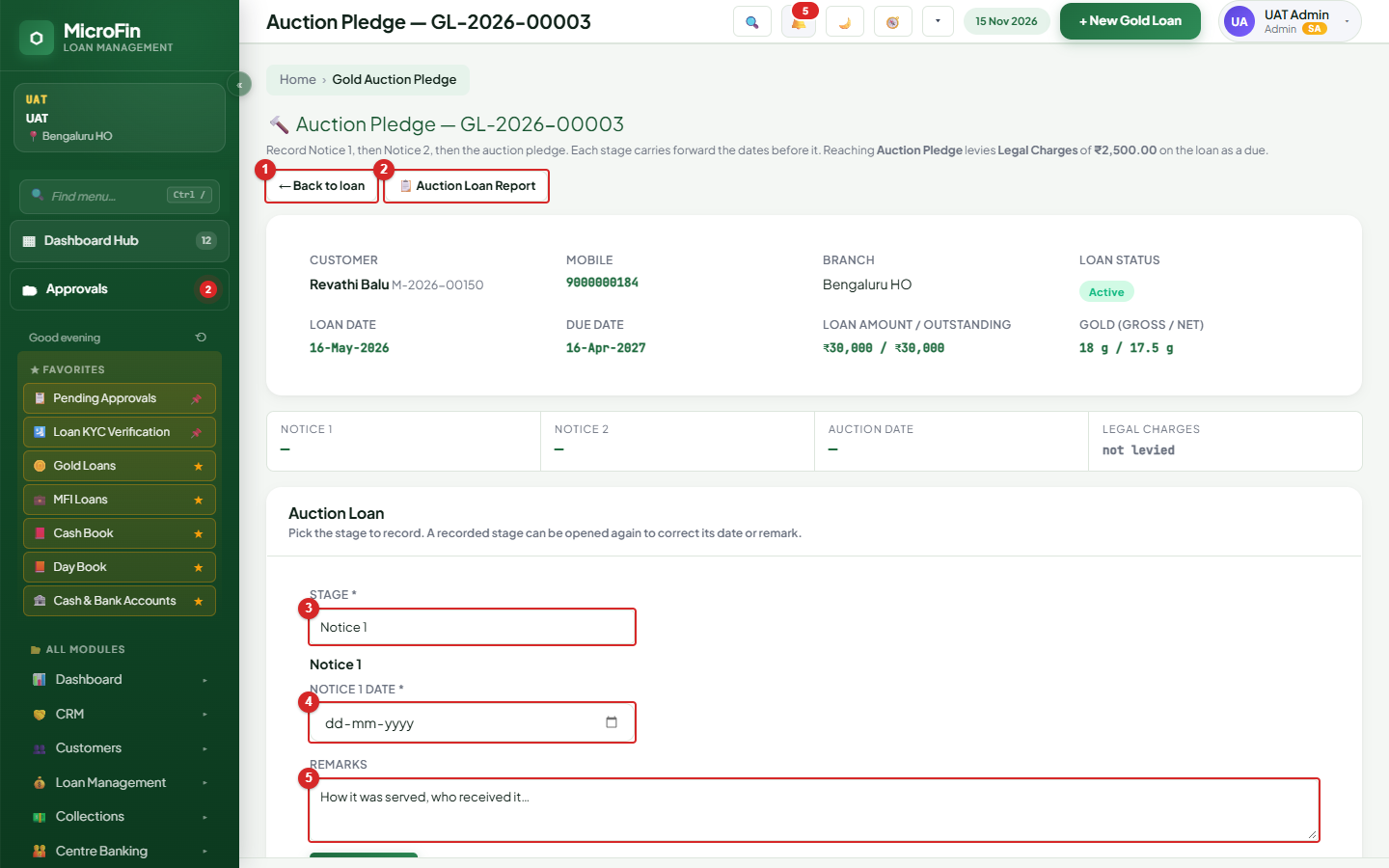
- Back to the loan
- Auction Loan Report
- Stage: Notice 1, Notice 2 or Auction Pledge
- Notice date
- Remarks: how it was served and who received it
G. Schedule and settle an Auction lot
- Open
Operations > Gold > Auctionand click + Schedule Auction. - Enter Auction House / Venue and Auction Date, then tick packets under Select Eligible Packets (Overdue Loans). Only packets in the safe whose loan is overdue, in your branch, appear. The packets become Auctioned.
- After the sale, open the lot and click Record Result. Enter Final Bid Amount (Rs), Received As (Cash, Bank Transfer, Cheque, UPI), Deposited To account, bidder details and the realised value per packet. The packet values must add up to the final bid: “Realized values must add up to the final bid”.
- Click Save Auction Result. Each loan's share is applied to interest, penalty and principal in that order; anything left is surplus. A loan fully cleared becomes Closed; otherwise the shortfall stays on the open loan.
- To cancel a lot before settlement, give a reason; a different user from the creator must do it (Admin excepted).
5. Field explanation
| Field | Purpose | Required? | Expected input | Validation | Example |
|---|---|---|---|---|---|
| Custody filter | Packet location | Optional | In Our Locker / At Bank (Released) / Auctioned | — | In Our Locker |
| Release remarks | Note on hand-over | Optional | Text | — | Collected by customer |
| Return to Safe reason | Why a release is undone | Yes | Text | 10+ characters; Admin only | Released in error |
| Bank Name | Bank holding the gold | Yes | Bank Master or text | — | Sample Bank |
| Repledge Date / Maturity Date | Batch period | Yes | Dates | Maturity after repledge date | — |
| Bank Interest Rate (% p.a.) | Bank's rate | Yes | Percent | Up to 999.99 | 9.5 |
| Repledge Amount (Rs) | Amount sought | Yes | Amount | Fits the field | 500,000 |
| Amount Received / Date / Mode / Reference / Account | Bank funding | When bank has paid | As labelled | All required together | — |
| Actual Closure Amount | Amount repaid to bank | On Close | Amount | Principal up to amount received; rest is interest | — |
| Movement Kind (own jewel) | Funding, Repayment, Interest Paid | Yes | List | Amount above zero | Funding |
| Notice Type / Filter By / Ticket Number | Notice selection | Yes (type, filter) | Lists, text | Ticket overrides filters | Overdue Notice |
| Stage / stage date | Auction Pledge steps | Yes | Notice 1, Notice 2, Auction Pledge; date | In order; notice dates not after today; auction date up to one year ahead | — |
| Legal charge: Collection date, Payment mode, Account | Collect the charge | Yes | As labelled | Date not before the levy day or after today; account of the loan's branch matching the mode | — |
| Auction House / Venue, Auction Date | Lot details | Yes | Text, date | At least one packet | — |
| Final Bid Amount (Rs) | Sale price | Yes | Amount above 0 | Equals the total of packet values | — |
| Realized value per packet | Split of the bid | Yes | Amounts | Must total the bid | — |
6. Buttons and actions
| Button | What it does |
|---|---|
| Release | Marks a packet as out of the safe. |
| Return to Safe | Admin undoes a wrong release. |
| + New Repledge Batch | Starts a batch. |
| Activate / Close / Cancel | Moves a batch through its states. |
| Correct Disbursed Amount | Fixes the amount the bank paid (second person needed). |
| Remove | Takes one loan out of a batch. |
| Report | Repledge Batch Report and Excel. |
| Record (Own-Jewel) | Posts one funding, repayment or interest entry. |
| Preview Notice / Print / PDF Export / WhatsApp / SMS / Email | Prepare and send notices. |
| Save stage | Records Notice 1, Notice 2 or Auction Pledge. |
| + Schedule Auction / Record Result / Save Auction Result | Auction lot steps. |
7. Business rules and validations
Always enforced Releasing a packet has no check on the loan's status or on who holds the gold. Any user with
CanManageLoans can do it.Always enforced A repledge batch moves through Initiated → Active → Closed, or Initiated → Cancelled. Activate works only on Initiated; Close only on Active. Maturity must be after the repledge date: “Maturity date (..) must be after the repledge date”.
Always enforced Only packets in the safe from Active or Overdue loans, not already in an open batch, can be repledged: “No eligible gold items were selected for repledge”.
Permission Create, Activate, Close, Amend and Remove need
CanRepledge. A non-HO user acts only on their own branch's batches. The Repledge feature must be switched on for the company.Always enforced Closing a loan that is in a batch, or removing the loan, returns its packet to the safe automatically; closing the batch or cancelling it does the same.
To Be Confirmed A second, older screen Multi-Loan Repledge is still in the menu. It records a journal entry only: no cash-book row and no packet movement, and closing it does not restore the loan's status. Use Repledge Batches for new work and ask your administrator before using the older screen.
Always enforced A repledged loan's core terms are locked in Amend Loan, and its ornaments cannot be added or removed while the gold is at the bank.
Always enforced Notice 1, Notice 2 and Auction Pledge must be recorded in order, once per loan; only a live loan can be edited. The legal charge is levied once, when Auction Pledge is first saved. [TBC] The ₹2,500 amount is a company setting that has no screen to change it; ask your administrator if your company uses another amount. The legal charge is not included in the closing quote, so tell the customer about it separately.
Recommendation (not enforced) The Auction Pledge register and auction lots are not linked: the software does not require Notice 1 and Notice 2 before scheduling a lot. Follow your own legal procedure before auctioning.
Always enforced A settled lot cannot be cancelled: “Cannot cancel a settled auction lot”. [TBC] No screen was found to reverse a settled lot, so check every figure before saving the result.
To Be Confirmed Any surplus after an auction is recorded as an amount owed to the customer. No screen was found to pay it out; ask your accounts team how to settle it.
Always enforced A notice or lot dated on an EOD-locked day is refused.
What these actions do to the books (plain words).
- Release / Return to Safe: custody record only, no money.
- Repledge Activate: bank money in; fees the bank deducted out. Close: repayment of principal out, bank interest as expense.
- Own-Jewel Repledge: one cash movement per entry (in for funding, out for repayment or interest).
- Auction result: the whole bid is recorded once as money in; each loan is credited its share; surplus is a liability.
- Legal charge: money in only when collected (through the receipt voucher); levying or waiving moves no cash.
8. Expected result
- Packets show the right custody status after release, repledge or auction.
- A batch shows its true status (confirm by opening it) with funding and cost figures.
- Notices are printed or sent and logged in the Notice Dashboard.
- The Auction Pledge register shows each stage with its date; the legal charge is Due, Collected or Waived.
- An auction lot shows Settled, with each loan Closed or left with its shortfall.
9. Troubleshooting
| Message or problem | Likely cause | What to do |
|---|---|---|
| Packet still In Our Locker after closing the loan | Packets are not released automatically | Release each packet in Gold Inventory. |
| “Returning gold to the safe is restricted to an Admin” | Not an Admin | Ask an Admin, with a reason of 10+ characters. |
| “…this gold is at a bank. Close the batch, or remove the loan from it.” | Open batch holds the packet | Close the batch or remove the loan from it. |
| “No eligible gold items were selected for repledge” | Packet not in the safe, loan closed, or already in a batch | Choose different packets. |
| Batch screen said success but status unchanged | The action was refused behind the message | Open the batch; check branch, EOD lock and who created it; try again as the right user. |
| “Maturity date … must be after the repledge date” | Dates wrong | Correct the dates. |
| “Realized values must add up to the final bid” | Packet values do not total the bid | Adjust the per-packet values. |
| “Cannot cancel a settled auction lot” | Lot already settled | Contact your administrator; there is no cancel after settlement. |
| No packets offered for auction | Loan not overdue, packet not in the safe, or other branch | Check the loan's overdue days and branch. |
| Auction Pledge stage disabled | Earlier stage missing | Save Notice 1, then Notice 2, then Auction Pledge. |
| Notice row “Skipped” | No mobile or e-mail on file | Update the member's contact details. |
| “No loans match the selected filters.” | Filters too narrow | Change the notice type or filter. |
| Repledge menu missing | Feature switched off | Ask your administrator. |
11. Related modules
- Chapter 60: creating the loan. Chapter 61: closing, renewal and corrections.
- Settings: Notification Settings (gold interest reminder) and notice templates.
- Finance chapters: Cash Book, Day Book and vouchers.
- End-of-day chapters: locked days affect every date here.
தங்கக் கடன்கள்
தங்கப் பாதுகாப்பு, மறு அடமானம், அறிவிப்புகள், ஏலம்
1. அறிமுகம்
அடமான நகைக்கு என்ன நடக்கிறது என்பதையும், திருப்பிச் செலுத்தப்படாத கடன்களுக்கு என்ன நடக்கிறது என்பதையும் இந்த அத்தியாயம் விளக்குகிறது:
- Gold Inventory: அடமானம் வைத்த ஒவ்வொரு நகைக்கும் ஒரு packet உண்டு. வாடிக்கையாளர் நகையைத் திரும்பப் பெறும்போது packet-ஐ Release செய்ய வேண்டும்; தவறாகச் செய்த Release-ஐ Admin திருத்தலாம்.
- Repledge Batches: நிறுவனம் கடன் பெறுவதற்காக, வாடிக்கையாளர்களின் நகைகளை ஒரு வங்கியில் மறு அடமானம் வைக்கிறது. Own-Jewel Repledge, உரிமையாளரின் சொந்த நகையை வங்கியில் அடமானம் வைப்பதைப் பதிவு செய்கிறது.
- அறிவிப்புகளும் ஏல அடமானப் பதிவேடும் (Auction Pledge): கடன் பெற்றவருக்கு அனுப்பும் நினைவூட்டல்கள், சட்ட அறிவிப்புகள், சட்டக் கட்டணம், Notice 1, Notice 2, Auction Pledge ஆகியவற்றின் பதிவேடு.
- Gold Auction lots: நிலுவைக் கடன்களின் நகையை விற்பனை செய்து, அதன் முடிவைக் கணக்கில் தீர்த்தல்.
உறுதிப்படுத்த வேண்டும் Auction Pledge பதிவேடு, repledge திரைகள், நகைப் பாதுகாப்பு (custody) தொடர்பான சில வசதிகள் ஆகியவை database புதுப்பிப்புகளைச் சார்ந்தவை; உங்கள் சர்வரில் அவற்றின் நிலை உறுதிப்படுத்தப்படவில்லை. இங்குள்ள மெனு அல்லது பொத்தான் இல்லையெனில் நிர்வாகியிடம் கேளுங்கள்.
2. வழிசெலுத்தல்
- Packets:
Operations > Gold > Gold Inventory. - Repledge batches:
Loan Management > Gold Loans > Repledge Batches(உங்கள் நிறுவனத்துக்கு Repledge வசதி இயக்கப்பட்டிருக்க வேண்டும்). - Own-jewel repledge:
Finance & Accounts > Capital & Funding > Own-Jewel Repledge. - அறிவிப்புகள்:
Collections > Recovery > Notices(Notice Generator); வார்ப்புருக்கள்Collections > Notice Templates; செயல்பாடுCollections > Notice Dashboard. - ஏல அடமானப் பதிவேடு (Auction Pledge): கடன் பக்கத்தில் உள்ள Auction Pledge பொத்தான்.
- Auction lots:
Operations > Gold > Auction.
- செயல்பாடுகள் > தங்கம் > தங்க இருப்பு
- பாக்கெட், கடன் எண் அல்லது உறுப்பினர் மூலம் தேடு
- பாக்கெட் இருப்பிட வடிகட்டி
- நடப்பிலுள்ள கடன்களிலிருந்து பாக்கெட்டுகளை நிரப்பு
3. தொடங்கும் முன்
- அனுமதி: Gold Inventory, Auction lots, Auction Pledge பதிவேட்டுக்கு
CanManageLoans. repledge batch-ஐ உருவாக்க, செயல்படுத்த (Activate), முடிக்க (Close), திருத்த, அதிலிருந்து கடனை நீக்கCanRepledgeதேவை. அறிவிப்புகளுக்குCanManageNoticesதேவை. Return to Safe, பிறர் உருவாக்கிய lot-ஐ ரத்து செய்தல் ஆகியவை Admin / SuperAdmin-க்கு மட்டும்; சட்டக் கட்டணத்தைத் தள்ளுபடி செய்ய மேலாளர் அல்லது Admin தேவை. - கடன் வழங்கப்படும்போது packet தானாக உருவாகும் (ஒவ்வொரு நகைக்கும் ஒன்று).
- தேதிகள், நாள் முடிவு (EOD) பூட்டப்பட்ட நாளில் இருக்கக் கூடாது.
- கிளைப் பயனர் தன் கிளையை மட்டுமே காண்பார்; HO பயனர் எந்தக் கிளையையும் வடிகட்டலாம்.
4. படிப்படியான வழிமுறைகள்
அ. வாடிக்கையாளர் நகையைத் திரும்பப் பெறும்போது packet-ஐ Release செய்தல்
- கடன் முடிக்கப்பட்டுவிட்டதையும், வாடிக்கையாளர் ரசீதைப் பெற்றுக்கொண்டதையும் உறுதிப்படுத்துங்கள்.
Operations > Gold > Gold Inventoryதிறந்து packet, கடன் எண் அல்லது உறுப்பினர் மூலம் தேடவும்.- packet வரியில் Release அழுத்தி, தேவையெனில் குறிப்பைச் சேர்த்து, Confirm Release சாளரத்தில் உறுதிப்படுத்தவும்.
- கடனின் ஒவ்வொரு packet-க்கும் இதைச் செய்யவும்.
பரிந்துரை (கட்டாயமில்லை) கடனை முடிப்பதால் அதன் packets விடுவிக்கப்படுவதில்லை. யாராவது Release செய்யும் வரை அவை “In Our Locker” நிலையிலேயே இருக்கும்; Release செய்யும் முன் கடன் முடிக்கப்பட்டுள்ளதா என்பதை மென்பொருள் சரிபார்ப்பதில்லை. உண்மையில் ஒப்படைக்கப்படும் நகையை மட்டுமே Release செய்யுங்கள்; கடனின் நிலையை நீங்களே சரிபாருங்கள்.
ஆ. தவறாக Release செய்த packet-ஐத் திருத்துதல்
- Admin, packet-ஐத் திறந்து, குறைந்தது 10 எழுத்துகள் கொண்ட காரணத்துடன் Return to Safe பயன்படுத்துவார்.
- நகை, திறந்த நிலையிலுள்ள repledge batch-இல் இருந்தால், அதை இவ்வாறு கைமுறையாகத் திருப்ப முடியாது: “…this gold is at a bank. Close the batch, or remove the loan from it.”
எப்போதும் கட்டாயம் Custody வடிகட்டி, Release செய்யப்பட்ட ஒவ்வொரு packet-ஐயும் — வாடிக்கையாளரிடம் திருப்பிக் கொடுத்த நகை உட்பட — At Bank (Released) என்றே காட்டும். கடனின் நிலையையும் சேர்த்துப் பார்த்துப் புரிந்துகொள்ளுங்கள்.
இ. Repledge Batch உருவாக்கி நடத்துதல்
Loan Management > Gold Loans > Repledge Batchesதிறந்து + New Repledge Batch அழுத்தவும்.- Step 1 - Select Gold Items: வங்கிக்கு அனுப்ப வேண்டிய packets-ஐ டிக் செய்யவும். பெட்டகத்தில் உள்ள, Active அல்லது Overdue கடன்களைச் சேர்ந்த, ஏற்கெனவே திறந்த batch எதிலும் இல்லாத packets மட்டுமே காட்டப்படும்.
- Step 2 - Batch Details: Bank Name தேர்ந்தெடுக்கவும் அல்லது உள்ளிடவும் (Bank Master-இலிருந்து தானாக நிரம்பும்); Repledge Date, Maturity Date, Bank Interest Rate (% p.a.), Repledge Amount (Rs) ஆகியவற்றையும், தேவையெனில் கட்டணங்களையும் உள்ளிடவும்.
- batch-ஐ Initiated நிலையில் சேமிக்கலாம் (“Repledge Batch {no} created. Awaiting bank activation.”); அல்லது Bank Funding பகுதியை (பெற்ற தொகை, தேதி, முறை, reference, கணக்கு) நிரப்பி, ஒரே படியில் உருவாக்கிச் செயல்படுத்தலாம்.
- வங்கி பணம் தந்ததும், batch-ஐத் திறந்து Disbursed Amount, Date ஆகியவற்றுடன் Activate செய்யவும். வங்கியிடமிருந்து வந்த பணம் உள்ளே வந்த பணமாகவும், வங்கி பிடித்த கட்டணம் வெளியே சென்ற பணமாகவும் பதிவாகும்; packets பெட்டகத்திலிருந்து வெளியேறும்; கடன்கள் மறு அடமானம் வைக்கப்பட்டவை (repledged) எனக் குறிக்கப்படும்.
- வங்கி தந்த தொகை தவறாகப் பதிவாகியிருந்தால், Reason உடன் Correct Disbursed Amount பயன்படுத்தவும்; இதை வேறொரு பயனர்தான் செய்ய வேண்டும்.
- batch-இலிருந்து ஒரு கடனை நீக்க, அந்தக் கடனுக்கு அருகிலுள்ள Remove-ஐக் காரணத்துடன் பயன்படுத்தவும். batch-இல் உள்ள ஒரே ஒரு கடனை நீக்க முடியாது; வங்கிப் பணம் பெற்ற batch-இல் நீக்க Admin தேவை.
- வங்கிக்குப் பணம் திருப்பிச் செலுத்தப்படும்போது Close பயன்படுத்தி, Actual Closure Amount, Date, கணக்கு ஆகியவற்றை உள்ளிடவும். திருப்பிச் செலுத்திய அசல் (பெற்ற தொகை வரை) என்றும், மீதி வங்கி வட்டி என்றும் பதிவாகும்; packets பெட்டகத்துக்குத் திரும்பும்; கடன்களில் இருந்த repledge குறி நீங்கும்.
- Initiated நிலையிலுள்ள batch-ஐக் காரணத்துடன் Cancel செய்யலாம் (உருவாக்கியவரே ரத்து செய்ய முடியாது — Admin தவிர; EOD பூட்டப்பட்ட நாளிலும் முடியாது).
- Report, Repledge Batch Report-ஐ Excel ஏற்றுமதியுடன் தரும்.
பரிந்துரை (கட்டாயமில்லை) ஒவ்வொரு Activate, Close அல்லது Cancel-க்குப் பிறகும் முடிவைச் சரிபாருங்கள். செயல் மறுக்கப்பட்டிருந்தாலும் (எ.கா. கிளை, EOD அல்லது இருவர் சரிபார்ப்பு காரணமாக) திரை “Batch activated”, “Batch closed” அல்லது “Batch cancelled” என்று காட்டக்கூடும். அதன் பின் batch-ஐத் திறந்து, அதன் நிலையை (Initiated, Active, Closed அல்லது Cancelled) உறுதிப்படுத்துங்கள்.
- கடன் மேலாண்மை > தங்கக் கடன்கள் > மறு அடமானத் தொகுப்புகள்
- தொகுப்பை அச்சிடு
ஈ. Own-Jewel Repledge
Finance & Accounts > Capital & Funding > Own-Jewel Repledgeதிறக்கவும்.- Bank Name, Date, Movement Kind (Funding, Repayment, Interest Paid), Amount (Rs) ஆகியவற்றையும், தேவையெனில் தங்கத்தின் கிராம் எடை, pledge reference, payment mode ஆகியவற்றையும் உள்ளிட்டு Record அழுத்தவும்.
- ஒவ்வொரு பதிவும் ஒரு பணப் பரிமாற்றம். இதில் உறுப்பினரோ கடனோ தொடர்புபடுவதில்லை.
உ. அறிவிப்புகளை அனுப்புதல்
Collections > Recovery > Notices(Notice Generator; தங்கக் கடன்கள்) திறக்கவும்.- Notice Type (Overdue Notice, Due Reminder, Auction Notice, Payment Reminder, Interest Pending (follow-up), No Dues Certificate (NOC), Custom Notice), Filter By (Due in 7 Days, Due Today, Overdue > 30 / 60 / 90 Days, Custom Date Range) ஆகியவற்றைத் தேர்ந்தெடுக்கவும். Ticket Number கொடுத்தால் மற்ற வடிகட்டிகள் புறக்கணிக்கப்படும்.
- Notice Template தேர்ந்தெடுத்து (Edit மூலம் அதைத் திருத்தலாம்), Preview Notice அழுத்தவும்.
- Matching Loans-இல் (All / None) கடன்களை டிக் செய்து, Print, PDF Export, WhatsApp, SMS அல்லது Email பயன்படுத்தவும். அனுப்புவதை உறுதிப்படுத்தவும்.
- மொபைல் எண்ணோ மின்னஞ்சலோ இல்லாத வரிகள் skipped (தவிர்க்கப்பட்டவை) எனப் பதிவாகும். ஒரே ஒரு கடனுக்கு அறிவிப்பு அனுப்ப, கடன் பக்கத்திலும் Notice, Notices பொத்தான்கள் உள்ளன.
எப்போதும் கட்டாயம் பட்டியல் அதிகபட்சம் 200 கடன்களைக் காட்டும். கிளைப் பயனர் தன் கிளையை மட்டுமே காண்பார். SMS, பதிவு செய்யப்பட்ட SMS வார்ப்புரு ID இல்லாமல், வார்ப்புருவில் உள்ள SMS உரையை அனுப்பும். [TBC] உங்கள் SMS சேவை வழங்குநருக்குப் பதிவு செய்யப்பட்ட வார்ப்புரு தேவையெனில், SMS அறிவிப்புகளை நம்பியிருக்கும் முன் நிர்வாகியிடம் சரிபாருங்கள்.
ஊ. ஏல அடமானப் பதிவேடு — Auction Pledge (Notice 1, Notice 2, Auction Pledge)
- நிலுவைக் கடனைத் திறந்து Auction Pledge அழுத்தவும்.
- Stage-இல் Notice 1 தேர்ந்தெடுத்து, தேதியையும் குறிப்புகளையும் உள்ளிட்டு, Save stage அழுத்தவும். அதன் பின் Notice 2, அதன் பின் Auction Pledge; முந்தைய நிலை பதிவாகும் வரை அடுத்த நிலை முடக்கப்பட்டிருக்கும் (disabled).
- ஒரு கடன் முதன்முறையாக Auction Pledge நிலையை அடையும்போது, Legal Charges தொகை (இயல்பாக ₹2,500) செலுத்த வேண்டிய தொகையாகச் சேர்க்கப்படும். அந்த நேரத்தில் பணம் எதுவும் நகராது.
- அதை வசூலிக்க, சட்டக் கட்டண அட்டையைத் திறந்து, Collection date, Payment mode (Cash, UPI, BankTransfer, NEFT, IMPS, Cheque), Cash / Bank account ஆகியவற்றை உள்ளிட்டுச் சேமிக்கவும். ஒரு receipt வவுச்சர் பதிவாகும்.
- மேலாளர் அல்லது Admin, குறைந்தது 5 எழுத்துகள் கொண்ட காரணத்துடன் அதை Waive (தள்ளுபடி) செய்யலாம்.
எப்போதும் கட்டாயம் இந்தப் பதிவேடு படிகளை மட்டுமே பதிவு செய்கிறது. அது கடனின் நிலையை மாற்றாது; கடன் தொடர்பான பணப் பதிவு எதையும் எழுதாது.
- கடனுக்குத் திரும்பு
- ஏலக் கடன் அறிக்கை
- நிலை: அறிவிப்பு 1, அறிவிப்பு 2 அல்லது ஏல அடமானம்
- அறிவிப்பு தேதி
- குறிப்புகள்: எப்படி வழங்கப்பட்டது, யார் பெற்றார்
எ. Auction lot-ஐத் திட்டமிடுதலும் தீர்த்தலும்
Operations > Gold > Auctionதிறந்து + Schedule Auction அழுத்தவும்.- Auction House / Venue, Auction Date உள்ளிட்டு, Select Eligible Packets (Overdue Loans) என்பதன் கீழ் packets-ஐ டிக் செய்யவும். உங்கள் கிளையில், கடன் நிலுவையில் (overdue) உள்ள, பெட்டகத்தில் இருக்கும் packets மட்டுமே தெரியும். தேர்ந்தெடுத்த packets, Auctioned நிலைக்கு மாறும்.
- விற்பனை முடிந்ததும் lot-ஐத் திறந்து Record Result அழுத்தவும். Final Bid Amount (Rs), Received As (Cash, Bank Transfer, Cheque, UPI), Deposited To கணக்கு, ஏலம் எடுத்தவரின் விவரங்கள், ஒவ்வொரு packet-க்கும் கிடைத்த மதிப்பு (realised value) ஆகியவற்றை உள்ளிடவும். packet மதிப்புகளின் கூட்டுத்தொகை இறுதி ஏலத் தொகைக்குச் சமமாக இருக்க வேண்டும்: “Realized values must add up to the final bid”.
- Save Auction Result அழுத்தவும். ஒவ்வொரு கடனின் பங்கும் வட்டி, அபராதம், அசல் என்ற வரிசையில் ஒதுக்கப்படும்; அதன் பின் மீதமிருப்பது surplus (மிகை). முழுமையாகத் தீர்ந்த கடன் Closed ஆகும்; இல்லையெனில் பற்றாக்குறை, திறந்த நிலையிலுள்ள கடனிலேயே தொடரும்.
- தீர்வுக்கு முன் lot-ஐ ரத்து செய்ய, காரணம் தர வேண்டும்; உருவாக்கியவர் அல்லாத வேறொரு பயனர்தான் அதைச் செய்ய வேண்டும் (Admin-க்கு விலக்கு).
5. புலங்களின் விளக்கம்
| புலம் | நோக்கம் | கட்டாயமா? | உள்ளீடு | சரிபார்ப்பு | எடுத்துக்காட்டு |
|---|---|---|---|---|---|
| Custody filter | packet எங்கே உள்ளது | விருப்பம் | In Our Locker / At Bank (Released) / Auctioned | — | In Our Locker |
| Release remarks | ஒப்படைப்புக் குறிப்பு | விருப்பம் | உரை | — | வாடிக்கையாளர் பெற்றார் |
| Return to Safe reason | Release ஏன் ரத்து செய்யப்படுகிறது | ஆம் | உரை | 10 அல்லது அதற்கு மேற்பட்ட எழுத்துகள்; Admin மட்டும் | தவறான Release |
| Bank Name | நகை வைக்கப்படும் வங்கி | ஆம் | Bank Master அல்லது உரை | — | Sample Bank |
| Repledge Date / Maturity Date | batch காலம் | ஆம் | தேதிகள் | Maturity Date, repledge தேதிக்குப் பின் இருக்க வேண்டும் | — |
| Bank Interest Rate (% p.a.) | வங்கியின் வட்டி விகிதம் | ஆம் | சதவீதம் | 999.99 வரை | 9.5 |
| Repledge Amount (Rs) | வங்கியிடம் கோரும் தொகை | ஆம் | தொகை | புலம் ஏற்கும் அளவுக்குள் | 500,000 |
| Amount Received / Date / Mode / Reference / Account | வங்கியிடமிருந்து பெற்ற பணம் | வங்கி பணம் தந்திருந்தால் | புலப் பெயரில் உள்ளபடி | அனைத்தும் ஒன்றாக நிரப்பப்பட வேண்டும் | — |
| Actual Closure Amount | வங்கிக்குத் திருப்பிச் செலுத்திய தொகை | Close செய்யும்போது | தொகை | பெற்ற தொகை வரை அசல்; மீதி வட்டி | — |
| Movement Kind (own jewel) | Funding, Repayment, Interest Paid | ஆம் | பட்டியல் | தொகை பூஜ்யத்துக்கு மேல் | Funding |
| Notice Type / Filter By / Ticket Number | அறிவிப்புத் தேர்வு | ஆம் (வகை, வடிகட்டி) | பட்டியல்கள், உரை | Ticket கொடுத்தால் வடிகட்டிகள் புறக்கணிக்கப்படும் | Overdue Notice |
| Stage / stage date | Auction Pledge படிகள் | ஆம் | Notice 1, Notice 2, Auction Pledge; தேதி | வரிசைப்படி மட்டும்; notice தேதிகள் இன்றைக்குப் பிந்தையதாக இருக்கக் கூடாது; ஏலத் தேதி ஓராண்டு வரை முன்னதாக இருக்கலாம் | — |
| Legal charge: Collection date, Payment mode, Account | கட்டணத்தை வசூலித்தல் | ஆம் | புலப் பெயரில் உள்ளபடி | தேதி, கட்டணம் விதிக்கப்பட்ட நாளுக்கு முந்தையதாகவோ இன்றைக்குப் பிந்தையதாகவோ இருக்கக் கூடாது; கணக்கு, கடனின் கிளையைச் சேர்ந்ததாகவும் முறைக்குப் பொருந்துவதாகவும் இருக்க வேண்டும் | — |
| Auction House / Venue, Auction Date | lot விவரங்கள் | ஆம் | உரை, தேதி | குறைந்தது ஒரு packet வேண்டும் | — |
| Final Bid Amount (Rs) | விற்பனை விலை | ஆம் | 0-க்கு மேற்பட்ட தொகை | packet மதிப்புகளின் கூட்டுத்தொகைக்குச் சமமாக இருக்க வேண்டும் | — |
| Realized value per packet | ஏலத் தொகையின் பங்கீடு | ஆம் | தொகைகள் | கூட்டுத்தொகை ஏலத் தொகைக்குச் சமமாக இருக்க வேண்டும் | — |
6. பொத்தான்களும் செயல்களும்
| பொத்தான் | செயல் |
|---|---|
| Release | packet பெட்டகத்திலிருந்து வெளியேறியதாகக் குறிக்கும். |
| Return to Safe | தவறான Release-ஐ Admin ரத்து செய்வார். |
| + New Repledge Batch | புதிய batch-ஐத் தொடங்கும். |
| Activate / Close / Cancel | batch-ஐ அதன் அடுத்தடுத்த நிலைகளுக்கு மாற்றும். |
| Correct Disbursed Amount | வங்கி தந்த தொகையைத் திருத்தும் (இரண்டாம் நபர் தேவை). |
| Remove | batch-இலிருந்து ஒரு கடனை நீக்கும். |
| Report | Repledge Batch Report-ஐயும் Excel-ஐயும் தரும். |
| Record (Own-Jewel) | ஒரு funding, repayment அல்லது interest பதிவை எழுதும். |
| Preview Notice / Print / PDF Export / WhatsApp / SMS / Email | அறிவிப்புகளைத் தயாரித்து அனுப்பும். |
| Save stage | Notice 1, Notice 2 அல்லது Auction Pledge-ஐப் பதிவு செய்யும். |
| + Schedule Auction / Record Result / Save Auction Result | Auction lot படிகள். |
7. வணிக விதிகளும் சரிபார்ப்புகளும்
எப்போதும் கட்டாயம் packet-ஐ Release செய்யும்போது கடனின் நிலையோ, நகை யாரிடம் உள்ளது என்பதோ சரிபார்க்கப்படுவதில்லை.
CanManageLoans உள்ள எந்தப் பயனரும் இதைச் செய்யலாம்.எப்போதும் கட்டாயம் repledge batch-இன் நிலைகள்: Initiated → Active → Closed, அல்லது Initiated → Cancelled. Activate, Initiated நிலையில் மட்டுமே செயல்படும்; Close, Active நிலையில் மட்டுமே. Maturity தேதி, repledge தேதிக்குப் பின் இருக்க வேண்டும்: “Maturity date (..) must be after the repledge date”.
எப்போதும் கட்டாயம் பெட்டகத்தில் உள்ள, Active அல்லது Overdue கடன்களைச் சேர்ந்த, ஏற்கெனவே திறந்த batch எதிலும் இல்லாத packets-ஐ மட்டுமே மறு அடமானம் வைக்க முடியும்: “No eligible gold items were selected for repledge”.
அனுமதி Create, Activate, Close, Amend, Remove-க்கு
CanRepledge தேவை. HO அல்லாத பயனர் தன் கிளையின் batch-களில் மட்டுமே செயல்பட முடியும். நிறுவனத்துக்கு Repledge வசதி இயக்கப்பட்டிருக்க வேண்டும்.எப்போதும் கட்டாயம் batch-இல் உள்ள ஒரு கடனை முடித்தாலோ, அந்தக் கடனை batch-இலிருந்து நீக்கினாலோ, அதன் packet தானாகப் பெட்டகத்துக்குத் திரும்பும்; batch-ஐ Close செய்தாலும் Cancel செய்தாலும் அவ்வாறே நடக்கும்.
உறுதிப்படுத்த வேண்டும் Multi-Loan Repledge என்ற இரண்டாவது, பழைய திரை இன்னும் மெனுவில் உள்ளது. அது ஒரு ஜர்னல் பதிவை மட்டுமே எழுதும்: பணப் புத்தக வரியும் இல்லை, packet நகர்வும் இல்லை; அதை மூடினாலும் கடனின் நிலை பழையபடி மாறாது. புதிய வேலைகளுக்கு Repledge Batches பயன்படுத்துங்கள்; பழைய திரையைப் பயன்படுத்தும் முன் நிர்வாகியிடம் கேளுங்கள்.
எப்போதும் கட்டாயம் மறு அடமானம் வைக்கப்பட்ட கடனின் அடிப்படை விதிமுறைகள் Amend Loan-இல் பூட்டப்படும்; நகை வங்கியில் இருக்கும் வரை அந்தக் கடனில் நகைகளைச் சேர்க்கவோ நீக்கவோ முடியாது.
எப்போதும் கட்டாயம் Notice 1, Notice 2, Auction Pledge ஆகியவை வரிசைப்படி, ஒரு கடனுக்கு ஒருமுறை மட்டுமே பதிவு செய்யப்பட வேண்டும்; செயலில் உள்ள கடனில் மட்டுமே திருத்த முடியும். சட்டக் கட்டணம், Auction Pledge முதன்முறையாகச் சேமிக்கப்படும்போது ஒருமுறை மட்டுமே விதிக்கப்படும். [TBC] ₹2,500 என்ற தொகை ஒரு நிறுவன அமைப்பு; அதை மாற்றுவதற்கான திரை இல்லை. உங்கள் நிறுவனம் வேறு தொகையைப் பயன்படுத்தினால் நிர்வாகியிடம் கேளுங்கள். சட்டக் கட்டணம் முடிப்புக் கணக்கீட்டில் (closing quote) சேர்க்கப்படுவதில்லை; எனவே அதை வாடிக்கையாளரிடம் தனியாகத் தெரிவியுங்கள்.
பரிந்துரை (கட்டாயமில்லை) Auction Pledge பதிவேடும் auction lot-களும் ஒன்றோடொன்று இணைக்கப்படவில்லை: lot திட்டமிடும் முன் Notice 1, Notice 2 பதிவாகியிருக்க வேண்டும் என்று மென்பொருள் கட்டாயப்படுத்துவதில்லை. ஏலம் விடும் முன் உங்கள் சொந்தச் சட்ட நடைமுறையைப் பின்பற்றுங்கள்.
எப்போதும் கட்டாயம் தீர்க்கப்பட்ட (settled) lot-ஐ ரத்து செய்ய முடியாது: “Cannot cancel a settled auction lot”. [TBC] தீர்க்கப்பட்ட lot-ஐத் திருப்பிக் கழிக்கும் (reverse) திரை எதுவும் கண்டறியப்படவில்லை; எனவே முடிவைச் சேமிக்கும் முன் ஒவ்வொரு எண்ணையும் சரிபாருங்கள்.
உறுதிப்படுத்த வேண்டும் ஏலத்துக்குப் பின் மீதமாகும் surplus (மிகை), வாடிக்கையாளருக்குச் செலுத்த வேண்டிய தொகையாகப் பதிவாகும். அதை வழங்குவதற்கான திரை எதுவும் கண்டறியப்படவில்லை; அதை எவ்வாறு தீர்ப்பது என்று உங்கள் கணக்குப் பிரிவிடம் கேளுங்கள்.
எப்போதும் கட்டாயம் EOD பூட்டப்பட்ட நாளில் தேதியிட்ட அறிவிப்பு அல்லது lot மறுக்கப்படும்.
இந்தச் செயல்கள் கணக்குப் புத்தகங்களில் என்ன செய்கின்றன (எளிய சொற்களில்).
- Release / Return to Safe: நகைப் பாதுகாப்புப் பதிவு (custody) மட்டும்; பணம் இல்லை.
- Repledge Activate: வங்கிப் பணம் உள்ளே வரும்; வங்கி பிடித்த கட்டணங்கள் வெளியே செல்லும். Close: திருப்பிச் செலுத்தும் அசல் வெளியே செல்லும்; வங்கி வட்டி செலவாகப் பதிவாகும்.
- Own-Jewel Repledge: ஒவ்வொரு பதிவுக்கும் ஒரு பணப் பரிமாற்றம் (Funding எனில் உள்ளே; Repayment அல்லது Interest எனில் வெளியே).
- ஏல முடிவு: முழு ஏலத் தொகையும் ஒருமுறை உள்ளே வந்த பணமாகப் பதிவாகும்; ஒவ்வொரு கடனுக்கும் அதன் பங்கு வரவு வைக்கப்படும்; surplus ஒரு பொறுப்பாக (liability) இருக்கும்.
- சட்டக் கட்டணம்: வசூலிக்கப்படும்போது மட்டுமே (receipt வவுச்சர் வழியாக) பணம் உள்ளே வரும்; விதிப்பதாலோ தள்ளுபடி செய்வதாலோ பணம் நகராது.
8. எதிர்பார்க்கும் முடிவு
- Release, repledge அல்லது ஏலத்துக்குப் பின் packets சரியான custody நிலையைக் காட்டும்.
- batch அதன் உண்மையான நிலையையும் (திறந்து பார்த்து உறுதிப்படுத்தவும்), பெற்ற பணம், செலவு விவரங்களையும் காட்டும்.
- அறிவிப்புகள் அச்சிடப்படும் அல்லது அனுப்பப்படும்; Notice Dashboard-இல் பதிவாகும்.
- Auction Pledge பதிவேடு ஒவ்வொரு நிலையையும் தேதியுடன் காட்டும்; சட்டக் கட்டணம் Due, Collected அல்லது Waived நிலையில் இருக்கும்.
- Auction lot, Settled எனக் காட்டும்; ஒவ்வொரு கடனும் Closed ஆகியிருக்கும், அல்லது அதன் பற்றாக்குறையுடன் தொடரும்.
9. சிக்கல் தீர்வு
| செய்தி அல்லது சிக்கல் | சாத்தியமான காரணம் | செய்ய வேண்டியது |
|---|---|---|
| கடனை முடித்த பின்னும் packet இன்னும் In Our Locker நிலையில் உள்ளது | packets தானாக விடுவிக்கப்படுவதில்லை | Gold Inventory-இல் ஒவ்வொரு packet-ஐயும் Release செய்யவும். |
| “Returning gold to the safe is restricted to an Admin” | நீங்கள் Admin அல்ல | 10 அல்லது அதற்கு மேற்பட்ட எழுத்துகள் கொண்ட காரணத்துடன் Admin-இடம் கேளுங்கள். |
| “…this gold is at a bank. Close the batch, or remove the loan from it.” | திறந்த நிலையிலுள்ள batch-இல் அந்த packet உள்ளது | batch-ஐ Close செய்யவும்; அல்லது கடனை அதிலிருந்து நீக்கவும். |
| “No eligible gold items were selected for repledge” | packet பெட்டகத்தில் இல்லை, கடன் முடிக்கப்பட்டுவிட்டது, அல்லது ஏற்கெனவே ஒரு batch-இல் உள்ளது | வேறு packets-ஐத் தேர்ந்தெடுக்கவும். |
| batch திரை வெற்றி என்று காட்டியது; ஆனால் நிலை மாறவில்லை | செய்தி வந்தாலும் செயல் உண்மையில் மறுக்கப்பட்டது | batch-ஐத் திறக்கவும்; கிளை, EOD பூட்டு, உருவாக்கியவர் யார் என்பதைச் சரிபார்க்கவும்; சரியான பயனராக மீண்டும் முயலவும். |
| “Maturity date … must be after the repledge date” | தேதிகள் தவறு | தேதிகளைத் திருத்தவும். |
| “Realized values must add up to the final bid” | packet மதிப்புகளின் கூட்டுத்தொகை ஏலத் தொகைக்குச் சமமாக இல்லை | ஒவ்வொரு packet-இன் மதிப்பையும் சரிசெய்யவும். |
| “Cannot cancel a settled auction lot” | lot ஏற்கெனவே தீர்க்கப்பட்டுவிட்டது | நிர்வாகியைத் தொடர்புகொள்ளுங்கள்; தீர்வுக்குப் பின் ரத்து செய்ய முடியாது. |
| ஏலத்துக்கு packets எதுவும் காட்டப்படவில்லை | கடன் நிலுவையில் (overdue) இல்லை, packet பெட்டகத்தில் இல்லை, அல்லது வேறு கிளை | கடனின் தாமத நாட்களையும் கிளையையும் சரிபாருங்கள். |
| Auction Pledge நிலை முடக்கப்பட்டுள்ளது (disabled) | முந்தைய நிலை பதிவாகவில்லை | முதலில் Notice 1, பின் Notice 2, பின் Auction Pledge சேமிக்கவும். |
| அறிவிப்பு வரி “Skipped” | மொபைல் எண்ணோ மின்னஞ்சலோ பதிவில் இல்லை | உறுப்பினரின் தொடர்பு விவரங்களைப் புதுப்பிக்கவும். |
| “No loans match the selected filters.” | வடிகட்டிகள் மிகக் குறுகலாக உள்ளன | அறிவிப்பு வகையை அல்லது வடிகட்டியை மாற்றவும். |
| Repledge மெனு இல்லை | வசதி off நிலையில் உள்ளது | நிர்வாகியிடம் கேளுங்கள். |
10. தமிழ் விளக்கம்
இந்த அத்தியாயத்தின் முழுத் தமிழ் வடிவம் இதுவே. ஆங்கிலப் பகுதியில் மேலே உள்ள அதே பிரிவுகள் (1–9, 11) இங்கு தமிழில் தரப்பட்டுள்ளன.
11. தொடர்புடைய தொகுதிகள்
- அத்தியாயம் 60: கடன் உருவாக்கம். அத்தியாயம் 61: முடித்தல், புதுப்பித்தல், திருத்தங்கள்.
- அமைப்புகள்: Notification Settings (தங்க வட்டி நினைவூட்டல்), அறிவிப்பு வார்ப்புருக்கள்.
- நிதி அத்தியாயங்கள்: Cash Book, Day Book, வவுச்சர்கள்.
- நாள் முடிவு (EOD) அத்தியாயங்கள்: பூட்டப்பட்ட நாட்கள் இங்குள்ள ஒவ்வொரு தேதியையும் பாதிக்கும்.