Approvals
Approvals: the Approval Inbox and approval chains
1. Overview
Some actions in MicroFin are too important to take effect the moment one person saves them. When your company switches on approval for such an action, the person who did it (the maker) saves the form, but nothing real happens yet. The form is parked as a request. The request then goes up a chain of approvers, for example Branch Manager, then Area Manager, then Regional Manager, then Admin. Only when the last approver approves does MicroFin carry out the action (creates the loan, posts the payment, closes the loan and so on).
This chapter covers: the Approval Inbox, My Requests, the request statuses, what each action does, shortcuts (centre bulk approve, partial approval of a collection grid, Approve & Disburse), and how an Admin sets up the chains in Settings > Approval Workflows. It ends with a table of every approval module.
There are two different "approval" screens, and they never list the same request:
- Approval Inbox (the fixed Approvals link at the top of the left menu): multi-level chains described in this chapter.
- Pending Approvals (
Administration > Approvals > Pending Approvals): a read-only list of single-step approvals that belong to other modules (pre-closure, rescheduling, write-off, MFI loan application, centre batch loan, gold loan disbursement, loan void, savings closure, EOD unlock). Review opens that module's own screen.
2. Navigation
- Approval Inbox: fixed link Approvals at the top of the left menu, or the Approvals tab of the bell icon. A red number shows how many requests are waiting for you.
- My Requests: Approval Inbox, then the My Requests button.
- Chain set-up (Admin only):
Settings > Approval Workflows(the gear group at the bottom of the left menu). - Single-step approvals of other modules:
Administration > Approvals > Pending Approvals. - Phone: the Approvals tab of the staff app (managers) shows the same queue.
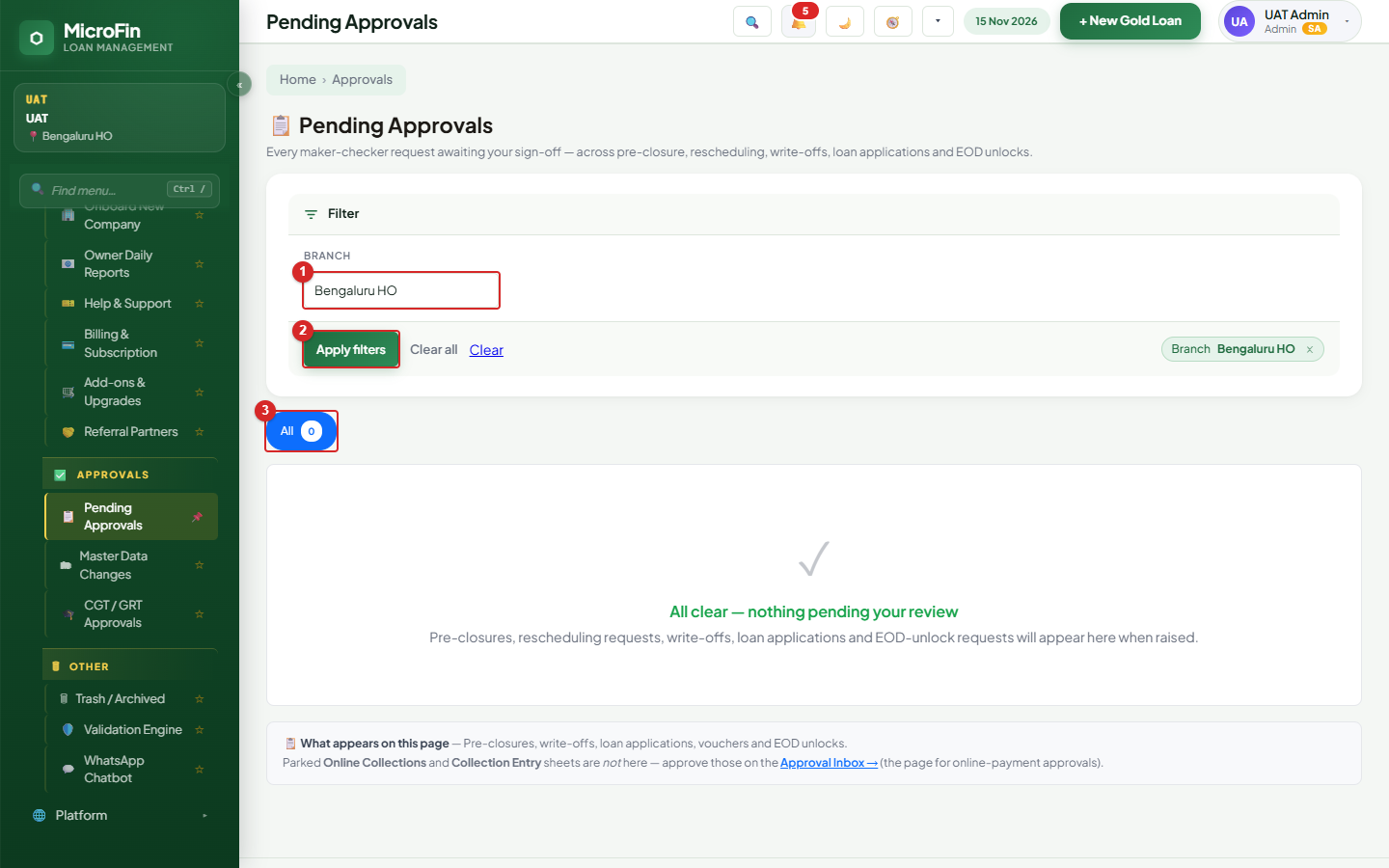
- Branch filter
- Apply filters
- Status tabs (All, with counts)
3. Before you start
- Who can open the screens: an Admin or SuperAdmin; a user whose role has the sensitive-data right; a manager-level user (Branch, Area, Divisional, Regional or Zonal Manager, Managing Director, Manager); or anyone who holds a step in a switched-on chain. Others see "Access Denied". This only decides who is shown the screen; every Approve or Reject is checked again.
- Plan: approvals need the plan feature MAKER_CHECKER. If your plan lacks it you are sent to the upgrade page.
- Who sees which request: you see only requests whose current step matches your role or designation, in your own branch or a branch granted to you. Admins and SuperAdmins see everything. Heads-office (HO) users see all branches.
- Who is "the Branch Manager"? Any active staff member whose role or designation name equals the step name. A step written "Branch Manager|Cashier" accepts either.
4. Step-by-step instructions
Approve or reject a request (approver)
- Click Approvals. The page title is "Approval Inbox". If it says "All clear - nothing awaiting your approval", you have nothing waiting.
- Use the chips All / Collections & Cash / Loans / Members & Centers / Other Approvals to narrow the list.
- Read the Summary (this is all the approver sees of the request) and the Chain drawn beside it: each step shows a mark for approved, rejected, returned, skipped, current or still to come.
- To approve, type remarks if the box says "remarks (required)" (otherwise "remarks (optional)") and click Approve. Confirm "Confirm approval" or "Approve & post".
- For collections at the last step, pick the payment mode and the cash or bank account if the row asks for it.
- To refuse, click Reject and give a reason. A reason is mandatory.
- To send it back for correction, click Return and say what should be corrected. See "Return" below; this exists only for a few request types.
- A request you raised yourself has no buttons and shows "your request - awaiting another approver".
Check your own requests (maker)
- Open
Approvals, then My Requests ("My Approval Requests"). - The columns are Module, Summary, Status, Progress ("N / M steps, at <step>") and Raised.
- You are not messaged when a request is decided. Look here for the outcome.
Return, resubmit or withdraw
- A returned request shows "Returned for correction" and the approver's remark. A banner says how many are waiting.
- Correct the underlying record on its own screen (for a travel claim: edit the claim; for a closure: the pre-closure stays as it was).
- Click Resubmit (add a note on what you changed). Approval starts again at the first step, using the chain as configured today.
- Or click Withdraw and give a reason. A closure is cancelled and any savings are released; a travel claim goes back to Draft.
- The system may refuse to resubmit, for example "pre-closure is no longer pending - withdraw this request instead".
Centre bulk approve
- In the inbox, single-member collections of one centre are grouped under a centre header with a tick-box on each row.
- Tick the collections you want and click Approve N selected. Confirm the message "Approve N collection(s) - ₹X from <centre> and post it/them to the ledger?"
- Up to 200 requests are approved in one go, oldest first. Each is checked on its own, so one refusal does not stop the rest.
- The result separates "N collection(s) approved and posted - ₹X" from "N passed to the next approver" and names the first five that were refused.
Partial approval of a collection grid sheet
- On a Collection grid request, click open the sheet. You see Member, Loan A/C, EMI, Principal, Interest, Savings and Total per row.
- Tick the rows to accept and click Approve selected (or Approve all).
- Unticked rows are dropped, not collected. The message says "Approved K of N row(s). The M excluded row(s) were NOT collected and must be re-entered on the collection sheet." The request's amount and summary are trimmed to the approved rows, and the step remark records "N of M row(s) excluded by approver".
Approve & Disburse (Loan Request)
- This button appears on a MFI Loan Request at its last step, only if the Admin has ticked One-click "Approve & Disburse" on Loan Requests.
- Pick the account in "- disburse from -" and confirm "Approve this loan AND disburse it now?"
- It is two separate commits. If the cash-out fails, the loan stays Approved and waits in the Bulk Disbursement queue.
- You may use it only if you could clear the disbursement approval alone (its approval is off, or you are Admin, or you hold its only step).
Set up an approval chain (Admin)
- Open
Settings > Approval Workflows("Approval Workflow Settings"). You need to be Admin or SuperAdmin. - Tick On for the module.
- Choose up to 6 steps in order from the drop-downs ("- rung N -"). Each step lists your designations, then roles, then Admin. Optionally choose an or stand-in role for a step.
- (Optional) Enter Min amount (₹). Requests below it skip approval. Leave 0 for "always".
- (Optional) Open Level options and set per step: Remarks required, Can reject, Can return ("n/a" where the module cannot take a request back), Skip if no one holds it.
- Click Save Settings. You see "Approval workflow settings saved." If a warning says "Saved - but these approval steps have NO matching active staff, so requests will strand there", give that role or designation to a staff member.
- (Optional) Tick One-click "Approve & Disburse" on Loan Requests.
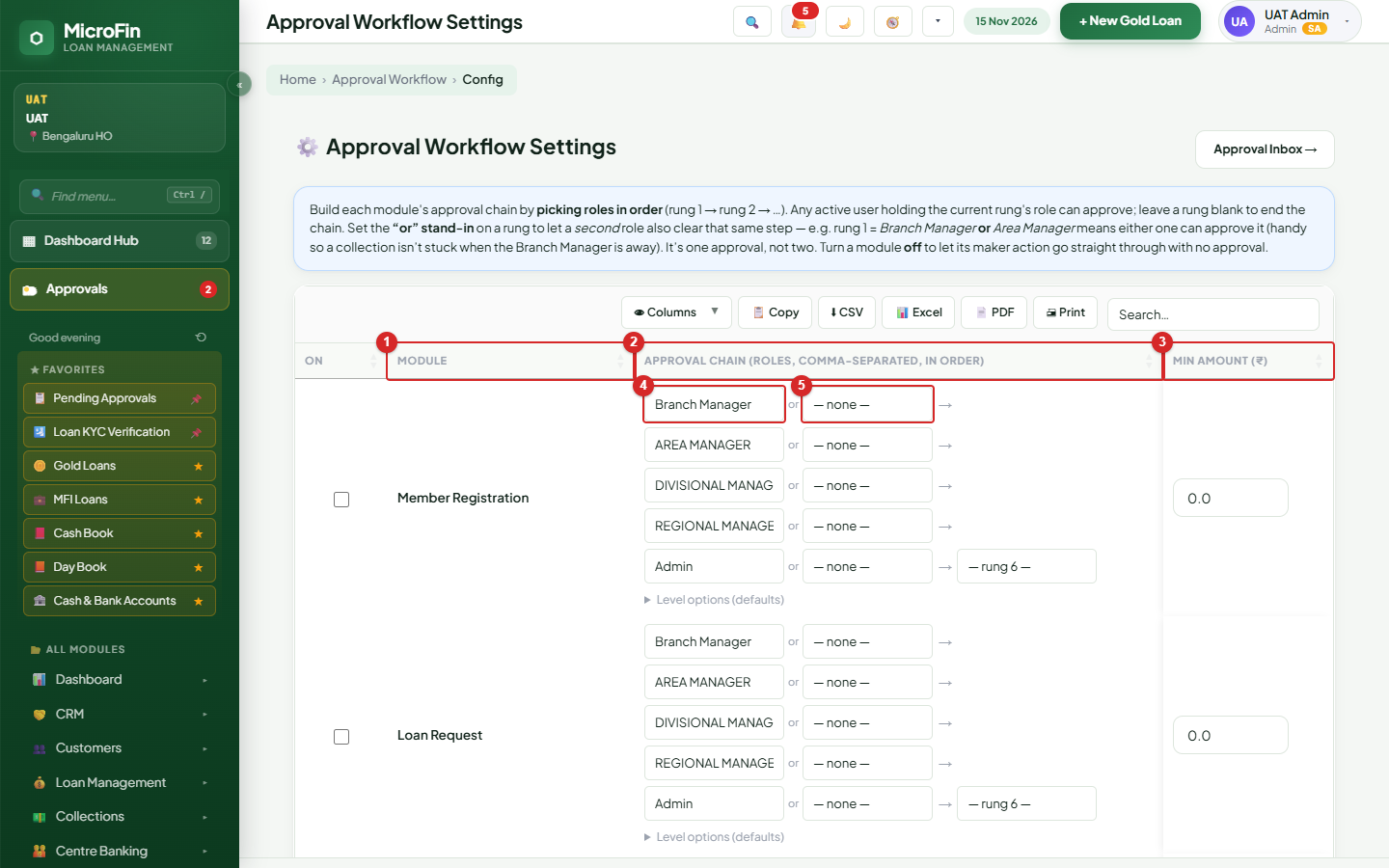
- Approval module
- The approval chain, rung by rung
- Minimum amount that triggers the chain
- Role for rung 1
- Alternate role for rung 1
5. Field explanation
| Field | Purpose | Required? | Expected input | Validation | Example |
|---|---|---|---|---|---|
| On | Switches approval on for a module | No | Tick | Five modules always require approval whatever this says (see section 7) | Ticked |
| Approval chain (rungs) | Who approves, in order | Yes, at least one | Up to 6 steps from the drop-downs | Maximum 6; an emptied chain of an always-on module is restored to its default | Branch Manager, Area Manager, Admin |
| or (stand-in) | A second role that may act on the same step | No | A role | — | Cashier |
| Min amount (₹) | Requests below this skip approval | No | Number, 0 = always | See warning below | 50000 |
| Remarks required | Approver must type remarks to approve | No | Tick per step | "Remarks are required to approve at the {level} level." | Ticked |
| Can reject | Whether this step may reject | No | Tick per step | When off: "Rejection is switched off at the {level} level - approve it or ask an Admin to reject it." | Ticked |
| Can return | Whether this step may send back | No | Tick per step | Only for Loan Close, Loan Close with Savings and Travel Claim; "Returning is not switched on at the {level} level." | Ticked |
| Skip if no one holds it | Passes over a step nobody holds | No | Tick per step | Ignored on the last step | Ticked |
| remarks (approver) | Why you decided | Depends on step | Text, up to 500 characters | Required if the step demands it; reject needs a reason | "Checked the schedule" |
| Return remark | What the maker must correct | Yes when returning | Text | "Say what needs correcting - a remark is required to return a request." | "Fix the claim total" |
6. Buttons and actions
| Button | What it does |
|---|---|
| Approve | Passes the request up one step, or, at the last step, carries out the action. |
| Approve & Disburse | Approves a Loan Request and releases the cash (last step only, if switched on). |
| Return | Sends a request back to the maker (three request types only). |
| Reject | Refuses the request; later steps never see it. |
| My Requests | Opens the maker's own requests. |
| Resubmit / Withdraw | The maker's choices for a returned request. |
| Approve N selected | Centre bulk approve (up to 200). |
| Approve selected / Approve all | Partial or full approval of a collection grid sheet. |
| Save Settings | Saves chains and options. |
7. Business rules and validations
Statuses
- Request: Pending, Approved, Rejected, Cancelled (withdrawn), Returned.
- Step: Pending, Approved, Rejected, Skipped, Returned, Superseded (an old step replaced when a returned request is resubmitted).
- There is no "Expired" or "Escalated" status.
Settings > Approval Workflows, the amount reaches Min amount, and the chain is not empty. The chains in the table below are the starting values until your company saves its own.The approval modules
"Default on?" and "Default chain" are the starting values; a company's own saved settings win.
| Module | What it approves | Default on? | Default chain |
|---|---|---|---|
| Member Registration | A new member (Gold or MFI) before the member record is created | No | Branch Manager > Area Manager > Divisional Manager > Regional Manager > Admin |
| Loan Request (MFI) | A new MFI loan request; on final approval the loan is created and approved, but no cash goes out | No | Branch Manager > Area Manager > Divisional Manager > Regional Manager > Admin |
| Collection Entry | Collections from all web and phone entry screens, before they are posted | No | Branch Manager > Area Manager > Divisional Manager > Regional Manager > Admin |
| Online Collection | A payment a customer made through a pay link or UPI, before it is posted to the bank account | Yes (always) | Branch Manager or Cashier (one step, either role) |
| Loan Disbursement (MFI) | A bulk or HO cash-out batch | No | Area Manager > Divisional Manager > Regional Manager > Admin |
| Voucher | A payment or receipt voucher | No | Area Manager > Divisional Manager > Regional Manager > Admin |
| Center Creation | A Center-Banking cluster (not the ordinary Create Centre screen) | No | Area Manager > Divisional Manager > Regional Manager > Admin |
| CGT | Scheduling of a CGT session (not the CGT result) | No | Area Manager > Divisional Manager > Regional Manager > Admin |
| GRT | The GRT sign-off; when off, the direct Branch Manager buttons on the GRT screen apply | No | Branch Manager |
| Loan Close | Closure or foreclosure of loans (single, bulk, centre); supports Return | No | Area Manager > Divisional Manager > Regional Manager > Admin |
| Loan Close with Savings Adjustment | A closure that takes money from the member's savings; supports Return; every step needs remarks | No | Branch Manager > Area Manager > Regional Manager > Admin |
| Branch Evacuate | Winding a branch down into another | Yes (always) | Admin |
| Savings Withdrawal | A counter payout from a savings account | No | Area Manager > Divisional Manager > Regional Manager > Admin |
| Centre Transfer | A member moving to another centre | Yes (always) | Branch Manager |
| Record Deletion | Delete requests for a member, centre, investor, investor payout, FD interest payout or staff salary | Yes (always) | Admin |
| ₹0 Collection | A collector's record that a member paid nothing, with a reason | No (exists only when On) | Branch Manager > Area Manager |
| Travel Claim | A staff member's monthly travel claim; supports Return; the first step is skipped if nobody else holds it | Yes (always) | Branch Manager > Regional Manager |
8. Expected result
When the last approver approves, the action is done exactly as if the maker had saved it directly (loan created, payment posted, loan closed). The request shows Approved with every step ticked. A rejected request shows Rejected and the action never happens. In My Requests the maker can see all of this, and an auditor can see who decided each step, when, and with what remark.
9. Troubleshooting
| Message or problem | Likely cause | What to do |
|---|---|---|
| "Access Denied" on Approvals | You are not an approver or manager and hold no chain step | Ask your Admin to give you the right role or step. |
| Approvals link sends you to an upgrade page | Plan lacks MAKER_CHECKER | Ask your Admin about the plan. |
| "Request already {Status}." | Someone else decided it first | Refresh the inbox. |
| "This request belongs to another branch." | Request is for a branch you cannot act on | Ask for branch access, or hand over to the right approver. |
| "You raised this request - a different approver must action it (4-eyes)." | You made the request | Ask another approver. |
| "Your role is not the approver for this step." | The request is at another step | Wait; or ask the holder of the current step. |
| "Remarks are required to approve at the {level} level." | Step needs remarks | Type remarks and approve again. |
| "A rejection reason is required." | Reject without reason | Give a reason. |
| "This kind of request cannot be returned - approve or reject it." | Return is limited to three request types | Approve or reject instead. |
| "Final approval failed while applying the change: ..." | The action itself can no longer be done | Fix the cause named in the message, then approve again or reject. |
| "Approve at most 200 collections at a time." | Too many ticked | Untick some and repeat. |
| "One-click Approve & Disburse is not enabled for this company." | Switch is off | Ask an Admin to tick it. |
| A request waits and nobody sees it | The step has no active holder | Admin: assign the role or designation, or tick "Skip if no one holds it" on non-last steps. |
| Collection screen refuses a loan with "Pending Approval #N" | An earlier collection on this loan is waiting | Get that request decided first. |
10. தமிழ் விளக்கம்
இந்த அத்தியாயத்தின் முழுத் தமிழ் வடிவம் கீழே உள்ளது.
11. Related modules
- Chapters on Member Registration, Loan Request, Loan Approval and Disbursement explain what is approved in each module.
- Collections chapters explain Collection Entry and ₹0 collection.
- End of Day (chapter 81) has its own unlock and reopen approvals, which are not in the Approval Inbox.
- Getting started (chapter 01) explains the red badge and the bell.
ஒப்புதல்கள்
ஒப்புதல்கள்: Approval Inbox மற்றும் ஒப்புதல் சங்கிலிகள்
1. அறிமுகம்
MicroFin-இல் சில செயல்கள் மிக முக்கியமானவை; ஒருவர் சேமித்த உடனேயே அவை நடைமுறைக்கு வரக்கூடாது. உங்கள் நிறுவனம் அத்தகைய செயலுக்கு ஒப்புதலை இயக்கியிருந்தால், அதைச் செய்தவர் (உருவாக்குபவர் / maker) படிவத்தைச் சேமிப்பார்; ஆனால் அப்போது உண்மையில் எதுவும் நடக்காது. படிவம் ஒரு கோரிக்கையாக நிறுத்தி வைக்கப்படும். பிறகு அந்தக் கோரிக்கை அங்கீகாரிகளின் சங்கிலி வழியாக — எ.கா. Branch Manager (கிளை மேலாளர்), பின் Area Manager, பின் Regional Manager, பின் Admin — மேலே செல்லும். கடைசி அங்கீகாரி அங்கீகரித்தால் மட்டுமே MicroFin அந்தச் செயலைச் செய்யும் (கடனை உருவாக்கும், செலுத்தலைப் பதிவு செய்யும், கடனை முடிக்கும் போன்றவை).
இந்த அத்தியாயம்: Approval Inbox, My Requests, கோரிக்கை நிலைகள், ஒவ்வொரு செயலும் செய்வது, குறுக்குவழிகள் (மைய மொத்த ஒப்புதல், வசூல் கட்டத்தின் பகுதி ஒப்புதல், Approve & Disburse), மற்றும் Admin Settings > Approval Workflows-இல் சங்கிலிகளை அமைப்பது ஆகியவற்றை விளக்குகிறது. கடைசியில் எல்லா ஒப்புதல் தொகுதிகளின் அட்டவணை உள்ளது.
"ஒப்புதல்" என்ற பெயரில் இரண்டு வெவ்வேறு திரைகள் உள்ளன; அவை ஒரே கோரிக்கையைப் பட்டியலிடுவதில்லை:
- Approval Inbox (இடப்புற மெனுவின் மேலுள்ள நிலையான Approvals இணைப்பு): இந்த அத்தியாயத்தில் உள்ள பல-நிலைச் சங்கிலிகள்.
- Pending Approvals (
Administration > Approvals > Pending Approvals): பிற தொகுதிகளுக்குரிய ஒற்றை-படி ஒப்புதல்களின், பார்வைக்கு மட்டுமான பட்டியல் (முன்கூட்டிய முடிப்பு, மறுசீரமைப்பு (Rescheduling), தள்ளுபடி (Write-off), MFI கடன் விண்ணப்பம், மைய கடன் தொகுப்பு (Centre Batch Loan), தங்கக் கடன் வழங்கல், கடன் ரத்து (Void), சேமிப்புக் கணக்கு முடிப்பு, EOD பூட்டுத் திறப்பு (unlock)). Review அந்தத் தொகுதியின் சொந்தத் திரையைத் திறக்கும்.
2. வழிசெலுத்தல்
- Approval Inbox: இடப்புற மெனுவின் மேலுள்ள நிலையான Approvals இணைப்பு, அல்லது மணி ஐகானின் Approvals தாவல். சிவப்பு எண் உங்களுக்காகக் காத்திருக்கும் கோரிக்கைகளைக் காட்டும்.
- My Requests: Approval Inbox-இல் My Requests பொத்தான்.
- சங்கிலி அமைப்பு (Admin மட்டும்):
Settings > Approval Workflows(இடப்புற மெனுவின் அடியிலுள்ள கியர் குழு). - பிற தொகுதிகளின் ஒற்றை-படி ஒப்புதல்கள்:
Administration > Approvals > Pending Approvals. - கைபேசி: Staff செயலியின் Approvals தாவல் (மேலாளர்களுக்கு) அதே வரிசையைக் காட்டும்.
- கிளை வடிகட்டி
- வடிகட்டிகளைப் பயன்படுத்து
- நிலை தாவல்கள் (அனைத்தும், எண்ணிக்கையுடன்)
3. தொடங்குவதற்கு முன்
- திரைகளைத் திறக்கக்கூடியவர்: Admin அல்லது SuperAdmin; முக்கியத் தரவு உரிமை உள்ள பணிப்பொறுப்பைக் கொண்ட பயனர்; மேலாளர்-நிலைப் பயனர் (Branch, Area, Divisional, Regional அல்லது Zonal Manager, Managing Director, Manager); அல்லது இயக்கப்பட்ட சங்கிலியில் ஒரு படியை வகிப்பவர். மற்றவர்களுக்கு "Access Denied" என வரும். இது திரை யாருக்குக் காட்டப்படும் என்பதை மட்டுமே தீர்மானிக்கும்; ஒவ்வொரு Approve அல்லது Reject-உம் மீண்டும் சரிபார்க்கப்படும்.
- Plan (சந்தாத் திட்டம்): ஒப்புதல்களுக்கு plan வசதி MAKER_CHECKER தேவை. உங்கள் plan-இல் அது இல்லையெனில் மேம்படுத்தல் (upgrade) பக்கத்துக்கு அனுப்பப்படுவீர்கள்.
- யாருக்கு எந்தக் கோரிக்கை தெரியும்: கோரிக்கையின் தற்போதைய படி உங்கள் பணிப்பொறுப்பு அல்லது பதவிப்பெயருடன் பொருந்தினால், அதுவும் உங்கள் சொந்தக் கிளையில் அல்லது உங்களுக்கு அணுகல் வழங்கப்பட்ட கிளையில் இருந்தால் மட்டுமே, அது உங்களுக்குத் தெரியும். Admin, SuperAdmin எல்லாவற்றையும் காண்பர். தலைமை அலுவலக (HO) பயனர்கள் எல்லாக் கிளைகளையும் காண்பர்.
- "கிளை மேலாளர்" என்பவர் யார்? படிப் பெயருக்குச் சமமான பணிப்பொறுப்பு அல்லது பதவிப் பெயர் உள்ள எந்தச் செயலில் உள்ள ஊழியரும். "Branch Manager|Cashier" என்ற படி இரண்டில் ஒருவரையும் ஏற்கும்.
4. படிப்படியான வழிமுறைகள்
கோரிக்கையை அங்கீகரிக்க அல்லது நிராகரிக்க (அங்கீகாரி)
- Approvals சொடுக்குங்கள். பக்கத் தலைப்பு "Approval Inbox". "All clear - nothing awaiting your approval" என்றால் உங்களுக்காக எதுவும் காத்திருக்கவில்லை.
- All / Collections & Cash / Loans / Members & Centers / Other Approvals சிப்புகளால் பட்டியலைக் குறுக்குங்கள்.
- Summary-ஐப் படியுங்கள் (அங்கீகாரி கோரிக்கையைப் பற்றிப் பார்ப்பது இது மட்டுமே), பக்கத்திலுள்ள Chain-ஐயும் பாருங்கள்: ஒவ்வொரு படியும் ஒப்புதல், நிராகரிப்பு, திருப்பம், தவிர்ப்பு, தற்போதைய அல்லது வரவிருக்கும் குறியுடன் தெரியும்.
- அங்கீகரிக்க, பெட்டி "remarks (required)" என்றால் குறிப்புகளை எழுதுங்கள் (இல்லையெனில் "remarks (optional)"), பின் Approve சொடுக்குங்கள். "Confirm approval" அல்லது "Approve & post" உறுதிசெய்யுங்கள்.
- கடைசிப் படியில் உள்ள வசூல்களுக்கு, வரிசை கேட்டால் பணம் செலுத்தும் முறையையும் பணம் அல்லது வங்கிக் கணக்கையும் தேர்ந்தெடுங்கள்.
- மறுக்க, Reject சொடுக்கி காரணம் தாருங்கள். காரணம் கட்டாயம்.
- திருத்தத்துக்குத் திருப்ப, Return சொடுக்கி எதைத் திருத்த வேண்டும் எனச் சொல்லுங்கள். கீழே "Return" பார்க்கவும்; சில வகைக் கோரிக்கைகளுக்கு மட்டுமே உண்டு.
- நீங்களே எழுப்பிய கோரிக்கையில் பொத்தான்கள் இல்லை; "your request - awaiting another approver" எனத் தெரியும்.
உங்கள் கோரிக்கைகளைப் பார்க்க (maker)
Approvalsதிறந்து My Requests ("My Approval Requests") சொடுக்குங்கள்.- நெடுவரிசைகள்: Module, Summary, Status, Progress ("N / M steps, at <step>"), Raised.
- கோரிக்கை முடிவானால் உங்களுக்குச் செய்தி வராது. முடிவை இங்கே பாருங்கள்.
திருப்புதல், மீண்டும் சமர்ப்பித்தல், திரும்பப் பெறுதல்
- திருப்பப்பட்ட கோரிக்கை "Returned for correction" எனவும் அங்கீகாரியின் குறிப்புடனும் தெரியும். எத்தனை காத்திருக்கின்றன என ஒரு பதாகை சொல்லும்.
- அடிப்படைப் பதிவை அதன் சொந்தத் திரையில் திருத்துங்கள் (பயணப்படி கோரிக்கை என்றால் கோரிக்கையைத் திருத்துங்கள்; முடிப்பு என்றால் முன்கூட்டிய முடிப்பு அப்படியே இருக்கும்).
- Resubmit சொடுக்குங்கள் (என்ன திருத்தினீர்கள் எனக் குறிப்பு சேர்க்கலாம்). ஒப்புதல் முதல் படியிலிருந்து, இன்றைய சங்கிலி அமைப்புடன் மீண்டும் தொடங்கும்.
- அல்லது Withdraw சொடுக்கிக் காரணம் தாருங்கள். முடிப்பு ரத்தாகி சேமிப்பு விடுவிக்கப்படும்; பயணப்படி கோரிக்கை Draft-க்குத் திரும்பும்.
- மீண்டும் சமர்ப்பிப்பதை மென்பொருள் மறுக்கலாம்; எ.கா. "pre-closure is no longer pending - withdraw this request instead".
மைய மொத்த ஒப்புதல்
- இன்பாக்ஸில், ஒரு மையத்தின் ஒற்றை-உறுப்பினர் வசூல்கள் மையத் தலைப்பின் கீழ் தொகுக்கப்பட்டிருக்கும்; ஒவ்வொரு வரிசையிலும் தேர்வுப்பெட்டி இருக்கும்.
- வேண்டிய வசூல்களைக் குறியிட்டு Approve N selected சொடுக்குங்கள். "Approve N collection(s) - ₹X from <centre> and post it/them to the ledger?" என்ற செய்தியை உறுதிசெய்யுங்கள்.
- ஒரே முறையில் 200 கோரிக்கைகள் வரை, பழையவை முதலில், அங்கீகரிக்கப்படும். ஒவ்வொன்றும் தனியாகச் சரிபார்க்கப்படும்; ஒன்று மறுக்கப்பட்டால் மற்றவை நிற்காது.
- முடிவு "N collection(s) approved and posted - ₹X" மற்றும் "N passed to the next approver" எனப் பிரித்துக் காட்டி, மறுக்கப்பட்ட முதல் ஐந்தைப் பெயரிடும்.
வசூல் கட்டத்தின் பகுதி ஒப்புதல்
- Collection grid கோரிக்கையில் open the sheet சொடுக்குங்கள். ஒவ்வொரு வரிசையிலும் Member, Loan A/C, EMI, Principal, Interest, Savings, Total தெரியும்.
- ஏற்க வேண்டிய வரிசைகளைக் குறியிட்டு Approve selected (அல்லது Approve all) சொடுக்குங்கள்.
- குறியிடாத வரிசைகள் நீக்கப்படும்; அவை வசூலாகப் பதிவாகாது. செய்தி: "Approved K of N row(s). The M excluded row(s) were NOT collected and must be re-entered on the collection sheet." கோரிக்கையின் தொகையும் சுருக்கமும் அங்கீகரிக்கப்பட்ட வரிசைகளுக்கு ஏற்பக் குறைக்கப்படும்; படிக் குறிப்பில் "N of M row(s) excluded by approver" பதிவாகும்.
Approve & Disburse (கடன் கோரிக்கை)
- Admin One-click "Approve & Disburse" on Loan Requests குறியிட்டிருந்தால் மட்டுமே, MFI கடன் கோரிக்கையின் கடைசி படியில் இந்தப் பொத்தான் தெரியும்.
- "- disburse from -" பட்டியலில் கணக்கைத் தேர்ந்தெடுத்து "Approve this loan AND disburse it now?" என்பதை உறுதிசெய்யுங்கள்.
- இவை தனித்தனியாகச் சேமிக்கப்படும் இரண்டு செயல்கள். பணம் வழங்குதல் தோல்வியடைந்தால் கடன் Approved நிலையிலேயே இருந்து, Bulk Disbursement வரிசையில் காத்திருக்கும்.
- கடன் வழங்கல் ஒப்புதலை நீங்கள் ஒருவரே முடிக்க முடிந்தால் மட்டுமே (அதன் ஒப்புதல் அணைக்கப்பட்டுள்ளது, அல்லது நீங்கள் Admin, அல்லது அதன் ஒரே படியை நீங்களே வகிக்கிறீர்கள்) இதைப் பயன்படுத்தலாம்.
ஒப்புதல் சங்கிலியை அமைக்க (Admin)
Settings > Approval Workflows("Approval Workflow Settings") திறக்கவும். நீங்கள் Admin அல்லது SuperAdmin ஆக இருக்க வேண்டும்.- தொகுதிக்கு On குறியிடுங்கள்.
- கீழிறங்கும் பட்டியல்களிலிருந்து ("- rung N -") வரிசைப்படி 6 படிகள் வரை தேர்ந்தெடுங்கள். ஒவ்வொரு படியிலும் உங்கள் பதவிப் பெயர்கள், பின் பணிப்பொறுப்புகள், பின் Admin இருக்கும். விருப்பமாக ஒரு படிக்கு or மாற்று பணிப்பொறுப்பையும் தேர்ந்தெடுக்கலாம்.
- (விருப்பம்) Min amount (₹) உள்ளிடுங்கள். அதற்குக் குறைவான கோரிக்கைகள் ஒப்புதல் இன்றியே செல்லும். "எப்போதும்" ஒப்புதல் வேண்டுமெனில் 0 என விடுங்கள்.
- (விருப்பம்) Level options திறந்து ஒவ்வொரு படிக்கும்: Remarks required, Can reject, Can return (தொகுதி திருப்ப முடியாத இடத்தில் "n/a"), Skip if no one holds it.
- Save Settings சொடுக்குங்கள். "Approval workflow settings saved." வரும். "Saved - but these approval steps have NO matching active staff, so requests will strand there" எச்சரிக்கை வந்தால், அந்தப் பணிப்பொறுப்பு/பதவியை ஓர் ஊழியருக்குக் கொடுங்கள்.
- (விருப்பம்) One-click "Approve & Disburse" on Loan Requests குறியிடுங்கள்.
- ஒப்புதல் தொகுதி
- ஒப்புதல் சங்கிலி, படிப்படியாக
- சங்கிலியைத் தூண்டும் குறைந்தபட்சத் தொகை
- படி 1க்கான பணிப்பொறுப்பு
- படி 1க்கான மாற்றுப் பணிப்பொறுப்பு
5. புல விளக்கம்
| புலம் | நோக்கம் | கட்டாயமா? | உள்ளீடு | சரிபார்ப்பு | எடுத்துக்காட்டு |
|---|---|---|---|---|---|
| On | தொகுதிக்கு ஒப்புதலை இயக்கும் | இல்லை | தேர்வுப்பெட்டி | ஐந்து தொகுதிகள் இதைப் பொருட்படுத்தாமல் எப்போதும் ஒப்புதல் கேட்கும் (பிரிவு 7) | குறியிட்டது |
| Approval chain (rungs) | யார், எந்த வரிசையில் அங்கீகரிப்பார்கள் | ஆம், குறைந்தது ஒன்று | பட்டியல்களிலிருந்து 6 படிகள் வரை | அதிகபட்சம் 6; எப்போதும் இயக்கத்திலுள்ள தொகுதியின் சங்கிலியை வெறுமையாக்கினால் அது இயல்புநிலைக்குத் திரும்பும் | Branch Manager, Area Manager, Admin |
| or (மாற்று) | அதே படியில் செயல்படக்கூடிய இரண்டாம் பணிப்பொறுப்பு | இல்லை | ஒரு பணிப்பொறுப்பு | — | Cashier |
| Min amount (₹) | இதற்குக் குறைவான கோரிக்கை ஒப்புதலைத் தவிர்க்கும் | இல்லை | எண்; 0 = எப்போதும் | கீழுள்ள எச்சரிக்கையைப் பார்க்கவும் | 50000 |
| Remarks required | அங்கீகரிக்க, அங்கீகாரி குறிப்பு எழுதுவது கட்டாயம் | இல்லை | படிக்கு ஒரு குறி | "Remarks are required to approve at the {level} level." | குறியிட்டது |
| Can reject | இந்தப் படி நிராகரிக்கலாமா | இல்லை | படிக்கு ஒரு குறி | அணைக்கப்பட்டிருந்தால்: "Rejection is switched off at the {level} level - approve it or ask an Admin to reject it." | குறியிட்டது |
| Can return | இந்தப் படி திருப்பலாமா | இல்லை | படிக்கு ஒரு குறி | Loan Close, Loan Close with Savings, Travel Claim மட்டும்; "Returning is not switched on at the {level} level." | குறியிட்டது |
| Skip if no one holds it | யாரும் இல்லாத படியைத் தாண்டும் | இல்லை | படிக்கு ஒரு குறி | கடைசிப் படியில் பொருட்படுத்தப்படாது | குறியிட்டது |
| remarks (அங்கீகாரி) | உங்கள் முடிவின் காரணம் | படியைப் பொறுத்து | உரை, 500 எழுத்துகள் வரை | படி கேட்டால் கட்டாயம்; நிராகரிப்புக்குக் காரணம் வேண்டும் | "Checked the schedule" |
| Return remark | maker எதைத் திருத்த வேண்டும் | திருப்பும்போது ஆம் | உரை | "Say what needs correcting - a remark is required to return a request." | "Fix the claim total" |
6. பொத்தான்களும் செயல்களும்
| பொத்தான் | செய்வது |
|---|---|
| Approve | கோரிக்கையை ஒரு படி மேலே அனுப்பும்; கடைசிப் படியில் செயலைச் செய்யும். |
| Approve & Disburse | கடன் கோரிக்கையை அங்கீகரித்துப் பணத்தையும் வழங்கும் (கடைசிப் படி, இயக்கியிருந்தால் மட்டும்). |
| Return | கோரிக்கையை maker-இடம் திருப்பும் (மூன்று வகைகளுக்கு மட்டும்). |
| Reject | கோரிக்கையை மறுக்கும்; பிந்தைய படிகள் அதைக் காணாது. |
| My Requests | maker-இன் சொந்தக் கோரிக்கைகளைத் திறக்கும். |
| Resubmit / Withdraw | திருப்பப்பட்ட கோரிக்கைக்கு maker-இன் தேர்வுகள். |
| Approve N selected | மைய மொத்த ஒப்புதல் (200 வரை). |
| Approve selected / Approve all | வசூல் கட்டத்துக்குப் பகுதி அல்லது முழு ஒப்புதல். |
| Save Settings | சங்கிலிகளையும் விருப்பங்களையும் சேமிக்கும். |
7. வணிக விதிகளும் சரிபார்ப்புகளும்
நிலைகள்
- கோரிக்கை: Pending, Approved, Rejected, Cancelled (திரும்பப் பெறப்பட்டது), Returned.
- படி: Pending, Approved, Rejected, Skipped, Returned, Superseded (திருப்பப்பட்ட கோரிக்கை மீண்டும் சமர்ப்பிக்கப்படும்போது மாற்றப்பட்ட பழைய படி).
- "Expired" அல்லது "Escalated" என்ற நிலை இல்லை.
Settings > Approval Workflows-இல் Admin On குறியிட்டு, தொகை Min amount-ஐ எட்டி, சங்கிலி வெறுமையாக இல்லாத போது மட்டுமே தொகுதிக்கு ஒப்புதல் தேவை. கீழே உள்ள அட்டவணையின் சங்கிலிகள், உங்கள் நிறுவனம் தன் அமைப்பைச் சேமிக்கும் வரையிலான தொடக்க மதிப்புகள்.ஒப்புதல் தொகுதிகள்
"Default on?" மற்றும் "Default chain" தொடக்க மதிப்புகள்; நிறுவனம் தானே சேமித்த அமைப்புகள் இருந்தால் அவையே முன்னுரிமை பெறும்.
| தொகுதி | எதற்கு ஒப்புதல் | இயல்பாக இயக்கத்தில் உள்ளதா? | இயல்புச் சங்கிலி |
|---|---|---|---|
| Member Registration | புதிய உறுப்பினர் (தங்கம் அல்லது MFI) — உறுப்பினர் பதிவு உருவாகும் முன் | இல்லை | Branch Manager > Area Manager > Divisional Manager > Regional Manager > Admin |
| Loan Request (MFI) | புதிய MFI கடன் கோரிக்கை; கடைசி ஒப்புதலில் கடன் உருவாக்கப்பட்டு அங்கீகரிக்கப்படும்; ஆனால் பணம் வழங்கப்படாது | இல்லை | Branch Manager > Area Manager > Divisional Manager > Regional Manager > Admin |
| Collection Entry | எல்லா இணையம்/கைபேசி வசூல் திரைகளின் வசூல்கள், பதிவுக்கு முன் | இல்லை | Branch Manager > Area Manager > Divisional Manager > Regional Manager > Admin |
| Online Collection | வாடிக்கையாளர் pay link/UPI மூலம் செலுத்தியது, வங்கிக் கணக்கில் பதிவாகும் முன் | ஆம் (எப்போதும்) | Branch Manager அல்லது Cashier (ஒரு படி, இரண்டில் ஒன்று) |
| Loan Disbursement (MFI) | மொத்த (bulk) அல்லது HO கடன் வழங்கல் தொகுப்பு (batch) | இல்லை | Area Manager > Divisional Manager > Regional Manager > Admin |
| Voucher | பணம் செலுத்தல் அல்லது பெறல் வவுச்சர் | இல்லை | Area Manager > Divisional Manager > Regional Manager > Admin |
| Center Creation | Center-Banking கொத்து (cluster) (சாதாரண Create Centre திரை அல்ல) | இல்லை | Area Manager > Divisional Manager > Regional Manager > Admin |
| CGT | CGT அமர்வு திட்டமிடல் (CGT முடிவு அல்ல) | இல்லை | Area Manager > Divisional Manager > Regional Manager > Admin |
| GRT | GRT இறுதி ஒப்புதல் (sign-off); அணைக்கப்பட்டிருந்தால் GRT திரையில் உள்ள நேரடி Branch Manager பொத்தான்களே பொருந்தும் | இல்லை | Branch Manager |
| Loan Close | கடன்களின் முடிப்பு / முன்கூட்டிய முடிப்பு (ஒற்றை, மொத்த, மையம்); Return உண்டு | இல்லை | Area Manager > Divisional Manager > Regional Manager > Admin |
| Loan Close with Savings Adjustment | உறுப்பினர் சேமிப்பிலிருந்து பணம் எடுக்கும் முடிப்பு; Return உண்டு; ஒவ்வொரு படிக்கும் குறிப்பு தேவை | இல்லை | Branch Manager > Area Manager > Regional Manager > Admin |
| Branch Evacuate | ஒரு கிளையை மற்றொன்றில் இணைத்து மூடுதல் | ஆம் (எப்போதும்) | Admin |
| Savings Withdrawal | சேமிப்புக் கணக்கிலிருந்து கவுண்டர் பணம் வழங்கல் | இல்லை | Area Manager > Divisional Manager > Regional Manager > Admin |
| Centre Transfer | உறுப்பினர் வேறு மையத்துக்கு மாறுதல் | ஆம் (எப்போதும்) | Branch Manager |
| Record Deletion | உறுப்பினர், மையம், முதலீட்டாளர், முதலீட்டாளர் வழங்கல் (payout), FD வட்டி வழங்கல், ஊழியர் சம்பளம் ஆகியவற்றின் நீக்கக் கோரிக்கை | ஆம் (எப்போதும்) | Admin |
| ₹0 Collection | உறுப்பினர் எதுவும் செலுத்தவில்லை என்று காரணத்துடன் வசூலிப்பவர் செய்யும் பதிவு | இல்லை (On ஆக இருக்கும்போது மட்டும் உண்டு) | Branch Manager > Area Manager |
| Travel Claim | ஊழியரின் மாதப் பயணப்படி கோரிக்கை; Return உண்டு; வேறு யாரும் முதல் படியை வகிக்காவிட்டால் அது தவிர்க்கப்படும் | ஆம் (எப்போதும்) | Branch Manager > Regional Manager |
8. எதிர்பார்க்கும் முடிவு
கடைசி அங்கீகாரி அங்கீகரித்ததும், maker நேரடியாகச் சேமித்திருந்தால் எப்படி நடக்குமோ அதேபடி செயல் நடக்கும் (கடன் உருவாகும், வசூல் பதிவாகும், கடன் முடியும்). கோரிக்கை Approved எனவும் எல்லாப் படிகளும் குறியிடப்பட்டும் தெரியும். நிராகரிக்கப்பட்டால் Rejected; செயல் நடக்காது. maker My Requests-இல் இதைக் காணலாம்; தணிக்கையாளர் ஒவ்வொரு படியையும் யார், எப்போது, என்ன குறிப்புடன் முடிவு செய்தார் என்று காணலாம்.
9. சிக்கல் தீர்வு
| செய்தி அல்லது சிக்கல் | சாத்தியமான காரணம் | செய்ய வேண்டியது |
|---|---|---|
| Approvals-இல் "Access Denied" | நீங்கள் அங்கீகாரி/மேலாளர் அல்ல; சங்கிலிப் படியும் இல்லை | சரியான பணிப்பொறுப்பு/படி தர Admin-ஐக் கேளுங்கள். |
| Approvals மேம்படுத்தல் பக்கத்துக்கு அனுப்புகிறது | திட்டத்தில் MAKER_CHECKER இல்லை | திட்டம் பற்றி Admin-ஐக் கேளுங்கள். |
| "Request already {Status}." | வேறொருவர் முன்பே முடிவு செய்தார் | இன்பாக்ஸைப் புதுப்பிக்கவும். |
| "This request belongs to another branch." | நீங்கள் செயல்பட முடியாத கிளையின் கோரிக்கை | கிளை அணுகல் கேளுங்கள்; அல்லது சரியான அங்கீகாரியிடம் விடுங்கள். |
| "You raised this request - a different approver must action it (4-eyes)." | நீங்களே கோரிக்கை எழுப்பினீர்கள் | வேறொரு அங்கீகாரியைக் கேளுங்கள். |
| "Your role is not the approver for this step." | கோரிக்கை வேறு படியில் உள்ளது | காத்திருங்கள்; அல்லது தற்போதைய படியை வகிப்பவரைக் கேளுங்கள். |
| "Remarks are required to approve at the {level} level." | படிக்குக் குறிப்பு தேவை | குறிப்பை எழுதி மீண்டும் அங்கீகரியுங்கள். |
| "A rejection reason is required." | காரணம் இல்லாமல் நிராகரிப்பு | காரணம் தாருங்கள். |
| "This kind of request cannot be returned - approve or reject it." | திருப்புதல் மூன்று வகைகளுக்கு மட்டுமே | அங்கீகரியுங்கள் அல்லது நிராகரியுங்கள். |
| "Final approval failed while applying the change: ..." | செயலை இனி செய்ய இயலவில்லை | செய்தியில் உள்ள காரணத்தைச் சரிசெய்து மீண்டும் அங்கீகரியுங்கள் அல்லது நிராகரியுங்கள். |
| "Approve at most 200 collections at a time." | அதிகம் குறியிடப்பட்டுள்ளது | சிலவற்றை நீக்கி மீண்டும் செய்யுங்கள். |
| "One-click Approve & Disburse is not enabled for this company." | வசதி அணைந்துள்ளது | Admin-ஐ இயக்கக் கேளுங்கள். |
| கோரிக்கை காத்திருக்கிறது, யாருக்கும் தெரியவில்லை | அந்தப் படியை வகிக்கும் செயலில் உள்ளவர் இல்லை | Admin: பணிப்பொறுப்பு/பதவியை ஒதுக்குங்கள்; அல்லது கடைசி அல்லாத படிகளில் "Skip if no one holds it" குறியிடுங்கள். |
| வசூல் திரை கடனை "Pending Approval #N" எனக் கூறி மறுக்கிறது | அதே கடனின் முந்தைய வசூல் காத்திருக்கிறது | முதலில் அந்தக் கோரிக்கையை முடிவு செய்யுங்கள். |
10. தமிழ் விளக்கம்
இந்த அத்தியாயத்தின் முழுத் தமிழ் வடிவம் இதுவே. ஆங்கிலப் பகுதியின் அதே பிரிவுகள் (1–9, 11) இங்கு தமிழில் தரப்பட்டுள்ளன; திரைப் பெயர்கள், பொத்தான்கள், செய்திகள் ஆங்கிலத்திலேயே உள்ளன.
11. தொடர்புடைய தொகுதிகள்
- உறுப்பினர் பதிவு, கடன் கோரிக்கை, கடன் ஒப்புதல், கடன் வழங்கல் அத்தியாயங்கள் ஒவ்வொன்றிலும் எது ஒப்புதலுக்குச் செல்கிறது என்பதை விளக்கும்.
- வசூல் அத்தியாயங்கள் Collection Entry, ₹0 வசூலை விளக்கும்.
- நாள் முடிவு (அத்தியாயம் 81) பூட்டுத் திறப்பு (unlock), மீண்டும் திறப்பு (reopen) ஆகியவற்றுக்குத் தனக்கென ஒப்புதல்களைக் கொண்டது; அவை Approval Inbox-இல் வராது.
- தொடங்குதல் (அத்தியாயம் 01) சிவப்பு எண்ணையும் மணியையும் விளக்கும்.