Loan Request
Requesting an MFI loan
1. Overview
A loan request is the application for a microfinance (MFI), Personal or Business loan. In MicroFin the request screen does more than record an application: it also builds the full EMI (instalment) schedule at once. So a request already carries its instalment dates and amounts, even though no cash has moved yet.
This chapter covers the New Loan form for one borrower, the Centre Batch Loan for a whole centre, the checks run when the request is saved, and the optional KYC verification stage that sits in front of approval. Approval is in chapter 21, cash-out in chapter 22. Gold loans are in separate chapters.
Four routes exist:
| Route | When | What the button does |
|---|---|---|
| 1. Create and disburse | No approval switched on | Disburse Loan makes an Active loan and pays it at once. |
| 2. Single-level approval | Company setting finance.RequireLoanApproval or the scheme's "Requires Manager Approval" is on | Submit for Approval saves a request waiting for a manager. |
| 3. Approval chain | The Approval Workflow module "Loan Request" is on | The form is parked; no loan exists until every approver signs off. |
| 4. Centre Batch Loan | Loans for the members of one centre | One request per member, reviewed together as a batch. |
2. Navigation
- New individual loan:
Loan Management > MFI Loans > MFI Loans, then New. - Personal or Business loan:
Loan Management > Personal Loans > New Personal LoanorLoan Management > Business Loans > New Business Loan. - Whole centre:
Loan Management > Centre Batch Loan. - Loan list:
Loan Management > MFI Loans > MFI Loans(the MFI Loan Book). A request still waiting for a decision shows as Requested. - KYC stage (when switched on):
Loan Management > Loan KYC Verification.
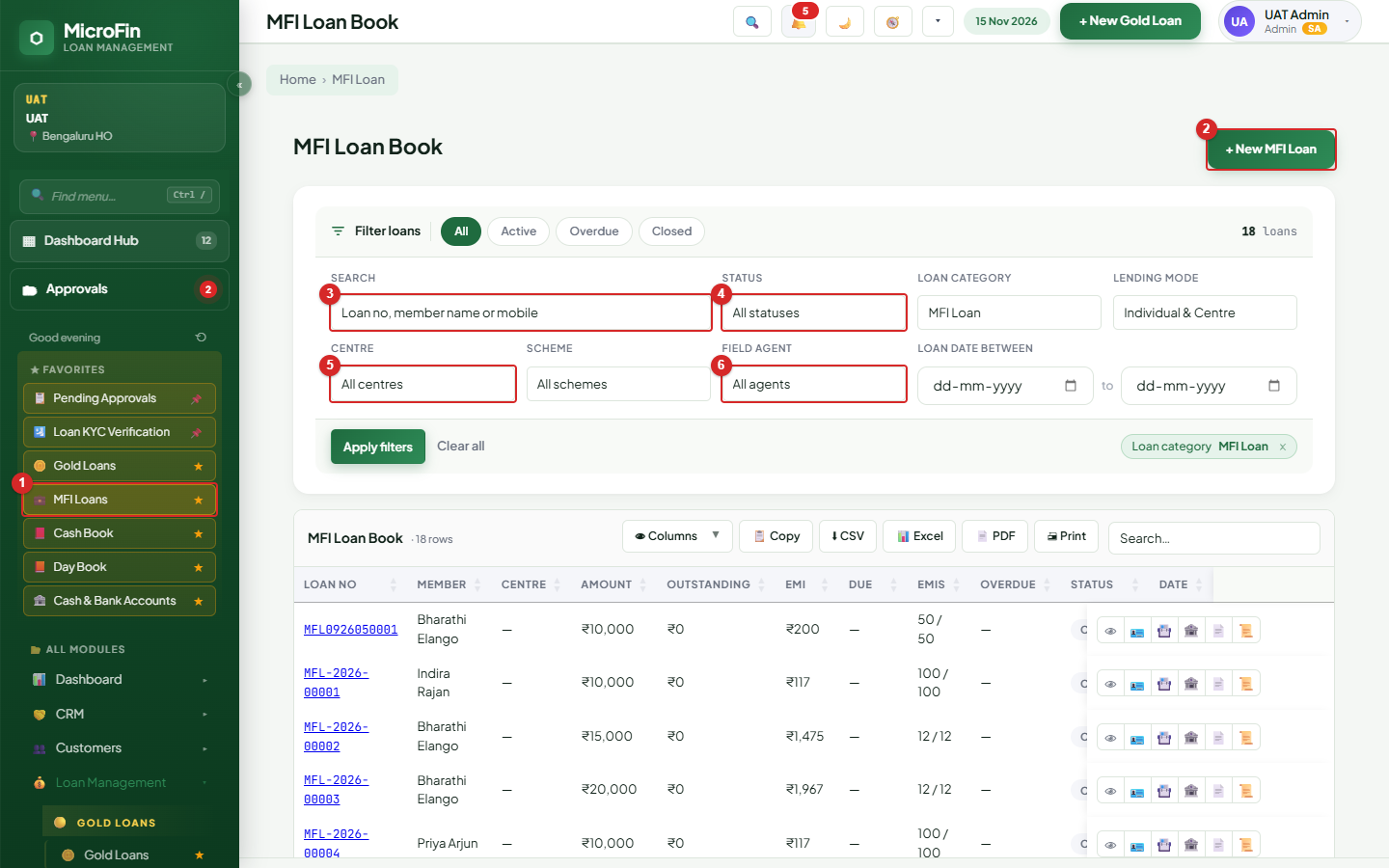
- Loan Management > MFI Loans
- New MFI Loan
- Search by loan number, member or mobile
- Status filter
- Centre filter
- Field agent filter
3. Before you start
- Permission: you need the loan-management right (
CanManageLoans). An HO (head-office) user must pick a Branch; a branch user always works in their own branch. - The member must already be registered, Active and not blacklisted (see chapter 5). The member must belong to the same branch as the loan.
- For a loan to a centre, the centre must exist, be Active and normally hold an approved GRT Pass (see the centre chapter).
- At least one Loan Scheme or Loan Product must be active (set up by your administrator).
- A Field agent (the staff member who looks after the borrower) must exist.
- If you plan to pay the cash out on the spot, know which cash drawer or bank account you will use.
4. Step-by-step instructions
Raise a loan request for one borrower
- Open
Loan Management > MFI Loans > MFI Loansand click New (or the Personal / Business "New" row). - HO users: choose the Branch card first.
- In Loan Setup Mode choose one of two tabs:
- Predefined Product — pick a Loan Product. Its amount, tenure, rate and instalment plan are copied and fixed.
- Custom Loan — pick a Loan Scheme (it supplies rates, fees, penalty and pre-closure rules) and type the amount and tenure yourself.
- In Borrower choose the member. Choose Lending mode Individual or Centre; for Centre also pick the Centre. Pick the Field agent. Add + Add Co-Borrower and guarantor details if you have them.
- In Loan Terms fill the Loan date, Disbursement date, First EMI date, Loan amount (₹) and the tenure (see the note below). Check the rate, EMI frequency, moratorium, fees and compulsory savings that the scheme or product filled in.
- Click ↺ Recalculate to see the instalment schedule. Check the dates and amounts. Use Apply to All only if you need to edit the schedule grid by hand.
- If a Disbursement card is shown and you are paying the cash now, choose the Cash / bank account and Payment mode.
- Add Remarks, then click Disburse Loan (no approval) or Submit for Approval.
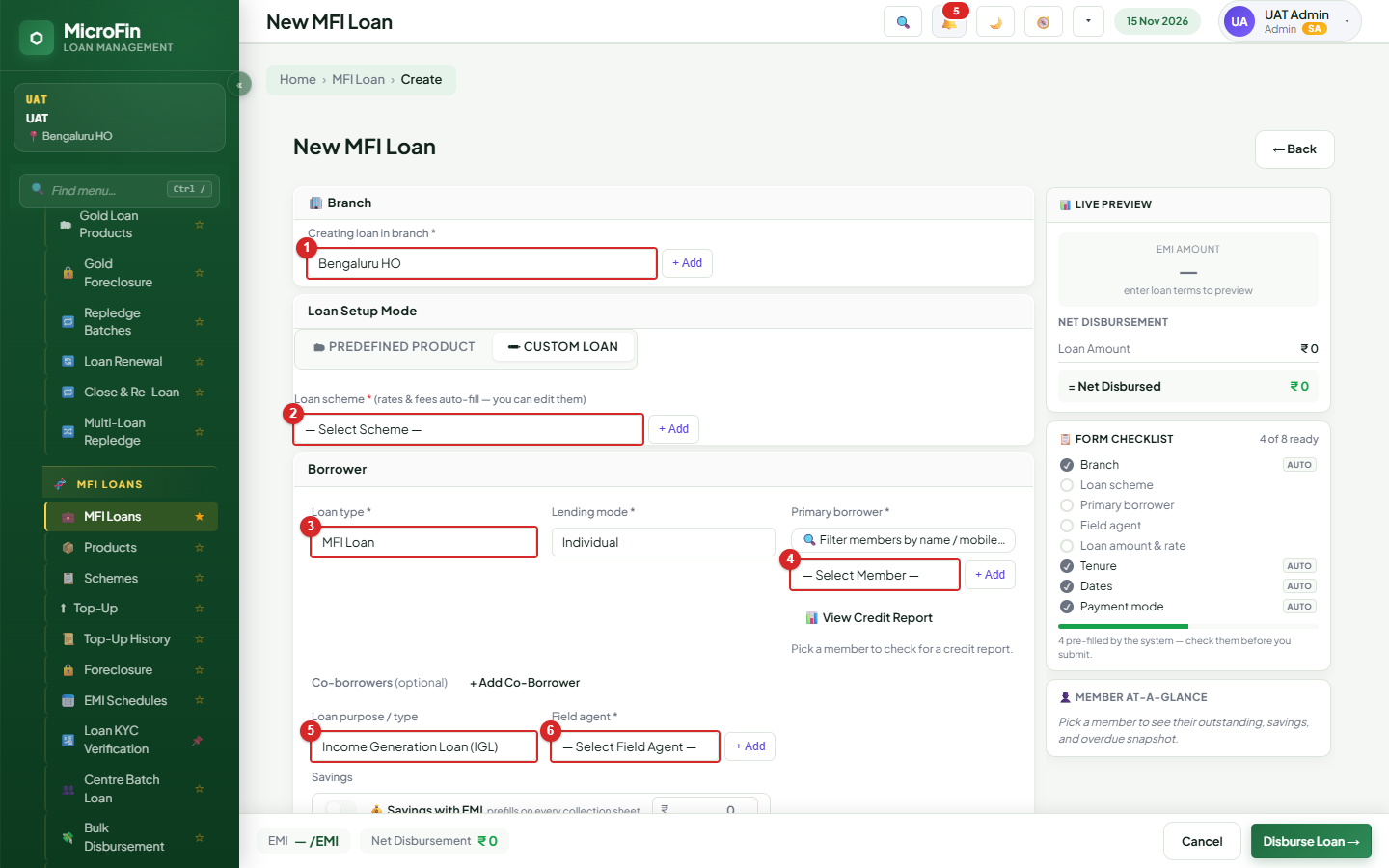
- Branch
- Loan scheme
- Loan category
- Member (primary borrower)
- Loan purpose
- Field agent
What you will see after saving
- No approval: "Loan created and disbursed successfully." and the Loan Detail page opens.
- Approval on: "Loan request submitted for approval. Approve it under Approvals, then disburse it."
- Approval chain on: "Loan request submitted for approval — it will be created once the chain signs off."
Raise a Centre Batch Loan
- Open
Loan Management > Centre Batch Loan. HO users with no home branch first pick the branch at the top: "Pick the branch this batch belongs to first (Branch, at the top of the form)." - Choose the Centre and the Field agent. A field officer sees only their own centres.
- Choose how the round is priced: same product for everyone, product per member, or custom terms (amount, rate, tenure, dates, optional scheme).
- Tick the members to include (the roster loads after you pick the centre). Set the dates; the first EMI date must be after the disbursement date.
- Submit. You see "Centre batch created with N loan request(s) — sent to the Branch Manager for review, edit & approval." A warning "N member(s) skipped — ..." names members who could not be included.
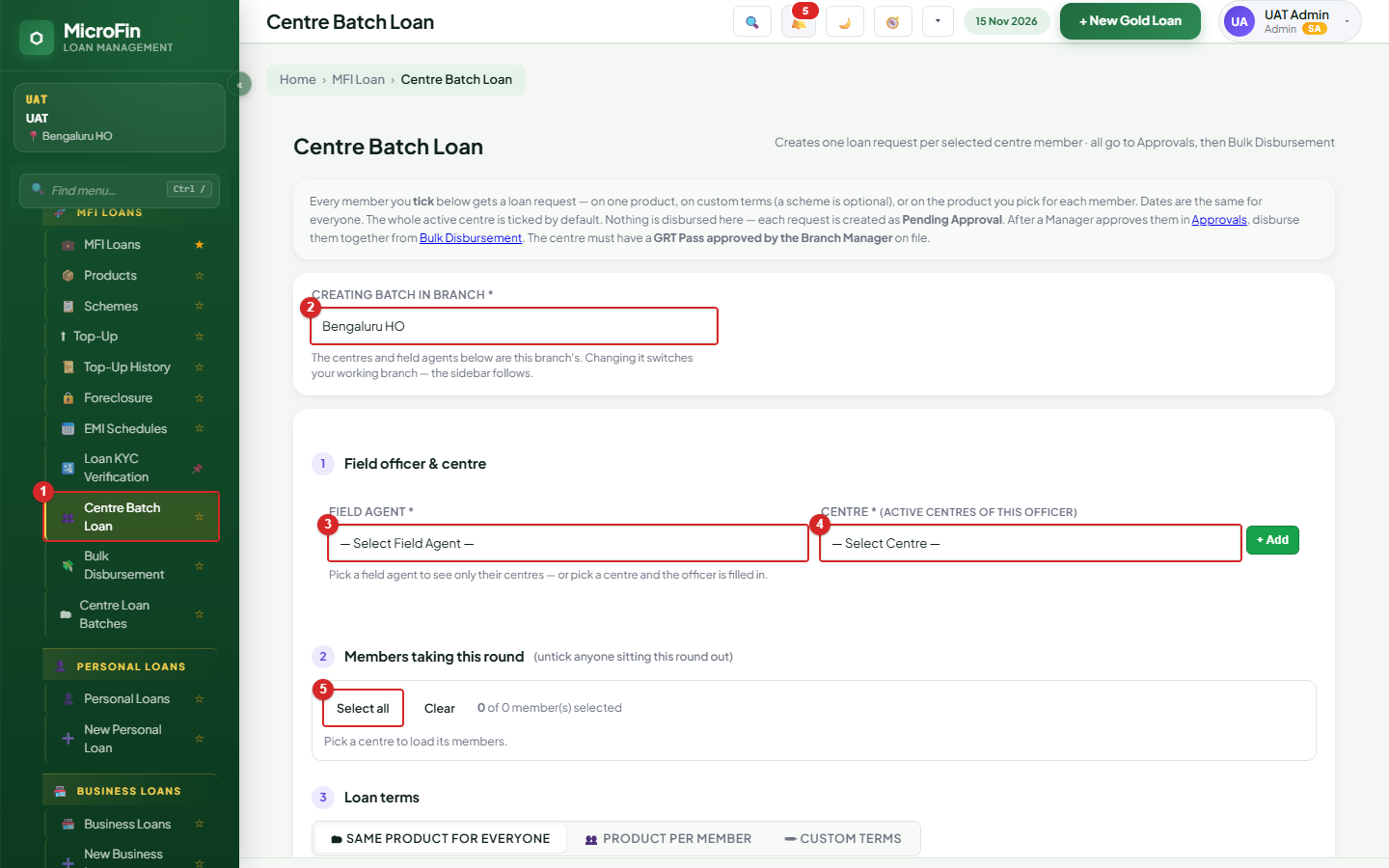
- Loan Management > Centre Batch Loan
- Branch
- Field agent
- Centre
- Select all members
mfi.HideBatchTermsForFieldStaff on, a field officer does not see terms, dates or schedule. The system dates the round today and sets the first EMI on the centre's next meeting day.Edit a request that is still waiting for a decision
Open the loan from the Loan Book; while it shows the banner "Pending Approval" click ✎ Edit Terms. Amount, tenure, rate, dates and field agent can be changed; the member cannot. The schedule is rebuilt. This is only possible before approval and before any payment.
The KYC verification stage (member's side)
Administration > UI & Settings > Settings > Role Access Rules, block "Loan request — KYC verification", tick "Require KYC verification before a loan request can go to approval". Off by default.When it is on, every new request starts as Pending KYC Verification. A verifier reviews the member's documents and either confirms them, sends the request back, or proposes a rejection (chapter 21). From the member's and the branch's side this means:
- Make sure the member's documents (Aadhaar, photo, house photo, etc.) are complete before you raise the request. Open the 🛂 KYC verification card on the Loan Detail page to see where the request stands.
- If the status becomes KYC Update Required, correct the member's KYC (the card has Update member KYC ↗) and click ↻ Re-submit for verification.
- Wait for KYC Verified. A request that has not reached KYC Verified cannot go to approval.
5. Field explanation
| Field | Purpose | Required? | Expected input | Validation | Example |
|---|---|---|---|---|---|
| Branch | Branch that owns the loan | Yes (HO users pick; branch users fixed) | Pick from list | Member must belong to this branch | Main Branch |
| Loan Setup Mode | Product or custom terms | Yes | Tab: Predefined Product / Custom Loan | Product mode needs a product; Custom needs a scheme | Custom Loan |
| Loan product | Fixed-terms loan | In Predefined mode | Pick from list | "Pick a loan product — a predefined loan takes its amount, tenure and rate from one." | — |
| Loan scheme | Rules and fees | In Custom mode | Pick from list | "Pick a loan scheme — a custom loan takes its rates, fees and pre-closure rules from one." | — |
| Primary borrower | The member | Yes | Pick a member | Active, not blacklisted, same branch | Lakshmi Devi |
| Loan type | MFI, Personal or Business; also sets the loan-number series (MFL-, PL-, BL-) | Yes | Pick | Cannot be changed later | MFI |
| Lending mode | Individual or Centre | Yes | Pick | Centre loans need a Centre | Centre |
| Centre | The centre the loan belongs to | For Centre loans | Pick | Active; normally needs a GRT Pass | — |
| Field agent | Staff who manages the loan | Yes | Pick | Required | — |
| Loan date / Disbursement date | Dates of the loan | Yes | Dates | Loan-date window applies if changed | 15-11-2026 |
| First EMI date | First instalment due date | Yes | Date | Must be after the disbursement date | 22-11-2026 |
| Loan amount (₹) | Principal | Yes | 1,000 to 10,000,000 | Range checked | 30000 |
| Tenure | Number of instalments | Yes | 1 to 120 | Range checked | 50 |
| Moratorium | Instalments at the start with nothing due | Optional | 0 to tenure minus 1 | Range checked | 0 |
| Interest rate, calculation method, EMI frequency | How instalments are worked out | Filled from scheme/product | As shown | Scheme/product governs | Weekly |
| Processing fee, Insurance premium, Document charge, GST on fees | Charges deducted at disbursement | Optional | Amount or % | Master values are re-applied at cash-out | — |
| Savings | Compulsory savings per instalment | Optional | Amount | — | 50 |
| Interest collection model | Standard, Cut (interest deducted up front) or Front-Loaded | Optional | Pick | — | Standard |
| Co-borrowers, Guarantors | Extra people on the loan | Optional | Name, mobile, relation, address, etc. | — | — |
| Cash / bank account, Payment mode | Where the cash leaves from | Only when paying now | Pick | Account must match the mode: Cash needs a cash drawer; NEFT, RTGS, UPI need a bank account | NEFT |
| Remarks | Free note | Optional | Text | — | — |
6. Buttons and actions
| Button | What it does |
|---|---|
| + Add Co-Borrower | Adds a co-borrower row. |
| Apply to All | Applies a value to every row of the schedule grid. |
| ↺ Recalculate | Rebuilds the schedule preview from the terms you typed. |
| Disburse Loan | Creates the loan, pays the cash out and posts the accounts (no approval). |
| Submit for Approval | Saves a request; no cash moves. |
| Cancel / ← Back | Leaves the form without saving. |
| ✎ Edit Terms | Changes a request still waiting for approval. |
| + New centre batch | Opens the Centre Batch Loan form. |
| 📊 View Credit Report | Opens a credit report already on file; it does not make a new pull. |
| ↻ Re-submit for verification | Sends the request back to the verifier after you update the member's KYC. |
7. Business rules and validations
mfi.RequireGrtPass.mfi.RenewalRequiresClosure: the member's old MFI loan must be settled or its closure started before a new request.mfi.LockTermsForFieldStaff: field officers cannot change prices; the scheme's amount and tenure limits apply to them.8. Expected result
- No approval: an Active loan with number
MFL-…(orPL-/BL-), the schedule, the cash movement and the fee entries; a "loan disbursed" SMS / WhatsApp message may be sent to the borrower. - Approval on: a request that the Loan Book shows as Requested, with the instalment schedule but no cash entry.
- Centre batch: a batch
GB-nnnnin PendingReview and one request per member. - KYC stage on: each new request starts at Pending KYC Verification.
9. Troubleshooting
| Message or problem | Likely cause | What to do |
|---|---|---|
| "First EMI date must be on or after the disbursement date." | First EMI date is too early | Move the first EMI date after the disbursement date. |
| "Pick a loan scheme — a custom loan takes its rates, fees and pre-closure rules from one." | Custom Loan mode with no scheme | Pick a scheme. |
| "Pick a loan product — a predefined loan takes its amount, tenure and rate from one." | Predefined mode with no product | Pick a product. |
| Member not in the list or refused | Member inactive, blacklisted or in another branch | Check the member; "Switch to that branch" if the member belongs elsewhere. |
| Centre loan refused for GRT | No approved GRT Pass for the centre | Complete the GRT, or ask the administrator about the waiver setting. |
| Identical loan refused | A loan with the same member, amount and date is already disbursed | Check the Loan Book; if a second loan is intended, change the date or amount. |
| "Insufficient balance in …" | Account does not hold the net amount | Pick another account or fund the account. |
| "That centre is not assigned to you — pick one of your own centres." | Field officer chose another officer's centre | Pick one of your own centres. |
| "Select at least one member to include in this round." | No member ticked | Tick at least one member. |
| Request cannot go to approval; "KYC verification: …" | KYC stage is on and not yet verified | Update the member's KYC and re-submit; wait for KYC Verified. |
| "Only pending-approval loans can be edited" | Loan already approved or rejected | Use Loan Amend (chapter 23) for a disbursed loan. |
11. Related modules
- Chapter 5 — Registering and managing members (KYC status, house photo).
- Chapter 21 — Loan approval.
- Chapter 22 — Loan disbursement.
- Chapter 23 — Servicing and closure.
கடன் கோரிக்கை
MFI கடன் கோரிக்கை
1. அறிமுகம்
கடன் கோரிக்கை என்பது நுண்கடன் (MFI), தனிநபர் (Personal) அல்லது வணிக (Business) கடனுக்கான விண்ணப்பம். MicroFin-ல் கோரிக்கைத் திரை கோரிக்கையைப் பதிவு செய்வதோடு நின்றுவிடாது; முழு தவணை (EMI) அட்டவணையையும் அதே நேரத்தில் உருவாக்குகிறது. எனவே பணம் இன்னும் வழங்கப்படாவிட்டாலும் கோரிக்கையிலேயே தவணைத் தேதிகளும் தொகைகளும் இருக்கும்.
இந்த அத்தியாயம் ஒரு கடன் பெறுபவருக்கான New Loan படிவம், ஒரு மையத்துக்கான Centre Batch Loan, சேமிக்கும்போது நடக்கும் சரிபார்ப்புகள், ஒப்புதலுக்கு முன் வரக்கூடிய விருப்பமான KYC verification நிலை ஆகியவற்றை விளக்குகிறது. ஒப்புதல் அத்தியாயம் 21-ல், பணம் வழங்கல் அத்தியாயம் 22-ல் உள்ளது. தங்கக் கடன்கள் தனி அத்தியாயங்களில் உள்ளன.
நான்கு வழிகள் உள்ளன:
| வழி | எப்போது | பொத்தான் செய்வது |
|---|---|---|
| 1. உருவாக்கி உடனே வழங்குதல் | ஒப்புதல் எதுவும் இயக்கப்படவில்லை | Disburse Loan ஒரு Active கடனை உருவாக்கி உடனே பணத்தை வழங்கும். |
| 2. ஒரே நிலை ஒப்புதல் | நிறுவன அமைப்பு finance.RequireLoanApproval அல்லது திட்டத்தின் "Requires Manager Approval" இயக்கத்தில் உள்ளது | Submit for Approval மேலாளரின் முடிவுக்காகக் காத்திருக்கும் கோரிக்கையைச் சேமிக்கும். |
| 3. ஒப்புதல் சங்கிலி | Approval Workflow தொகுதி "Loan Request" இயக்கத்தில் உள்ளது | படிவம் நிறுத்தி வைக்கப்படும்; எல்லா அங்கீகாரிகளும் ஒப்புதல் தரும் வரை கடன் உருவாகாது. |
| 4. Centre Batch Loan | ஒரு மையத்தின் உறுப்பினர்களுக்கான கடன்கள் | ஒவ்வொரு உறுப்பினருக்கும் ஒரு கோரிக்கை; ஒரே தொகுப்பாகப் பரிசீலனை. |
2. வழிசெலுத்தல்
- ஒருவருக்கான புதிய கடன்:
Loan Management > MFI Loans > MFI Loans, பிறகு New. - Personal / Business கடன்:
Loan Management > Personal Loans > New Personal Loanஅல்லதுLoan Management > Business Loans > New Business Loan. - முழு மையம்:
Loan Management > Centre Batch Loan. - கடன் பட்டியல்:
Loan Management > MFI Loans > MFI Loans(MFI Loan Book). முடிவுக்காகக் காத்திருக்கும் கோரிக்கை Requested என்று தெரியும். - KYC நிலை (இயக்கத்தில் இருந்தால்):
Loan Management > Loan KYC Verification.
- கடன் மேலாண்மை > MFI கடன்கள்
- புதிய MFI கடன்
- கடன் எண், உறுப்பினர் அல்லது கைபேசி மூலம் தேடு
- நிலை வடிகட்டி
- மைய வடிகட்டி
- கள முகவர் வடிகட்டி
3. தொடங்கும் முன்
- அனுமதி: கடன் மேலாண்மை உரிமை (
CanManageLoans) தேவை. HO (தலைமை அலுவலக) பயனர் Branch தேர்ந்தெடுக்க வேண்டும்; கிளைப் பயனர் எப்போதும் தம் கிளையில் மட்டுமே பணியாற்றுவார். - உறுப்பினர் பதிவு செய்யப்பட்டு, Active ஆக, கருப்புப்பட்டியலில் இல்லாமல் இருக்க வேண்டும் (அத்தியாயம் 5). உறுப்பினர் கடனின் அதே கிளையைச் சேர்ந்தவராக இருக்க வேண்டும்.
- மையக் கடனுக்கு மையம் இருக்க வேண்டும், Active ஆக இருக்க வேண்டும்; பொதுவாக ஒப்புதல் பெற்ற GRT Pass வேண்டும் (மையம் பற்றிய அத்தியாயத்தைப் பார்க்கவும்).
- குறைந்தது ஒரு Loan Scheme அல்லது Loan Product செயலில் இருக்க வேண்டும் (நிர்வாகி அமைப்பார்).
- Field agent (கடன் பெறுபவரைக் கவனிக்கும் பணியாளர்) இருக்க வேண்டும்.
- உடனே பணம் வழங்குவதாக இருந்தால் எந்தப் பணப்பெட்டி / வங்கிக் கணக்கு என்பதை அறிந்திருங்கள்.
4. படிப்படியான வழிமுறைகள்
ஒரு கடன் பெறுபவருக்குக் கோரிக்கை எழுப்புதல்
Loan Management > MFI Loans > MFI Loansதிறந்து New அழுத்தவும் (அல்லது Personal / Business "New" வரி).- HO பயனர்: முதலில் Branch அட்டையில் கிளையைத் தேர்ந்தெடுக்கவும்.
- Loan Setup Mode-ல் இரு தாவல்களில் ஒன்றைத் தேர்ந்தெடுக்கவும்:
- Predefined Product — ஒரு Loan Product தேர்வு செய்யவும். அதன் தொகை, தவணை எண்ணிக்கை, வட்டி விகிதம், தவணைத் திட்டம் ஆகியவை அப்படியே எடுத்துக்கொள்ளப்படும்; அவற்றை மாற்ற முடியாது.
- Custom Loan — ஒரு Loan Scheme தேர்வு செய்யவும் (வட்டி விகிதம், கட்டணம், அபராதம், முன்கூட்டிய முடிப்பு விதிகள் அதிலிருந்து வரும்); தொகையையும் தவணை எண்ணிக்கையையும் நீங்களே உள்ளிடுங்கள்.
- Borrower-ல் உறுப்பினரைத் தேர்ந்தெடுக்கவும். Lending mode-ல் Individual அல்லது Centre தேர்வு செய்யவும்; Centre எனில் Centre-ஐயும் தேர்வு செய்யவும். Field agent தேர்வு செய்யவும். இணைக் கடனாளி, உத்தரவாததாரர் விவரங்கள் இருந்தால் + Add Co-Borrower மூலம் சேர்க்கவும்.
- Loan Terms-ல் Loan date, Disbursement date, First EMI date, Loan amount (₹), தவணை எண்ணிக்கை ஆகியவற்றை நிரப்பவும் (கீழே உள்ள குறிப்பைப் பார்க்கவும்). திட்டம்/தயாரிப்பு நிரப்பிய வட்டி விகிதம், தவணை இடைவெளி (EMI frequency), moratorium, கட்டணங்கள், கட்டாயச் சேமிப்பு ஆகியவற்றைச் சரிபார்க்கவும்.
- தவணை அட்டவணையைப் பார்க்க ↺ Recalculate அழுத்தவும். தேதிகளையும் தொகைகளையும் சரிபார்க்கவும். அட்டவணையைக் கையால் திருத்த வேண்டுமானால் மட்டும் Apply to All பயன்படுத்தவும்.
- Disbursement அட்டை தெரிந்து, இப்போதே பணம் வழங்குவதாக இருந்தால் Cash / bank account, Payment mode தேர்வு செய்யவும்.
- Remarks சேர்த்து Disburse Loan (ஒப்புதல் இல்லையெனில்) அல்லது Submit for Approval அழுத்தவும்.
- கிளை
- கடன் திட்டம்
- கடன் வகை
- உறுப்பினர் (முதன்மை கடன் பெறுபவர்)
- கடன் நோக்கம்
- கள முகவர்
சேமித்த பின் என்ன தெரியும்
- ஒப்புதல் இல்லை: "Loan created and disbursed successfully." பிறகு Loan Detail பக்கம் திறக்கும்.
- ஒப்புதல் இயக்கம்: "Loan request submitted for approval. Approve it under Approvals, then disburse it."
- ஒப்புதல் சங்கிலி: "Loan request submitted for approval — it will be created once the chain signs off."
Centre Batch Loan எழுப்புதல்
Loan Management > Centre Batch Loanதிறக்கவும். சொந்தக் கிளை (home branch) இல்லாத HO பயனர் முதலில் படிவத்தின் மேலே கிளையைத் தேர்ந்தெடுக்க வேண்டும்: "Pick the branch this batch belongs to first (Branch, at the top of the form)."- Centre, Field agent தேர்வு செய்யவும். களப்பணி அலுவலர் தன் மையங்களை மட்டுமே காண்பார்.
- இந்தச் சுற்றுக்கான விலை நிர்ணய முறையைத் தேர்வு செய்யவும்: அனைவருக்கும் same product, product per member, அல்லது custom terms (தொகை, வட்டி விகிதம், தவணை எண்ணிக்கை, தேதிகள், விருப்பமாக scheme).
- சேர்க்க வேண்டிய உறுப்பினர்களை டிக் செய்யவும் (மையத்தைத் தேர்ந்தெடுத்த பின் உறுப்பினர் பட்டியல் ஏற்றப்படும்). தேதிகளை அமைக்கவும்; முதல் EMI தேதி வழங்கல் தேதிக்குப் பின் இருக்க வேண்டும்.
- சமர்ப்பிக்கவும். "Centre batch created with N loan request(s) — sent to the Branch Manager for review, edit & approval." என்று தெரியும். சேர்க்க முடியாத உறுப்பினர்கள் "N member(s) skipped — ..." எச்சரிக்கையில் பெயருடன் வரும்.
- கடன் மேலாண்மை > மையக் குழுக் கடன்
- கிளை
- கள முகவர்
- மையம்
- அனைத்து உறுப்பினர்களையும் தேர்வு செய்
mfi.HideBatchTermsForFieldStaff அமைப்பு இயக்கத்தில் இருந்தால் களப்பணி அலுவலருக்குக் கடன் விதிமுறைகள், தேதிகள், அட்டவணை தெரியாது. மென்பொருள் அந்தச் சுற்றுக்கு இன்றைய தேதியை இட்டு, முதல் EMI-ஐ மையத்தின் அடுத்த கூட்ட நாளில் வைக்கும்.முடிவுக்குக் காத்திருக்கும் கோரிக்கையைத் திருத்துதல்
Loan Book-லிருந்து கடனைத் திறக்கவும்; "Pending Approval" பதாகை தெரியும்போது ✎ Edit Terms அழுத்தவும். தொகை, தவணை எண்ணிக்கை, வட்டி விகிதம், தேதிகள், field agent ஆகியவற்றை மாற்றலாம்; உறுப்பினரை மாற்ற முடியாது. அட்டவணை மீண்டும் உருவாகும். ஒப்புதலுக்கு முன்பும், எந்தத் தொகையும் செலுத்தப்படுவதற்கு முன்பும் மட்டுமே இதைச் செய்ய முடியும்.
KYC verification நிலை (உறுப்பினர் தரப்பில்)
Administration > UI & Settings > Settings > Role Access Rules-ல் "Loan request — KYC verification" பகுதியில் "Require KYC verification before a loan request can go to approval" என்பதை Admin டிக் செய்தால் இயங்கும். இயல்பாக அணைந்திருக்கும்.இது இயக்கத்தில் இருந்தால் ஒவ்வொரு புதிய கோரிக்கையும் Pending KYC Verification என்று தொடங்கும். சரிபார்ப்பாளர் உறுப்பினரின் ஆவணங்களைப் பார்த்து உறுதிசெய்வார், திருப்பி அனுப்புவார், அல்லது நிராகரிப்பைப் பரிந்துரைப்பார் (அத்தியாயம் 21). உறுப்பினர்/கிளை தரப்பில் செய்ய வேண்டியவை:
- கோரிக்கை எழுப்பும் முன் உறுப்பினரின் ஆவணங்கள் (Aadhaar, புகைப்படம், வீட்டுப் புகைப்படம் போன்றவை) முழுமையாக இருப்பதை உறுதிசெய்யுங்கள். கோரிக்கையின் நிலையை Loan Detail பக்கத்தின் 🛂 KYC verification அட்டையில் பார்க்கலாம்.
- நிலை KYC Update Required ஆனால் உறுப்பினரின் KYC-ஐத் திருத்தவும் (அட்டையில் Update member KYC ↗ உள்ளது), பிறகு ↻ Re-submit for verification அழுத்தவும்.
- KYC Verified ஆகும் வரை காத்திருக்கவும். KYC Verified ஆகாத கோரிக்கை ஒப்புதலுக்குச் செல்லாது.
5. புல விளக்கம்
| புலம் | நோக்கம் | கட்டாயமா? | உள்ளீடு | சரிபார்ப்பு | எடுத்துக்காட்டு |
|---|---|---|---|---|---|
| Branch | கடனுக்கு உரிமையான கிளை | ஆம் (HO தேர்வு; கிளைப் பயனருக்கு நிலையானது) | பட்டியலில் தேர்வு | உறுப்பினர் இந்தக் கிளையைச் சேர்ந்தவராக இருக்க வேண்டும் | Main Branch |
| Loan Setup Mode | தயாரிப்பு அல்லது தனிப்பயன் விதிகள் | ஆம் | தாவல்: Predefined Product / Custom Loan | Product முறைக்கு product; Custom-க்கு scheme வேண்டும் | Custom Loan |
| Loan product | நிலையான விதிகள் கொண்ட கடன் | Predefined முறையில் | பட்டியலில் தேர்வு | "Pick a loan product — a predefined loan takes its amount, tenure and rate from one." | — |
| Loan scheme | விதிகள், கட்டணங்கள் | Custom முறையில் | பட்டியலில் தேர்வு | "Pick a loan scheme — a custom loan takes its rates, fees and pre-closure rules from one." | — |
| Primary borrower | உறுப்பினர் | ஆம் | உறுப்பினரைத் தேர்வு | Active, கருப்புப்பட்டியலில் இல்லை, அதே கிளை | Lakshmi Devi |
| Loan type | MFI, Personal, Business; கடன் எண் வரிசையையும் (MFL-, PL-, BL-) தீர்மானிக்கும் | ஆம் | தேர்வு | பின்னர் மாற்ற முடியாது | MFI |
| Lending mode | Individual அல்லது Centre | ஆம் | தேர்வு | Centre கடனுக்கு Centre தேவை | Centre |
| Centre | கடனுக்கு உரிய மையம் | Centre கடனுக்கு | தேர்வு | Active; பொதுவாக GRT Pass தேவை | — |
| Field agent | கடனைக் கவனிக்கும் பணியாளர் | ஆம் | தேர்வு | கட்டாயம் | — |
| Loan date / Disbursement date | கடன் தேதிகள் | ஆம் | தேதி | மாற்றினால் தேதி வரம்பு பொருந்தும் | 15-11-2026 |
| First EMI date | முதல் தவணை தேதி | ஆம் | தேதி | வழங்கல் தேதிக்குப் பின் இருக்க வேண்டும் | 22-11-2026 |
| Loan amount (₹) | அசல் | ஆம் | 1,000 முதல் 10,000,000 | வரம்பு சரிபார்க்கப்படும் | 30000 |
| Tenure | தவணைகளின் எண்ணிக்கை | ஆம் | 1 முதல் 120 | வரம்பு சரிபார்க்கப்படும் | 50 |
| Moratorium | தொடக்கத்தில் எதுவும் செலுத்த வேண்டாத தவணைகள் | விருப்பம் | 0 முதல் தவணை−1 | வரம்பு சரிபார்க்கப்படும் | 0 |
| வட்டி விகிதம், கணக்கிடும் முறை, தவணை இடைவெளி (EMI frequency) | தவணைகள் கணக்கிடப்படும் விதம் | scheme/product-லிருந்து நிரப்பப்படும் | காட்டப்பட்டபடி | scheme/product தீர்மானிக்கும் | Weekly |
| Processing fee, Insurance premium, Document charge, GST on fees | வழங்கலில் கழிக்கப்படும் கட்டணங்கள் | விருப்பம் | தொகை அல்லது % | பணம் வழங்கும்போது master மதிப்புகள் மீண்டும் பொருந்தும் | — |
| Savings | ஒவ்வொரு தவணையின் கட்டாயச் சேமிப்பு | விருப்பம் | தொகை | — | 50 |
| Interest collection model | Standard, Cut (வட்டி முன்கூட்டியே கழிப்பு) அல்லது Front-Loaded | விருப்பம் | தேர்வு | — | Standard |
| Co-borrowers, Guarantors | கடனில் கூடுதல் நபர்கள் | விருப்பம் | பெயர், மொபைல், உறவு, முகவரி முதலியன | — | — |
| Cash / bank account, Payment mode | பணம் எங்கிருந்து செல்லும் | இப்போது வழங்கினால் மட்டும் | தேர்வு | கணக்கு முறைக்குப் பொருந்த வேண்டும்: Cash-க்கு பணப்பெட்டி; NEFT, RTGS, UPI-க்கு வங்கிக் கணக்கு | NEFT |
| Remarks | குறிப்பு | விருப்பம் | உரை | — | — |
6. பொத்தான்களும் செயல்களும்
| பொத்தான் | செய்வது |
|---|---|
| + Add Co-Borrower | இணைக் கடனாளி வரியைச் சேர்க்கும். |
| Apply to All | அட்டவணையின் அனைத்து வரிகளிலும் ஒரு மதிப்பைப் பொருத்தும். |
| ↺ Recalculate | நீங்கள் உள்ளிட்ட விதிகளிலிருந்து அட்டவணை முன்னோட்டத்தை மீண்டும் உருவாக்கும். |
| Disburse Loan | கடனை உருவாக்கி, பணம் வழங்கி, கணக்குகளைப் பதிவு செய்யும் (ஒப்புதல் இல்லையெனில்). |
| Submit for Approval | கோரிக்கையைச் சேமிக்கும்; பணம் நகராது. |
| Cancel / ← Back | சேமிக்காமல் வெளியேறும். |
| ✎ Edit Terms | ஒப்புதலுக்குக் காத்திருக்கும் கோரிக்கையை மாற்றும். |
| + New centre batch | Centre Batch Loan படிவத்தைத் திறக்கும். |
| 📊 View Credit Report | ஏற்கனவே கோப்பில் உள்ள credit report-ஐத் திறக்கும்; புதிதாக அறிக்கை பெறாது. |
| ↻ Re-submit for verification | உறுப்பினரின் KYC-ஐப் புதுப்பித்த பின் கோரிக்கையைச் சரிபார்ப்பாளருக்குத் திருப்பி அனுப்பும். |
7. வணிக விதிகளும் சரிபார்ப்புகளும்
mfi.RequireGrtPass-ஐ அணைக்காவிட்டால், மையக் கடனுக்கு ஒப்புதல் பெற்ற GRT Pass வேண்டும்; GRT-ல் கிளை மேலாளர் நிராகரித்த உறுப்பினருக்கு கடன் இல்லை.mfi.RenewalRequiresClosure: புதிய கோரிக்கைக்கு முன் உறுப்பினரின் பழைய MFI கடன் முடிக்கப்பட்டிருக்க வேண்டும் அல்லது முடிப்பு தொடங்கியிருக்க வேண்டும்.mfi.LockTermsForFieldStaff: களப்பணி அலுவலர் விலைகளை மாற்ற முடியாது; திட்டத்தின் தொகை, தவணை வரம்புகள் அவர்களுக்குப் பொருந்தும்.8. எதிர்பார்க்கும் முடிவு
- ஒப்புதல் இல்லை:
MFL-…(அல்லதுPL-/BL-) எண்ணுடன் செயலில் உள்ள கடன், அட்டவணை, பணப் பதிவு, கட்டணப் பதிவுகள்; கடன் பெறுபவருக்கு SMS / WhatsApp செய்தி செல்லலாம். - ஒப்புதல் இயக்கம்: Loan Book-ல் Requested என்று காட்டும் கோரிக்கை; தவணை அட்டவணை உண்டு, பணப் பதிவு இல்லை.
- Centre batch: PendingReview நிலையில்
GB-nnnnதொகுப்பு; ஒவ்வொரு உறுப்பினருக்கும் ஒரு கோரிக்கை. - KYC நிலை இயக்கம்: ஒவ்வொரு புதிய கோரிக்கையும் Pending KYC Verification என்று தொடங்கும்.
9. சிக்கல் தீர்வு
| செய்தி / சிக்கல் | சாத்தியக் காரணம் | செய்ய வேண்டியது |
|---|---|---|
| "First EMI date must be on or after the disbursement date." | முதல் EMI தேதி மிக முன்னதாக உள்ளது | முதல் EMI தேதியை வழங்கல் தேதிக்குப் பின் வைக்கவும். |
| "Pick a loan scheme — a custom loan takes its rates, fees and pre-closure rules from one." | Custom Loan முறையில் scheme இல்லை | Scheme தேர்வு செய்யவும். |
| "Pick a loan product — a predefined loan takes its amount, tenure and rate from one." | Predefined முறையில் product இல்லை | Product தேர்வு செய்யவும். |
| உறுப்பினர் பட்டியலில் இல்லை / மறுக்கப்படுகிறார் | உறுப்பினர் செயலில் இல்லை, கருப்புப்பட்டியலில் உள்ளார், அல்லது வேறு கிளையைச் சேர்ந்தவர் | உறுப்பினரைச் சரிபார்க்கவும்; வேறு கிளையைச் சேர்ந்தவர் எனில் "Switch to that branch" மூலம் அந்தக் கிளைக்கு மாறவும். |
| GRT காரணமாக மையக் கடன் மறுப்பு | மையத்துக்கு ஒப்புதல் பெற்ற GRT Pass இல்லை | GRT-ஐ முடிக்கவும்; அல்லது விலக்கு அமைப்பு குறித்து நிர்வாகியிடம் கேளுங்கள். |
| ஒத்த கடன் மறுப்பு | அதே உறுப்பினர், தொகை, தேதியுடன் கடன் ஏற்கனவே வழங்கப்பட்டுள்ளது | Loan Book-ஐச் சரிபார்க்கவும்; இரண்டாம் கடன் உண்மையெனில் தேதி/தொகையை மாற்றவும். |
| "Insufficient balance in …" | கணக்கில் நிகரத் தொகை இல்லை | வேறு கணக்கைத் தேர்வு செய்யவும் அல்லது கணக்கில் நிதி சேர்க்கவும். |
| "That centre is not assigned to you — pick one of your own centres." | வேறு அலுவலரின் மையம் தேர்வு | உங்கள் மையத்தைத் தேர்வு செய்யவும். |
| "Select at least one member to include in this round." | எந்த உறுப்பினரும் டிக் செய்யப்படவில்லை | குறைந்தது ஒருவரை டிக் செய்யவும். |
| ஒப்புதலுக்குச் செல்லவில்லை; "KYC verification: …" | KYC நிலை இயக்கம், இன்னும் சரிபார்க்கப்படவில்லை | உறுப்பினர் KYC-ஐப் புதுப்பித்து re-submit செய்யவும்; KYC Verified வரை காத்திருக்கவும். |
| "Only pending-approval loans can be edited" | கடன் ஏற்கனவே ஒப்புதல்/நிராகரிப்பு பெற்றது | வழங்கப்பட்ட கடனுக்கு Loan Amend (அத்தியாயம் 23) பயன்படுத்தவும். |
10. தமிழ் விளக்கம்
இந்த அத்தியாயத்தில் கடன் கோரிக்கை எழுப்பும்போதே தவணை அட்டவணையும் உருவாகிறது; "Disburse Loan" பொத்தான் ஒப்புதல் இயக்கத்தில் இல்லாதபோது கடனை உருவாக்கிப் பணத்தையும் உடனே வழங்கிவிடும் என்பதை நினைவில் கொள்ளுங்கள். திரைப் பெயர்கள், பொத்தான் பெயர்கள் ஆங்கிலத்திலேயே காட்டப்பட்டுள்ளன.
11. தொடர்புடைய தொகுதிகள்
- அத்தியாயம் 5 — உறுப்பினர் பதிவு மற்றும் மேலாண்மை (KYC நிலை, வீட்டுப் புகைப்படம்).
- அத்தியாயம் 21 — கடன் ஒப்புதல்.
- அத்தியாயம் 22 — கடன் வழங்கல்.
- அத்தியாயம் 23 — கடன் பராமரிப்பும் முடிப்பும்.