Deposits and Savings
Fixed and recurring deposits
1. Overview
A deposit is money a member (the depositor) places with your company. MicroFin handles two kinds:
- Fixed Deposit (FD) — one lump sum, held for a number of months at the rate of a Deposit Scheme. Depending on the payout mode, interest is paid during the term or together with the principal at maturity.
- Recurring Deposit (RD) — a fixed instalment paid daily, weekly, fortnightly or monthly for a number of collections. Everything is paid out at maturity.
This chapter covers the scheme master, opening and closing an FD, interest payouts (the one-click list and the FD Payout Register), reversing a payout, the RD life cycle, receipts and certificates, and referral commission. Member savings accounts are in the next chapter.
2. Navigation
All screens are under the Deposits group of the left menu:
Deposits > Deposit Schemes— scheme master.Deposits > Fixed Deposits— FD register; + Open FD; View on a row.Deposits > FD Interest Payouts— one-click worklist of interest that is due.Deposits > FD Payout Register— generate, pay and reverse interest payouts.Deposits > Recurring Deposits— RD register; + Open RD.Deposits > RD Collections— instalments that are due.Deposits > Referral Commission— commission owed to referrers.
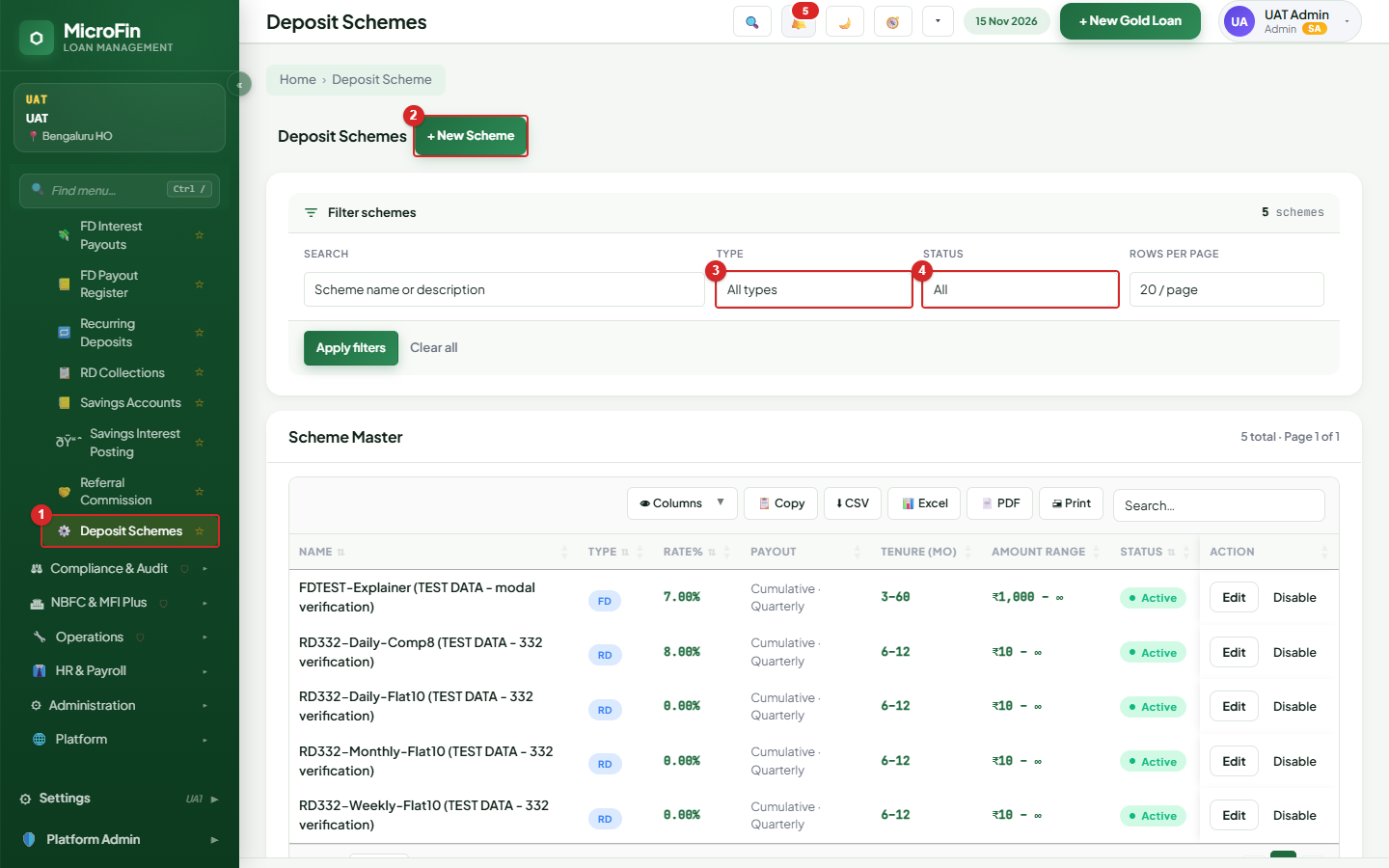
- Deposits > Deposit Schemes
- New Scheme
- Deposit type filter
- Status filter
3. Before you start
- Permissions differ by action.
- Deposit Schemes need the settings right (
CanManageSettings). - Opening an FD or RD, and collecting an RD instalment, need only a signed-in user of the branch.
- Closing an FD or RD needs the sensitive-data right (
CanViewSensitiveData). - FD interest payouts (both lists), the FD Payout Register and Referral Commission need both Access Vouchers (
CanAccessVouchers) and Manage Loans (CanManageLoans). - Reverse and Delete on the register are for Admin and SuperAdmin only.
- Deposit Schemes need the settings right (
- A branch user sees and works on their own branch only (“This deposit belongs to another branch.”). HO users see every branch.
- Have ready: the depositor as an existing member, the scheme, and the payment details (mode and the Cash / Bank account the money goes into or comes from).
- Enter the real date. The Open Date of an FD or RD and the dates on several other forms are not checked against a back-date or future-date window. Only a locked day or closed period stops you. Type the real date the money moved.
4. Step-by-step instructions
A. Create a deposit scheme
- Open
Deposits > Deposit Schemesand click + New Scheme. - Under Basic Details enter Scheme Name and choose Deposit Type (Fixed Deposit (FD) or Recurring Deposit (RD)).
- Under Interest & Payout enter Interest Rate (% p.a.) and choose Payout Mode: Cumulative (compound, paid at maturity), Monthly payout (simple), Quarterly payout (simple) or At Maturity (simple, single payout). Set Premature Penalty (% rate reduction).
- Set Min Tenure (months), Max Tenure (months), Min Amount (₹) and, if you want a ceiling, Max Amount (₹).
- (FD only, optional) Tick Allow a different rate / payout mode per customer and fill Minimum customer rate (% p.a.) and Maximum customer rate (% p.a.). The scheme's own rate must lie inside this band.
- (RD only) Fill Collection Frequency, Interest Mode, and for Flat the Flat Rate (%) and Flat Rate Basis, plus Missed Instalment Penalty (₹) and Grace Days.
- Click ✓ Create Scheme. To stop offering a scheme use Disable on the list; existing deposits are unaffected.
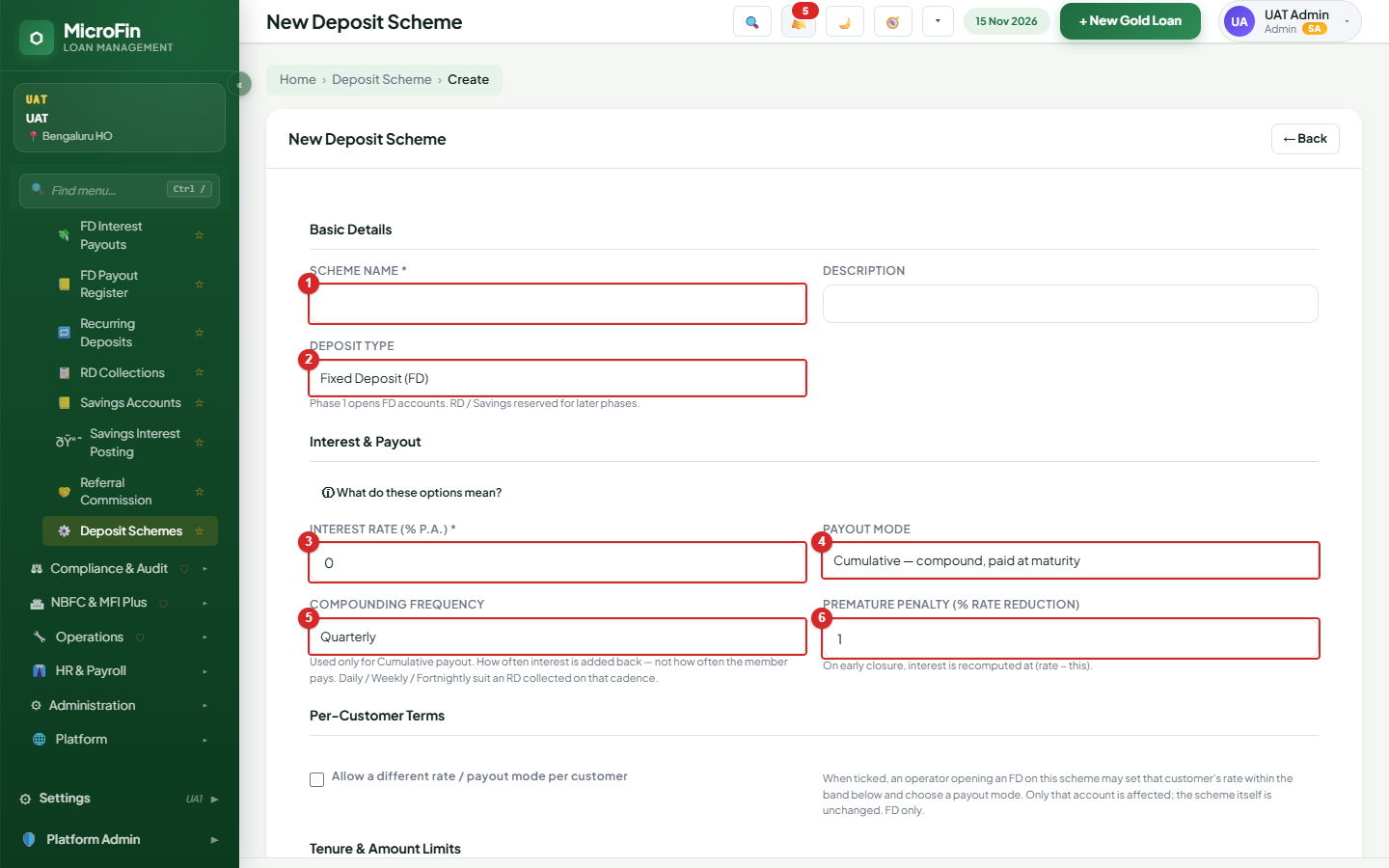
- Scheme name
- Deposit type (FD, RD or Savings)
- Interest rate
- Payout mode
- Compounding frequency
- Premature closure penalty (%)
B. Open a Fixed Deposit
- Open
Deposits > Fixed Depositsand click + Open FD. - Choose the Member (use + Add if the person is not yet a member) and the FD Scheme.
- Enter Amount (₹), Tenure (months) and Open Date.
- (Optional) Referred By — type at least two characters of the member's name or mobile and pick from the list; enter Referral Commission (% p.a.) only if this deposit should differ from the company rate (blank = company rate, 0 = none).
- (Only if the scheme allows it) Tick Customise the rate / payout mode for this customer and enter Customer Rate (% p.a.) and Payout Mode. This affects only this account.
- Choose Investment Type: Unsecured, or Secured (gold held as security). For Secured, add each item with Photo, Weight (g), Purity, Pieces and Description using + Add Item.
- Under Payment Details choose Payment Mode and Cash / Bank Account, and Reference No. for any non-cash mode.
- Check the Maturity Preview (Maturity Date, Interest Style, Total Interest, Maturity Value, Each Payout), then click ✓ Open Fixed Deposit and confirm “Open this fixed deposit and receive …?”.
- You see “Fixed Deposit opened.” Open the deposit with View and click 🖨 Receipt or 📜 Certificate.
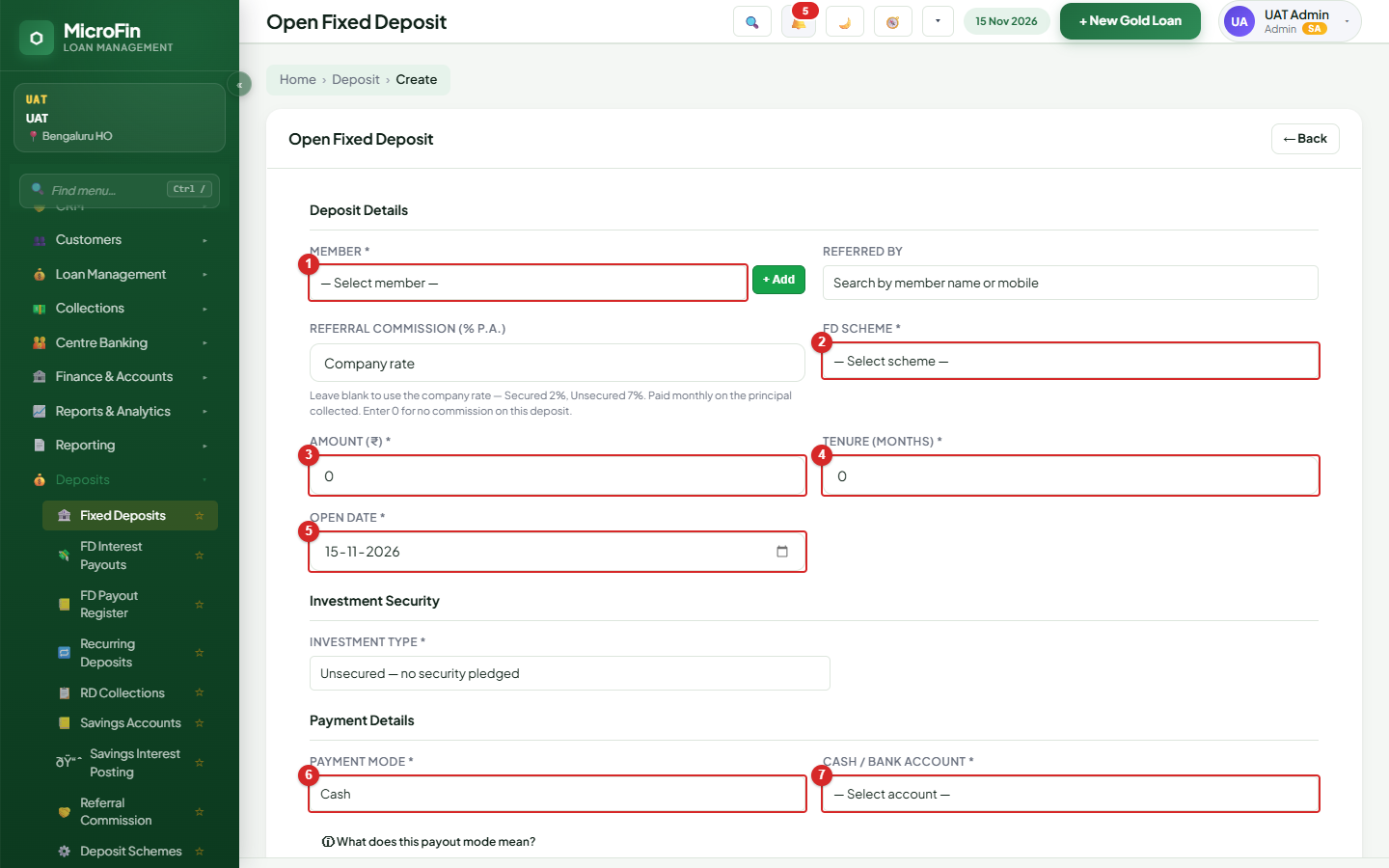
- Member
- Scheme
- Deposit amount
- Tenure in months
- Opening date
- Payment mode
- Cash or bank account that receives the deposit
C. Pay FD interest during the term
Only Monthly, Quarterly and At Maturity FDs pay out interest before closure. A Cumulative FD pays nothing until maturity and never appears on the payout screens. Use one of the two routes for an FD at a time.
Route 1 — FD Interest Payouts list (one click)
- Open
Deposits > FD Interest Payouts. The Payable Now banner shows the total due. - On the FD's row choose Pay via (mode) and the account, then click Pay ₹x and confirm. The payout is dated today.
Route 2 — FD Payout Register (generate, then pay)
- Open
Deposits > FD Payout Registerand click ⚡ Generate payouts. - Choose Month, Year, optionally Branch, and Calculate interest up to. The date starts at the company cut-off for that month (normally the last day of the month). Click Re-quote if you change it, check the preview, then click ⚡ Generate n payout(s). Generating writes
Pendingrows only; no money moves. - Back on the register, click Pay on a row. Check Amount paid (₹) (it starts at what is outstanding), Payment date, Payment mode, Pay from account, optional Reference / cheque no and Remarks, then confirm.
- If you pay less than the net payable the row becomes
Partial; use Pay again for the rest. A full payment makes itPaid.
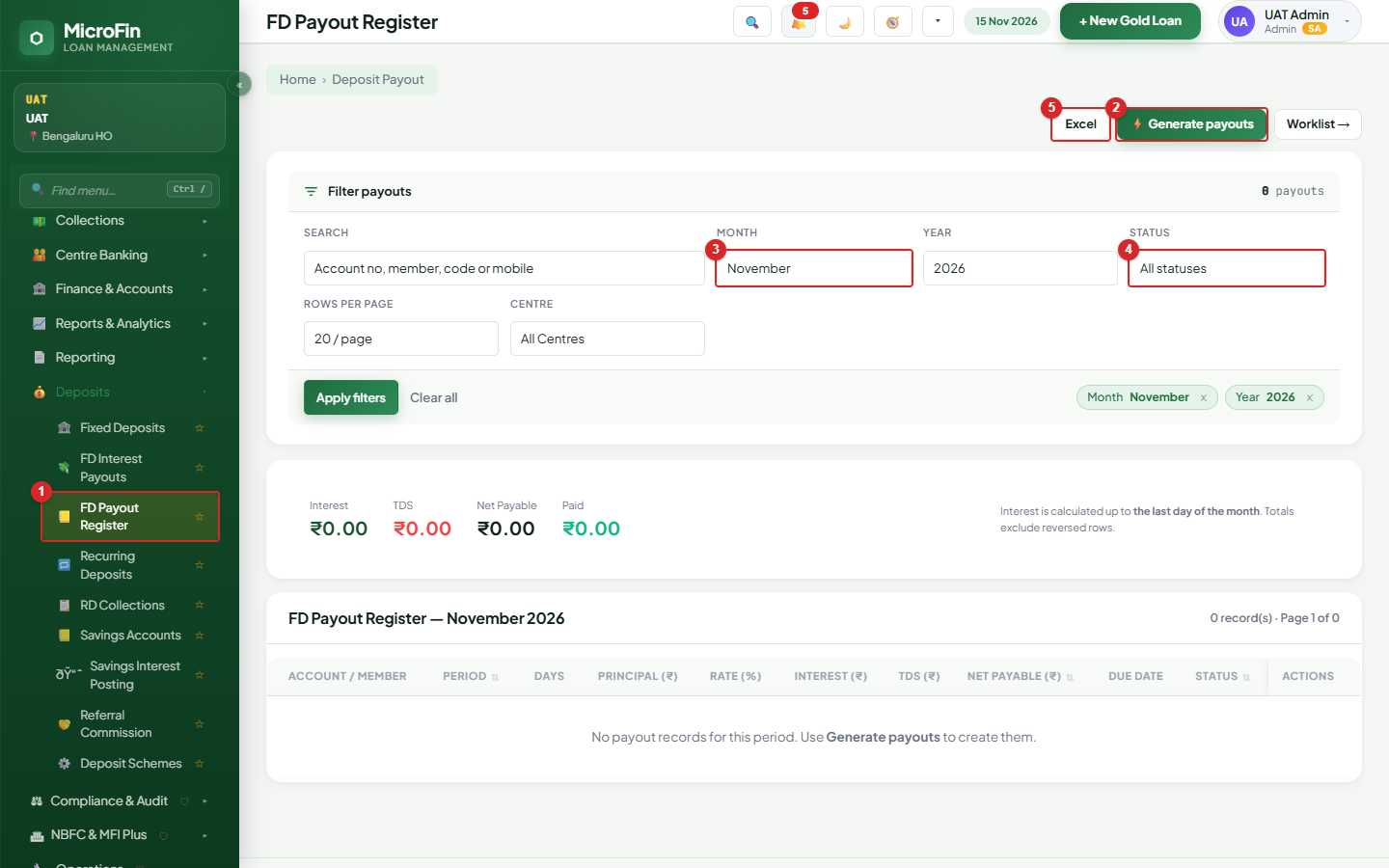
- Deposits > FD Payout Register
- Generate payouts
- Month
- Status filter
- Excel download
Pending or Partial row on the register, so the same interest is never paid twice.D. Reverse an interest payout (Admin or SuperAdmin)
- On the FD Payout Register find the
PaidorPartialrow and click ↩ Reverse. - Enter a reason (at least 3 characters) and confirm. The interest is handed back with a contra entry dated today, the deposit's interest-paid figure is reduced, and the period becomes payable again. The row stays on the register as
Reversed. - A mistaken
Pendingrow (nothing paid) can be removed with the delete icon. This sends a deletion request for approval; after it is approved, run Generate again to recreate the row.
E. Close an FD — at maturity or early
- Open the FD with View. Click Settle at Maturity (when today is on or after the maturity date) or Close Early (Premature).
- The page shows Principal, Interest Accrued, Interest Already Paid, Settlement Type and Amount Payable. An early closure shows an amber banner explaining the penalty.
- Check Closure Date. If you change it the page reloads so the quote matches that date.
- Choose Payment Mode and Cash / Bank Account (and Reference No. for non-cash). Add Remarks if needed.
- Click ✓ Settle & Close and confirm “Confirm Closure”. The status becomes
Closed(on or after maturity) orPrematureClosed, and the closure receipt opens.
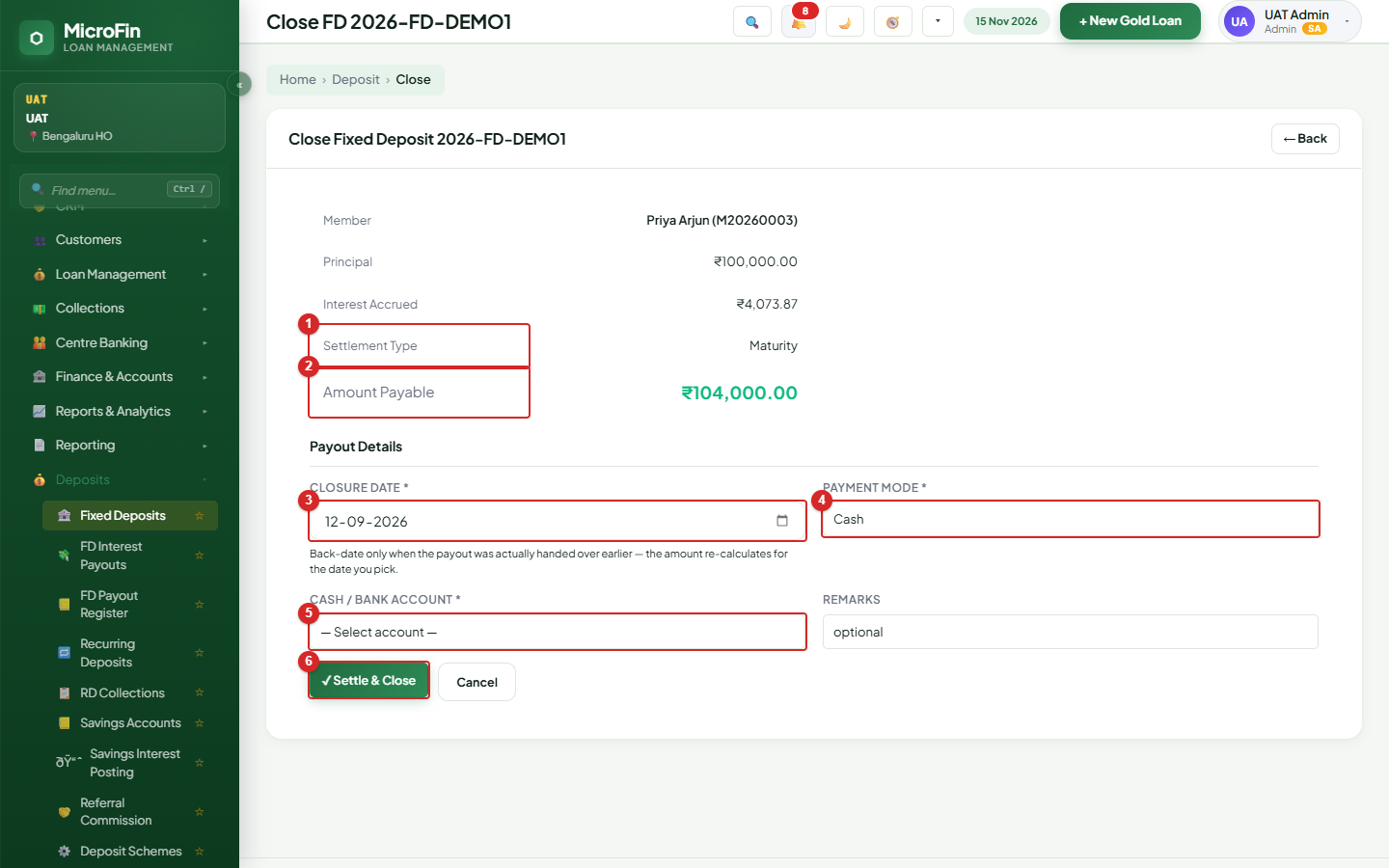
- Settlement type (maturity or premature)
- Amount payable
- Closure Date
- Payment Mode
- Cash / Bank Account the payout is paid from
- Settle & Close
F. Open a Recurring Deposit
- Open
Deposits > Recurring Depositsand click + Open RD. - Choose Member and RD Scheme. The scheme's cadence names the labels, for example “Daily Installment (₹)”.
- Enter Installment (₹), Number of Collections (a count of collections, for example 365 for a one-year daily RD — not months) and Open Date.
- Under First Installment — Payment Details enter Collected On (the day the first instalment was received), Payment Mode and Cash / Bank Account.
- Check the Maturity Preview, then click ✓ Open RD & Collect Installment 1. The first instalment is collected in the same step.
G. Collect RD instalments
- Open
Deposits > RD Collections. Set Collect via, Into account and Reference at the top. - On a row, Due now shows how many instalments have fallen due and Penalty the late fee for them.
- Click Collect n × ₹x to take every due instalment in one action, or Just 1 for only the next one. The collection is dated today and one receipt line is made for each instalment.
- If the depositor paid nothing, click ₹0 to record a zero collection request instead (see the collection chapters).
- You can also collect one instalment from the RD's View page with Collect ₹x.
H. Close an RD
- On the RD View page click Close / Settle RD and complete it exactly as an FD closure (Closure Date, mode, account, ✓ Settle & Close).
- Only the instalments actually collected are paid out, at the contract rate on or after maturity, or at the reduced rate for an early closure. Missed instalments are simply not part of the payout.
I. Pay referral commission
- Open
Deposits > Referral Commission. Each row is one deposit that has a referrer. - Choose Pay via and the account on the row (or set the header block and Apply to all rows).
- Click Pay for the oldest unpaid month, or Pay all n for every unpaid month. Payment is dated today.
- To correct the rate for one deposit, use the rate box on the row. Months already paid do not change.
5. Field explanation
| Field | Purpose | Required? | Expected input | Validation | Example |
|---|---|---|---|---|---|
| Scheme Name | Names the product | Yes | Up to 100 characters | Unique in your company: “A deposit scheme named '…' already exists.” | One Year FD |
| Interest Rate (% p.a.) | Scheme rate | Yes | 0–100 | “Interest rate must be between 0 and 100.” | 8.5 |
| Payout Mode | How FD interest is paid | Yes | Cumulative / Monthly / Quarterly / At Maturity | Must be one of these | Quarterly |
| Premature Penalty (% rate reduction) | Points knocked off the rate on early closure | Optional (default 1) | 0–100 | Range checked | 1 |
| Min / Max Tenure (months) | Allowed term | Yes | 1–600 | Max not below min | 12 / 60 |
| Min / Max Amount (₹) | Allowed amount | Min yes, Max optional | Rupees | “Maximum amount cannot be less than minimum amount.” | 10,000 |
| Allow a different rate / payout mode per customer | Lets staff set one customer's terms | Optional (FD only) | Tick plus min and max customer rate | Both bounds needed; min not above max; scheme rate inside the band | Band 7–9 |
| Collection Frequency | RD cadence | RD only | Daily / Weekly / Fortnightly / Monthly | Refused on an FD scheme | Daily |
| Interest Mode | RD interest style | RD only | Compound / Flat | Flat needs a rate | Flat |
| Flat Rate (%) / Flat Rate Basis | Flat RD interest | Flat only | 0–100, two decimals; Whole term or Per annum | Whole term is refused when the scheme's tenure band is wider than 12 months | 10 |
| Missed Instalment Penalty (₹) / Grace Days | Late fee per late instalment, and days of tolerance | Optional | Rupees; whole days | — | ₹5, 2 days |
| Member | The depositor | Yes | Pick from the list | “Select a valid member.” | Lakshmi Devi |
| Amount (₹) / Tenure (months) | FD size and term | Yes | Within the scheme limits | “Amount is below the scheme minimum of ₹x.” / “Tenure must be between a and b months.” | 50,000 / 12 |
| Open Date | Start of the deposit | Yes | Date | Not checked against a back-date window — enter the real date | 15-11-2026 |
| Investment Type | Secured or Unsecured | Yes | Unsecured / Secured | Secured needs at least one gold item with photo (5 MB), weight, purity | Unsecured |
| Payment Mode / Cash / Bank Account / Reference No. | How the money moves | Yes (reference for non-cash) | Cash needs a Cash account; other modes need a Bank account | “Payment mode is required.” “Select the Cash/Bank account.” “A reference number is required for non-cash payments.” | NEFT |
| Referred By / Referral Commission (% p.a.) | Referrer and own rate | Optional | Existing member; 0–100 | A member cannot refer themself; a rate with no referrer is refused | — |
| Installment (₹) / Number of Collections | RD instalment and count | Yes | Amount; up to 2,000 collections | Scheme minimum / maximum; term inside the scheme's month band | ₹100 / 365 |
| Collected On | Date of RD instalment 1 | Yes | Date | Not in the future; not before Open Date | 15-11-2026 |
| Closure Date | Date of settlement | Yes | Date | Within the back-date window; not in the future; not before opening or the last movement | 15-11-2027 |
| Reason (reverse) | Why a payout is reversed | Yes | Text | At least 3 characters | Paid to wrong account |
6. Buttons and actions
| Button | What it does |
|---|---|
| + New Scheme / Edit / Disable / Enable | Creates or changes a scheme, or stops or restarts offering it. |
| What do these options mean? | Opens a plain-language explanation of the scheme options; changes nothing. |
| + Open FD / + Open RD | Opens the form for a new deposit. |
| ✓ Open Fixed Deposit | Saves the FD and books the cash received. |
| ✓ Open RD & Collect Installment 1 | Saves the RD and collects its first instalment. |
| 🖨 Receipt / 📜 Certificate | Prints the receipt (numbers FD-OP-… for opening, FD-CL-… for closure) or the certificate. The certificate prints as ORIGINAL; 🖨 Print DUPLICATE copy stamps a replacement copy. |
| Pay ₹x | Pays one FD interest payout, dated today (FD Interest Payouts list). |
| ⚡ Generate payouts | Creates Pending payout rows for a month (no money moves). |
| Pay (register) | Pays a generated row in full or in part, with a date. |
| ↩ Reverse | Admin/SuperAdmin: hands a paid payout back. |
| Collect n × ₹x / Just 1 / ₹0 | Collects all due RD instalments, only the next one, or records that nothing was paid. |
| Settle at Maturity / Close Early (Premature) / Close / Settle RD | Opens the closure form. |
| ✓ Settle & Close | Pays out and closes the deposit. |
| Pay / Pay all n (Referral) | Pays the oldest unpaid month, or every unpaid month, of commission. |
| Excel | Exports the FD Interest Payouts list, the FD Payout Register and the Referral Commission list. |
7. Business rules and validations
deposit.PayoutCutoffDay; 0 or blank = last day of the month)./Settings/ReferralCommission, and a change affects future months only).Pending or Partial register row for it can no longer be paid (“This deposit is Closed — only an active deposit can be paid out.”) and is not removed automatically. Ask an Admin to delete the Pending row. Pay or reverse register rows before closing the FD./DepositLoan. We could not confirm a menu entry for it on every installation, so it is not described step by step here. Ask your administrator whether it is enabled for you.8. Expected result
- FD opened: status
Active, the amount is booked as cash/bank received, receiptFD-OP-…is available, message “Fixed Deposit opened.” - RD opened: status
Active, instalment 1 collected, message “Recurring Deposit opened (installment 1 collected).” - Payout paid: message “Interest payout recorded.”; the register row is
PaidorPartial; the deposit's passbook gets an interest-payout line. - Closed: “Deposit closed and settled.”; status
ClosedorPrematureClosed; closure receiptFD-CL-…; the passbook balance becomes 0. - Payout reversed: “FD interest payout reversed.”; row
Reversed; period payable again.
9. Troubleshooting
| Message or problem | Likely cause | What to do |
|---|---|---|
| “The Deposits module is not enabled for this company…” | The module switch is off | Ask your administrator to have a SuperAdmin turn it on. |
| Cannot open the closure or payout screens | You lack the needed right | Closure needs CanViewSensitiveData; payouts need Access Vouchers and Manage Loans. Ask your administrator. |
| “This deposit cannot be closed (already settled or lien-marked).” | Deposit already closed, or a loan is secured on it | Check the status; settle the loan against the deposit first. |
| “Cannot settle on … — that day's books are locked…” | Closed accounting period or EOD lock | Pick an open date or ask for the period / EOD to be reopened. |
| “Closure date … is before the last transaction on this deposit” | Date earlier than the last entry | Use a date on or after the last entry, not later than today. |
| “This FD has a pending payout on the register for the period ending …” | A Pending or Partial row exists | Pay it from the register, or delete the Pending row, then retry. |
| “Cumulative deposits pay interest only at maturity.” | You tried to pay a Cumulative FD | Nothing to do until maturity. |
| “No interest payout is due yet.” | Nothing earned up to the cut-off date | Wait for the cut-off or check the FD's open date. |
| “Nothing to generate for the period ending …” | No active FD has unpaid interest to that date | Check the date and whether payouts already exist. |
| “Pick the Cash/Bank account for this row first.” | No account chosen on the list row | Select the account, then click Pay or Collect. |
| “A Secured investment needs at least one photograph of the gold held as security.” | Secured FD without a photographed item | Add an item with photo, weight and purity, or choose Unsecured. |
| “Only n installment(s) remain on this RD — x were requested.” | Too many instalments asked for | Collect no more than remain. |
| “Reason is required (min 3 characters).” | Reversal reason too short | Enter a clear reason of 3 or more characters. |
| “4-eyes rule: a different user must reverse this payout…” | Shown to a non-admin processor | Ask a different authorised user, or an Admin. |
| Passbook shows an interest payout under “Debit” | Display convention of the deposit passbook | Read the Type column; the payout is money paid out to the depositor. |
11. Related modules
- Savings accounts and passbook (next chapter) — a member's savings account and the Unclaimed Savings report.
- Member management — the depositor must exist as a member; the optional gas-connection and location checks start on the member's page.
- Accounting — every deposit receipt and payout appears in the Cash Book, Day Book and Balance Sheet (deposits as a liability).
- End of Day and approvals — a locked day blocks payouts and closures; payout deletion goes through the approval chain.
வைப்புகளும் சேமிப்பும்
நிலை வைப்பும் தொடர் வைப்பும்
1. அறிமுகம்
வைப்பு என்பது ஒரு உறுப்பினர் (வைப்பாளர்) உங்கள் நிறுவனத்தில் வைக்கும் பணம். MicroFin இரண்டு வகைகளைக் கையாளுகிறது:
- நிலை வைப்பு (Fixed Deposit – FD) — ஒரே தொகை, Deposit Scheme-இன் வட்டி விகிதத்தில் குறிப்பிட்ட மாதங்களுக்கு வைக்கப்படும். வழங்கல் முறையைப் (Payout Mode) பொறுத்து, வட்டி காலத்தின் இடையில் வழங்கப்படும் அல்லது முதிர்வில் அசலுடன் சேர்த்து வழங்கப்படும்.
- தொடர் வைப்பு (Recurring Deposit – RD) — தினசரி, வாராந்திர, இரு வாரத்துக்கு ஒருமுறை அல்லது மாதாந்திர முறையில், குறிப்பிட்ட எண்ணிக்கையிலான வசூல்களுக்கு நிலையான தவணை செலுத்தப்படும். முதிர்வில் முழுத் தொகையும் வழங்கப்படும்.
இந்த அத்தியாயம் திட்டப் பட்டியல் (scheme master), FD தொடங்குதல் மற்றும் முடித்தல், வட்டி வழங்கல் (ஒரு-சொடுக்குப் பட்டியல் மற்றும் FD Payout Register), வழங்கலைத் திருப்பிக் கழித்தல், RD-இன் தொடக்கம் முதல் முடிப்பு வரையிலான நடைமுறை, ரசீது, சான்றிதழ், பரிந்துரைக் கமிஷன் ஆகியவற்றை விளக்குகிறது. உறுப்பினர் சேமிப்புக் கணக்குகள் அடுத்த அத்தியாயத்தில் உள்ளன.
2. வழிசெலுத்தல்
எல்லாத் திரைகளும் இடப்புற மெனுவின் Deposits தொகுப்பில் உள்ளன:
Deposits > Deposit Schemes— திட்டங்களின் பட்டியல்.Deposits > Fixed Deposits— FD பதிவேடு; + Open FD; வரிசையில் View.Deposits > FD Interest Payouts— செலுத்த வேண்டிய வட்டியின் ஒரு-சொடுக்குப் பட்டியல்.Deposits > FD Payout Register— வட்டி வழங்கல்களை உருவாக்க, செலுத்த, திருப்பிக் கழிக்க.Deposits > Recurring Deposits— RD பதிவேடு; + Open RD.Deposits > RD Collections— செலுத்த வேண்டிய தவணைகள்.Deposits > Referral Commission— பரிந்துரைத்தவர்களுக்குரிய கமிஷன்.
- வைப்புகள் > வைப்புத் திட்டங்கள்
- புதிய திட்டம்
- வைப்பு வகை வடிகட்டி
- நிலை வடிகட்டி
3. தொடங்குவதற்கு முன்
- செயலுக்கேற்ப அனுமதி மாறுபடும்.
- Deposit Schemes-க்கு அமைப்பு உரிமை (
CanManageSettings) தேவை. - FD / RD தொடங்கவும், RD தவணை வசூலிக்கவும் கிளையில் உள்நுழைந்த பயனர் போதும்.
- FD / RD-ஐ முடிக்க முக்கியத் தரவு உரிமை (
CanViewSensitiveData) தேவை. - FD வட்டி வழங்கல் (இரு பட்டியல்கள்), FD Payout Register, Referral Commission ஆகியவற்றுக்கு Access Vouchers (
CanAccessVouchers) மற்றும் Manage Loans (CanManageLoans) இரண்டும் தேவை. - பதிவேட்டில் Reverse, Delete ஆகியவை Admin, SuperAdmin-க்கு மட்டுமே.
- Deposit Schemes-க்கு அமைப்பு உரிமை (
- கிளைப் பயனர் தம் கிளையை மட்டுமே பார்க்கவும், அதில் மட்டுமே பணிபுரியவும் முடியும் (“This deposit belongs to another branch.”). HO பயனர் எல்லாக் கிளைகளையும் காண்பார்.
- தயாராக வைக்கவும்: ஏற்கெனவே உறுப்பினராக உள்ள வைப்பாளர், scheme, பணம் செலுத்தும் விவரம் (mode, பணம் செல்லும்/வரும் Cash / Bank கணக்கு).
- உண்மையான தேதியை உள்ளிடுங்கள். FD / RD-இன் Open Date மற்றும் வேறு சில படிவங்களின் தேதிகள் பின்தேதி அல்லது எதிர்காலத் தேதி வரம்புடன் ஒப்பிட்டுச் சரிபார்க்கப்படுவதில்லை. பூட்டப்பட்ட நாள் அல்லது மூடிய கணக்கியல் காலம் மட்டுமே தடுக்கும். பணம் நகர்ந்த உண்மையான தேதியை உள்ளிடவும்.
4. படிப்படியான வழிமுறைகள்
A. வைப்புத் திட்டத்தை உருவாக்குதல்
Deposits > Deposit Schemesதிறந்து + New Scheme சொடுக்கவும்.- Basic Details-இல் Scheme Name உள்ளிட்டு Deposit Type (Fixed Deposit (FD) அல்லது Recurring Deposit (RD)) தேர்வு செய்யவும்.
- Interest & Payout-இல் Interest Rate (% p.a.) உள்ளிட்டு Payout Mode தேர்வு செய்யவும்: Cumulative (compound, முதிர்வில் வழங்கல்), Monthly payout (simple), Quarterly payout (simple) அல்லது At Maturity (simple, ஒரே வழங்கல்). Premature Penalty (% rate reduction) அமைக்கவும்.
- Min Tenure (months), Max Tenure (months), Min Amount (₹) அமைக்கவும்; உச்சவரம்பு வேண்டுமெனில் Max Amount (₹).
- (FD மட்டும், விருப்பம்) Allow a different rate / payout mode per customer குறியிட்டு Minimum customer rate (% p.a.), Maximum customer rate (% p.a.) நிரப்பவும். scheme-இன் சொந்த விகிதம் இந்த வரம்புக்குள் இருக்க வேண்டும்.
- (RD மட்டும்) Collection Frequency, Interest Mode, Flat எனில் Flat Rate (%), Flat Rate Basis, மேலும் Missed Instalment Penalty (₹), Grace Days நிரப்பவும்.
- ✓ Create Scheme சொடுக்கவும். scheme-ஐ இனி வழங்க வேண்டாமெனில் பட்டியலில் Disable; ஏற்கெனவே உள்ள வைப்புகள் பாதிக்கப்படாது.
- திட்டப் பெயர்
- வைப்பு வகை (FD, RD அல்லது சேமிப்பு)
- வட்டி விகிதம்
- வழங்கல் முறை
- கூட்டு வட்டி இடைவெளி
- முன்கூட்டிய முடிப்பு அபராதம் (%)
B. நிலை வைப்பு (FD) தொடங்குதல்
Deposits > Fixed Depositsதிறந்து + Open FD சொடுக்கவும்.- Member (உறுப்பினர் இல்லையெனில் + Add) மற்றும் FD Scheme தேர்வு செய்யவும்.
- Amount (₹), Tenure (months), Open Date உள்ளிடவும்.
- (விருப்பம்) Referred By — உறுப்பினரின் பெயர் அல்லது கைபேசி எண்ணின் குறைந்தது இரண்டு எழுத்துகளைத் தட்டச்சு செய்து பட்டியலிலிருந்து தேர்வு செய்யவும்; இந்த வைப்புக்கு நிறுவன விகிதத்திலிருந்து வேறுபட்ட விகிதம் வேண்டுமெனில் மட்டும் Referral Commission (% p.a.) உள்ளிடவும் (காலி = நிறுவன விகிதம், 0 = கமிஷன் இல்லை).
- (scheme அனுமதித்தால் மட்டும்) Customise the rate / payout mode for this customer குறியிட்டு Customer Rate (% p.a.), Payout Mode உள்ளிடவும். இது இந்தக் கணக்கை மட்டுமே பாதிக்கும்.
- Investment Type தேர்வு: Unsecured, அல்லது Secured (தங்கம் பிணையாக). Secured எனில் + Add Item மூலம் ஒவ்வொரு பொருளுக்கும் Photo, Weight (g), Purity, Pieces, Description சேர்க்கவும்.
- Payment Details-இல் Payment Mode, Cash / Bank Account, பணமல்லாத முறைக்கு Reference No. உள்ளிடவும்.
- Maturity Preview (Maturity Date, Interest Style, Total Interest, Maturity Value, Each Payout) பார்த்து ✓ Open Fixed Deposit சொடுக்கி “Open this fixed deposit and receive …?” என்பதை உறுதிப்படுத்தவும்.
- “Fixed Deposit opened.” என வரும். View மூலம் வைப்பைத் திறந்து 🖨 Receipt அல்லது 📜 Certificate சொடுக்கவும்.
- உறுப்பினர்
- திட்டம்
- வைப்புத் தொகை
- காலம் (மாதங்கள்)
- தொடங்கிய தேதி
- செலுத்தும் முறை
- வைப்பைப் பெறும் ரொக்க அல்லது வங்கிக் கணக்கு
C. காலத்தின் இடையே FD வட்டி வழங்குதல்
Monthly, Quarterly, At Maturity FD-கள் மட்டுமே முடிப்புக்கு முன் வட்டி வழங்கும். Cumulative FD முதிர்வு வரை எதுவும் வழங்காது; வழங்கல் திரைகளிலும் தோன்றாது. ஒரு FD-க்கு ஒரு நேரத்தில் ஒரே வழியைப் பயன்படுத்தவும்.
வழி 1 — FD Interest Payouts பட்டியல் (ஒரு சொடுக்கு)
Deposits > FD Interest Payoutsதிறக்கவும். Payable Now பட்டை செலுத்த வேண்டிய மொத்தத் தொகையைக் காட்டும்.- FD-இன் வரிசையில் Pay via (mode), கணக்கு தேர்வு செய்து Pay ₹x சொடுக்கி உறுதிப்படுத்தவும். வழங்கல் இன்றைய தேதியிடப்படும்.
வழி 2 — FD Payout Register (உருவாக்கி, பின் செலுத்து)
Deposits > FD Payout Registerதிறந்து ⚡ Generate payouts சொடுக்கவும்.- Month, Year, தேவையெனில் Branch, Calculate interest up to தேர்வு செய்யவும். இந்தத் தேதி முதலில் அந்த மாதத்துக்கான நிறுவனத்தின் கணக்கீட்டு இறுதித் தேதியாக (cut-off; பொதுவாக மாதத்தின் கடைசி நாள்) இருக்கும். மாற்றினால் Re-quote சொடுக்கி, முன்னோட்டம் பார்த்து ⚡ Generate n payout(s) சொடுக்கவும். இது
Pendingவரிசைகளை மட்டுமே எழுதும்; பணம் நகராது. - பதிவேட்டில் வரிசையில் Pay சொடுக்கவும். Amount paid (₹) (நிலுவைத் தொகையுடன் தொடங்கும்), Payment date, Payment mode, Pay from account, விருப்பமாக Reference / cheque no, Remarks சரிபார்த்து உறுதிப்படுத்தவும்.
- நிகரமாகச் செலுத்த வேண்டிய தொகையைவிடக் குறைவாகச் செலுத்தினால் வரிசை
Partialஆகும்; மீதிக்கு மீண்டும் Pay. முழுமையாகச் செலுத்தினால்Paid.
- வைப்புகள் > FD வழங்கல் பதிவேடு
- வழங்கல்களை உருவாக்கு
- மாதம்
- நிலை வடிகட்டி
- Excel பதிவிறக்கம்
Pending அல்லது Partial வரிசை உள்ள FD-ஐ ஒரு-சொடுக்குப் பட்டியல் மறுக்கும்; எனவே ஒரே வட்டி இருமுறை செலுத்தப்படாது.D. வட்டி வழங்கலைத் திருப்பிக் கழித்தல் (Admin அல்லது SuperAdmin)
- FD Payout Register-இல்
Paidஅல்லதுPartialவரிசையைக் கண்டு ↩ Reverse சொடுக்கவும். - காரணத்தை (குறைந்தது 3 எழுத்துகள்) உள்ளிட்டு உறுதிப்படுத்தவும். வட்டி இன்றைய தேதியிட்ட எதிர்ப்பதிவுடன் (contra entry) திரும்பப் பெறப்படும்; வைப்பில் செலுத்தப்பட்ட வட்டித் தொகை குறையும்; அந்தக் காலம் மீண்டும் செலுத்தத்தக்கதாகும். வரிசை
Reversedஆகப் பதிவேட்டில் இருக்கும். - தவறான
Pendingவரிசையை (எதுவும் செலுத்தாதது) நீக்கும் ஐகானால் நீக்கலாம்; இது ஒப்புதலுக்கான நீக்கல் கோரிக்கையை அனுப்பும். ஒப்புதலுக்குப் பின் Generate மீண்டும் இயக்கி வரிசையை உருவாக்கவும்.
E. FD-ஐ முடித்தல் — முதிர்வில் அல்லது முன்கூட்டியே
- View மூலம் FD-ஐத் திறந்து Settle at Maturity (இன்று முதிர்வு தேதி அல்லது அதற்குப் பின்) அல்லது Close Early (Premature) சொடுக்கவும்.
- திரை Principal, Interest Accrued, Interest Already Paid, Settlement Type, Amount Payable காட்டும். முன்கூட்டிய முடிப்புக்கு அபராதத்தை விளக்கும் மஞ்சள் பட்டை வரும்.
- Closure Date-ஐச் சரிபார்க்கவும். அதை மாற்றினால், கணக்கிடப்பட்ட தொகை (quote) அந்தத் தேதிக்குப் பொருந்தும் வகையில் பக்கம் மீண்டும் ஏற்றப்படும்.
- Payment Mode, Cash / Bank Account (பணமல்லாததற்கு Reference No.) தேர்வு செய்யவும். தேவையெனில் Remarks.
- ✓ Settle & Close சொடுக்கி “Confirm Closure” உறுதிப்படுத்தவும். நிலை
Closed(முதிர்வில்/பின்) அல்லதுPrematureClosedஆகும்; முடிப்பு ரசீது திறக்கும்.
- தீர்வு வகை (முதிர்வு அல்லது முன்கூட்டியது)
- செலுத்த வேண்டிய தொகை
- முடிப்புத் தேதி
- செலுத்தும் முறை
- தொகை வழங்கப்படும் ரொக்க / வங்கிக் கணக்கு
- Settle & Close
F. தொடர் வைப்பு (RD) தொடங்குதல்
Deposits > Recurring Depositsதிறந்து + Open RD சொடுக்கவும்.- Member, RD Scheme தேர்வு செய்யவும். scheme-இன் வசூல் இடைவெளிக்கேற்ப லேபிள்களின் பெயர் அமையும், எ.கா. “Daily Installment (₹)”.
- Installment (₹), Number of Collections (வசூல்களின் எண்ணிக்கை — எ.கா. ஓராண்டு தினசரி RD-க்கு 365; மாதம் அல்ல), Open Date உள்ளிடவும்.
- First Installment — Payment Details-இல் Collected On (முதல் தவணை பெறப்பட்ட நாள்), Payment Mode, Cash / Bank Account உள்ளிடவும்.
- Maturity Preview பார்த்து ✓ Open RD & Collect Installment 1 சொடுக்கவும். முதல் தவணை அதே படியில் வசூலாகும்.
G. RD தவணைகளை வசூலித்தல்
Deposits > RD Collectionsதிறக்கவும். மேலே Collect via, Into account, Reference அமைக்கவும்.- வரிசையில் Due now எத்தனை தவணைகள் செலுத்த வேண்டியவை என்பதையும், Penalty அவற்றுக்கான தாமதக் கட்டணத்தையும் காட்டும்.
- செலுத்த வேண்டிய எல்லாத் தவணைகளையும் ஒரே செயலில் எடுக்க Collect n × ₹x; அடுத்த ஒன்றை மட்டும் எடுக்க Just 1. வசூல் இன்றைய தேதியிடப்படும்; ஒவ்வொரு தவணைக்கும் ஒரு ரசீது வரி உருவாகும்.
- வைப்பாளர் எதுவும் செலுத்தவில்லை எனில் ₹0 சொடுக்கி ₹0 வசூல் கோரிக்கையைப் பதிவு செய்யவும் (வசூல் அத்தியாயங்களைப் பார்க்க).
- RD-இன் View பக்கத்திலும் Collect ₹x மூலம் ஒரு தவணையை வசூலிக்கலாம்.
H. RD-ஐ முடித்தல்
- RD View பக்கத்தில் Close / Settle RD சொடுக்கி FD முடிப்பைப் போலவே (Closure Date, mode, கணக்கு, ✓ Settle & Close) முடிக்கவும்.
- உண்மையில் வசூலான தவணைகள் மட்டுமே வழங்கப்படும் — முதிர்வில்/பின் ஒப்பந்த விகிதத்தில், முன்கூட்டியே எனில் குறைந்த விகிதத்தில். தவறிய தவணைகள் வழங்கலில் சேராது.
I. பரிந்துரைக் கமிஷன் செலுத்துதல்
Deposits > Referral Commissionதிறக்கவும். ஒவ்வொரு வரிசையும் பரிந்துரைத்தவர் உள்ள ஒரு வைப்பு.- வரிசையில் Pay via, கணக்கு தேர்வு செய்யவும் (அல்லது மேல் பகுதியில் அமைத்து Apply to all rows).
- மிகப் பழைய செலுத்தப்படாத மாதத்துக்கு Pay, எல்லாச் செலுத்தப்படாத மாதங்களுக்கும் Pay all n. வழங்கல் இன்றைய தேதியிடப்படும்.
- ஒரு வைப்புக்கான விகிதத்தைத் திருத்த வரிசையின் rate பெட்டியைப் பயன்படுத்தவும்; ஏற்கெனவே செலுத்திய மாதங்கள் மாறாது.
5. புல விளக்கம்
| புலம் | நோக்கம் | கட்டாயமா? | உள்ளீடு | சரிபார்ப்பு | எடுத்துக்காட்டு |
|---|---|---|---|---|---|
| Scheme Name | திட்டத்தின் பெயர் | ஆம் | 100 எழுத்துகள் வரை | நிறுவனத்தில் தனித்துவம்: “A deposit scheme named '…' already exists.” | One Year FD |
| Interest Rate (% p.a.) | scheme வட்டி | ஆம் | 0–100 | “Interest rate must be between 0 and 100.” | 8.5 |
| Payout Mode | FD வட்டி எப்படி வழங்கப்படும் | ஆம் | Cumulative / Monthly / Quarterly / At Maturity | இவற்றில் ஒன்று | Quarterly |
| Premature Penalty (% rate reduction) | முன்கூட்டிய முடிப்பில் விகிதத்திலிருந்து குறைக்கப்படும் புள்ளிகள் | விருப்பம் (இயல்பு 1) | 0–100 | வரம்பு சரிபார்ப்பு | 1 |
| Min / Max Tenure (months) | அனுமதிக்கப்பட்ட காலம் | ஆம் | 1–600 | Max, Min-ஐ விடக் குறையக்கூடாது | 12 / 60 |
| Min / Max Amount (₹) | அனுமதிக்கப்பட்ட தொகை | Min ஆம், Max விருப்பம் | ரூபாய் | “Maximum amount cannot be less than minimum amount.” | 10,000 |
| Allow a different rate / payout mode per customer | ஒரு வாடிக்கையாளருக்குத் தனி விதிமுறை | விருப்பம் (FD மட்டும்) | குறி, மேலும் குறைந்தபட்ச, அதிகபட்ச வாடிக்கையாளர் விகிதம் | இரு எல்லைகளும் தேவை; குறைந்தபட்சம் அதிகபட்சத்தை மீறக்கூடாது; scheme விகிதம் வரம்புக்குள் இருக்க வேண்டும் | வரம்பு 7–9 |
| Collection Frequency | RD வசூல் இடைவெளி | RD மட்டும் | Daily / Weekly / Fortnightly / Monthly | FD scheme-இல் மறுக்கப்படும் | Daily |
| Interest Mode | RD வட்டி முறை | RD மட்டும் | Compound / Flat | Flat-க்கு விகிதம் தேவை | Flat |
| Flat Rate (%) / Flat Rate Basis | Flat RD வட்டி | Flat-க்கு மட்டும் | 0–100, இரு தசம இடங்கள்; Whole term அல்லது Per annum | scheme-இன் கால வரம்பு 12 மாதங்களைவிட அகலமாக இருந்தால் Whole term மறுக்கப்படும் | 10 |
| Missed Instalment Penalty (₹) / Grace Days | தாமதத் தவணைக்கான கட்டணம், சலுகை நாட்கள் | விருப்பம் | ரூபாய்; முழு நாட்கள் | — | ₹5, 2 நாள் |
| Member | வைப்பாளர் | ஆம் | பட்டியலில் தேர்வு | “Select a valid member.” | Lakshmi Devi |
| Amount (₹) / Tenure (months) | FD தொகை, காலம் | ஆம் | scheme வரம்புக்குள் | “Amount is below the scheme minimum of ₹x.” / “Tenure must be between a and b months.” | 50,000 / 12 |
| Open Date | வைப்பு தொடங்கும் நாள் | ஆம் | தேதி | பின்தேதி வரம்புடன் ஒப்பிட்டுச் சரிபார்க்கப்படாது — உண்மையான தேதியை உள்ளிடவும் | 15-11-2026 |
| Investment Type | Secured அல்லது Unsecured | ஆம் | Unsecured / Secured | Secured-க்கு புகைப்படம் (5 MB), எடை, தூய்மையுடன் குறைந்தது ஒரு பொருள் | Unsecured |
| Payment Mode / Cash / Bank Account / Reference No. | பணம் நகரும் முறை | ஆம் (பணமல்லாததற்கு reference) | Cash-க்கு Cash கணக்கு; மற்றவைக்கு Bank கணக்கு | “Payment mode is required.” “Select the Cash/Bank account.” “A reference number is required for non-cash payments.” | NEFT |
| Referred By / Referral Commission (% p.a.) | பரிந்துரைத்தவர், சொந்த விகிதம் | விருப்பம் | ஏற்கெனவே உள்ள உறுப்பினர்; 0–100 | தன்னையே பரிந்துரைக்க முடியாது; பரிந்துரைத்தவர் இல்லாமல் விகிதம் மறுக்கப்படும் | — |
| Installment (₹) / Number of Collections | RD தவணை, எண்ணிக்கை | ஆம் | தொகை; 2,000 வசூல்கள் வரை | scheme குறைந்தபட்சம்/அதிகபட்சம்; காலம் scheme மாத வரம்புக்குள் | ₹100 / 365 |
| Collected On | RD தவணை 1-இன் தேதி | ஆம் | தேதி | எதிர்காலம் கூடாது; Open Date-க்கு முன் கூடாது | 15-11-2026 |
| Closure Date | முடிப்புத் தேதி | ஆம் | தேதி | பின்தேதி வரம்புக்குள்; எதிர்காலம் கூடாது; தொடக்கம்/கடைசிப் பதிவுக்கு முன் கூடாது | 15-11-2027 |
| Reason (reverse) | வழங்கல் ஏன் திருப்பிக் கழிக்கப்படுகிறது | ஆம் | உரை | குறைந்தது 3 எழுத்துகள் | Paid to wrong account |
6. பொத்தான்களும் செயல்களும்
| பொத்தான் | செய்வது |
|---|---|
| + New Scheme / Edit / Disable / Enable | scheme-ஐ உருவாக்க/மாற்ற, அல்லது வழங்குவதை நிறுத்த/தொடங்க. |
| What do these options mean? | scheme விருப்பங்களை எளிய மொழியில் விளக்கும்; எதையும் மாற்றாது. |
| + Open FD / + Open RD | புதிய வைப்புக்கான படிவத்தைத் திறக்கும். |
| ✓ Open Fixed Deposit | FD-ஐச் சேமித்து பெற்ற பணத்தைப் பதிவு செய்யும். |
| ✓ Open RD & Collect Installment 1 | RD-ஐச் சேமித்து முதல் தவணையை வசூலிக்கும். |
| 🖨 Receipt / 📜 Certificate | ரசீது (தொடக்கம் FD-OP-…, முடிப்பு FD-CL-…) அல்லது சான்றிதழை அச்சிடும். சான்றிதழ் ORIGINAL ஆக அச்சாகும்; 🖨 Print DUPLICATE copy மாற்று நகலை DUPLICATE முத்திரையுடன் அச்சிடும். |
| Pay ₹x | ஒரு FD வட்டி வழங்கலை இன்றைய தேதியில் செலுத்தும் (FD Interest Payouts பட்டியல்). |
| ⚡ Generate payouts | ஒரு மாதத்துக்கான Pending வரிசைகளை உருவாக்கும் (பணம் நகராது). |
| Pay (பதிவேடு) | உருவாக்கிய வரிசையை முழுமையாக அல்லது பகுதியாகத் தேதியுடன் செலுத்தும். |
| ↩ Reverse | Admin/SuperAdmin: செலுத்திய வழங்கலைத் திரும்பப் பெறும். |
| Collect n × ₹x / Just 1 / ₹0 | செலுத்த வேண்டிய எல்லா RD தவணைகள், அடுத்த ஒன்று, அல்லது எதுவும் செலுத்தவில்லை என்ற பதிவு. |
| Settle at Maturity / Close Early (Premature) / Close / Settle RD | முடிப்புப் படிவத்தைத் திறக்கும். |
| ✓ Settle & Close | தொகையை வழங்கி வைப்பை முடிக்கும். |
| Pay / Pay all n (Referral) | மிகப் பழைய அல்லது எல்லாச் செலுத்தப்படாத மாதக் கமிஷனைச் செலுத்தும். |
| Excel | FD Interest Payouts, FD Payout Register, Referral Commission பட்டியலை ஏற்றுமதி செய்யும். |
7. வணிக விதிகளும் சரிபார்ப்புகளும்
deposit.PayoutCutoffDay; 0 அல்லது காலி = மாத இறுதி)./Settings/ReferralCommission-இல் மாற்றலாம்; மாற்றம் எதிர்கால மாதங்களுக்கு மட்டும்).Pending அல்லது Partial பதிவேட்டு வரிசைகளைச் செலுத்த முடியாது (“This deposit is Closed — only an active deposit can be paid out.”); அவை தானாக நீங்காது. Pending வரிசையை நீக்க Admin-இடம் கேளுங்கள். FD-ஐ முடிக்கும் முன் பதிவேட்டு வரிசைகளைச் செலுத்தவும் அல்லது திருப்பிக் கழிக்கவும்./DepositLoan முகவரியில் கிடைக்கும். எல்லா நிறுவல்களிலும் இதற்கு மெனு உள்ளதா என உறுதிசெய்ய முடியவில்லை; எனவே படிப்படியாக இங்கு விவரிக்கவில்லை. உங்களுக்கு இயக்கப்பட்டுள்ளதா என நிர்வாகியிடம் கேளுங்கள்.8. எதிர்பார்க்கும் முடிவு
- FD தொடங்கியது: நிலை
Active, தொகை பணம்/வங்கியில் பெறப்பட்டதாகப் பதிவு, ரசீதுFD-OP-…கிடைக்கும், செய்தி “Fixed Deposit opened.” - RD தொடங்கியது: நிலை
Active, தவணை 1 வசூலானது, செய்தி “Recurring Deposit opened (installment 1 collected).” - வழங்கல் செலுத்தப்பட்டது: “Interest payout recorded.”; பதிவேட்டு வரிசை
Paidஅல்லதுPartial; வைப்பின் passbook-இல் வட்டி வழங்கல் வரி. - முடிந்தது: “Deposit closed and settled.”; நிலை
Closedஅல்லதுPrematureClosed; முடிப்பு ரசீதுFD-CL-…; passbook இருப்பு 0. - வழங்கல் திருப்பிக் கழிக்கப்பட்டது: “FD interest payout reversed.”; வரிசை
Reversed; காலம் மீண்டும் செலுத்தத்தக்கது.
9. சிக்கல் தீர்வு
| செய்தி அல்லது சிக்கல் | சாத்தியமான காரணம் | செய்ய வேண்டியது |
|---|---|---|
| “The Deposits module is not enabled for this company…” | module சுவிட்ச் அணைந்துள்ளது | SuperAdmin-இடம் இயக்கச் சொல்ல நிர்வாகியிடம் கேளுங்கள். |
| முடிப்பு அல்லது வழங்கல் திரைகளைத் திறக்க முடியவில்லை | தேவையான உரிமை இல்லை | முடிப்புக்கு CanViewSensitiveData; வழங்கலுக்கு Access Vouchers + Manage Loans. நிர்வாகியிடம் கேளுங்கள். |
| “This deposit cannot be closed (already settled or lien-marked).” | வைப்பு ஏற்கெனவே முடிந்துவிட்டது, அல்லது அதைப் பிணையாகக் கொண்ட கடன் உள்ளது | நிலையைப் பாருங்கள்; முதலில் வைப்பின் மீதான கடனைத் தீர்க்கவும். |
| “Cannot settle on … — that day's books are locked…” | மூடிய கணக்கியல் காலம் அல்லது EOD பூட்டு | திறந்த தேதியைத் தேர்வு செய்யுங்கள் அல்லது காலம்/EOD-ஐ மீண்டும் திறக்கக் கேளுங்கள். |
| “Closure date … is before the last transaction on this deposit” | கடைசிப் பதிவுக்கு முந்திய தேதி | கடைசிப் பதிவு அல்லது அதற்குப் பிந்திய, இன்றைக்கு மிகாத தேதியை உள்ளிடவும். |
| “This FD has a pending payout on the register for the period ending …” | Pending அல்லது Partial வரிசை உள்ளது | பதிவேட்டில் செலுத்துங்கள் அல்லது Pending வரிசையை நீக்கி, மீண்டும் முயலுங்கள். |
| “Cumulative deposits pay interest only at maturity.” | Cumulative FD-க்கு வழங்க முயன்றீர்கள் | முதிர்வு வரை எதுவும் செய்ய வேண்டியதில்லை. |
| “No interest payout is due yet.” | cut-off தேதி வரை வட்டி ஈட்டப்படவில்லை | cut-off வரை காத்திருங்கள் அல்லது FD தொடக்கத் தேதியைப் பாருங்கள். |
| “Nothing to generate for the period ending …” | அந்தத் தேதி வரை செலுத்தப்படாத வட்டியுடன் செயலில் உள்ள FD இல்லை | தேதியையும், வழங்கல்கள் ஏற்கெனவே உள்ளனவா என்பதையும் பாருங்கள். |
| “Pick the Cash/Bank account for this row first.” | வரிசைக்குக் கணக்கு தேர்வு செய்யவில்லை | கணக்கைத் தேர்ந்து Pay அல்லது Collect சொடுக்கவும். |
| “A Secured investment needs at least one photograph of the gold held as security.” | புகைப்படப் பொருள் இல்லாத Secured FD | புகைப்படம், எடை, தூய்மையுடன் பொருளைச் சேர்க்கவும் அல்லது Unsecured தேர்வு செய்யவும். |
| “Only n installment(s) remain on this RD — x were requested.” | மிக அதிகத் தவணைகள் கேட்கப்பட்டன | மீதமுள்ளதற்கு மிகாமல் வசூலிக்கவும். |
| “Reason is required (min 3 characters).” | திருப்பல் காரணம் மிகச் சிறியது | 3 அல்லது அதற்கு மேற்பட்ட எழுத்துகளில் தெளிவான காரணம் எழுதுங்கள். |
| “4-eyes rule: a different user must reverse this payout…” | வழங்கலைச் செலுத்திய, Admin அல்லாத பயனருக்குக் காட்டப்படும் | அதிகாரமுள்ள வேறொரு பயனரிடம் அல்லது Admin-இடம் கேளுங்கள். |
| Passbook-இல் வட்டி வழங்கல் “Debit” நெடுவரிசையில் வருகிறது | வைப்பு passbook-இன் காட்சி மரபு | Type நெடுவரிசையைப் பாருங்கள்; அது வைப்பாளருக்குச் செலுத்திய பணம். |
10. தமிழ் விளக்கம்
இந்த அத்தியாயம் நிலை வைப்பு (FD), தொடர் வைப்பு (RD), வட்டி வழங்கல், முடிப்பு, பரிந்துரைக் கமிஷன் ஆகியவற்றை விளக்குகிறது. திரையிலுள்ள ஆங்கில லேபிள்கள், மெனு வழிகள், பொத்தான் பெயர்கள் மாறாமல் ஆங்கிலத்திலேயே தரப்பட்டுள்ளன.
11. தொடர்புடைய தொகுதிகள்
- சேமிப்புக் கணக்குகளும் passbook-உம் (அடுத்த அத்தியாயம்) — உறுப்பினரின் சேமிப்புக் கணக்கு, Unclaimed Savings அறிக்கை.
- உறுப்பினர் மேலாண்மை — வைப்பாளர் உறுப்பினராக இருக்க வேண்டும்; விருப்பத்துக்குரிய எரிவாயு இணைப்பு, இருப்பிடச் சரிபார்ப்புகள் உறுப்பினர் பக்கத்தில் தொடங்கும்.
- கணக்கியல் — ஒவ்வொரு வைப்பு ரசீதும் வழங்கலும் Cash Book, Day Book, Balance Sheet-இல் தோன்றும் (வைப்புகள் பொறுப்பாக — liability).
- நாள் முடிவும் ஒப்புதல்களும் — பூட்டப்பட்ட நாள் வழங்கல், முடிப்பைத் தடுக்கும்; வழங்கல் நீக்கல் ஒப்புதல் சங்கிலி வழியாகச் செல்லும்.