Other Reports
Other reports: portfolio, gold, performance and the Report Builder
1. Overview
This chapter is the catalogue of the reports that are not covered in the collection chapters. The Collection Sheet, the collection-side reports, the DCR, the DCB and the accounting books (Cash Book, Day Book, Trial Balance and so on) have their own chapters. Here you will find:
- the MFI portfolio reports (Loan Outstanding, PAR, NPA / Write-off, Payment Aging, PSL, the CGT / GRT Compliance report, KYC Pending, the Disbursement Register and its bank files, Repayment Schedule);
- the Gold loan reports (the Gold Loan Reports hub with its 23 cards);
- the Insurance Format, Gold Product Report, Customer Loan Master and the Reporting group;
- Staff Performance, Monday Review / Monday Digest and the dashboards in brief;
- the Report Builder, where you design your own report.
Two ideas matter throughout: every report has its own exact definition of its figures (two reports can show different "overdue days" for the same loan, and both are correct for their own definition), and the As of date does not mean the same thing on every screen. Section 4 teaches both.
2. Navigation
Reports are spread over four sidebar groups: Reports & Analytics (sub-groups Portfolio, Collection, Financial, and Report Insights), Reporting, HR & Payroll > Performance, and Dashboard. A group row has no page of its own; only Gold Loan Reports opens a hub page with cards.
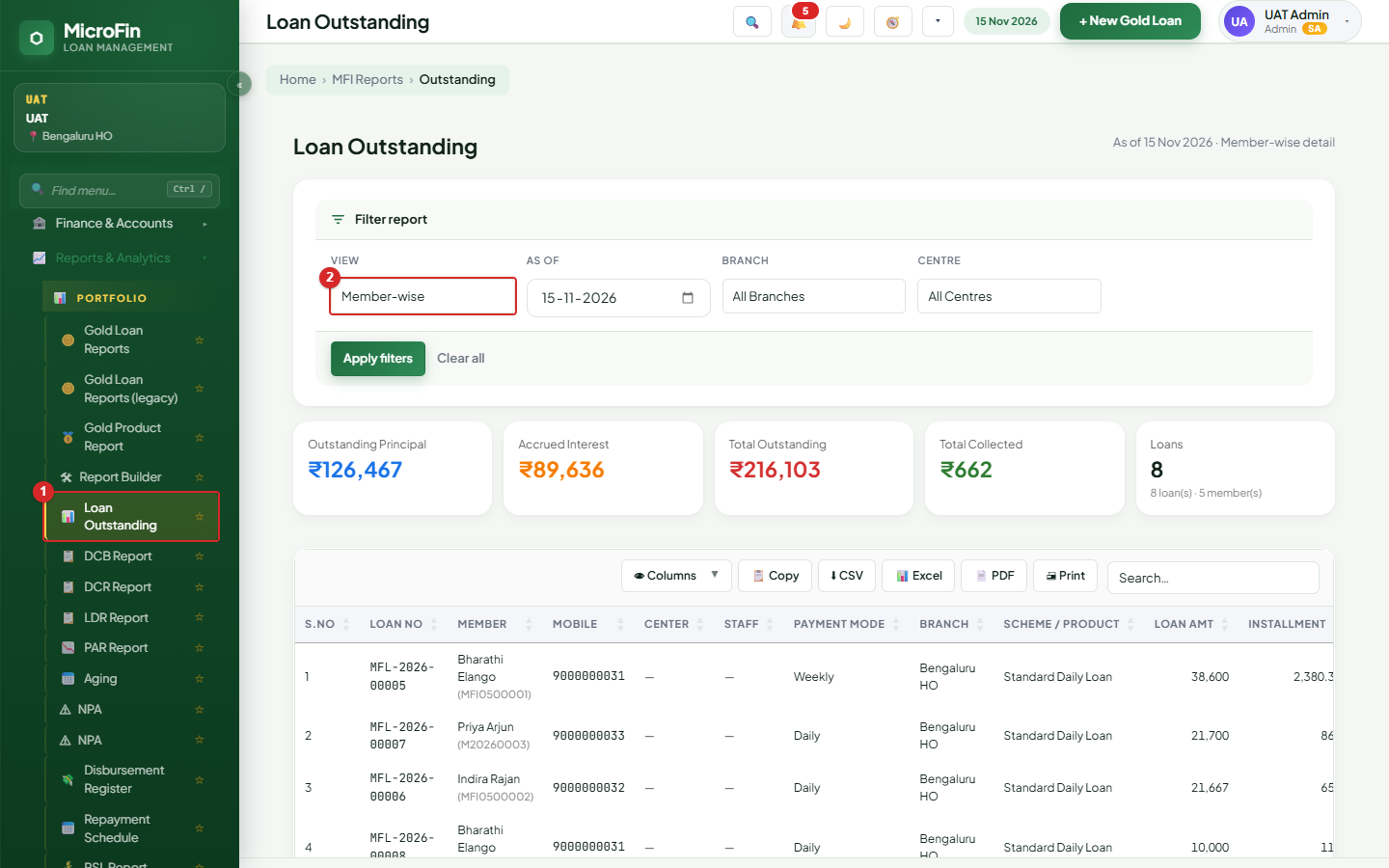
- Reports & Analytics > Portfolio > Loan Outstanding
- Member-wise or centre-wise view
2.1 Catalogue: MFI portfolio and registers
"Exports" lists the buttons that exist on the screen. Most flat tables also show a small toolbar (Copy, CSV, Excel, PDF, Print) that exports the table exactly as drawn; this is not listed again below.
| Report | Menu path | Product | Key filters | Exports |
|---|---|---|---|---|
| Loan Outstanding | Reports & Analytics > Portfolio > Loan Outstanding | MFI | View (Member-wise / Center-wise), As of, Branch, Centre | Toolbar only |
| PAR Report | Reports & Analytics > Portfolio > PAR Report | MFI | As of, Branch, Centre | Toolbar only |
| NPA / Write-off (MFI row) | Reports & Analytics > Portfolio > NPA | MFI | As of, Branch, Centre | Toolbar only |
| Payment Aging | Reports & Analytics > Portfolio > Aging | MFI | Branch (HO), As of date, Bucket, Centre | Excel link (Bucket Summary and Loan Detail) |
| PSL Report | Reports & Analytics > Portfolio > PSL Report | MFI | As of only | Toolbar only |
| CGT / GRT Compliance | Reports & Analytics > Portfolio > CGT / GRT Compliance | MFI | As of, Branch, Centre | Toolbar only |
| KYC Pending | Reports & Analytics > Portfolio > KYC Pending | Gold and MFI | Branch, Centre (no date) | Toolbar only |
| LDR Report | Reports & Analytics > Portfolio > LDR Report | MFI | As of date (shown but not used) | Toolbar only |
| Disbursement Register | Reports & Analytics > Portfolio > Disbursement Register (also Reporting > Disbursement Reporting) | MFI | From, To, Branch, Centre | Bank files: NEFT workbook, FedOne workbook, SIBerNet NEFT and SIBerNet Payee (csv) |
| Repayment Schedule | Reports & Analytics > Portfolio > Repayment Schedule (also Reporting > Due EMI Reporting) | MFI | From, To, Branch, Centre | Toolbar only |
| Branch Performance | Reports & Analytics > Collection > Branch Performance | MFI | From, To | Toolbar only |
| Agent Performance | Reports & Analytics > Collection > Agent Performance | MFI | From, To, Branch (HO), Field agent | Export Excel |
| Centre Performance | Reports & Analytics > Collection > Centre Performance | MFI | As of, Branch, Centre | Toolbar only |
Branch, Agent and Centre Performance and the collection-side reports are described in the collection reports chapter; this chapter only notes the points that affect how you read the figures.
2.2 Catalogue: Gold loan reports
All of these open from Reports & Analytics > Portfolio > Gold Loan Reports, then the card named in the first column.
| Report (card) | Product | Key filters | Exports |
|---|---|---|---|
| Active Loan Report | Gold | Branch, Status (including Notice 1 / Notice 2 / Auction), Pledged from / to, search | Excel |
| Loan Outstanding | Gold | Branch, Status | Excel (loan sheet, ornament sheet, criteria sheet) |
| Overdue Report | Gold | Branch | Excel |
| Risk Analysis | Gold | Branch, 22Ct rate, 24Ct rate | Toolbar only |
| LTV Report | Gold | Branch, 22Ct rate, 24Ct rate | Toolbar only |
| Pending Collection | Gold | Branch | Toolbar only |
| Interest Pending | Gold | Branch, As on, days unpaid, amount pending | Toolbar only |
| High Risk Loans | Gold | Branch, rates, Min LTV %, Min overdue days | Toolbar only |
| Auction Eligible | Gold | Branch, Min overdue days | Toolbar only |
| Gold Valuation | Gold | Branch, rates, Status | Toolbar only |
| Gold Inventory | Gold | Branch, rates | Toolbar only |
| Stock-in-Hand | Gold | Branch, Gold location, rates, Item detail | Excel |
| NPA Report | Gold | Branch, NPA threshold days | Excel |
| Interest Income | Gold | Branch, Period | Toolbar only |
| Daily Collection, Disbursement Report, Customer History, Auction P&L, Principal vs Interest | Gold | Branch and period or search | See the gold chapters |
| Pledge & Release Register | Gold | Branch, dates, Date type, Loan status, Repledge position | Excel |
| Loan & Repledge Position | Gold | Branch, dates, Date type, Repledge position | Excel |
| Gold Loan Interest Report | Gold | Branch, As on, Pledged from / to, Repledged, Status | Excel |
| Auction Loan Report | Gold | Branch, Stage, stage dates, Loans (Live only / Live and closed), search | Excel (24 columns) |
| Gold Loan Reports (legacy) | Gold | Report type (Active / Overdue / Closed), Branch (HO) | Export Excel |
| Gold Product Report | MFI product loans (gold purchase) | Branch, Purchase date, GL status, search | Excel (22 columns) |
2.3 Catalogue: cross-product, staff and builder
| Report | Menu path | Product | Key filters | Exports |
|---|---|---|---|---|
| Loan Disbursement Report (combined) | Reporting > Loan Disbursement Report | Gold and MFI | From, To, Branch, Module, Staff, Status, Centre | Excel; NEFT, FedOne and SIBerNet bank files |
| Insurance Format | Reports & Analytics > Portfolio > Insurance Format | MFI | Disbursed from / to, Branch, Insurance premium, Rows, Search | Excel (insurer format) |
| Customer Loan Master | Reports & Analytics > Customer Loan Master | Gold, MFI, Vehicle | Search, Branch, Module, Scope, Status and many more | Excel |
| Staff Performance (Target vs Achievement) | HR & Payroll > Performance > Staff Performance | Gold and MFI | Period, Branch, Staff, Loan type, Sort by | Excel |
| Staff Daily Collection Report | HR & Payroll > Performance > Daily Collection Report | Gold and MFI | Report date, Branch, Loan type | Toolbar only |
| Pending Collection (staff) | Reports & Analytics > Collection > Pending Collection | Gold and MFI | From, To, Show, Branch, Staff | Excel with totals |
| Advance Collection (staff) | HR & Payroll > Performance > Advance Collection | MFI | Period, Branch, Staff | Toolbar only |
| Overdue & PAR (staff) | HR & Payroll > Performance > Overdue & PAR | Gold and MFI | As of, Branch, Loan type | Toolbar only |
| Period Performance | HR & Payroll > Performance > Period Performance | Gold and MFI | Period type, Year, Branch, Field staff | Toolbar only |
| Monday Review | Dashboard > Monday Review | MFI | Week, Branch | Toolbar only (the digest mails the same figures) |
| Analytics | Reports & Analytics > Financial > Analytics | Gold and MFI | Period, Branch | Excel (3 sheets) |
| Report Insights | Reports & Analytics > Report Insights | MFI | As of, Branch | None |
| Report Builder | Reports & Analytics > Portfolio > Report Builder | Gold and others | Data source, columns, filters | Excel, CSV, PDF, Print |
2.4 Things that are in the software but are NOT available to you
3. Before you start
- Permission: the Portfolio, Gold, Reporting, Insurance Format and Customer Loan Master reports need the right CanViewReports. The Report Builder needs the different right CanBuildReports. Monday Review needs CanViewAnalytics.
- Product scope: MFI reports open only when your company has the MFI module; the Gold Loan Reports need the Gold module. KYC Pending opens for either.
- Branch: a head-office (HO) user may pick a branch or All Branches; a branch user sees their own branch (and any branches granted to them). A field officer's own book is shown on their own performance page.
- Deployment note: some rows depend on a database script that your administrator must have run, so a menu row can be missing on your company.
4. Step-by-step instructions
4.1 Run any standard report
- Open the menu row. The filter panel (headed "Filter report" or "Report parameters") appears with Period or As of, Branch (HO users), Centre and report-specific boxes.
- Choose the filters. Clear all returns to the defaults.
- Press Apply filters (some screens say Apply or Refresh).
- Read the summary cards and the table. Where the table has the toolbar, click a column heading to sort.
- Export with the page's own button (Excel, Excel (list), Export Excel, bank-file buttons) or with the toolbar above the table (Copy, CSV, Excel, PDF, Print).
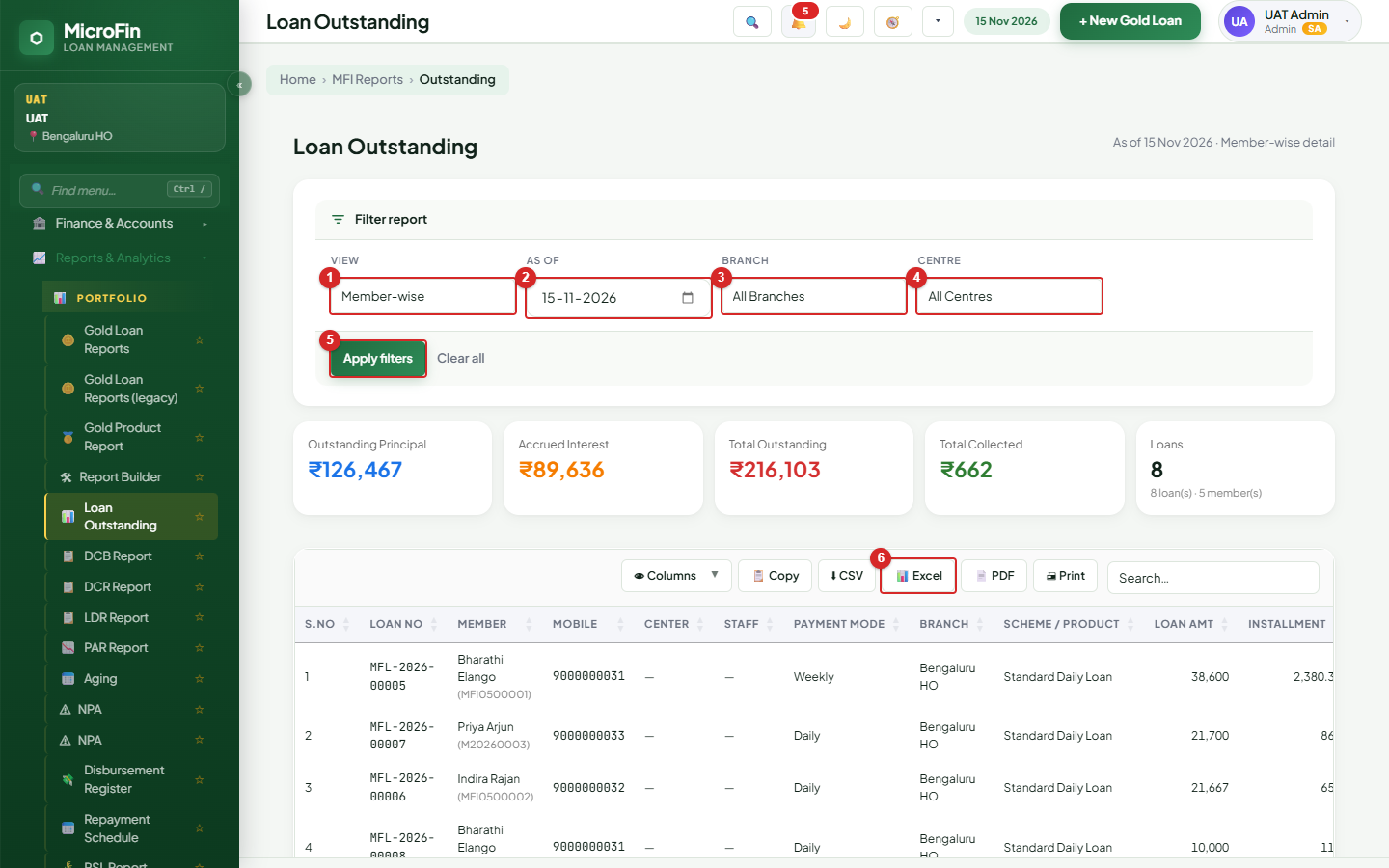
- View
- As-of date
- Branch
- Centre
- Apply filters
- Excel download
4.2 Reading the "As of" date
- Today (or blank): the report reads the live figures of the loans.
- An earlier date on Loan Outstanding, PAR, NPA, Payment Aging, PSL, Centre Performance and the CGT / GRT report: MicroFin rebuilds the balances of that day by adding back the receipts dated after it. The page header says when a report is historical.
- A future date is changed to today.
- Remember it is an approximation: MicroFin does not keep a per-instalment payment history, so for an earlier day it assumes payments went to the oldest instalment first, and interest waived at a later pre-closure is not added back.
- Centre Performance always shows today's savings balance, whatever date you pick; the page says so.
- LDR shows an As of date box, but every figure is live. Changing the date changes nothing.
- Gold reports: Loan Outstanding, Overdue and Pending Collection take no date (they always mean today). Only the Gold Loan Interest Report and Interest Pending are date-driven, and they call the box As on.
- KYC Pending has no date at all.
4.3 Read the MFI portfolio reports
- Loan Outstanding: choose Member-wise or Center-wise. Princ O/S is the loan's principal outstanding; Int O/S is all unpaid scheduled interest, due or not (a balance, not arrears); Total O/S is the two added. In the Center-wise view loans without a centre sit in one row "(No Center / Individual)".
- PAR: principal outstanding is placed in buckets by overdue days: 1-30, 31-60, 61-90, 91-180, 181+. PAR >30 % is everything above 30 days divided by the total portfolio; PAR >60 % and PAR >90 % likewise.
- NPA / Write-off: loans classified Sub-Standard, Doubtful, Loss or Written Off, or more than 90 days overdue. In practice the 90-day test decides. Its Int O/S is the arrears counter, a different figure from Loan Outstanding.
- Payment Aging: pick a Bucket (All, Current, 1-30 DPD, 31-60 DPD, 61-90 DPD, 91-180 DPD, 181+ DPD (NPA)). Outstanding, Interest, Penalty and Total Due are shown per loan, and the Excel adds a Bucket Summary.
- PSL: loans are grouped by the scheme's loan category (blank = General). A loan priced only on a product with no scheme falls into General.
- KYC Pending: every member whose KYC status is blank or not Verified, with a yes/no for each uploaded document, the list of what is Missing, and live loans and outstanding.
- Repayment Schedule: instalments due in the window that are not Paid, including Waived and Cancelled rows, at their full scheduled amount.
4.4 Disbursement Register and bank files
- Open
Reports & Analytics > Portfolio > Disbursement Registerand set From, To, Branch and Centre. - Check the totals: Loan Amount, Net, each deduction. The check "Loan Amount - Net - Total Deductions" must be 0; if not, a banner says "unaccounted".
- For a bank payment, press the bank button your bank needs (NEFT, FedOne, SIBerNet NEFT, SIBerNet Payee). For SIBerNet the bank needs the Payee file first, then the NEFT file.
- The file holds exactly the rows you see; amount per row is the Net disbursed. A refusal (for example a missing bank detail) is shown on the page.
4.5 Gold reports and the rate boxes
- Open
Reports & Analytics > Portfolio > Gold Loan Reportsand click the card. - Risk Analysis, LTV Report, High Risk Loans, Gold Valuation, Gold Inventory and Stock-in-Hand show 22Ct rate (Rs/g) and 24Ct rate (Rs/g) boxes.
- Leave them blank to use the company gold rates set in Settings; type a rate to see market values at that rate.
- The rate you type changes the figures on that page only; nothing is saved.
Reading the main gold reports:
- Gold Loan Interest Report: every figure is computed to the As on date. Status is Closing, Auction, Overdue or Active. The left block is what the customer owes (Principal, ROI, 1 Month Int, Pending Int, Total amount); the right block is what we owe the bank for repledged loans (Repledge Amount, DAYS at the bank, Total interest). The page calls the interest engine once per loan, so it is slow on a large book.
- Pledge & Release Register: pick the Date type (Pledge date, Release date (to customer), Bank release date). Auctioned or written-off loans are not releases.
- Loan & Repledge Position: pledge and bank-borrowing columns side by side, agreeing row for row with the register.
- Stock-in-Hand is gold in our vault by default; Gold Inventory counts repledged gold as if it were still in the branch safe. Use Stock-in-Hand for "gold in the safe".
- Auction Loan Report: the Auction Pledge register by Stage (Auction, Notice 1, Notice 2) with the legal charge due and collected.
4.6 Use the Report Builder
- Open
Reports & Analytics > Portfolio > Report Builder(you need CanBuildReports). - Choose a Data source: Loans, Members, Collections (Gold receipts), Gold Pledges (ornaments), Branches or Staff. Changing the source clears the form. Gold Pledges needs the Gold module.
- Under Columns, tick the fields to show.
- Under Filters, press + Add filter and choose a field, one of ten operators, and a value.
- Under Group, press + Add group level (up to four levels).
- Under Aggregates, press + Add aggregate and choose SUM, COUNT, AVG, MIN, MAX or DISTINCT COUNT.
- Under Sort, press + Add sort level and choose ASC or DESC.
- Under Calculated fields, press + Add calculated field and write arithmetic over field names, for example
Outstanding Principal + Outstanding Interest. - Press Run report. If the definition is invalid, an error banner names the problem.
- Press Excel, CSV, PDF or Print. Each runs the same definition again.
- To keep it, type a name in "Name this report..." and press Save report. The message is
Saved "<name>".. Tick Shared if others should open it.
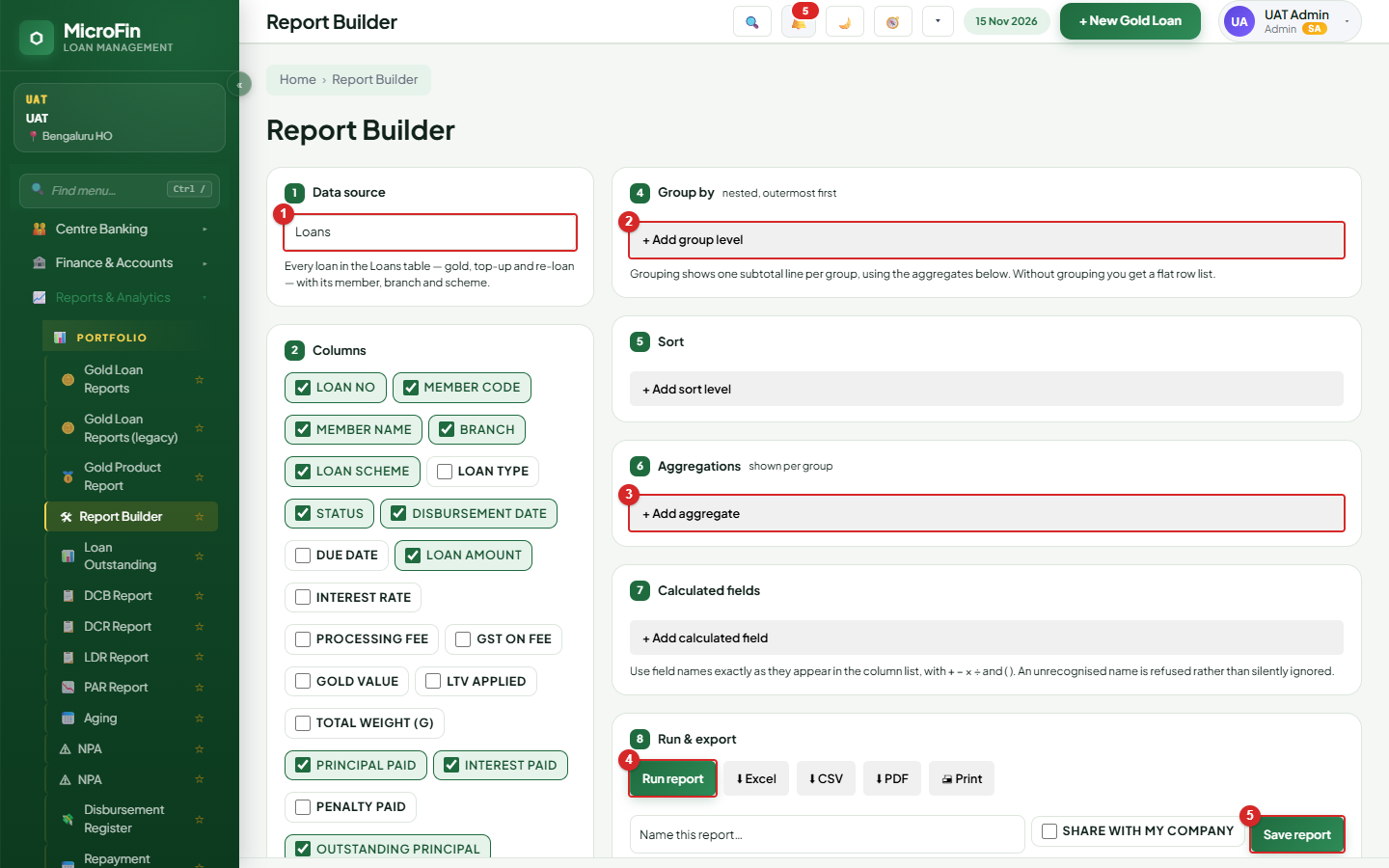
- Data source
- Add a group level
- Add a total or count
- Run report
- Save report
4.7 Staff Performance and targets
- Open
HR & Payroll > Performance > Staff Performance. Choose the Period (a quick pick or From / To; the default is the month to date), Branch, Staff, Loan type and Sort by. - Read per staff: Demand, Carry-fwd (arrears from before the period), Total demand, Dues collected, Pending and Eff % (dues collected divided by total demand), then Cash collected (all receipts) and Achv % (cash collected divided by target).
- To set targets, go to
HR & Payroll > Performance > Set Targets, choose Period type (Daily, Weekly, Monthly), dates, Branch and Loan type, press Load, type the Collection Target and Disbursement Target per staff (0 to 99,999,999) and press Save Targets. The message is "<n> target(s) saved successfully." Saving the same staff and period again overwrites. - Where no target is set, MicroFin uses the Monthly goal in Settings > Monthly Goals, and if there is none, an automatic target equal to the month's scheduled demand.
4.8 Monday Review and the Monday Digest
- Open
Dashboard > Monday Review. It shows the Monday-to-Sunday week that has just closed; pick any date to see another week. An HO user with no branch picked sees all branches side by side. - Panels: Scorecard (portfolio, disbursement, PAR 30, collection efficiency), liquidity, branch economics, watchlist (slipped loans, top exposures) and loan activity. A panel that fails to load is listed as unavailable; the others still show.
- To receive it by e-mail, an administrator sets the recipients and switches at
Administration > Company Ops > Owner Daily Reports(Reports.Enabled and Reports.WeeklyDigest.Enabled must both be on). The e-mail goes on Mondays at 06:00 IST. A preview that sends nothing is available from the same page.
5. Field explanation
| Field | Purpose | Required? | Expected input | Validation | Example |
|---|---|---|---|---|---|
| As of / As of date | The day the balances should describe | Optional | Date | Future date becomes today; ignored on LDR | 31-10-2026 |
| As on (gold) | Date to which interest and status are computed | Optional | Date | Default today (IST) | 15-11-2026 |
| From / To | Period of receipts or disbursements | Optional | Dates | Default depends on the report (see section 7) | 01-11-2026 to 15-11-2026 |
| Branch | Which branch to read | Optional | HO user: any branch or All Branches; others: own | A branch user cannot widen it | Gold Street Branch |
| Centre | Narrow to one centre | Optional | Centre list of the branch in view | A centre outside the branch is dropped | Lakshmi Mahalir Centre |
| View | Member-wise or Center-wise | Optional | Choice | None | Center-wise |
| Bucket | One overdue band on Payment Aging | Optional | All, Current, 1-30 DPD ... 181+ DPD (NPA) | None | 31-60 DPD |
| 22Ct rate / 24Ct rate (Rs/g) | Gold rate used for market value | Optional | Rupees per gram | Blank = company gold rates; page-only | 6,000 |
| Min LTV % / Min overdue days | Thresholds on High Risk Loans | Optional | Numbers | Defaults 75 and 30 | 80 |
| Gold location | Stock-in-Hand scope | Optional | In our vault, With funding bank, All pledged gold | Default In our vault | In our vault |
| Date type (gold register) | Which date the range applies to | Optional | Pledge date, Release date, Bank release date | None | Pledge date |
| Insurance premium | Insurance Format scope | Optional | Every disbursed loan / Only loans that charged a premium / Only loans with no premium | None | Only loans that charged a premium |
| Rows (Insurance Format) | Complete or incomplete rows | Optional | All, Ready to send, Need data | None | Need data |
| Data source (Builder) | The table family to report on | Yes | One of six sources | Changing it clears the form | Loans |
| Name (Builder) | Name of a saved report | Yes, to save | Text | Unique per author | Overdue by branch |
| Shared (Builder) | Let others open the saved report | Optional | Tick | None | Ticked |
| Collection Target / Disbursement Target | Staff target | Yes per row you save | Rupees | 0 to 99,999,999 | 150000 |
6. Buttons and actions
| Button | What it does |
|---|---|
| Apply filters / Apply / Refresh | Runs the report with the filters chosen |
| Clear all | Returns filters to defaults |
| Excel / Excel (list) / Export Excel | Downloads the server Excel file of that screen |
| Excel (insurer format) | Downloads the insurer's 43-column upload workbook; always every row of the filtered set, not just the page |
| NEFT / FedOne / SIBerNet NEFT / SIBerNet Payee | Builds the bank upload file from the Disbursement Register rows |
| Run report / Save report | Report Builder: run the definition / save it under a name |
| CSV / PDF / Print | Report Builder outputs |
| Load / Save Targets | Staff targets screen |
| Rebuild missing rows | Gold Product Report: recreates register rows for disbursed product loans that have none |
7. Business rules and validations
- Different definitions are normal. Check this list before comparing two reports.
- Collection efficiency. Branch Performance Coll Effi % = collected divided by the amount disbursed in the same period, not by demand. Agent Performance Recovery % and the DCB use demand. Monday Review efficiency = all receipts of the week divided by the week's demand. Use demand-based figures to judge collection discipline.
- Disbursed. Branch and Agent Performance and the Reporting Loan Report count every loan by disbursement date and do not apply the "cash actually left" rule that the Disbursement Register uses.
- Gold overdue. Gold Loan Outstanding, Pending Collection and Active Loan Report show the stored overdue-days counter. Overdue Report, NPA Report, High Risk Loans, Auction Eligible and Risk Analysis count the days since the loan's final due date. A gold EMI loan that is behind on an instalment, but before its final due date, appears on the first group and not on the second.
- Interest on MFI. Loan Outstanding "Int O/S" is all unpaid scheduled interest; Payment Aging and NPA "Interest" is the arrears counter.
- Advance means different things on DCR, on Staff Performance > Advance Collection and on Collection Progress. Always name the screen.
- LDR = principal outstanding of open loans divided by investor capital of the branch, all time. "Deposit" here is not customer FD / RD / savings, and the As of date is ignored.
- CGT / GRT Compliance does not read the CGT or GRT session and result records. It shows CGT as done when the centre has any recorded meeting and GRT as done when the Centre KYC is verified. Use the CGT and GRT screens for the real status.
- Default % on Centre Performance is the count of overdue loans divided by active loans, not a rupee ratio.
- Analytics shows "Net Cash Flow (Gold)" (its Excel calls it "Net Profit"): cash collected minus loans disbursed. It is not profit.
- PSL targets are fixed in the program, not settings: Agriculture 18 %, Micro Enterprises 7.5 %, Weaker Sections 11.5 %, Education 0, Housing 0, overall 75 %.
- Gold NPA provision is fixed in the program, applied to outstanding principal only: threshold to 179 days Sub-Standard 10 %, 180-364 Doubtful-1 20 %, 365-729 Doubtful-2 30 %, 730+ Loss Asset 100 %.
- Gold Risk Score (0-100) adds an LTV part, an overdue part and a payment-behaviour part; 70+ Critical, 40+ High, 20+ Medium, otherwise Low. LTV bands: 90+ Danger, 75-90 Warning, 60-75 Caution, below 60 Safe.
- Defaults for dates: DCR is today to today; DCB, Disbursement Register, Branch and Agent Performance start on the 1st of the month; Repayment Schedule shows today plus 30 days. Some period reports use the server date and some the IST date, which can differ near midnight.
- Branch scope on Excel: several Excel files (Aging, PAR, NPA, Disbursement, Agent and Branch Performance) read the branch exactly as in the address, so an HO user's file can cover more branches than the page they were looking at. Check the Branch box before exporting.
- Migrated receipts (old-system history, no cash) are counted by DCR, DCB and the Monday Review.
- Customer Loan Master duplicate rule: same member, same sanctioned amount and same loan date; the copy with the most money collected is kept as the original and the others are flagged.
- Insurance Format: sum assured is the loan amount; the PAN column is filled only for roles with the sensitive-data right; incomplete rows are flagged and never filled in for you.
- Report Insights adds a short "What this says" paragraph only if an AI key is set on the server; every number in the text is checked against the report and the text is discarded if one does not match.
8. Expected result
- A report opens with the filters you chose and the same figures if you run it twice on the same day.
- Excel files carry the same rows as the screen (the Gold Loan Outstanding workbook adds an ornament sheet and a criteria sheet).
- A saved Report Builder report appears in the Saved reports list with its Name, Data source and Shared mark.
- The Monday Digest (if switched on) reaches the owner recipients on Monday morning.
9. Troubleshooting
| Message or problem | Likely cause | What to do |
|---|---|---|
| A menu row or card is missing | Your role lacks the right, the module is not on, or the database script was not run | Ask your administrator to check CanViewReports / CanBuildReports and the deployment |
| LDR does not change when I change the date | LDR ignores the As of date | Treat every LDR figure as live |
| Gold Overdue lists fewer loans than Gold Loan Outstanding shows overdue | The two reports measure from different dates (final due date versus stored counter) | Read section 7; use the report that matches your question |
| Branch Performance "Coll Effi %" looks very low or very high | It divides by disbursement, not demand | Use Agent Performance Recovery % or DCB |
| An Excel file has more branches than the screen | The Excel did not use the sidebar branch default | Pick the Branch explicitly, then export |
| Payment Aging shows fewer loans than Loan Outstanding | Aging admits Active loans only | Expected difference |
| "Showing the first N matching rows. Narrow the filters" | Report Builder cap reached (10,000 listed, 50,000 scanned) | Add filters or a date range |
| An error banner on Run report | The definition is invalid (for example a missing field or a bad calculated field) | Read the banner, correct the named item |
| "That saved report no longer exists, or is not shared with you." | It was deleted or is not shared | Ask the author to share it |
| "Only the person who saved this report can change it." | You are not the author or an Admin | Save a copy under your own name |
| Past As of date gives different figures from last month's printout | Past dates are rebuilt approximately | Use the figures printed on the day for audit |
| Gold Loan Interest Report is slow | One interest calculation per loan | Narrow with Branch or the Pledged from / to dates |
| Insurance Format row marked "Need data" | A required member detail is blank | Complete the member record, then run again |
| A bank file will not download | A bank detail is missing on a loan | Read the message on the page and correct the loan or member |
10. தமிழ் விளக்கம்
இந்த அத்தியாயத்தின் தமிழ் வடிவம் கீழே உள்ளது; பட்டன்கள், மெனு பாதைகள் ஆங்கிலத்திலேயே இருக்கும்.
11. Related modules
- Collection Sheet and demand sheets (chapter 30)
- Collection reports and corrections (chapter 33)
- DCR (chapter 34) and DCB (chapter 35)
- Accounting books: Cash Book, Day Book, Trial Balance (chapter 40)
- Centres, CGT and GRT (chapters 10 to 12)
- Gold loan pledge (chapter 60)
- Deposits (chapter 70)
பிற அறிக்கைகள்
பிற அறிக்கைகள்: போர்ட்ஃபோலியோ, தங்கம், செயல்திறன் மற்றும் Report Builder
1. அறிமுகம்
இந்த அத்தியாயம், வசூல் அத்தியாயங்களில் இடம்பெறாத அறிக்கைகளின் பட்டியல். வசூல் தாள் (Collection Sheet), வசூல் தொடர்பான அறிக்கைகள், DCR, DCB மற்றும் கணக்குப் புத்தகங்கள் (Cash Book, Day Book, Trial Balance) தனி அத்தியாயங்களில் உள்ளன. இங்கே:
- MFI போர்ட்ஃபோலியோ அறிக்கைகள்: Loan Outstanding, PAR, NPA / Write-off, Payment Aging, PSL, CGT / GRT Compliance, KYC Pending, Disbursement Register மற்றும் அதன் வங்கிக் கோப்புகள், Repayment Schedule.
- தங்கக் கடன் அறிக்கைகள்: Gold Loan Reports பக்கத்தில் உள்ள 23 அட்டைகள்.
- Insurance Format, Gold Product Report, Customer Loan Master, Reporting குழு.
- Staff Performance, Monday Review / Monday Digest, சுருக்கமாக டாஷ்போர்டுகள்.
- நீங்களே அறிக்கையை வடிவமைக்கும் Report Builder.
இரண்டு விஷயங்களை நினைவில் கொள்ளுங்கள்: ஒவ்வொரு அறிக்கைக்கும் தனக்கே உரிய கணக்கீட்டு வரையறை உண்டு (ஒரே கடனுக்கு இரண்டு அறிக்கைகளில் வெவ்வேறு "தாமத நாட்கள்" வரலாம்; இரண்டும் தத்தம் வரையறைப்படி சரியே). மேலும் As of தேதிக்கு எல்லா திரைகளிலும் ஒரே பொருள் இல்லை. பிரிவு 4 இவை இரண்டையும் விளக்குகிறது.
2. வழிசெலுத்தல்
அறிக்கைகள் நான்கு பக்கப்பட்டி குழுக்களில் உள்ளன: Reports & Analytics (Portfolio, Collection, Financial, Report Insights), Reporting, HR & Payroll > Performance, Dashboard. குழு வரிக்குத் தனிப் பக்கம் இல்லை; Gold Loan Reports மட்டுமே அட்டைகளுடன் கூடிய முகப்புப் பக்கத்தைத் திறக்கும்.
- அறிக்கைகள் & பகுப்பாய்வு > போர்ட்ஃபோலியோ > கடன் நிலுவை
- உறுப்பினர் வாரியான அல்லது மைய வாரியான பார்வை
2.1 பட்டியல்: MFI போர்ட்ஃபோலியோ அறிக்கைகளும் பதிவேடுகளும்
"ஏற்றுமதி" நெடுவரிசை, திரையில் உள்ள பொத்தான்களைப் பட்டியலிடுகிறது. பெரும்பாலான எளிய அட்டவணைகளில் ஒரு சிறிய கருவிப்பட்டியும் (Copy, CSV, Excel, PDF, Print) இருக்கும்; அது அட்டவணையைத் திரையில் உள்ளபடியே ஏற்றுமதி செய்யும். அது கீழே மீண்டும் குறிப்பிடப்படவில்லை.
| அறிக்கை | மெனு பாதை | தயாரிப்பு | முக்கிய வடிகட்டிகள் | ஏற்றுமதி |
|---|---|---|---|---|
| Loan Outstanding | Reports & Analytics > Portfolio > Loan Outstanding | MFI | View (Member-wise / Center-wise), As of, Branch, Centre | கருவிப்பட்டி மட்டும் |
| PAR Report | Reports & Analytics > Portfolio > PAR Report | MFI | As of, Branch, Centre | கருவிப்பட்டி மட்டும் |
| NPA / Write-off (MFI வரி) | Reports & Analytics > Portfolio > NPA | MFI | As of, Branch, Centre | கருவிப்பட்டி மட்டும் |
| Payment Aging | Reports & Analytics > Portfolio > Aging | MFI | Branch (HO), As of date, Bucket, Centre | Excel இணைப்பு (Bucket Summary, Loan Detail) |
| PSL Report | Reports & Analytics > Portfolio > PSL Report | MFI | As of மட்டும் | கருவிப்பட்டி மட்டும் |
| CGT / GRT Compliance | Reports & Analytics > Portfolio > CGT / GRT Compliance | MFI | As of, Branch, Centre | கருவிப்பட்டி மட்டும் |
| KYC Pending | Reports & Analytics > Portfolio > KYC Pending | தங்கம், MFI | Branch, Centre (தேதி இல்லை) | கருவிப்பட்டி மட்டும் |
| LDR Report | Reports & Analytics > Portfolio > LDR Report | MFI | As of date (காட்டப்படும்; ஆனால் பயன்படுத்தப்படுவதில்லை) | கருவிப்பட்டி மட்டும் |
| Disbursement Register | Reports & Analytics > Portfolio > Disbursement Register (மேலும் Reporting > Disbursement Reporting) | MFI | From, To, Branch, Centre | வங்கிக் கோப்புகள்: NEFT workbook, FedOne workbook, SIBerNet NEFT, SIBerNet Payee (csv) |
| Repayment Schedule | Reports & Analytics > Portfolio > Repayment Schedule (மேலும் Reporting > Due EMI Reporting) | MFI | From, To, Branch, Centre | கருவிப்பட்டி மட்டும் |
| Branch Performance | Reports & Analytics > Collection > Branch Performance | MFI | From, To | கருவிப்பட்டி மட்டும் |
| Agent Performance | Reports & Analytics > Collection > Agent Performance | MFI | From, To, Branch (HO), Field agent | Export Excel |
| Centre Performance | Reports & Analytics > Collection > Centre Performance | MFI | As of, Branch, Centre | கருவிப்பட்டி மட்டும் |
Branch Performance, Agent Performance, Centre Performance ஆகியவையும் வசூல் தொடர்பான அறிக்கைகளும் வசூல் அறிக்கைகள் அத்தியாயத்தில் விளக்கப்பட்டுள்ளன; எண்களைப் படிக்கும் விதத்தைப் பாதிக்கும் குறிப்புகளை மட்டுமே இந்த அத்தியாயம் தருகிறது.
2.2 பட்டியல்: தங்கக் கடன் அறிக்கைகள்
இவை அனைத்தும் Reports & Analytics > Portfolio > Gold Loan Reports திறந்து, முதல் நெடுவரிசையில் குறிப்பிடப்பட்ட அட்டையை அழுத்தினால் திறக்கும்.
| அறிக்கை (அட்டை) | தயாரிப்பு | முக்கிய வடிகட்டிகள் | ஏற்றுமதி |
|---|---|---|---|
| Active Loan Report | தங்கம் | Branch, Status (Notice 1 / Notice 2 / Auction உட்பட), Pledged from / to, தேடல் | Excel |
| Loan Outstanding | தங்கம் | Branch, Status | Excel (கடன் தாள், நகைத் தாள், criteria தாள்) |
| Overdue Report | தங்கம் | Branch | Excel |
| Risk Analysis | தங்கம் | Branch, 22Ct rate, 24Ct rate | கருவிப்பட்டி மட்டும் |
| LTV Report | தங்கம் | Branch, 22Ct rate, 24Ct rate | கருவிப்பட்டி மட்டும் |
| Pending Collection | தங்கம் | Branch | கருவிப்பட்டி மட்டும் |
| Interest Pending | தங்கம் | Branch, As on, செலுத்தப்படாத நாட்கள், நிலுவைத் தொகை | கருவிப்பட்டி மட்டும் |
| High Risk Loans | தங்கம் | Branch, விலைகள் (rates), Min LTV %, Min overdue days | கருவிப்பட்டி மட்டும் |
| Auction Eligible | தங்கம் | Branch, Min overdue days | கருவிப்பட்டி மட்டும் |
| Gold Valuation | தங்கம் | Branch, விலைகள் (rates), Status | கருவிப்பட்டி மட்டும் |
| Gold Inventory | தங்கம் | Branch, விலைகள் (rates) | கருவிப்பட்டி மட்டும் |
| Stock-in-Hand | தங்கம் | Branch, Gold location, விலைகள் (rates), Item detail | Excel |
| NPA Report | தங்கம் | Branch, NPA வரம்பு நாட்கள் | Excel |
| Interest Income | தங்கம் | Branch, Period | கருவிப்பட்டி மட்டும் |
| Daily Collection, Disbursement Report, Customer History, Auction P&L, Principal vs Interest | தங்கம் | Branch; காலம் அல்லது தேடல் | தங்க அத்தியாயங்களைப் பார்க்கவும் |
| Pledge & Release Register | தங்கம் | Branch, தேதிகள், Date type, Loan status, Repledge position | Excel |
| Loan & Repledge Position | தங்கம் | Branch, தேதிகள், Date type, Repledge position | Excel |
| Gold Loan Interest Report | தங்கம் | Branch, As on, Pledged from / to, Repledged, Status | Excel |
| Auction Loan Report | தங்கம் | Branch, Stage, stage தேதிகள், Loans (Live only / Live and closed), தேடல் | Excel (24 நெடுவரிசைகள்) |
| Gold Loan Reports (பழைய பதிப்பு) | தங்கம் | Report type (Active / Overdue / Closed), Branch (HO) | Export Excel |
| Gold Product Report | MFI தயாரிப்புக் கடன்கள் (தங்கம் வாங்குதல்) | Branch, Purchase date, GL status, தேடல் | Excel (22 நெடுவரிசைகள்) |
2.3 பட்டியல்: பல தயாரிப்புகளுக்கான அறிக்கைகள், பணியாளர் அறிக்கைகள், Report Builder
| அறிக்கை | மெனு பாதை | தயாரிப்பு | முக்கிய வடிகட்டிகள் | ஏற்றுமதி |
|---|---|---|---|---|
| Loan Disbursement Report (இணைந்தது) | Reporting > Loan Disbursement Report | தங்கம், MFI | From, To, Branch, Module, Staff, Status, Centre | Excel; NEFT, FedOne, SIBerNet வங்கிக் கோப்புகள் |
| Insurance Format | Reports & Analytics > Portfolio > Insurance Format | MFI | Disbursed from / to, Branch, Insurance premium, Rows, Search | Excel (காப்பீட்டு நிறுவன வடிவம்) |
| Customer Loan Master | Reports & Analytics > Customer Loan Master | தங்கம், MFI, வாகனம் | Search, Branch, Module, Scope, Status மற்றும் பல | Excel |
| Staff Performance (Target vs Achievement) | HR & Payroll > Performance > Staff Performance | தங்கம், MFI | Period, Branch, Staff, Loan type, Sort by | Excel |
| Staff Daily Collection Report | HR & Payroll > Performance > Daily Collection Report | தங்கம், MFI | Report date, Branch, Loan type | கருவிப்பட்டி மட்டும் |
| Pending Collection (பணியாளர்) | Reports & Analytics > Collection > Pending Collection | தங்கம், MFI | From, To, Show, Branch, Staff | Excel with totals |
| Advance Collection (பணியாளர்) | HR & Payroll > Performance > Advance Collection | MFI | Period, Branch, Staff | கருவிப்பட்டி மட்டும் |
| Overdue & PAR (பணியாளர்) | HR & Payroll > Performance > Overdue & PAR | தங்கம், MFI | As of, Branch, Loan type | கருவிப்பட்டி மட்டும் |
| Period Performance | HR & Payroll > Performance > Period Performance | தங்கம், MFI | Period type, Year, Branch, Field staff | கருவிப்பட்டி மட்டும் |
| Monday Review | Dashboard > Monday Review | MFI | Week, Branch | கருவிப்பட்டி மட்டும் (digest மின்னஞ்சலிலும் இதே எண்கள் வரும்) |
| Analytics | Reports & Analytics > Financial > Analytics | தங்கம், MFI | Period, Branch | Excel (3 தாள்கள்) |
| Report Insights | Reports & Analytics > Report Insights | MFI | As of, Branch | இல்லை |
| Report Builder | Reports & Analytics > Portfolio > Report Builder | தங்கம் மற்றும் பிற | தரவு மூலம், நெடுவரிசைகள், வடிகட்டிகள் | Excel, CSV, PDF, Print |
2.4 மென்பொருளில் இருந்தும் உங்களுக்குக் கிடைக்காதவை
3. தொடங்கும் முன்
- அனுமதி: Portfolio, Gold, Reporting, Insurance Format, Customer Loan Master அறிக்கைகளுக்கு CanViewReports உரிமை தேவை. Report Builder-க்கு வேறான CanBuildReports தேவை. Monday Review-க்கு CanViewAnalytics தேவை.
- தயாரிப்பு: உங்கள் நிறுவனத்தில் MFI தொகுதி இருந்தால் மட்டுமே MFI அறிக்கைகள் திறக்கும்; Gold Loan Reports-க்கு Gold தொகுதி தேவை. இவற்றில் எது இருந்தாலும் KYC Pending திறக்கும்.
- கிளை: தலைமை அலுவலக (HO) பயனர் ஒரு கிளையையோ All Branches-ஐயோ தேர்ந்தெடுக்கலாம்; கிளைப் பயனர் தன் கிளையை (மற்றும் தனக்கு அனுமதிக்கப்பட்ட கிளைகளை) மட்டுமே காண்பார். களப்பணி அலுவலரின் சொந்தக் கணக்கு அவருடைய செயல்திறன் பக்கத்தில் காட்டப்படும்.
- நிறுவல் குறிப்பு: சில மெனு வரிகள், நிர்வாகி இயக்கியிருக்க வேண்டிய தரவுத்தள ஸ்கிரிப்டைச் சார்ந்தவை; அதனால் உங்கள் நிறுவனத்தில் ஒரு மெனு வரி இல்லாமல் இருக்கலாம்.
4. படிப்படியான வழிமுறைகள்
4.1 எந்த நிலையான அறிக்கையையும் இயக்க
- மெனு வரியைத் திறக்கவும். "Filter report" அல்லது "Report parameters" என்ற தலைப்புடன் வடிகட்டிப் பலகை தோன்றும்; அதில் Period அல்லது As of, Branch (HO பயனர்கள்), Centre, அந்த அறிக்கைக்கே உரிய பெட்டிகள் ஆகியவை இருக்கும்.
- வடிகட்டிகளைத் தேர்ந்தெடுக்கவும். Clear all இயல்புநிலைக்குத் திருப்பும்.
- Apply filters (சில திரைகளில் Apply அல்லது Refresh) அழுத்தவும்.
- சுருக்க அட்டைகளையும் அட்டவணையையும் படிக்கவும். அட்டவணையில் கருவிப்பட்டி இருந்தால், நெடுவரிசைத் தலைப்பைச் சொடுக்கி வரிசைப்படுத்தலாம்.
- பக்கத்தின் சொந்தப் பொத்தான் (Excel, Excel (list), Export Excel, வங்கிக் கோப்புப் பொத்தான்கள்) அல்லது அட்டவணைக்கு மேலுள்ள கருவிப்பட்டி (Copy, CSV, Excel, PDF, Print) மூலம் ஏற்றுமதி செய்யவும்.
- பார்வை
- குறிப்பிட்ட தேதி நிலவரம்
- கிளை
- மையம்
- வடிகட்டிகளைப் பயன்படுத்து
- Excel பதிவிறக்கம்
4.2 "As of" தேதியைப் புரிந்துகொள்ள
- இன்று (அல்லது காலி): கடன்களின் நேரடி (live) எண்கள் காட்டப்படும்.
- Loan Outstanding, PAR, NPA, Payment Aging, PSL, Centre Performance, CGT / GRT-இல் முந்தைய தேதி கொடுத்தால், அந்தத் தேதிக்குப் பிந்தைய ரசீதுகளைத் திரும்பச் சேர்த்து, அன்றைய இருப்புகளை MicroFin மீண்டும் உருவாக்கும். அறிக்கை பழைய தேதிக்குரியது என்பதைப் பக்கத் தலைப்பு தெரிவிக்கும்.
- எதிர்காலத் தேதி இன்றைய தேதியாக மாற்றப்படும்.
- இது தோராயமான கணக்கு என்பதை நினைவில் கொள்ளுங்கள்: தவணை வாரியான செலுத்துதல் வரலாற்றை MicroFin சேமிப்பதில்லை; எனவே முந்தைய நாளுக்கு, பணம் மிகப் பழைய தவணைக்கே முதலில் சென்றதாக அது கருதும்; பின்னர் நடந்த முன்கூட்டிய முடிப்பில் தள்ளுபடி செய்யப்பட்ட வட்டி திரும்பச் சேர்க்கப்படாது.
- Centre Performance எந்தத் தேதி கொடுத்தாலும் இன்றைய சேமிப்பு இருப்பையே காட்டும்; பக்கமே அதைச் சொல்லும்.
- LDR-இல் As of date பெட்டி இருந்தாலும் எல்லா எண்களும் நேரடியானவை; தேதியை மாற்றினால் எதுவும் மாறாது.
- தங்க அறிக்கைகள்: Loan Outstanding, Overdue, Pending Collection-க்கு தேதி இல்லை (எப்போதும் இன்று). Gold Loan Interest Report மற்றும் Interest Pending மட்டுமே தேதி சார்ந்தவை; அங்கே பெட்டியின் பெயர் As on.
- KYC Pending-க்கு தேதியே இல்லை.
4.3 MFI போர்ட்ஃபோலியோ அறிக்கைகளைப் படிக்க
- Loan Outstanding: Member-wise அல்லது Center-wise தேர்ந்தெடுக்கவும். Princ O/S என்பது கடனின் அசல் நிலுவைத் தொகை; Int O/S என்பது செலுத்தப்படாத, அட்டவணையிலுள்ள அனைத்து வட்டியும் — செலுத்த வேண்டிய தேதி வந்திருந்தாலும் வராவிட்டாலும் (இது ஒரு இருப்பு; முந்தைய நிலுவை அல்ல); Total O/S என்பது இரண்டின் கூட்டுத்தொகை. Center-wise பார்வையில், மையம் இல்லாத கடன்கள் "(No Center / Individual)" என்ற ஒரே வரியில் இருக்கும்.
- PAR: அசல் நிலுவைத் தொகை, தாமத நாட்களின்படி 1-30, 31-60, 61-90, 91-180, 181+ என்ற பிரிவுகளில் (buckets) வைக்கப்படும். PAR >30 % = 30 நாட்களுக்கு மேலுள்ள அனைத்தும் ÷ மொத்த போர்ட்ஃபோலியோ; PAR >60 %, PAR >90 % ஆகியவையும் அவ்வாறே.
- NPA / Write-off: Sub-Standard, Doubtful, Loss அல்லது Written Off என வகைப்படுத்தப்பட்ட கடன்கள், அல்லது 90 நாட்களுக்கு மேல் தாமதமான கடன்கள். நடைமுறையில் 90 நாள் சோதனையே தீர்மானிக்கும். இதன் Int O/S என்பது முந்தைய நிலுவைக் கணக்கீடு (arrears counter); Loan Outstanding-இல் உள்ள எண்ணிலிருந்து இது வேறுபட்டது.
- Payment Aging: ஒரு Bucket தேர்ந்தெடுக்கவும் (All, Current, 1-30 DPD, 31-60 DPD, 61-90 DPD, 91-180 DPD, 181+ DPD (NPA)). ஒவ்வொரு கடனுக்கும் Outstanding, Interest, Penalty, Total Due காட்டப்படும்; Excel-இல் Bucket Summary கூடுதலாக இருக்கும்.
- PSL: கடன்கள் திட்டத்தின் (scheme) loan category-யின்படி குழுவாக்கப்படும் (காலி = General). திட்டம் இல்லாத தயாரிப்பின் அடிப்படையில் மட்டும் விலை நிர்ணயிக்கப்பட்ட கடன் General-இல் சேரும்.
- KYC Pending: KYC நிலை காலியாகவோ Verified அல்லாததாகவோ உள்ள ஒவ்வொரு உறுப்பினரும்; பதிவேற்றிய ஒவ்வொரு ஆவணத்துக்கும் ஆம்/இல்லை; எவை Missing என்ற பட்டியல்; செயலில் உள்ள கடன்கள், நிலுவைத் தொகை ஆகியவை.
- Repayment Schedule: அந்தக் காலத்தில் செலுத்த வேண்டிய, Paid அல்லாத தவணைகள் (Waived, Cancelled வரிகள் உட்பட), அட்டவணையிலுள்ள முழுத் தொகையுடன்.
4.4 Disbursement Register மற்றும் வங்கிக் கோப்புகள்
Reports & Analytics > Portfolio > Disbursement Registerதிறந்து From, To, Branch, Centre அமைக்கவும்.- மொத்தங்களைச் சரிபார்க்கவும்: Loan Amount, Net, ஒவ்வொரு பிடித்தமும் (deduction). "Loan Amount - Net - Total Deductions" என்ற சரிபார்ப்பு 0 ஆக இருக்க வேண்டும்; இல்லையெனில் "unaccounted" என்ற பட்டை தோன்றும்.
- வங்கி மூலம் பணம் செலுத்த, உங்கள் வங்கிக்குத் தேவையான பொத்தானை (NEFT, FedOne, SIBerNet NEFT, SIBerNet Payee) அழுத்தவும். SIBerNet-இல் வங்கிக்கு முதலில் Payee கோப்பும், பின்னர் NEFT கோப்பும் தேவை.
- கோப்பில், நீங்கள் திரையில் காணும் வரிகள் மட்டுமே இருக்கும்; ஒவ்வொரு வரியின் தொகை Net (நிகர வழங்கல் தொகை). மறுக்கப்பட்டால் (எ.கா. வங்கி விவரம் இல்லை) அது பக்கத்தில் காட்டப்படும்.
4.5 தங்க அறிக்கைகள் மற்றும் rate பெட்டிகள்
Reports & Analytics > Portfolio > Gold Loan Reportsதிறந்து அட்டையைச் சொடுக்கவும்.- Risk Analysis, LTV Report, High Risk Loans, Gold Valuation, Gold Inventory, Stock-in-Hand-இல் 22Ct rate (Rs/g), 24Ct rate (Rs/g) பெட்டிகள் இருக்கும்.
- காலியாக விட்டால் Settings-இல் அமைக்கப்பட்ட நிறுவனத் தங்க விலைகள் பயன்படுத்தப்படும்; ஒரு விலையை உள்ளிட்டால் அந்த விலையில் சந்தை மதிப்புகள் காட்டப்படும்.
- நீங்கள் உள்ளிடும் விலை அந்தப் பக்கத்தின் எண்களை மட்டுமே மாற்றும்; எதுவும் சேமிக்கப்படாது.
முக்கிய தங்க அறிக்கைகளைப் படித்தல்:
- Gold Loan Interest Report: எல்லா எண்களும் As on தேதி வரை கணக்கிடப்படும். Status: Closing, Auction, Overdue அல்லது Active. இடப்பக்கப் பகுதி, வாடிக்கையாளர் நமக்குச் செலுத்த வேண்டியது (Principal, ROI, 1 Month Int, Pending Int, Total amount); வலப்பக்கப் பகுதி, மறு அடமானம் வைத்த கடன்களுக்கு நாம் வங்கிக்குச் செலுத்த வேண்டியது (Repledge Amount, வங்கியில் இருந்த DAYS, Total interest). பக்கம் ஒவ்வொரு கடனுக்கும் தனித்தனியாக வட்டிக் கணக்கீட்டை இயக்குவதால், கடன்கள் அதிகம் உள்ள புத்தகத்தில் மெதுவாக இருக்கும்.
- Pledge & Release Register: Date type (Pledge date, Release date (to customer), Bank release date) தேர்ந்தெடுக்கவும். ஏலம் விடப்பட்ட அல்லது தள்ளுபடி (write-off) செய்யப்பட்ட கடன்கள் release ஆகக் கருதப்படுவதில்லை.
- Loan & Repledge Position: அடமான நெடுவரிசைகளும் வங்கிக் கடன் நெடுவரிசைகளும் அருகருகே இருக்கும்; பதிவேட்டுடன் வரிக்கு வரி பொருந்தும்.
- Stock-in-Hand இயல்பாக நம் பெட்டகத்தில் உள்ள தங்கத்தைக் காட்டும்; Gold Inventory, மறு அடமானம் வைத்த தங்கத்தையும் கிளைப் பெட்டகத்திலேயே இருப்பதுபோல் எண்ணும். "பெட்டகத்தில் உள்ள தங்கம்" தெரிய வேண்டுமெனில் Stock-in-Hand பயன்படுத்தவும்.
- Auction Loan Report: Stage (Auction, Notice 1, Notice 2) வாரியாக ஏல அடமானப் பதிவேடு (Auction Pledge); செலுத்த வேண்டிய, வசூலான சட்டக் கட்டணத்துடன் (Legal Charges).
4.6 Report Builder பயன்படுத்த
Reports & Analytics > Portfolio > Report Builderதிறக்கவும் (CanBuildReports தேவை).- Data source தேர்ந்தெடுக்கவும்: Loans, Members, Collections (Gold receipts), Gold Pledges (ornaments), Branches, Staff. மூலத்தை மாற்றினால் படிவம் காலியாகிவிடும். Gold Pledges-க்கு Gold தொகுதி தேவை.
- Columns-இல் காட்ட வேண்டிய புலங்களைத் தேர்ந்தெடுக்கவும்.
- Filters-இல் + Add filter அழுத்தி, ஒரு புலம், பத்து operator-களில் ஒன்று, ஒரு மதிப்பு ஆகியவற்றைத் தேர்ந்தெடுக்கவும்.
- Group-இல் + Add group level அழுத்தவும் (அதிகபட்சம் நான்கு நிலைகள்).
- Aggregates-இல் + Add aggregate அழுத்தி SUM, COUNT, AVG, MIN, MAX அல்லது DISTINCT COUNT தேர்ந்தெடுக்கவும்.
- Sort-இல் + Add sort level அழுத்தி ASC அல்லது DESC தேர்ந்தெடுக்கவும்.
- Calculated fields-இல் + Add calculated field அழுத்தி, புலப் பெயர்களைக் கொண்டு கணக்கை எழுதவும்; எ.கா.
Outstanding Principal + Outstanding Interest. - Run report அழுத்தவும். வரையறை தவறாக இருந்தால், பிழைப் பட்டை சிக்கலைக் குறிப்பிடும்.
- Excel, CSV, PDF, Print அழுத்தவும்; ஒவ்வொன்றும் அதே வரையறையை மீண்டும் இயக்கும்.
- சேமிக்க, "Name this report..." பெட்டியில் பெயரை உள்ளிட்டு Save report அழுத்தவும். செய்தி:
Saved "<name>".. மற்றவர்கள் திறக்க வேண்டுமானால் Shared டிக் செய்யவும்.
- தரவு மூலம்
- குழு நிலையைச் சேர்
- கூட்டுத்தொகை அல்லது எண்ணிக்கையைச் சேர்
- அறிக்கையை இயக்கு
- அறிக்கையைச் சேமி
4.7 Staff Performance மற்றும் இலக்குகள்
HR & Payroll > Performance > Staff Performanceதிறக்கவும். Period (விரைவுத் தேர்வு அல்லது From / To; இயல்பு: மாதத் தொடக்கம் முதல் இன்று வரை), Branch, Staff, Loan type, Sort by தேர்ந்தெடுக்கவும்.- ஒவ்வொரு பணியாளருக்கும் இவற்றைப் படியுங்கள்: Demand, Carry-fwd (காலத்துக்கு முந்தைய நிலுவை), Total demand, Dues collected, Pending, Eff % (Dues collected ÷ Total demand); பிறகு Cash collected (அனைத்து ரசீதுகளும்), Achv % (Cash collected ÷ இலக்கு).
- இலக்கு அமைக்க
HR & Payroll > Performance > Set Targets: Period type (Daily, Weekly, Monthly), தேதிகள், Branch, Loan type தேர்ந்தெடுத்து Load அழுத்தவும்; ஒவ்வொரு பணியாளருக்கும் Collection Target, Disbursement Target (0 முதல் 99,999,999) உள்ளிட்டு Save Targets அழுத்தவும். செய்தி: "<n> target(s) saved successfully." அதே பணியாளர், அதே காலத்தை மீண்டும் சேமித்தால் பழையது மாற்றப்படும். - இலக்கு அமைக்கப்படாத இடத்தில், Settings > Monthly Goals-இல் உள்ள மாத இலக்கை MicroFin பயன்படுத்தும்; அதுவும் இல்லையெனில் அந்த மாதத்தின் அட்டவணைப்படியான தேவைக்குச் சமமான தானியங்கி இலக்கைப் பயன்படுத்தும்.
4.8 Monday Review மற்றும் Monday Digest
Dashboard > Monday Reviewதிறக்கவும். இப்போதுதான் முடிந்த, திங்கள் முதல் ஞாயிறு வரையிலான வாரம் காட்டப்படும்; வேறு வாரத்தைப் பார்க்க அந்த வாரத்தின் ஏதேனும் ஒரு தேதியைத் தேர்ந்தெடுக்கவும். கிளை தேர்ந்தெடுக்காத HO பயனர் எல்லா கிளைகளையும் அருகருகே காண்பார்.- பலகைகள்: Scorecard (போர்ட்ஃபோலியோ, வழங்கல், PAR 30, வசூல் திறன்), liquidity, branch economics, watchlist (நிலை தாழ்ந்த கடன்கள், மிகப் பெரிய கடன் தொகைகள்), கடன் செயல்பாடு. ஏற்றப்படாத பலகை "unavailable" எனப் பட்டியலிடப்படும்; மற்றவை தொடர்ந்து காட்டப்படும்.
- இதை மின்னஞ்சலில் பெற, நிர்வாகி
Administration > Company Ops > Owner Daily Reports-இல் பெறுநர்களையும் சுவிட்சுகளையும் அமைக்க வேண்டும் (Reports.Enabled, Reports.WeeklyDigest.Enabled இரண்டும் on ஆக இருக்க வேண்டும்). மின்னஞ்சல் திங்கட்கிழமைகளில் காலை 06:00 IST-க்கு அனுப்பப்படும். எதையும் அனுப்பாமல் முன்னோட்டம் பார்க்கும் வசதி அதே பக்கத்தில் உண்டு.
5. புலங்களின் விளக்கம்
| புலம் | நோக்கம் | கட்டாயமா? | உள்ளீடு | சரிபார்ப்பு | எடுத்துக்காட்டு |
|---|---|---|---|---|---|
| As of / As of date | இருப்புகள் எந்த நாளுக்குரியவை | விருப்பம் | தேதி | எதிர்காலத் தேதி இன்றைய தேதியாக மாற்றப்படும்; LDR-இல் புறக்கணிக்கப்படும் | 31-10-2026 |
| As on (தங்கம்) | வட்டியும் நிலையும் எந்தத் தேதி வரை கணக்கிடப்படும் | விருப்பம் | தேதி | இயல்பு இன்று (IST) | 15-11-2026 |
| From / To | ரசீது அல்லது வழங்கல் காலம் | விருப்பம் | தேதிகள் | இயல்பு, அறிக்கைக்கு ஏற்ப மாறும் (பிரிவு 7-ஐப் பார்க்கவும்) | 01-11-2026 முதல் 15-11-2026 |
| Branch | எந்தக் கிளையைப் படிக்க வேண்டும் | விருப்பம் | HO பயனர்: ஏதேனும் ஒரு கிளை அல்லது All Branches; மற்றவர்கள்: தன் கிளை | கிளைப் பயனர் இதை விரிவாக்க முடியாது | Gold Street Branch |
| Centre | ஒரு மையத்துக்கு மட்டும் சுருக்க | விருப்பம் | பார்வையில் உள்ள கிளையின் மையப் பட்டியல் | கிளைக்கு வெளியே உள்ள மையம் நீக்கப்படும் | Lakshmi Mahalir Centre |
| View | Member-wise அல்லது Center-wise | விருப்பம் | தேர்வு | இல்லை | Center-wise |
| Bucket | Payment Aging-இல் ஒரு தாமதப் பிரிவு | விருப்பம் | All, Current, 1-30 DPD ... 181+ DPD (NPA) | இல்லை | 31-60 DPD |
| 22Ct rate / 24Ct rate (Rs/g) | சந்தை மதிப்புக்குப் பயன்படும் தங்க விலை | விருப்பம் | ஒரு கிராமுக்கு ரூபாய் | காலி = நிறுவனத் தங்க விலைகள்; அந்தப் பக்கத்துக்கு மட்டும் | 6,000 |
| Min LTV % / Min overdue days | High Risk Loans வரம்புகள் | விருப்பம் | எண்கள் | இயல்பு 75 மற்றும் 30 | 80 |
| Gold location | Stock-in-Hand வரம்பு | விருப்பம் | In our vault, With funding bank, All pledged gold | இயல்பு In our vault | In our vault |
| Date type (தங்கப் பதிவேடு) | தேதி வரம்பு எந்தத் தேதிக்குப் பொருந்தும் | விருப்பம் | Pledge date, Release date, Bank release date | இல்லை | Pledge date |
| Insurance premium | Insurance Format வரம்பு | விருப்பம் | Every disbursed loan / Only loans that charged a premium / Only loans with no premium | இல்லை | Only loans that charged a premium |
| Rows (Insurance Format) | முழுமையான அல்லது முழுமையற்ற வரிகள் | விருப்பம் | All, Ready to send, Need data | இல்லை | Need data |
| Data source (Builder) | அறிக்கைக்கான தரவு மூலம் | ஆம் | ஆறு மூலங்களில் ஒன்று | மாற்றினால் படிவம் காலியாகிவிடும் | Loans |
| Name (Builder) | சேமித்த அறிக்கையின் பெயர் | சேமிக்க வேண்டுமெனில் ஆம் | உரை | ஒரே உருவாக்கியவரிடம் ஒரே பெயர் இருமுறை கூடாது | Overdue by branch |
| Shared (Builder) | பிறர் திறக்க அனுமதி | விருப்பம் | டிக் | இல்லை | டிக் செய்யப்பட்டது |
| Collection Target / Disbursement Target | பணியாளர் இலக்கு | சேமிக்கும் ஒவ்வொரு வரிக்கும் ஆம் | ரூபாய் | 0 முதல் 99,999,999 | 150000 |
6. பொத்தான்களும் செயல்களும்
| பொத்தான் | செயல் |
|---|---|
| Apply filters / Apply / Refresh | தேர்ந்தெடுத்த வடிகட்டிகளுடன் அறிக்கையை இயக்கும் |
| Clear all | வடிகட்டிகளை இயல்புக்குத் திருப்பும் |
| Excel / Excel (list) / Export Excel | அந்தத் திரைக்கான, சர்வர் உருவாக்கும் Excel கோப்பைப் பதிவிறக்கும் |
| Excel (insurer format) | காப்பீட்டு நிறுவனத்தின் 43 நெடுவரிசைப் பதிவேற்றக் கோப்பைப் பதிவிறக்கும்; பக்கத்தில் தெரிபவை மட்டுமல்ல, வடிகட்டிய அனைத்து வரிகளும் எப்போதும் இருக்கும் |
| NEFT / FedOne / SIBerNet NEFT / SIBerNet Payee | Disbursement Register வரிகளிலிருந்து வங்கிப் பதிவேற்றக் கோப்பை உருவாக்கும் |
| Run report / Save report | Report Builder: வரையறையை இயக்கும் / ஒரு பெயரில் சேமிக்கும் |
| CSV / PDF / Print | Report Builder வெளியீடுகள் |
| Load / Save Targets | பணியாளர் இலக்குத் திரை |
| Rebuild missing rows | Gold Product Report: பதிவேட்டு வரி இல்லாத, வழங்கப்பட்ட தயாரிப்புக் கடன்களுக்குப் பதிவேட்டு வரிகளை மீண்டும் உருவாக்கும் |
7. வணிக விதிகளும் சரிபார்ப்புகளும்
- வரையறைகள் வேறுபடுவது இயல்பு. இரண்டு அறிக்கைகளை ஒப்பிடும் முன் இந்தப் பட்டியலைப் பாருங்கள்.
- வசூல் திறன். Branch Performance-இன் Coll Effi % = வசூல் ÷ அதே காலத்தில் வழங்கிய தொகை; தேவையால் வகுக்கப்படுவதில்லை. Agent Performance Recovery % மற்றும் DCB தேவையால் வகுக்கின்றன. Monday Review திறன் = வாரத்தின் அனைத்து ரசீதுகள் ÷ வாரத் தேவை. வசூல் ஒழுங்கை மதிப்பிட, தேவை அடிப்படையிலான எண்களைப் பயன்படுத்துங்கள்.
- Disbursed. Branch, Agent Performance மற்றும் Reporting Loan Report ஆகியவை ஒவ்வொரு கடனையும் வழங்கல் தேதியின்படி எண்ணுகின்றன; Disbursement Register பயன்படுத்தும் "பணம் உண்மையில் வெளியே சென்றது" என்ற விதியை இவை பயன்படுத்துவது இல்லை.
- தங்கக் கடன் நிலுவை (overdue). Gold Loan Outstanding, Pending Collection, Active Loan Report ஆகியவை சேமிக்கப்பட்ட தாமத நாள் எண்ணிக்கையைக் காட்டுகின்றன. Overdue Report, NPA Report, High Risk Loans, Auction Eligible, Risk Analysis ஆகியவை கடனின் இறுதிச் செலுத்தும் தேதியிலிருந்து நாட்களை எண்ணுகின்றன. ஒரு தவணையில் பின்தங்கிய, ஆனால் இறுதிச் செலுத்தும் தேதி இன்னும் வராத தங்க EMI கடன், முதல் குழுவில் வரும்; இரண்டாவது குழுவில் வராது.
- MFI வட்டி. Loan Outstanding "Int O/S" = செலுத்தப்படாத, அட்டவணையிலுள்ள அனைத்து வட்டியும்; Payment Aging, NPA ஆகியவற்றின் "Interest" = முந்தைய நிலுவைக் கணக்கீடு (arrears counter).
- Advance என்பதற்கு DCR, Staff Performance > Advance Collection, Collection Progress-இல் வெவ்வேறு பொருள். எப்போதும் திரையின் பெயரைச் சொல்லுங்கள்.
- LDR = திறந்த கடன்களின் அசல் நிலுவை ÷ கிளையின் முதலீட்டாளர் மூலதனம் (தொடக்கம் முதல் இன்று வரை). இங்கே "Deposit" என்பது வாடிக்கையாளர் FD / RD / சேமிப்பு அல்ல; As of தேதி புறக்கணிக்கப்படும்.
- CGT / GRT Compliance CGT, GRT அமர்வு/முடிவுப் பதிவுகளைப் படிப்பதில்லை. மையத்தில் ஏதேனும் ஒரு கூட்டம் பதிவாகியிருந்தால் CGT முடிந்ததாகவும், Centre KYC சரிபார்க்கப்பட்டிருந்தால் GRT முடிந்ததாகவும் இது காட்டும். உண்மையான நிலைக்கு CGT, GRT திரைகளைப் பயன்படுத்துங்கள்.
- Default % (Centre Performance) = நிலுவைக் கடன்களின் எண்ணிக்கை ÷ செயலில் உள்ள கடன்கள்; ரூபாய் விகிதம் அல்ல.
- Analytics-இல் "Net Cash Flow (Gold)" (Excel-இல் "Net Profit") = வசூலித்த பணம் − வழங்கிய கடன்கள். இது லாபம் அல்ல.
- PSL இலக்குகள் மென்பொருளிலேயே நிலையாக உள்ளன; அவை அமைப்புகள் அல்ல: Agriculture 18 %, Micro Enterprises 7.5 %, Weaker Sections 11.5 %, Education 0, Housing 0, மொத்தம் 75 %.
- தங்க NPA ஒதுக்கீடு (Provision) மென்பொருளிலேயே நிலையானது; அசல் நிலுவைத் தொகைக்கு மட்டுமே பொருந்தும்: வரம்பு நாள் முதல் 179 நாட்கள் வரை Sub-Standard 10 %, 180-364 Doubtful-1 20 %, 365-729 Doubtful-2 30 %, 730+ Loss Asset 100 %.
- Gold Risk Score (0-100) LTV பகுதி, தாமதப் பகுதி, செலுத்தும் பழக்கப் பகுதி ஆகிய மூன்றின் கூட்டு; 70+ Critical, 40+ High, 20+ Medium, மற்றவை Low. LTV பிரிவுகள்: 90+ Danger, 75-90 Warning, 60-75 Caution, 60-க்குக் கீழ் Safe.
- தேதிகளின் இயல்புகள்: DCR-இல் இன்று முதல் இன்று வரை; DCB, Disbursement Register, Branch Performance, Agent Performance ஆகியவை மாதத்தின் 1-ஆம் தேதியில் தொடங்கும்; Repayment Schedule இன்று முதல் அடுத்த 30 நாட்களைக் காட்டும். காலம் சார்ந்த சில அறிக்கைகள் சர்வர் தேதியையும், சில IST தேதியையும் பயன்படுத்துகின்றன; நள்ளிரவை ஒட்டிய நேரத்தில் இவை வேறுபடலாம்.
- Excel-இல் கிளை வரம்பு: பல Excel கோப்புகள் (Aging, PAR, NPA, Disbursement, Agent Performance, Branch Performance) முகவரியில் உள்ளபடியே கிளையை எடுத்துக்கொள்கின்றன; எனவே HO பயனரின் கோப்பில், அவர் பார்த்த பக்கத்தைவிட அதிகக் கிளைகள் இருக்கலாம். ஏற்றுமதிக்கு முன் Branch பெட்டியைச் சரிபாருங்கள்.
- Migrated ரசீதுகள் (பழைய மென்பொருளின் வரலாறு, பணம் இல்லை) DCR, DCB, Monday Review ஆகியவற்றில் எண்ணப்படும்.
- Customer Loan Master நகல் விதி: ஒரே உறுப்பினர், ஒரே அனுமதித் தொகை, ஒரே கடன் தேதி; அதிகப் பணம் வசூலான பதிவு மூலப் பதிவாக வைக்கப்படும்; மற்றவை நகல் எனக் குறியிடப்படும்.
- Insurance Format: Sum assured = கடன் தொகை; PAN நெடுவரிசை, முக்கியத் தரவு (sensitive data) உரிமை உள்ள பணிப்பொறுப்புகளுக்கு மட்டுமே நிரப்பப்படும்; முழுமையற்ற வரிகள் குறியிடப்படும்; அவை ஒருபோதும் தானாக நிரப்பப்படாது.
- Report Insights சர்வரில் AI விசை அமைக்கப்பட்டால் மட்டுமே "What this says" என்ற சிறு பத்தியைச் சேர்க்கும்; உரையிலுள்ள ஒவ்வொரு எண்ணும் அறிக்கையுடன் சரிபார்க்கப்படும்; ஒன்று பொருந்தாவிட்டாலும் உரை நீக்கப்படும்.
8. எதிர்பார்க்கும் முடிவு
- நீங்கள் தேர்ந்தெடுத்த வடிகட்டிகளுடன் அறிக்கை திறக்கும்; அதே நாளில் இருமுறை இயக்கினாலும் அதே எண்கள் வரும்.
- Excel கோப்புகளில் திரையில் உள்ள அதே வரிகள் இருக்கும் (Gold Loan Outstanding workbook-இல் நகைத் தாளும் criteria தாளும் கூடுதலாக இருக்கும்).
- சேமித்த Report Builder அறிக்கை Saved reports பட்டியலில் Name, Data source, Shared குறியுடன் தோன்றும்.
- Monday Digest இயக்கப்பட்டிருந்தால் திங்கள் காலை உரிமையாளர் பெறுநர்களுக்கு வந்து சேரும்.
9. சிக்கல் தீர்வு
| செய்தி அல்லது சிக்கல் | சாத்தியமான காரணம் | செய்ய வேண்டியது |
|---|---|---|
| மெனு வரி அல்லது அட்டை இல்லை | உங்கள் பணிப்பொறுப்புக்கு உரிமை இல்லை, தொகுதி இயக்கப்படவில்லை, அல்லது தரவுத்தள ஸ்கிரிப்ட் இயக்கப்படவில்லை | CanViewReports / CanBuildReports உரிமைகளையும் நிறுவல் நிலையையும் சரிபார்க்குமாறு நிர்வாகியிடம் கேளுங்கள் |
| தேதியை மாற்றினாலும் LDR மாறவில்லை | LDR As of தேதியைப் புறக்கணிக்கிறது | LDR-இன் ஒவ்வொரு எண்ணையும் நேரடி (live) எண்ணாகக் கருதுங்கள் |
| Gold Loan Outstanding நிலுவையில் (overdue) எனக் காட்டுவதைவிட Gold Overdue குறைவான கடன்களைப் பட்டியலிடுகிறது | இரண்டு அறிக்கைகளும் வெவ்வேறு தேதிகளிலிருந்து கணக்கிடுகின்றன (இறுதிச் செலுத்தும் தேதி; சேமிக்கப்பட்ட எண்ணிக்கை) | பிரிவு 7-ஐப் படித்து, உங்கள் கேள்விக்குப் பொருந்தும் அறிக்கையைப் பயன்படுத்துங்கள் |
| Branch Performance "Coll Effi %" மிகக் குறைவாக அல்லது மிக அதிகமாகத் தெரிகிறது | இது தேவையால் அல்ல, வழங்கிய தொகையால் வகுக்கிறது | Agent Performance Recovery % அல்லது DCB பயன்படுத்துங்கள் |
| Excel கோப்பில் திரையைவிட அதிகக் கிளைகள் உள்ளன | Excel, பக்கப்பட்டிக் கிளை இயல்பைப் பயன்படுத்தவில்லை | Branch-ஐ நீங்களே தெளிவாகத் தேர்ந்தெடுத்த பின் ஏற்றுமதி செய்யவும் |
| Payment Aging, Loan Outstanding-ஐவிடக் குறைவான கடன்களைக் காட்டுகிறது | Aging, Active கடன்களை மட்டுமே எடுக்கும் | இது எதிர்பார்க்கப்படும் வேறுபாடே |
| "Showing the first N matching rows. Narrow the filters" | Report Builder வரம்பு எட்டப்பட்டது (பட்டியலில் 10,000; படிக்கப்படுவது 50,000) | வடிகட்டிகளையோ தேதி வரம்பையோ சேர்க்கவும் |
| Run report அழுத்தியதும் பிழைப் பட்டை | வரையறை தவறு (எ.கா. ஒரு புலம் இல்லை, அல்லது calculated field தவறு) | பட்டையைப் படித்து, அது குறிப்பிடும் உருப்படியைத் திருத்தவும் |
| "That saved report no longer exists, or is not shared with you." | அது நீக்கப்பட்டுள்ளது, அல்லது உங்களுடன் பகிரப்படவில்லை | உருவாக்கியவரிடம் அதைப் பகிருமாறு (Shared) கேளுங்கள் |
| "Only the person who saved this report can change it." | நீங்கள் உருவாக்கியவர் அல்லது Admin அல்ல | உங்கள் பெயரில் ஒரு நகலைச் சேமிக்கவும் |
| பழைய As of தேதிக்கான எண்கள், கடந்த மாதம் அச்சிட்ட எண்களிலிருந்து வேறுபடுகின்றன | பழைய தேதிகளுக்கான எண்கள் தோராயமாகவே மீண்டும் உருவாக்கப்படுகின்றன | தணிக்கைக்கு அந்த நாளில் அச்சிட்ட எண்களைப் பயன்படுத்துங்கள் |
| Gold Loan Interest Report மெதுவாக உள்ளது | ஒவ்வொரு கடனுக்கும் தனி வட்டிக் கணக்கீடு நடக்கிறது | Branch அல்லது Pledged from / to தேதிகள் மூலம் சுருக்கவும் |
| Insurance Format வரி "Need data" எனக் குறிக்கப்பட்டுள்ளது | தேவையான ஓர் உறுப்பினர் விவரம் காலியாக உள்ளது | உறுப்பினர் பதிவை நிறைவு செய்து மீண்டும் இயக்கவும் |
| வங்கிக் கோப்பு பதிவிறக்கம் ஆகவில்லை | ஒரு கடனில் வங்கி விவரம் இல்லை | பக்கத்தில் உள்ள செய்தியைப் படித்து, கடன் அல்லது உறுப்பினர் பதிவைத் திருத்தவும் |
10. தமிழ் விளக்கம்
இந்தப் பகுதி முழுவதும் தமிழில் உள்ளது; திரையின் பெயர்கள், மெனு பாதைகள், பட்டன்கள் ஆங்கிலத்தில் அப்படியே இருக்கும்.
11. தொடர்புடைய தொகுதிகள்
- வசூல் தாள் (Collection Sheet), தேவைத் தாள்கள் (அத்தியாயம் 30)
- வசூல் அறிக்கைகள், திருத்தங்கள் (அத்தியாயம் 33)
- DCR (அத்தியாயம் 34), DCB (அத்தியாயம் 35)
- கணக்குப் புத்தகங்கள்: Cash Book, Day Book, Trial Balance (அத்தியாயம் 40)
- மையங்கள், CGT, GRT (அத்தியாயங்கள் 10 முதல் 12)
- தங்கக் கடன் அடமானம் (அத்தியாயம் 60)
- வைப்புகள் (அத்தியாயம் 70)