DCR
DCR — the Daily Collection Report
1. Overview
The DCR (Daily Collection Report) answers one question: how much money did we receive, and how was it made up? It lists the posted, non-reversed receipts of a period, centre by centre or member by member.
Read these three points first, because they cause most confusion:
- DCR is a list of receipts. It has no demand column. For demand against collection, use the DCB report (chapter 35).
- DCR leaves out loan closure receipts (FullClosure) and TopUpSettlement entries. They are not in the main grid. They are listed in a separate table, Foreclosures & settlements.
- Collected = Principal + Interest + Penalty. Savings is not inside Collected; it has its own column.
This chapter covers MFI loans. Gold collections have their own reports (Gold Loan Reports > Daily Collection).
2. Navigation
Reports & Analytics > Portfolio > DCR Reportopens the Center-wise page.- Click Member-wise -> to switch to the member-wise page. Use the link on that page to come back to Center-wise.
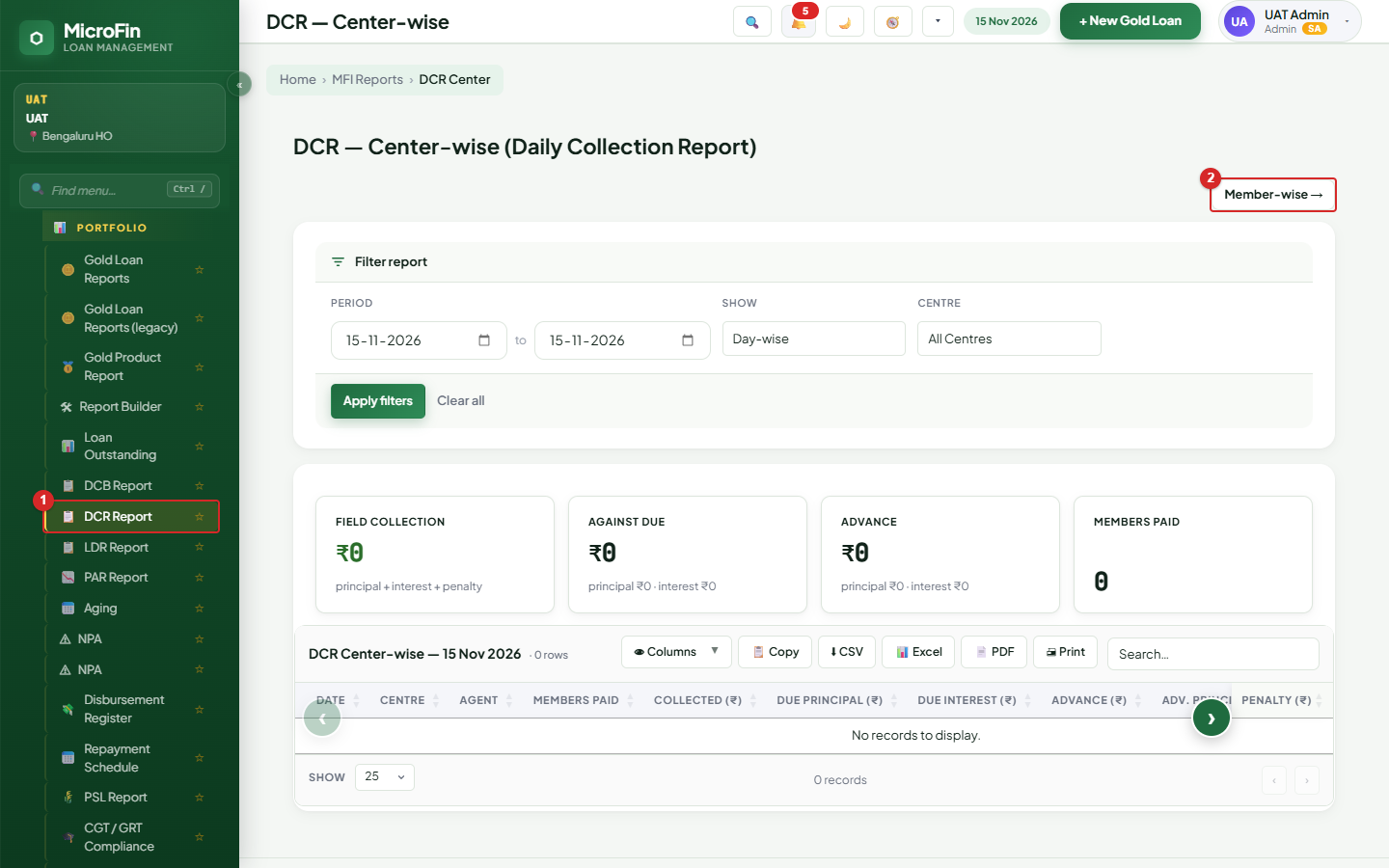
- Reports & Analytics > Portfolio > DCR Report
- Switch to the member-wise report
3. Before you start
- Permission: the reports right (
CanViewReports) and the MFI module on your plan. - Branch: a branch user is always held to their own branch. An HO user who opens the page with no branch in the address sees the branch selected in the sidebar; choose another branch, or clear it to see all branches.
- Only posted receipts appear. A collection that is still waiting for approval has not posted, so it is not here yet. A reversed receipt is dropped.
- [PERM] There is no field-officer restriction on DCR. A field officer who can open the page sees the whole branch, not only their own centres.
4. Step-by-step instructions
Read a day's collection
- Open
Reports & Analytics > Portfolio > DCR Report. - In the filter panel set the Period (from and to). It opens on today to today.
- Set Show to Day-wise (one row per centre per day) or Overall (period total) (one row per centre for the whole period).
- Choose the Branch (HO users) and, if you want one centre, the Centre.
- Click Apply filters. Clear all resets the panel.
- Read the KPI tiles first, then the grid, then the Foreclosures & settlements table and the warning bar below it.
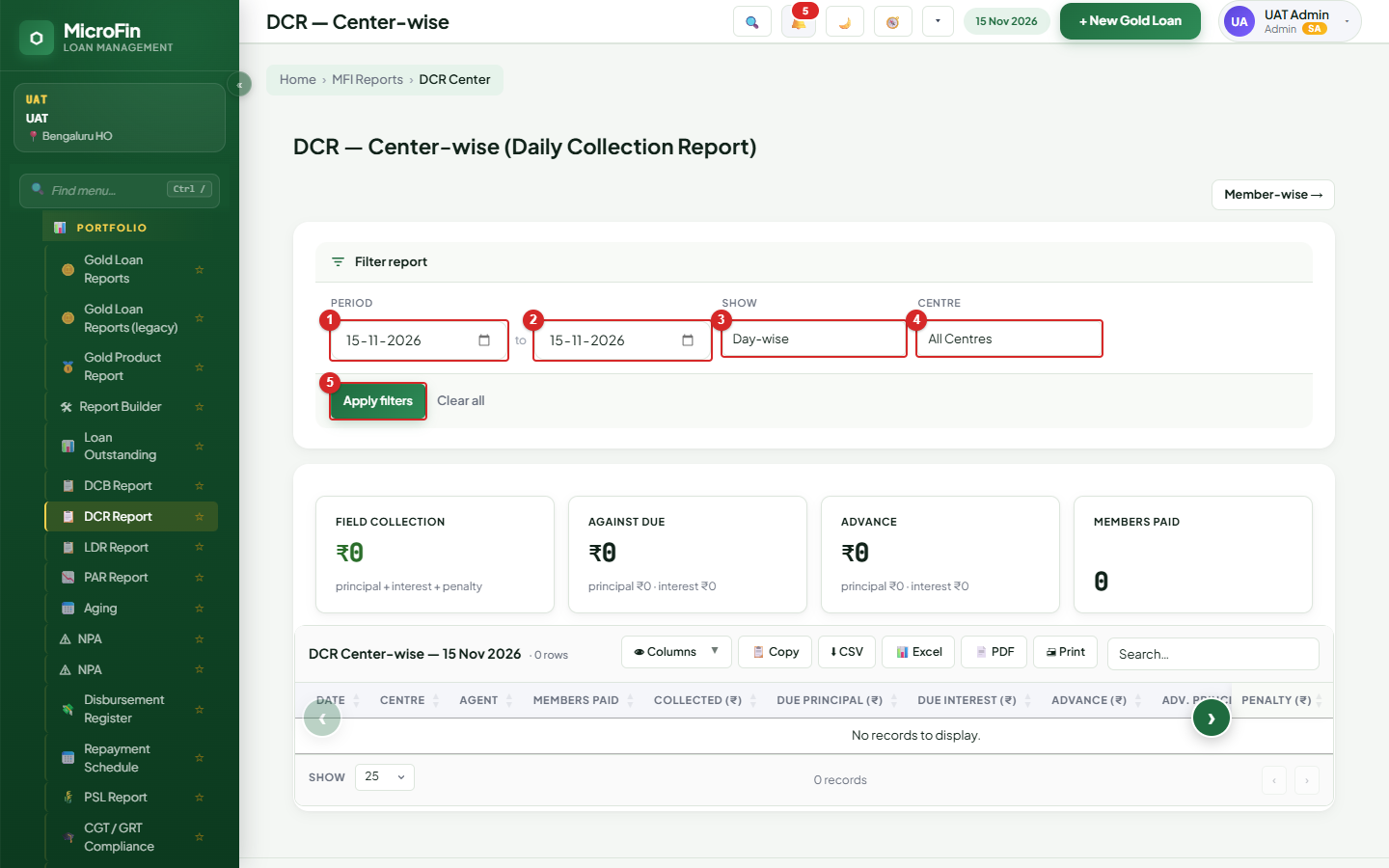
- From date
- To date
- Day-wise or overall for the period
- Centre
- Apply filters
See who paid
- Click Member-wise ->.
- Day-wise shows every receipt as its own row. Overall folds the receipts into one row per member (a member with two loans stays one row naming both loans).
- The closure amount excluded from the grid is quoted in a warning bar. The list of the closed loans is on the Center-wise page.
Export
The page has no server Excel button. Use the table toolbar (Copy, CSV, Excel, PDF, Print), which exports the table as drawn with its Total row.
5. Field explanation
Filters:
| Field | Purpose | Required? | Expected input | Validation | Example |
|---|---|---|---|---|---|
| Period (from / to) | Receipt dates to include | Yes (default today to today) | Two dates | Receipts are matched on payment date | 15-11-2026 to 15-11-2026 |
| Show | Day-wise or period total | Yes | Day-wise / Overall (period total) | — | Day-wise |
| Branch | Limit to a branch | HO only | Pick from list | Non-HO users are held to their own branch | Main Branch |
| Centre | Limit to a centre | Optional | Pick from list | A loan counts as in the centre by its own centre or by its borrower's active centre membership | Rose Centre |
Center-wise columns and tiles:
| Item | Meaning |
|---|---|
| Members Paid | Day-wise: number of loans that paid that day. Overall: number of distinct members in the period |
| Collected | Sum of Principal + Interest + Penalty received. Savings excluded |
| Principal / Interest / Penalty | The receipt components |
| Savings | Compulsory savings received with the receipts |
| Due Principal / Due Interest | The principal and interest that paid instalments due on or before the receipt date (today's demand plus arrears) |
| Advance | Principal and interest that paid instalments falling due after the receipt date. A loan that closed the same day is a buy-out, not advance |
| Total Cash (row) | Collected + Savings: what the officer carries |
| Agent(s) | Who collected: the receipt's collector, otherwise the loan's field agent |
| Tiles | Field Collection, Against Due, Advance, Savings Collected, Total Field Cash (only when the book collects savings), Members Paid, Centres, Foreclosure Collected |
Member-wise columns: Date, Member, Loan No, Branch, Center, Receipt No, Mode, Amount, Due Principal, Due Interest, Advance (with Adv. Principal / Adv. Interest), Penalty, Savings, Collected By, and the EMI span the receipt covered.
The panel How Rs X adds up shows Collected as Due principal + interest + Advance principal + interest + penalty.
6. Buttons and actions
| Button | What it does |
|---|---|
| Apply filters | Re-runs the report with the filter panel |
| Clear all | Resets the filters |
| Member-wise -> / back link | Switches between the centre and member pages |
| Table toolbar (Copy, CSV, Excel, PDF, Print) | Exports the table as it is on screen |
7. Business rules and validations
8. Expected result
You see the receipts of the period grouped as you chose, with a Total row. The tile Field Collection equals the Collected total; Total Field Cash adds savings. The foreclosure table and the warning bar give the rest of the cash.
9. Troubleshooting
| Message or problem | Likely cause | What to do |
|---|---|---|
| A collection I entered is missing | It is parked for approval, or was reversed | Check the approval inbox; DCR shows posted receipts only |
| A foreclosed loan is not in the grid | Closures are excluded by design | Look in Foreclosures & settlements |
| DCR total is lower than DCB collection | DCB includes closure receipts | Add the foreclosure total to DCR |
| A loan without a centre is missing from the centre filter | Filter works by centre | Use Member-wise with the Centre box empty |
| Default dates are one day off | The page default may follow the server date | Set the Period yourself |
| Another branch's data is missing | Branch users are held to their own branch | Ask an HO user |
10. Tamil explanation
The full Tamil version of this chapter follows in the Tamil block below.
11. Related modules
- Chapter 35: DCB (demand against collection).
- Chapter 30: The Collection Sheet (what to collect).
- Chapter 31: Collection entry (where the receipts are posted).
- Chapter 40: Accounting (Cash Book, End of Day).
DCR
DCR — தினசரி வசூல் அறிக்கை
1. அறிமுகம்
DCR (Daily Collection Report) ஒரே கேள்விக்குப் பதில் தருகிறது: நமக்கு எவ்வளவு பணம் வந்தது, அது எவற்றால் ஆனது? குறிப்பிட்ட காலத்தில் பதிவான, திருப்பிக் கழிக்கப்படாத (not reversed) ரசீதுகளை மையம் வாரியாகவோ உறுப்பினர் வாரியாகவோ பட்டியலிடுகிறது.
பெரும்பாலான குழப்பங்களுக்குக் காரணம் இவையே என்பதால், முதலில் இந்த மூன்றையும் படியுங்கள்:
- DCR என்பது ரசீதுகளின் பட்டியல். இதில் தேவை (demand) நெடுவரிசை இல்லை. தேவையுடன் வசூலை ஒப்பிட DCB அறிக்கையைப் (அத்தியாயம் 35) பயன்படுத்துங்கள்.
- கடன் முடிப்பு ரசீதுகள் (FullClosure), TopUpSettlement பதிவுகள் DCR-இல் சேர்க்கப்படுவதில்லை; முதன்மை அட்டவணையில் அவை வராது. அவை Foreclosures & settlements என்ற தனி அட்டவணையில் பட்டியலிடப்படும்.
- Collected = அசல் + வட்டி + அபராதம். சேமிப்பு Collected-இல் சேராது; அதற்குத் தனி நெடுவரிசை உண்டு.
இந்த அத்தியாயம் MFI கடன்களுக்கானது. தங்கக் கடன் வசூலுக்குத் தனி அறிக்கைகள் உள்ளன (Gold Loan Reports > Daily Collection).
2. வழிசெலுத்தல்
Reports & Analytics > Portfolio > DCR Report— Center-wise பக்கத்தைத் திறக்கும்.- Member-wise -> அழுத்தினால் உறுப்பினர் வாரியான பக்கம் வரும்; அந்தப் பக்கத்தில் உள்ள இணைப்பு மூலம் Center-wise பக்கத்துக்குத் திரும்பலாம்.
- அறிக்கைகள் & பகுப்பாய்வு > போர்ட்ஃபோலியோ > DCR அறிக்கை
- உறுப்பினர் வாரியான அறிக்கைக்கு மாறு
3. தொடங்கும் முன்
- அனுமதி: அறிக்கைகளைப் பார்க்கும் உரிமை (
CanViewReports), உங்கள் திட்டத்தில் (plan) MFI தொகுதி ஆகியவை தேவை. - கிளை: கிளைப் பயனர் தன் கிளையை மட்டுமே பார்க்க முடியும். HO பயனர், முகவரியில் (address) கிளை குறிப்பிடாமல் பக்கத்தைத் திறந்தால், பக்கப்பட்டியில் தேர்ந்தெடுத்த கிளை தெரியும்; வேறு கிளையைத் தேர்வு செய்யலாம், அல்லது தேர்வை நீக்கி அனைத்துக் கிளைகளையும் காணலாம்.
- பதிவான ரசீதுகள் மட்டுமே வரும். ஒப்புதலுக்குக் காத்திருக்கும் வசூல் இன்னும் பதிவாகவில்லை; எனவே அது இங்கு தெரியாது. திருப்பிக் கழிக்கப்பட்ட (reversed) ரசீது பட்டியலில் வராது.
- [PERM] DCR-இல் களப்பணி அலுவலருக்கான கட்டுப்பாடு இல்லை. பக்கத்தைத் திறக்க முடிந்த களப்பணி அலுவலர் தன் மையங்களை மட்டுமல்ல, முழுக் கிளையையும் காண்பார்.
4. படிப்படியான வழிமுறைகள்
ஒரு நாளின் வசூலைப் படிக்க
Reports & Analytics > Portfolio > DCR Reportதிறக்கவும்.- வடிகட்டிப் பலகையில் Period (தொடக்கத் தேதி, முடிவுத் தேதி) அமைக்கவும். இயல்பாக இன்று முதல் இன்று வரை என இருக்கும்.
- Show-இல் Day-wise (ஒவ்வொரு மையத்துக்கும் நாளுக்கு ஒரு வரி) அல்லது Overall (period total) (காலம் முழுவதற்கும் மையத்துக்கு ஒரு வரி) தேர்ந்தெடுக்கவும்.
- Branch (HO பயனர்கள்), ஒரு மையம் மட்டும் வேண்டுமெனில் Centre தேர்ந்தெடுக்கவும்.
- Apply filters அழுத்தவும். Clear all பலகையை மீட்டமைக்கும்.
- முதலில் KPI அட்டைகளையும், பிறகு அட்டவணையையும், இறுதியாக Foreclosures & settlements அட்டவணையையும் அதன் கீழுள்ள எச்சரிக்கைப் பட்டையையும் படியுங்கள்.
- தொடக்கத் தேதி
- முடிவுத் தேதி
- நாள் வாரியாக அல்லது காலம் முழுவதும்
- மையம்
- வடிகட்டிகளைப் பயன்படுத்து
யார் செலுத்தினார் என்று பார்க்க
- Member-wise -> அழுத்தவும்.
- Day-wise-இல் ஒவ்வொரு ரசீதும் தனி வரியாக வரும். Overall-இல் ரசீதுகள் உறுப்பினருக்கு ஒரு வரியாக இணைக்கப்படும் (இரண்டு கடன் உள்ள உறுப்பினருக்கும் ஒரே வரி; அதில் இரண்டு கடன்களும் குறிப்பிடப்படும்).
- அட்டவணையில் சேர்க்கப்படாத முடிப்புத் தொகை எச்சரிக்கைப் பட்டையில் காட்டப்படும். முடிக்கப்பட்ட கடன்களின் பட்டியல் Center-wise பக்கத்தில் உள்ளது.
ஏற்றுமதி
பக்கத்தில் சர்வர் Excel பொத்தான் இல்லை. அட்டவணைக் கருவிப்பட்டியை (Copy, CSV, Excel, PDF, Print) பயன்படுத்துங்கள்; அது அட்டவணையைத் திரையில் உள்ளபடியே, Total வரியுடன் ஏற்றுமதி செய்யும்.
5. புலங்களின் விளக்கம்
வடிகட்டிகள்:
| புலம் | நோக்கம் | கட்டாயமா? | உள்ளீடு | சரிபார்ப்பு | எடுத்துக்காட்டு |
|---|---|---|---|---|---|
| Period (from / to) | சேர்க்க வேண்டிய ரசீதுத் தேதிகள் | ஆம் (இயல்பு: இன்று முதல் இன்று வரை) | இரண்டு தேதிகள் | ரசீதுகள் பணம் செலுத்திய தேதியின்படி பொருத்தப்படும் | 15-11-2026 முதல் 15-11-2026 |
| Show | நாள் வாரியாகவா, காலத்தின் மொத்தமாகவா | ஆம் | Day-wise / Overall (period total) | — | Day-wise |
| Branch | ஒரு கிளைக்கு மட்டும் சுருக்க | HO மட்டும் | பட்டியலிலிருந்து தேர்வு | HO அல்லாத பயனர் தன் கிளைக்குள் மட்டும் | Main Branch |
| Centre | ஒரு மையத்துக்கு மட்டும் சுருக்க | விருப்பம் | பட்டியலிலிருந்து தேர்வு | கடனின் சொந்த மையம் அல்லது கடன் பெற்றவரின் செயலில் உள்ள மைய உறுப்பினர் நிலையைக் கொண்டு கடன் அந்த மையத்தைச் சேர்ந்ததாகக் கருதப்படும் | Rose Centre |
Center-wise நெடுவரிசைகளும் அட்டைகளும்:
| உருப்படி | பொருள் |
|---|---|
| Members Paid | Day-wise: அன்று செலுத்திய கடன்களின் எண்ணிக்கை; Overall: அந்தக் காலத்தில் செலுத்திய தனித்தனி உறுப்பினர்களின் எண்ணிக்கை |
| Collected | பெறப்பட்ட அசல் + வட்டி + அபராதத்தின் கூட்டுத்தொகை. சேமிப்பு சேராது |
| Principal / Interest / Penalty | ரசீதின் கூறுகள் |
| Savings | ரசீதுடன் வந்த கட்டாயச் சேமிப்பு |
| Due Principal / Due Interest | ரசீது தேதியிலோ அதற்கு முன்போ செலுத்த வேண்டிய தவணைகளுக்குச் சென்ற அசல், வட்டி (இன்றைய தேவை + முந்தைய நிலுவை) |
| Advance | ரசீது தேதிக்குப் பிறகு செலுத்த வேண்டிய தவணைகளுக்குச் சென்ற அசல், வட்டி. அதே நாளில் முடிக்கப்பட்ட கடன் buy-out ஆகும்; Advance அல்ல |
| Total Cash (வரி) | Collected + Savings: அலுவலர் கையில் கொண்டு வரும் பணம் |
| Agent(s) | வசூலித்தவர்: ரசீதில் உள்ள வசூலிப்பாளர்; இல்லையெனில் கடனின் field agent |
| அட்டைகள் | Field Collection, Against Due, Advance, Savings Collected, Total Field Cash (சேமிப்பு வசூலிக்கும் புத்தகத்தில் மட்டும்), Members Paid, Centres, Foreclosure Collected |
Member-wise நெடுவரிசைகள்: Date, Member, Loan No, Branch, Center, Receipt No, Mode, Amount, Due Principal, Due Interest, Advance (Adv. Principal / Adv. Interest உடன்), Penalty, Savings, Collected By, மற்றும் அந்த ரசீது ஈடுசெய்த தவணை வரம்பு (EMI span).
How Rs X adds up பலகை Collected-ஐ Due அசல் + வட்டி + Advance அசல் + வட்டி + அபராதம் என்று பிரித்துக் காட்டும்.
6. பொத்தான்களும் செயல்களும்
| பொத்தான் | செயல் |
|---|---|
| Apply filters | வடிகட்டிப் பலகையில் உள்ளபடி அறிக்கையை மீண்டும் இயக்கும் |
| Clear all | வடிகட்டிகளை மீட்டமைக்கும் |
| Member-wise -> / திரும்பும் இணைப்பு | மையப் பக்கத்துக்கும் உறுப்பினர் பக்கத்துக்கும் இடையே மாற்றும் |
| அட்டவணைக் கருவிப்பட்டி (Copy, CSV, Excel, PDF, Print) | அட்டவணையைத் திரையில் உள்ளபடியே ஏற்றுமதி செய்யும் |
7. வணிக விதிகளும் சரிபார்ப்புகளும்
8. எதிர்பார்க்கும் முடிவு
அந்தக் காலத்தின் ரசீதுகள், நீங்கள் தேர்ந்தெடுத்த முறையில் குழுவாக்கப்பட்டு, Total வரியுடன் தெரியும். Field Collection அட்டை Collected மொத்தத்துக்குச் சமம்; Total Field Cash சேமிப்பையும் சேர்க்கும். மீதமுள்ள பணத்தை முன்கூட்டிய முடிப்பு அட்டவணையும் எச்சரிக்கைப் பட்டையும் காட்டும்.
9. சிக்கல் தீர்வு
| செய்தி அல்லது சிக்கல் | சாத்தியமான காரணம் | செய்ய வேண்டியது |
|---|---|---|
| நான் உள்ளிட்ட வசூல் தெரியவில்லை | ஒப்புதலுக்காகக் காத்திருக்கிறது, அல்லது திருப்பிக் கழிக்கப்பட்டது (reversed) | ஒப்புதல் உள்பெட்டியைப் (Approval Inbox) பாருங்கள்; DCR பதிவான ரசீதுகளை மட்டுமே காட்டும் |
| முன்கூட்டியே முடிக்கப்பட்ட கடன் அட்டவணையில் இல்லை | வடிவமைப்பின்படியே முடிப்புகள் விலக்கப்படுகின்றன | Foreclosures & settlements அட்டவணையில் பாருங்கள் |
| DCR மொத்தம் DCB வசூலைவிடக் குறைவாக உள்ளது | DCB முடிப்பு ரசீதுகளையும் சேர்க்கும் | முன்கூட்டிய முடிப்பு மொத்தத்தை DCR-உடன் கூட்டுங்கள் |
| மையம் இல்லாத கடன், மைய வடிகட்டியில் வரவில்லை | வடிகட்டி மையத்தின் அடிப்படையில் செயல்படுகிறது | Centre பெட்டியைக் காலியாக விட்டு Member-wise பக்கத்தைப் பயன்படுத்துங்கள் |
| இயல்புத் தேதிகள் ஒரு நாள் மாறியுள்ளன | பக்கத்தின் இயல்பு, சர்வர் தேதியைப் பின்பற்றக்கூடும் | Period-ஐ நீங்களே அமைக்கவும் |
| வேறு கிளையின் தரவு தெரியவில்லை | கிளைப் பயனர் தன் கிளையை மட்டுமே பார்க்க முடியும் | HO பயனரைக் கேளுங்கள் |
10. தமிழ் விளக்கம்
இந்த அத்தியாயத்தின் முழுத் தமிழ் வடிவம் இதுவே. ஆங்கிலப் பகுதியில் மேலே உள்ள அதே பிரிவுகள் (1–9, 11) இங்கு தமிழில் தரப்பட்டுள்ளன.
11. தொடர்புடைய தொகுதிகள்
- அத்தியாயம் 35: DCB (தேவைக்கு எதிரான வசூல்).
- அத்தியாயம் 30: வசூல் தாள் (எதை வசூலிக்க வேண்டும்).
- அத்தியாயம் 31: வசூல் பதிவு (ரசீதுகள் பதிவாகும் இடம்).
- அத்தியாயம் 40: கணக்கியல் (Cash Book, நாள் முடிவு).