Draft for review. Tamil text is awaiting native-speaker review.மதிப்பாய்வுக்கான வரைவு. தமிழ் உரை தாய்மொழி மதிப்பாய்வுக்காகக் காத்திருக்கிறது.
Loan Approval
Approving or rejecting an MFI loan
1. Overview
Approval is the decision, by someone other than the person who raised the request, that a loan may go ahead. Approval never moves cash. After approval the loan waits in the Bulk Disbursement queue (chapter 22) until someone pays it out.
Approval is optional and can run in four ways. Which one your company uses depends on its settings, so ask your administrator.
Route
Where you approve
Single-level approval (company or scheme setting)
Administration > Approvals > Pending Approvals (type "MFI Loan Disbursement") or the ✓ Approve button on the Loan Detail page
Approval chain "Loan Request" (several levels)
The Approval Inbox, one level at a time
Centre Batch Loan
Loan Management > Centre Loan Batches, Review
Optional KYC verification stage in front of any of the above
Loan Management > Loan KYC Verification
Always enforced Three different things are called "Approved". (1) The loan's application is Approved: a manager said yes. (2) The loan's status is Approved: it is waiting for cash. (3) The "Approved" chip on the Approvals page. A loan is ready for Bulk Disbursement only when both (1) and (2) are true.
Always enforcedRejection is final. A rejected loan is cancelled and its instalments are cancelled. It cannot be reopened; the member needs a new request. The member is free to apply again at once.
2. Navigation
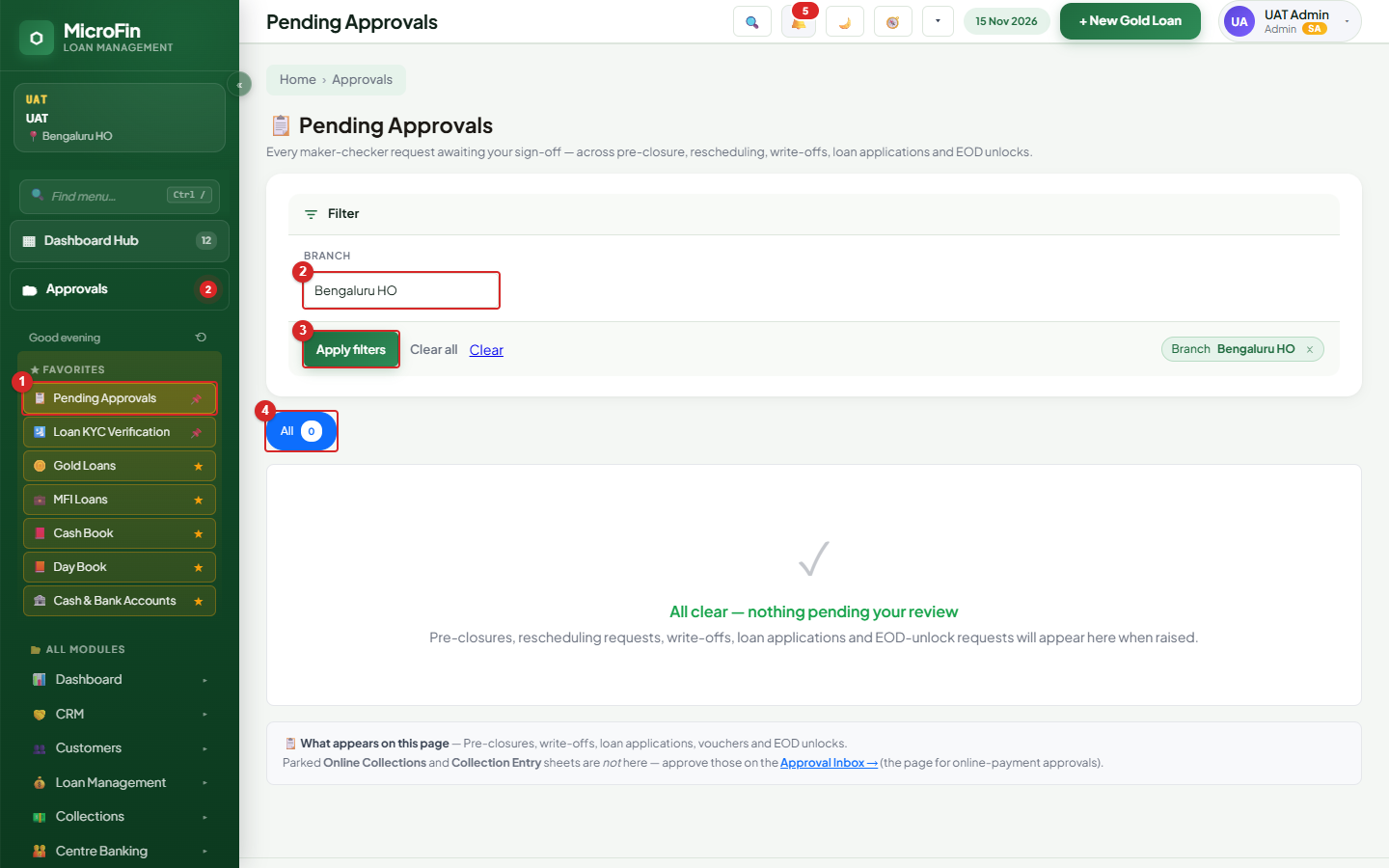
Pending requests: Administration > Approvals > Pending Approvals, filter type MFI Loan Disbursement (single level) or Centre Batch Loan (one row per batch still waiting).
Chain approvals: the Approval Inbox.
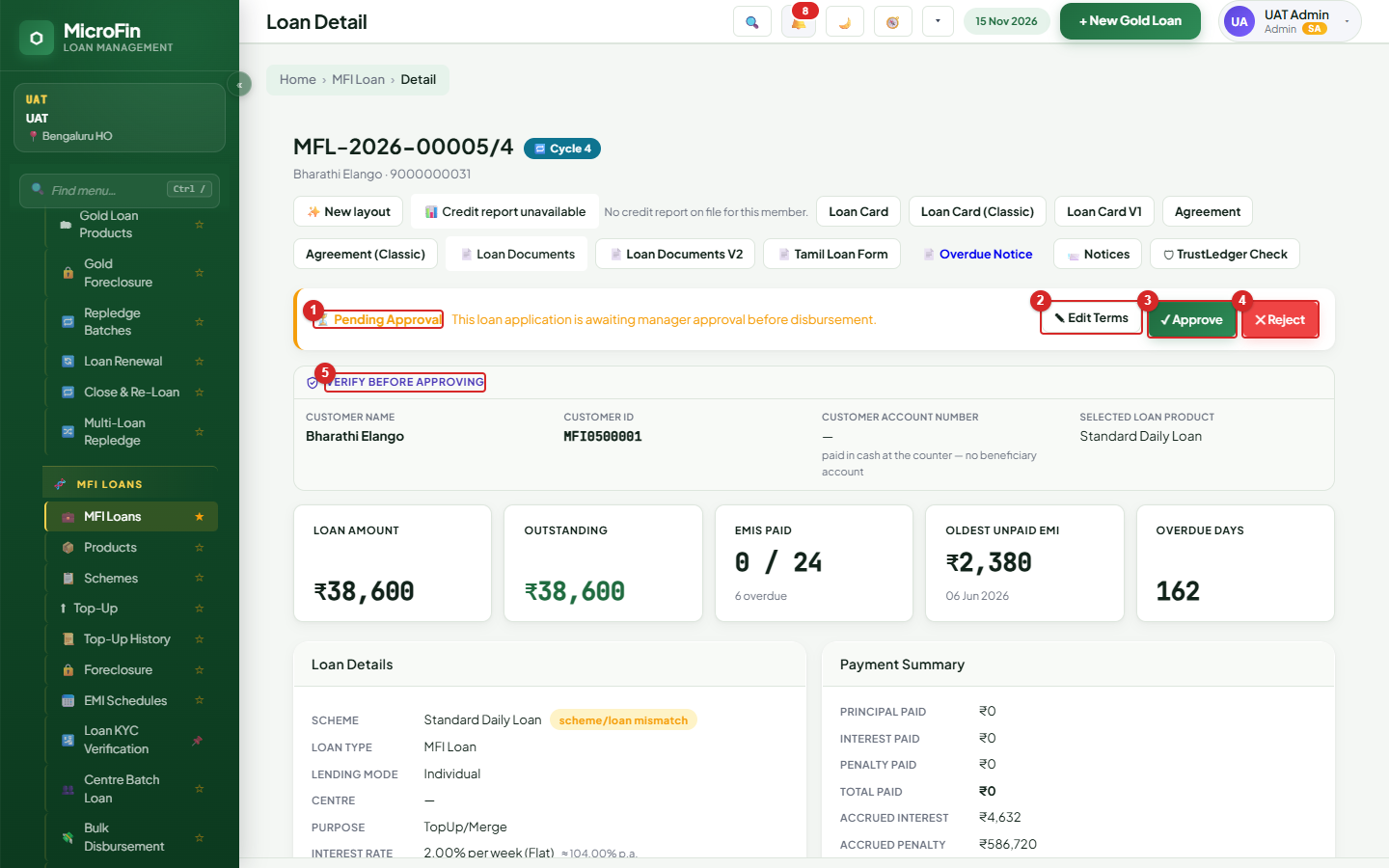
One loan: open it from Loan Management > MFI Loans > MFI Loans; the banner reads "⏳ Pending Approval - This loan application is awaiting manager approval before disbursement."
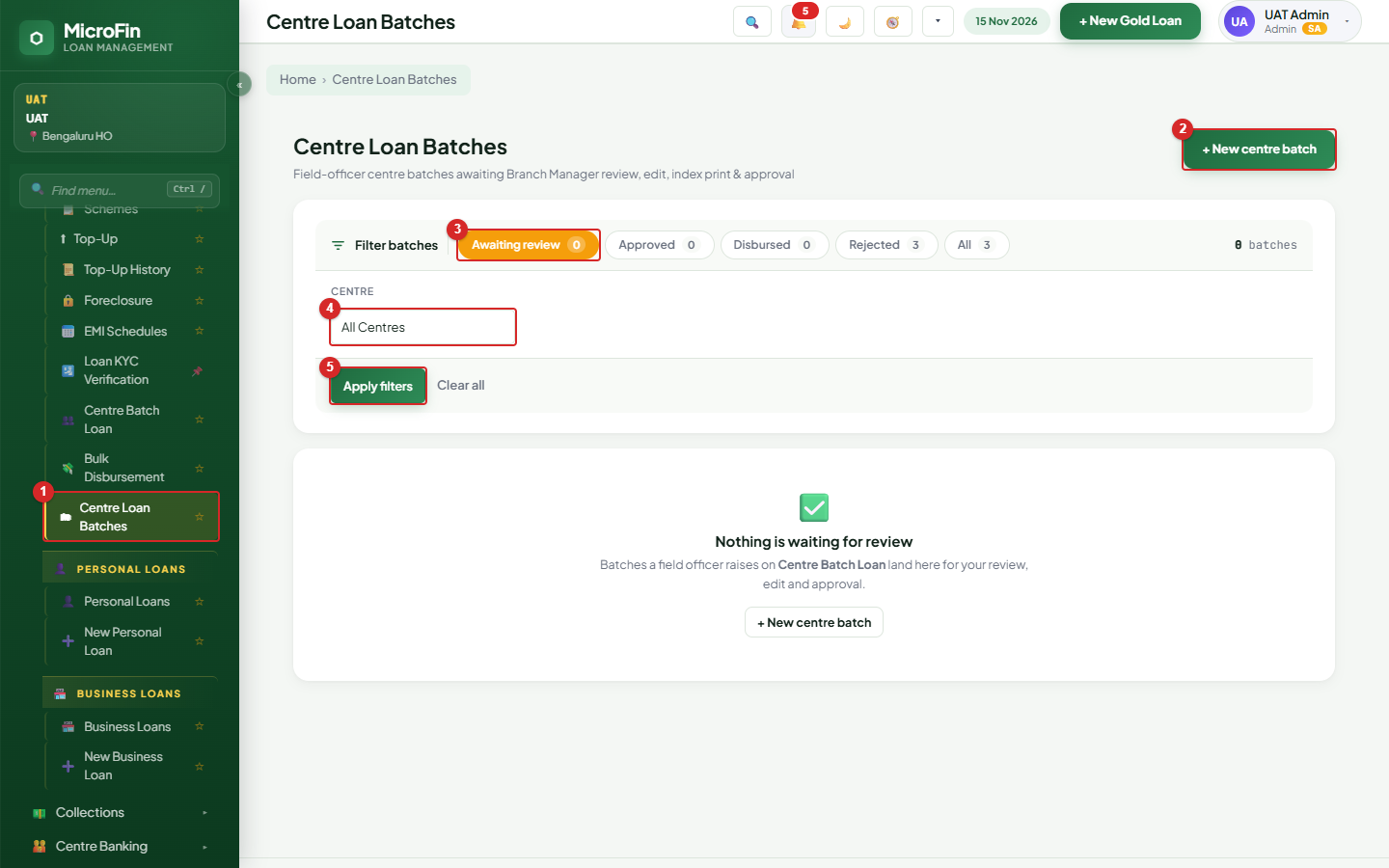
Centre batches: Loan Management > Centre Loan Batches.
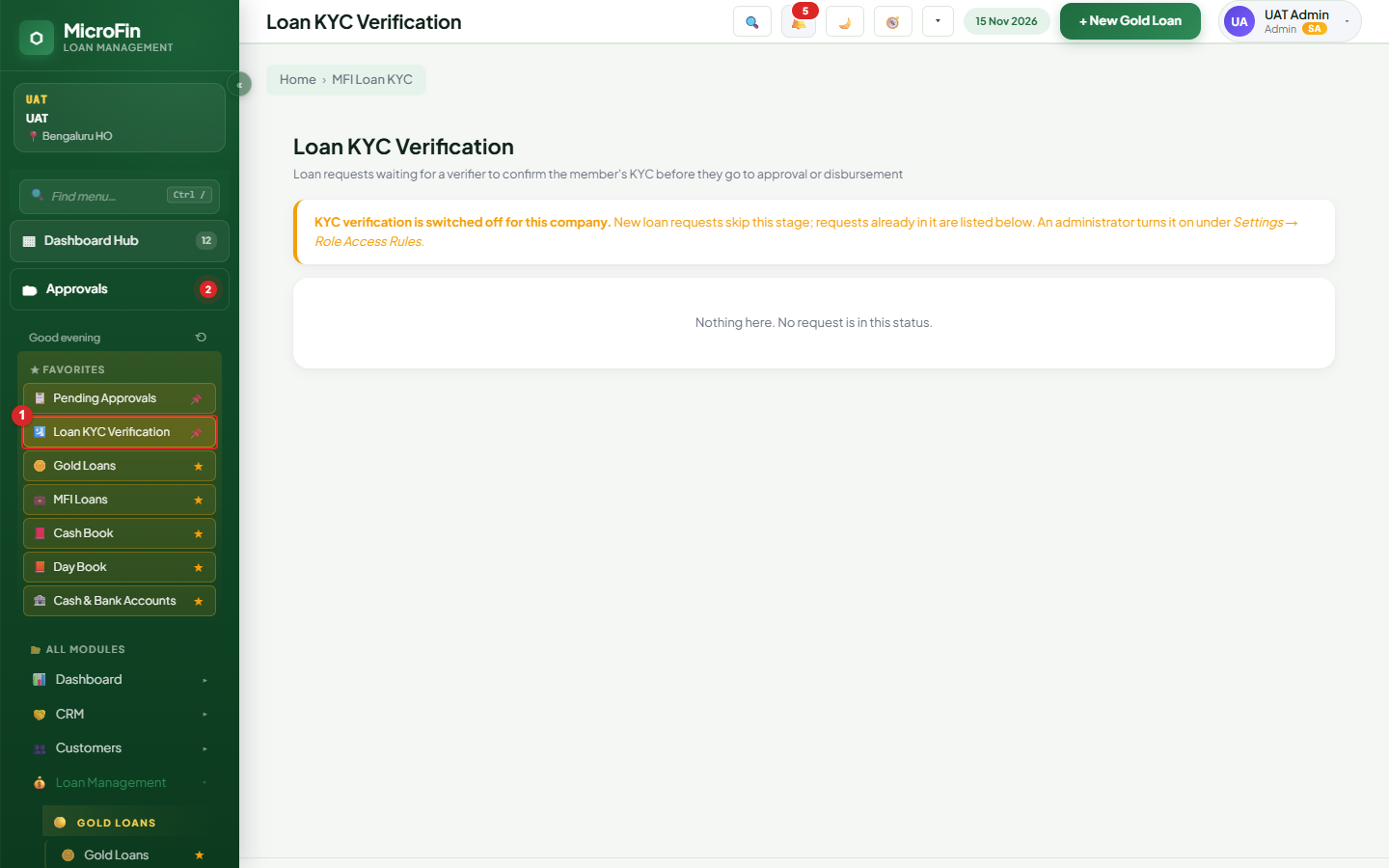
KYC queue: Loan Management > Loan KYC Verification (red badge shows the number waiting).
Pending Approvals
Administration > Approvals > Pending Approvals
Branch filter
Apply filters
Status tab with its count
3. Before you start
Permission: Approve, Reject and Bulk Approve need the loan-management right (CanManageLoans).
A different person: you cannot approve a loan you raised. The message is "You created this loan — a different Manager/Admin must approve it (4-eyes principle)." Admin and SuperAdmin are exempt.
KYC: when the KYC stage is switched on, the request must read KYC Verified first.
Branch: branch users approve loans of their own branch only.
Review the member, amount, tenure, rate and the instalment schedule before you decide.
4. Step-by-step instructions
Approve or reject one loan (single-level approval)
Open Administration > Approvals > Pending Approvals and find the loan (or open the loan from the Loan Book).
Check the details. If something is wrong and the request is still pending, click ✎ Edit Terms and correct it; the schedule is rebuilt.
To approve click ✓ Approve. You see "MFI Loan {no} approved. Cash can now be disbursed."
To reject click ✕ Reject, type the reason in Rejection Reason \* (at least 5 characters) and click Confirm Reject. You see "Loan {no} rejected."
Loan Detail pending banner
Pending Approval banner
Edit Terms
Approve
Reject
Verification card: check the customer and product before approving
To Be Confirmed On the Loan Detail page the Approve, Reject and Edit Terms buttons may appear only for users whose role is titled exactly "Admin" or "Manager". If your role has another title (for example "Branch Manager") and you do not see the buttons, approve from Administration > Approvals > Pending Approvals instead.
Approve many loans at once (Bulk Approve)
Open the pending list and tick the loans.
Click the bulk approve button.
The system approves what it can and tells you how many it skipped. It skips loans of another branch, loans you created yourself, loans still waiting for KYC, and loans that are no longer pending.
Approve through the Loan Request chain
Depends on a setting Applies only if the Approval Workflow module "Loan Request" is switched on (Administration > Approval Workflows). The default chain is Branch Manager, Area Manager, Divisional Manager, Regional Manager, Admin; your administrator may change it.
Nothing exists in the Loan Book yet — only the parked request.
Open the Approval Inbox. You see only requests whose current level matches your role and branch.
Click Approve to pass it to the next level, or Reject to stop it. A rejection leaves nothing to undo.
When the last level approves, the system creates the loan (in the name of the person who raised it) and approves it. The loan is then ready for Bulk Disbursement.
If the KYC stage is on and still open at that moment, the loan is created but not approved; it stays in Pending Approvals.
Depends on a setting A company may also switch on "one-click Approve & Disburse" for this chain. It works only if the approver can also clear the Loan Disbursement chain alone. If the cash-out fails, the loan simply waits in Bulk Disbursement.
Review and approve a Centre Batch
Open Loan Management > Centre Loan Batches and click Review on a batch in PendingReview (or View for others).
On "Centre Batch {BatchNo}" you may change the shared terms and click 💾 Save changes, use Preview Schedule, 🖨 Print Index, or 📄 Loan Documents.
To approve the whole batch click Approve. The system re-checks every loan (amount, tenure, moratorium, rate, dates, centre Active, members Active and not blacklisted, GRT Pass, KYC, product active). If any loan fails, the whole batch is refused and the members are named.
To reject click ✕ Reject, type a reason (at least 3 characters) and Confirm rejection. To drop one member use Reject member. If only one loan is left, reject the whole batch.
Centre Batch review page
Loan Management > Centre Loan Batches
New centre batch
Awaiting review tab
Centre filter
Apply filters
The KYC verification queue
Depends on a setting Exists only when "Require KYC verification before a loan request can go to approval" is ticked at Administration > UI & Settings > Settings > Role Access Rules (off by default).
Open Loan Management > Loan KYC Verification. The queue opens on Pending KYC Verification. Other tabs: Open, KYC Update Required, Rejection Pending Approval, KYC Verified, Rejected, each with a count.
Click Review on a row. The page shows the loan request and the member's KYC (call buttons, document images, chips such as "✓ Member KYC verified", "✓ eKYC verified", "✓ PAN verified", "Not gateway-verified", "🚫 Blacklisted").
Choose one action:
✓ Confirm KYC verified — the request can now go to approval, and the member's own KYC is marked Verified.
↩ Request KYC update — type what is wrong (at least 5 characters). The branch must correct the member's KYC and re-submit.
✕ Propose rejection — type the reason (at least 5 characters). It is final only after a manager approves it.
A manager reviewing a proposed rejection chooses ✕ Approve rejection (the loan is rejected and cancelled) or Decline rejection with a remark of at least 5 characters (it goes back to Pending KYC Verification).
Loan KYC Verification queue
Loan KYC Verification, pinned in the menu
The KYC status moves like this:
From
Action
To
Pending KYC Verification
Confirm KYC verified
KYC Verified
Pending KYC Verification
Request KYC update
KYC Update Required
KYC Update Required
Re-submit for verification
Pending KYC Verification
Pending KYC Verification or KYC Update Required
Propose rejection
Rejection Pending Approval
Rejection Pending Approval
Approve rejection
Rejected (loan cancelled)
Rejection Pending Approval
Decline rejection
Pending KYC Verification
5. Field explanation
Field
Purpose
Required?
Expected input
Validation
Example
Rejection Reason (loan)
Why the loan is rejected
Yes, when rejecting
Text, at least 5 characters
"Rejection reason must be at least 5 characters."
Documents incomplete
Reason (centre batch reject / reject member)
Why the batch or member is rejected
Yes
At least 3 characters
Length checked
Centre not ready
Remarks on batch approve
Note on the approval
Optional
Text
—
—
Reason for KYC update
What is wrong in the KYC
Yes
At least 5 characters
Length checked
House photo missing
Reason for proposed rejection
Why KYC rejection is proposed
Yes
At least 5 characters
Length checked
—
Remark for declining a rejection
Why the rejection is not approved
Yes
At least 5 characters
Length checked
—
Branch / Centre / Status filters
Narrow the queue
Optional
Pick
—
—
6. Buttons and actions
Button
What it does
✓ Approve
Approves one pending loan. No cash moves.
✕ Reject / Confirm Reject
Rejects the loan; status becomes Cancelled and the instalments are cancelled.
✎ Edit Terms
Changes a pending loan; the schedule is rebuilt.
Bulk Approve
Approves ticked loans; skips and counts the ones it cannot approve.
Review (batch)
Opens the Centre Batch review page.
💾 Save changes
Saves edited batch terms (only in PendingReview).
Approve (batch)
Approves every loan in the batch after a full re-check.
Always enforced Only a loan whose application is PendingApproval can be approved or rejected.
Always enforced A request still waiting for a KYC verifier cannot be approved through any door (single Approve, Bulk Approve, the Loan Request chain, Centre Batch Approve). Message: "Loan {no} cannot go to approval yet — KYC verification: {status}. A verifier must confirm the member's KYC first (Loans → Loan KYC Verification)."
Always enforced Maker-checker (four-eyes): the person who raised the loan or batch cannot approve it, unless Admin or SuperAdmin. For a batch the message is "You created this batch — another Branch Manager / Admin must approve it." The person who proposed a KYC rejection cannot approve it: "You proposed this rejection — a different Branch Manager / Area Manager / Admin must approve it."
Permission Centre Batch: only a manager-level user (role title contains "manager", or Admin / SuperAdmin) may edit, approve or reject: "Only a Branch Manager can approve this batch." Field officers see only batches they made or own.
Permission KYC: the people who may confirm, request an update or propose rejection are the roles on the "Verify loan KYC" list (default Telecaller, HR, HO Admin, Accountant, Accounts Manager) or SuperAdmin. The people who may approve or decline a rejection are on the rejection-approver list (default Branch Manager, Area Manager, Admin) or SuperAdmin. Admins edit both lists at Administration > UI & Settings > Settings > Role Access Rules.
Always enforced A KYC "Confirm" also marks the member's own KYC as Verified. If your company requires a house photo and none is on file, it refuses: "Cannot confirm KYC — the member's house photo is missing and this company requires it. Use 'Request KYC update'..."
Always enforced Loans raised before the KYC stage was switched on, or created by other tools (for example the Gold Re-Loan), have no KYC status and are never held back by it. A KYC Verified confirmation is also possible while the loan is already approved and waiting in Bulk Disbursement.
Always enforced Rejection (any door) writes ApplicationStatus Rejected and Status Cancelled, cancels the instalments, and posts nothing to the accounts. The borrower gets a "loan rejected" message that does not include your reason.
Always enforced Approval, KYC steps, Edit Terms and rejection never post any accounting entry.
Recommendation (not enforced) The approval list calls the type "MFI Loan Disbursement" even though approving releases no cash. Treat it as "approve the request"; cash is a separate step.
8. Expected result
Approved: application Approved, status Approved. The loan appears in Loan Management > Bulk Disbursement. The member may get a "loan approved" SMS / WhatsApp message.
Rejected: the loan shows Rejected / Cancelled with the reason; no money moved; the member can apply again.
Batch approved: every loan approved and the batch shows Approved; later Disbursed when all its loans are Active.
KYC confirmed: "KYC confirmed for loan {no} — the request can now go to approval."
9. Troubleshooting
Message or problem
Likely cause
What to do
"You created this loan — a different Manager/Admin must approve it (4-eyes principle)."
You raised the loan
Ask another manager or an Admin.
"Only a Branch Manager can approve this batch."
Your role is not manager-level
Use a manager or Admin login.
"Loan {no} cannot go to approval yet — KYC verification: …"
KYC stage not cleared
Get the verifier to confirm, or update the member's KYC and re-submit.
"Rejection reason must be at least 5 characters."
Reason too short
Type a fuller reason.
"This batch is already 'X'."
Batch is no longer in PendingReview
Open it with View; nothing more to do.
"This is the only loan left awaiting review in the batch — reject the whole batch instead."
Rejecting the last loan
Reject the whole batch.
Batch approve refuses and names members
Re-check failed (e.g. centre or member no longer Active, GRT missing)
Fix the named issue, or reject those members, then approve again.
No Approve button on Loan Detail
Button shows only for roles titled "Admin" or "Manager"
Use Pending Approvals instead.
Bulk Approve skipped some loans
Other branch, created by you, KYC open, not pending
Read the skip message; handle those individually.
A loan is not in the Approvals list
Its approval route is the chain, the batch, or no approval at all
Check the Approval Inbox or Centre Loan Batches.
11. Related modules
Chapter 20 — Loan request and KYC verification from the branch side.
Chapter 22 — Loan disbursement.
Approvals engine chapter (approval inbox and chains).
ஒப்புதல் என்பது, கோரிக்கை எழுப்பியவரைத் தவிர வேறொருவர் "இந்தக் கடன் தொடரலாம்" என்று எடுக்கும் முடிவு. ஒப்புதல் ஒருபோதும் பணத்தை நகர்த்துவதில்லை. ஒப்புதலுக்குப் பிறகு யாராவது பணத்தை வழங்கும் வரை கடன் Bulk Disbursement வரிசையில் (அத்தியாயம் 22) காத்திருக்கும்.
ஒப்புதல் விருப்பமானது; நான்கு வழிகளில் நடக்கலாம். உங்கள் நிறுவனம் எதைப் பயன்படுத்துகிறது என்பது அதன் அமைப்புகளைப் பொறுத்தது; நிர்வாகியிடம் கேளுங்கள்.
மேற்கண்டவற்றுக்கு முன் விருப்பமான KYC verification நிலை
Loan Management > Loan KYC Verification
எப்போதும் கட்டாயம் "Approved" என்ற சொல் மூன்று வெவ்வேறு பொருள்களில் வருகிறது. (1) கடனின் விண்ணப்பம் Approved: மேலாளர் சம்மதித்துவிட்டார். (2) கடனின் நிலை Approved: பணத்துக்காகக் காத்திருக்கிறது. (3) Approvals பக்கத்தில் உள்ள "Approved" குறி. (1), (2) இரண்டும் இருந்தால் மட்டுமே கடன் Bulk Disbursement-க்குத் தயார்.
எப்போதும் கட்டாயம்நிராகரிப்பு இறுதியானது. நிராகரிக்கப்பட்ட கடன் ரத்து செய்யப்படும்; அதன் தவணைகளும் ரத்தாகும். மீண்டும் திறக்க முடியாது; உறுப்பினருக்குப் புதிய கோரிக்கை தேவை. உறுப்பினர் உடனே மீண்டும் விண்ணப்பிக்கலாம்.
2. வழிசெலுத்தல்
நிலுவையில் உள்ள கோரிக்கைகள்: Administration > Approvals > Pending Approvals, வகை MFI Loan Disbursement (ஒரே நிலை) அல்லது Centre Batch Loan (காத்திருக்கும் ஒவ்வொரு தொகுப்புக்கும் ஒரு வரி).
சங்கிலி ஒப்புதல்கள்: Approval Inbox.
ஒரு கடன்: Loan Management > MFI Loans > MFI Loans வழியாகத் திறக்கவும்; பதாகை: "⏳ Pending Approval - This loan application is awaiting manager approval before disbursement."
Centre தொகுப்புகள்: Loan Management > Centre Loan Batches.
KYC வரிசை: Loan Management > Loan KYC Verification (காத்திருக்கும் எண்ணிக்கையை சிவப்புக் குறி காட்டும்).
Pending Approvals
நிர்வாகம் > ஒப்புதல்கள் > நிலுவை ஒப்புதல்கள்
கிளை வடிகட்டி
வடிகட்டிகளைப் பயன்படுத்து
நிலை தாவலும் அதன் எண்ணிக்கையும்
3. தொடங்கும் முன்
அனுமதி: Approve, Reject, Bulk Approve-க்கு கடன் மேலாண்மை உரிமை (CanManageLoans) தேவை.
வேறொருவர்: நீங்கள் எழுப்பிய கடனுக்கு நீங்களே ஒப்புதல் தர முடியாது. செய்தி: "You created this loan — a different Manager/Admin must approve it (4-eyes principle)." Admin, SuperAdmin-க்கு விலக்கு உண்டு.
KYC: KYC நிலை இயக்கத்தில் இருந்தால் கோரிக்கை முதலில் KYC Verified ஆக வேண்டும்.
கிளை: கிளைப் பயனர் தன் கிளையின் கடன்களுக்கு மட்டுமே ஒப்புதல் தரலாம்.
முடிவெடுக்கும் முன் உறுப்பினர், தொகை, தவணை எண்ணிக்கை, வட்டி விகிதம், தவணை அட்டவணை ஆகியவற்றைச் சரிபாருங்கள்.
4. படிப்படியான வழிமுறைகள்
ஒரு கடனுக்கு ஒப்புதல் அளித்தல் / நிராகரித்தல் (ஒரே நிலை ஒப்புதல்)
Administration > Approvals > Pending Approvals திறந்து கடனைக் கண்டறியவும் (அல்லது Loan Book-லிருந்து கடனைத் திறக்கவும்).
விவரங்களைச் சரிபார்க்கவும். ஏதேனும் தவறு இருந்து, கோரிக்கை இன்னும் நிலுவையில் இருந்தால் ✎ Edit Terms அழுத்தித் திருத்தவும்; அட்டவணை மீண்டும் உருவாகும்.
ஒப்புதல் தர ✓ Approve அழுத்தவும். "MFI Loan {no} approved. Cash can now be disbursed." என்று தெரியும்.
சரிபார்ப்பு அட்டை: ஒப்புதலுக்கு முன் வாடிக்கையாளரையும் தயாரிப்பையும் சரிபார்க்கவும்
உறுதிப்படுத்த வேண்டும் Loan Detail பக்கத்தில் Approve, Reject, Edit Terms பொத்தான்கள் பணிப்பொறுப்பின் பெயர் சரியாக "Admin" அல்லது "Manager" என்று இருப்பவர்களுக்கு மட்டுமே தெரியலாம். உங்கள் பணிப்பொறுப்பின் பெயர் வேறாக (எ.கா. "Branch Manager") இருந்து, பொத்தான்கள் தெரியவில்லை என்றால், Administration > Approvals > Pending Approvals-லிருந்து ஒப்புதல் தாருங்கள்.
பல கடன்களுக்கு ஒரே நேரத்தில் ஒப்புதல் (Bulk Approve)
நிலுவைப் பட்டியலைத் திறந்து கடன்களை டிக் செய்யவும்.
Bulk approve பொத்தானை அழுத்தவும்.
ஒப்புதல் தர முடிந்தவற்றுக்கு மென்பொருள் ஒப்புதல் தரும்; எத்தனை தவிர்க்கப்பட்டன என்றும் சொல்லும். வேறு கிளைக் கடன்கள், நீங்களே உருவாக்கிய கடன்கள், KYC-க்காகக் காத்திருக்கும் கடன்கள், இனி நிலுவையில் இல்லாத கடன்கள் தவிர்க்கப்படும்.
Loan Request சங்கிலி வழியாக ஒப்புதல்
அமைப்பைப் பொறுத்தது Approval Workflow தொகுதி "Loan Request" இயக்கத்தில் இருந்தால் மட்டுமே பொருந்தும் (Administration > Approval Workflows). இயல்புச் சங்கிலி: Branch Manager, Area Manager, Divisional Manager, Regional Manager, Admin; நிர்வாகி மாற்றலாம்.
Loan Book-ல் இன்னும் எதுவும் இல்லை — நிறுத்தி வைக்கப்பட்ட கோரிக்கை மட்டுமே உள்ளது.
Approval Inbox திறக்கவும். தற்போதைய நிலை உங்கள் பணிப்பொறுப்புக்கும் கிளைக்கும் பொருந்தும் கோரிக்கைகள் மட்டுமே தெரியும்.
அடுத்த நிலைக்கு அனுப்ப Approve அழுத்தவும்; நிறுத்த Reject அழுத்தவும். நிராகரித்தால் திரும்பப் பெற வேண்டியது எதுவும் இருக்காது.
கடைசி நிலை ஒப்புதல் தரும்போது, மென்பொருள் கோரிக்கை எழுப்பியவர் பெயரில் கடனை உருவாக்கி அதற்கு ஒப்புதலும் தரும். பிறகு கடன் Bulk Disbursement-க்குத் தயார்.
அந்த நேரத்தில் KYC நிலை இயக்கத்தில் இருந்து, இன்னும் முடியாமல் இருந்தால், கடன் உருவாகும் ஆனால் ஒப்புதல் பெறாது; Pending Approvals-ல் காத்திருக்கும்.
அமைப்பைப் பொறுத்தது நிறுவனம் இந்தச் சங்கிலிக்கு "one-click Approve & Disburse" இயக்கலாம். அங்கீகாரி Loan Disbursement சங்கிலியையும் தனியொருவராக முடிக்கக்கூடியவராக இருந்தால் மட்டுமே இது செயல்படும். பணம் வழங்கல் தோல்வியடைந்தால் கடன் Bulk Disbursement-ல் காத்திருக்கும்.
Centre Batch-ஐப் பரிசீலித்து ஒப்புதல்
Loan Management > Centre Loan Batches திறந்து, PendingReview நிலைத் தொகுப்பில் Review (மற்றவற்றுக்கு View) அழுத்தவும்.
"Centre Batch {BatchNo}" பக்கத்தில் பொதுவான விதிகளை மாற்றி 💾 Save changes அழுத்தலாம்; Preview Schedule, 🖨 Print Index, 📄 Loan Documents பயன்படுத்தலாம்.
முழுத் தொகுப்புக்கும் ஒப்புதல் தர Approve அழுத்தவும். மென்பொருள் ஒவ்வொரு கடனையும் மீண்டும் சரிபார்க்கும் (தொகை, தவணை எண்ணிக்கை, moratorium, வட்டி விகிதம், தேதிகள், மையம் Active, உறுப்பினர்கள் Active மற்றும் கருப்புப்பட்டியலில் இல்லை, GRT Pass, KYC, product Active). ஏதேனும் கடன் தோல்வியுற்றால் முழுத் தொகுப்பும் மறுக்கப்பட்டு, உறுப்பினர்கள் பெயருடன் காட்டப்படுவர்.
நிராகரிக்க ✕ Reject அழுத்தி காரணம் (குறைந்தது 3 எழுத்துகள்) உள்ளிட்டு Confirm rejection அழுத்தவும். ஒரு உறுப்பினரை மட்டும் நீக்க Reject member பயன்படுத்தவும். ஒரே ஒரு கடன் மட்டும் மீதமிருந்தால் முழுத் தொகுப்பையும் நிராகரிக்கவும்.
Centre Batch review page
கடன் மேலாண்மை > மையக் கடன் தொகுப்புகள்
புதிய மையத் தொகுப்பு
மதிப்பாய்வுக்குக் காத்திருக்கும் தாவல்
மைய வடிகட்டி
வடிகட்டிகளைப் பயன்படுத்து
KYC verification வரிசை
அமைப்பைப் பொறுத்ததுAdministration > UI & Settings > Settings > Role Access Rules-ல் "Require KYC verification before a loan request can go to approval" டிக் செய்யப்பட்டிருந்தால் மட்டுமே இந்த வரிசை இருக்கும் (இயல்பாக அணைந்திருக்கும்).
ஒரு வரியில் Review அழுத்தவும். பக்கத்தில் கடன் கோரிக்கையும் உறுப்பினரின் KYC-யும் (அழைப்புப் பொத்தான்கள், ஆவணப் படங்கள், "✓ Member KYC verified", "✓ eKYC verified", "✓ PAN verified", "Not gateway-verified", "🚫 Blacklisted" குறிகள்) தெரியும்.
ஒரு செயலைத் தேர்ந்தெடுக்கவும்:
✓ Confirm KYC verified — கோரிக்கை இனி ஒப்புதலுக்குச் செல்லலாம்; உறுப்பினரின் சொந்த KYC-யும் Verified ஆகக் குறிக்கப்படும்.
↩ Request KYC update — என்ன தவறு என்று எழுதவும் (குறைந்தது 5 எழுத்துகள்). கிளை உறுப்பினர் KYC-ஐத் திருத்தி மீண்டும் சமர்ப்பிக்க வேண்டும்.
✕ Propose rejection — காரணம் எழுதவும் (குறைந்தது 5 எழுத்துகள்). மேலாளர் ஒப்புதல் தந்த பிறகே அது இறுதியாகும்.
நிராகரிப்புப் பரிந்துரையைப் பரிசீலிக்கும் மேலாளர் ✕ Approve rejection (கடன் நிராகரிக்கப்பட்டு ரத்தாகும்) அல்லது குறைந்தது 5 எழுத்துக் குறிப்புடன் Decline rejection (மீண்டும் Pending KYC Verification-க்குச் செல்லும்) தேர்வு செய்யலாம்.
Loan KYC Verification queue
கடன் KYC சரிபார்ப்பு, மெனுவில் பொருத்தப்பட்டுள்ளது
KYC நிலை இப்படி மாறும்:
இருந்து
செயல்
அடுத்த நிலை
Pending KYC Verification
Confirm KYC verified
KYC Verified
Pending KYC Verification
Request KYC update
KYC Update Required
KYC Update Required
Re-submit for verification
Pending KYC Verification
Pending KYC Verification அல்லது KYC Update Required
Propose rejection
Rejection Pending Approval
Rejection Pending Approval
Approve rejection
Rejected (கடன் ரத்து)
Rejection Pending Approval
Decline rejection
Pending KYC Verification
5. புல விளக்கம்
புலம்
நோக்கம்
கட்டாயமா?
உள்ளீடு
சரிபார்ப்பு
எடுத்துக்காட்டு
Rejection Reason (கடன்)
நிராகரிப்புக் காரணம்
நிராகரிக்கும்போது ஆம்
உரை, குறைந்தது 5 எழுத்துகள்
"Rejection reason must be at least 5 characters."
ஆவணங்கள் முழுமையில்லை
காரணம் (batch / member நிராகரிப்பு)
தொகுப்பு/உறுப்பினர் நிராகரிப்புக் காரணம்
ஆம்
குறைந்தது 3 எழுத்துகள்
நீளம் சரிபார்க்கப்படும்
மையம் தயாரில்லை
Batch ஒப்புதல் குறிப்பு (Remarks)
ஒப்புதல் குறிப்பு
விருப்பம்
உரை
—
—
KYC திருத்தக் காரணம்
KYC-ல் என்ன தவறு
ஆம்
குறைந்தது 5 எழுத்துகள்
நீளம் சரிபார்க்கப்படும்
வீட்டுப் புகைப்படம் இல்லை
பரிந்துரைக்கப்படும் நிராகரிப்புக் காரணம்
KYC நிராகரிப்புக் காரணம்
ஆம்
குறைந்தது 5 எழுத்துகள்
நீளம் சரிபார்க்கப்படும்
—
நிராகரிப்பை மறுக்கும் குறிப்பு
ஏன் நிராகரிப்பு ஏற்கப்படவில்லை
ஆம்
குறைந்தது 5 எழுத்துகள்
நீளம் சரிபார்க்கப்படும்
—
Branch / Centre / Status வடிகட்டிகள்
வரிசையைச் சுருக்க
விருப்பம்
தேர்வு
—
—
6. பொத்தான்களும் செயல்களும்
பொத்தான்
செய்வது
✓ Approve
நிலுவையில் உள்ள ஒரு கடனுக்கு ஒப்புதல் தரும். பணம் நகராது.
✕ Reject / Confirm Reject
கடனை நிராகரிக்கும்; நிலை Cancelled ஆகும்; தவணைகள் ரத்தாகும்.
✎ Edit Terms
நிலுவையில் உள்ள கடனை மாற்றும்; அட்டவணை மீண்டும் உருவாகும்.
Bulk Approve
டிக் செய்த கடன்களுக்கு ஒப்புதல் தரும்; முடியாதவற்றைத் தவிர்த்து அவற்றின் எண்ணிக்கையைச் சொல்லும்.
Review (batch)
Centre Batch பரிசீலனைப் பக்கத்தைத் திறக்கும்.
💾 Save changes
திருத்திய தொகுப்பு விதிகளைச் சேமிக்கும் (PendingReview-ல் மட்டும்).
Approve (batch)
முழு மறுசரிபார்ப்புக்குப் பின் தொகுப்பின் அனைத்துக் கடன்களுக்கும் ஒப்புதல் தரும்.
எப்போதும் கட்டாயம் விண்ணப்பம் PendingApproval நிலையில் உள்ள கடனுக்கு மட்டுமே ஒப்புதல் தரவோ அதை நிராகரிக்கவோ முடியும்.
எப்போதும் கட்டாயம் KYC சரிபார்ப்பாளருக்காகக் காத்திருக்கும் கோரிக்கைக்கு எந்த வழியிலும் (single Approve, Bulk Approve, Loan Request சங்கிலி, Centre Batch Approve) ஒப்புதல் தர முடியாது. செய்தி: "Loan {no} cannot go to approval yet — KYC verification: {status}. A verifier must confirm the member's KYC first (Loans → Loan KYC Verification)."
எப்போதும் கட்டாயம் Maker-checker (நான்கு கண் விதி): கடனை அல்லது தொகுப்பை எழுப்பியவர் அதற்கு ஒப்புதல் தர முடியாது (Admin / SuperAdmin தவிர). தொகுப்புக்கான செய்தி: "You created this batch — another Branch Manager / Admin must approve it." KYC நிராகரிப்பைப் பரிந்துரைத்தவர் அதற்கு ஒப்புதல் தர முடியாது: "You proposed this rejection — a different Branch Manager / Area Manager / Admin must approve it."
அனுமதி Centre Batch: மேலாளர் நிலைப் பயனர் (பணிப்பொறுப்புப் பெயரில் "manager" உள்ளவர், அல்லது Admin / SuperAdmin) மட்டுமே திருத்த, ஒப்புதல் தர, நிராகரிக்க முடியும்: "Only a Branch Manager can approve this batch." களப்பணி அலுவலர் தாம் உருவாக்கிய அல்லது தமக்குரிய தொகுப்புகளை மட்டுமே காண்பர்.
அனுமதி KYC: உறுதிசெய்யவும், திருத்தம் கோரவும், நிராகரிப்பைப் பரிந்துரைக்கவும் "Verify loan KYC" பட்டியலில் உள்ள பணிப்பொறுப்புகள் (இயல்பாக Telecaller, HR, HO Admin, Accountant, Accounts Manager) அல்லது SuperAdmin மட்டுமே முடியும். நிராகரிப்புக்கு ஒப்புதல் தரவும் அதை மறுக்கவும் rejection-approver பட்டியலில் உள்ளவர்கள் (இயல்பாக Branch Manager, Area Manager, Admin) அல்லது SuperAdmin மட்டுமே முடியும். இரு பட்டியல்களையும் Admin Administration > UI & Settings > Settings > Role Access Rules-ல் திருத்தலாம்.
எப்போதும் கட்டாயம் KYC "Confirm" உறுப்பினரின் சொந்த KYC-யையும் Verified ஆகக் குறிக்கும். உங்கள் நிறுவனத்தில் வீட்டுப் புகைப்படம் கட்டாயமாக இருந்து, அது கோப்பில் இல்லையெனில் மறுக்கும்: "Cannot confirm KYC — the member's house photo is missing and this company requires it. Use 'Request KYC update'..."
எப்போதும் கட்டாயம் KYC நிலை இயக்கப்படுவதற்கு முன் எழுப்பப்பட்ட கடன்கள், அல்லது பிற கருவிகளால் (எ.கா. Gold Re-Loan) உருவான கடன்களுக்கு KYC நிலை இல்லை; அவை தடுக்கப்படாது. கடன் ஏற்கனவே ஒப்புதல் பெற்று Bulk Disbursement-ல் காத்திருக்கும்போதும் KYC Verified உறுதி செய்ய முடியும்.
எப்போதும் கட்டாயம் எந்த வழியில் நிராகரித்தாலும்: ApplicationStatus Rejected, Status Cancelled என்று பதிவாகும்; தவணைகள் ரத்தாகும்; கணக்குகளில் எதுவும் பதிவாகாது. கடன் பெறுபவருக்குச் செல்லும் "loan rejected" செய்தியில் உங்கள் காரணம் இருக்காது.
எப்போதும் கட்டாயம் ஒப்புதல், KYC படிகள், Edit Terms, நிராகரிப்பு ஆகியவை எந்தக் கணக்குப் பதிவையும் உருவாக்காது.
பரிந்துரை (கட்டாயமில்லை) ஒப்புதல் பணத்தை வழங்காவிட்டாலும் பட்டியல் இந்த வகையை "MFI Loan Disbursement" என்று அழைக்கிறது. இதை "கோரிக்கைக்கு ஒப்புதல்" என்று கருதுங்கள்; பணம் வழங்கல் தனிப் படி.
8. எதிர்பார்க்கும் முடிவு
ஒப்புதல்: விண்ணப்பம் Approved, நிலை Approved. கடன் Loan Management > Bulk Disbursement-ல் தோன்றும். உறுப்பினருக்கு "loan approved" SMS / WhatsApp செல்லலாம்.
நிராகரிப்பு: கடன் Rejected / Cancelled என்று காரணத்துடன் காட்டும்; பணம் நகரவில்லை; உறுப்பினர் மீண்டும் விண்ணப்பிக்கலாம்.
Batch ஒப்புதல்: அனைத்துக் கடன்களும் ஒப்புதல் பெறும்; தொகுப்பு Approved; எல்லாக் கடன்களும் Active ஆனபின் Disbursed.
KYC உறுதி: "KYC confirmed for loan {no} — the request can now go to approval."
9. சிக்கல் தீர்வு
செய்தி / சிக்கல்
சாத்தியக் காரணம்
செய்ய வேண்டியது
"You created this loan — a different Manager/Admin must approve it (4-eyes principle)."
கடனை நீங்களே எழுப்பினீர்கள்
வேறு மேலாளர் அல்லது Admin-இடம் கேளுங்கள்.
"Only a Branch Manager can approve this batch."
உங்கள் பணிப்பொறுப்பு மேலாளர் நிலையில் இல்லை
மேலாளர் அல்லது Admin உள்நுழைவைப் பயன்படுத்துங்கள்.
"Loan {no} cannot go to approval yet — KYC verification: …"
KYC நிலை முடியவில்லை
சரிபார்ப்பாளரிடம் உறுதிசெய்யச் சொல்லுங்கள்; அல்லது உறுப்பினர் KYC-ஐப் புதுப்பித்து re-submit செய்யவும்.
"Rejection reason must be at least 5 characters."
காரணம் மிகச் சுருக்கம்
விரிவாக எழுதுங்கள்.
"This batch is already 'X'."
தொகுப்பு PendingReview-ல் இல்லை
View மூலம் திறக்கவும்; வேறு செயல் இல்லை.
"This is the only loan left awaiting review in the batch — reject the whole batch instead."
கடைசிக் கடனை நிராகரிக்கிறீர்கள்
முழுத் தொகுப்பையும் நிராகரிக்கவும்.
Batch ஒப்புதல் மறுக்கப்பட்டு உறுப்பினர்களின் பெயர்கள் காட்டப்படுகின்றன
மறுசரிபார்ப்பு தோல்வி (எ.கா. மையம் அல்லது உறுப்பினர் இப்போது Active இல்லை, GRT இல்லை)
குறிப்பிட்ட சிக்கலைச் சரிசெய்யவும்; அல்லது அந்த உறுப்பினர்களை நிராகரித்த பின் மீண்டும் ஒப்புதல் தாருங்கள்.
Loan Detail-ல் Approve பொத்தான் இல்லை
பொத்தான் "Admin" அல்லது "Manager" பெயருடைய பணிப்பொறுப்புகளுக்கு மட்டும்
Pending Approvals-ஐப் பயன்படுத்துங்கள்.
Bulk Approve சிலவற்றைத் தவிர்த்தது
வேறு கிளை, நீங்கள் உருவாக்கியவை, KYC முடியாதவை, நிலுவையில் இல்லாதவை
தவிர்ப்புச் செய்தியைப் படித்து அவற்றைத் தனித்தனியாகக் கையாளுங்கள்.
கடன் Approvals பட்டியலில் இல்லை
அதன் ஒப்புதல் வழி சங்கிலியாகவோ தொகுப்பாகவோ இருக்கலாம்; அல்லது ஒப்புதலே தேவையில்லாமல் இருக்கலாம்
Approval Inbox அல்லது Centre Loan Batches-ஐப் பாருங்கள்.
10. தமிழ் விளக்கம்
ஒப்புதல் என்பது பணம் வழங்குவது அல்ல; வழங்கலுக்கான அனுமதி மட்டுமே. நிராகரிக்கப்பட்ட கடன் மீண்டும் திறக்கப்படாது — புதிய கோரிக்கை எழுப்ப வேண்டும்.
11. தொடர்புடைய தொகுதிகள்
அத்தியாயம் 20 — கடன் கோரிக்கை; கிளைத் தரப்பில் KYC சரிபார்ப்பு.
அத்தியாயம் 22 — கடன் வழங்கல்.
ஒப்புதல்கள் அத்தியாயம் (Approval Inbox, சங்கிலிகள்).
அமைப்புகள் அத்தியாயம் (Role Access Rules, Approval Workflows).