Gold Loans
Gold loan: payments, closure, renewal and corrections
1. Overview
After a gold loan is paid out, the customer pays interest, pays part of the principal, renews, tops up or closes the loan. This chapter explains each of these, the receipts they produce, and the tools used to correct mistakes (Amend, pledge-date change, ornament changes, Void, receipt Reverse / Amend). It also explains in plain words what each action does to the cash book.
2. Navigation
- Loan page:
Loan Management > Gold Loans > Gold Loans, then View. Buttons such as Collect Payment, Top-Up, Amend Loan, Renew Loan, Re-Loan, Close Loan are on this page and only appear when the loan's status allows them. - Payment entry:
Collections > Collection Entry > Payments, then Collect. - Payment History (reverse / amend a receipt):
Collections > Collection Entry > Payments. - Renewals:
Loan Management > Gold Loans > Loan Renewal. - Re-loan:
Loan Management > Gold Loans > Close & Re-Loan. - Foreclosure (approved closure):
Loan Management > Gold Loans > Gold Foreclosure(covered in the pre-closure chapter).
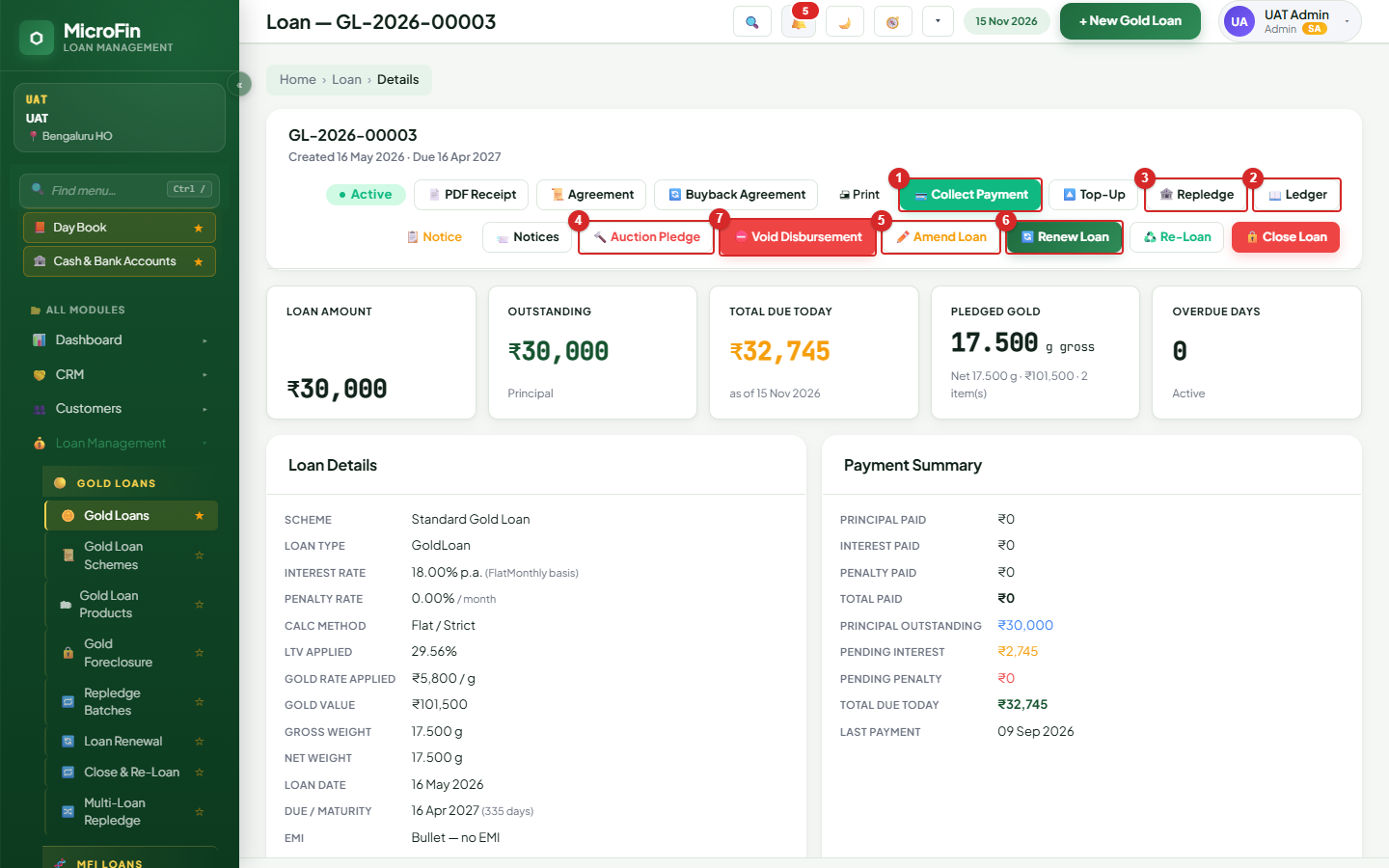
- Collect Payment
- Ledger
- Repledge
- Auction Pledge
- Amend Loan
- Renew Loan
- Void Disbursement
3. Before you start
- Permission:
CanManageLoansto collect, close, renew, re-loan and top up. Amend Loan, Void Disbursement and the pledge date card are for Admin / SuperAdmin only. Reversing or amending a receipt needsCanManageCompany. - The payment date must be an open day: inside the back-date window (default 30 days) and not on a day whose end of day (EOD) is locked.
- Know the account (Cash / Bank) that receives the money.
- A loan can be collected only while it is Active, Overdue, Repledged or TopedUp.
4. Step-by-step instructions
A. Collect interest or a part payment
- Open the loan with View and click Collect Payment (or open
Collections > Collection Entry > Payments > Collectand search by Loan No, Member Name or Mobile). - Check the Payment Date. The interest shown is quoted to this date; if you change the date the quote refreshes (default setting).
- Choose the Payment Type: Interest Only, Part Payment, EMI Payment, Penalty Only, Full Redemption (Close Loan) or Auction Settlement.
- Check or fill Principal Paid (Rs), Interest Paid (Rs), Penalty Paid (Rs) and, if any, Pre-Close Charge (Rs) and Other Charges (Rs).
- Choose Payment Mode (Cash, UPI / GPay / PhonePe, Bank Transfer, Cheque, NEFT, RTGS) and the Cash / Bank Account. Add split lines if the customer pays through two accounts.
- Click Record & Print Receipt. Message: “Payment recorded! Receipt: RC-yyyy-nnnnn”. Print the receipt (Classic or Premium layout, A4 or A5).
B. Collect an EMI loan
- For a loan with an instalment schedule choose EMI Payment, or collect from the loan's EMI Schedule page, or from the Gold EMI Collection day sheet.
- The amount fills instalments according to your company's allocation mode (Selected row or oldest first).
- Collect Advance and Pay Overdue buttons appear on EMI loans for paying ahead or clearing arrears.
C. Close a loan (direct)
- Open the loan and click Close Loan.
- Review System Calculated interest and penalty, then Final Settlement. Principal is fixed at the full outstanding. Interest and penalty are editable.
- If you reduce interest or penalty, type an Override Reason.
- Choose the payment date, mode and account. Click to confirm. Message: “Loan closed successfully. Receipt: RC-…”.
- Release the packets (see chapter 62). Closing the loan does not hand the gold back by itself.
Operations > Gold > Gold Inventory and release each packet when the customer collects the ornaments. The software does not do this automatically and does not check it.For an approved closure with approval levels, use Gold Foreclosure (pre-closure chapter).
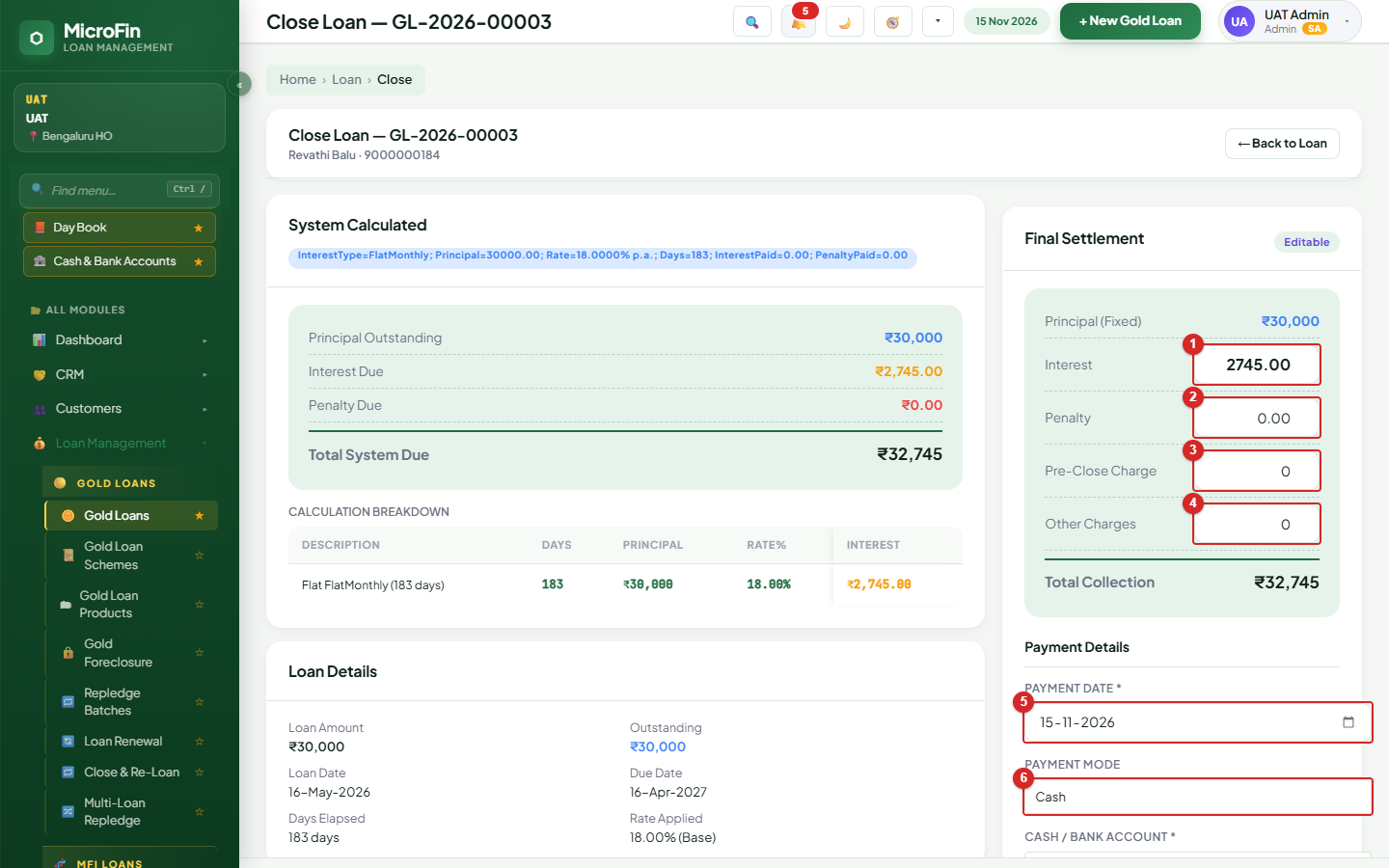
- Final interest
- Final penalty
- Pre-closure charge
- Other charges
- Payment date
- Payment mode
D. Renew a loan (rollover)
- Open
Loan Management > Gold Loans > Loan Renewal. Eligible Loans lists Active or Overdue approved loans with no renewal or pre-closure pending. - Click Renew. The page shows Dues as at Renewal Date, New Term (tenure in days, 1–3650) and Payment Details.
- Enter the Renewal Date, New Tenure (days), the Renewal Charge (defaults to the scheme's processing fee), optional Principal Paid (Rs), Payment Mode and account.
- Click Submit Renewal. The loan is not changed yet. Message: “Renewal #n created (Pending Approval).”
- A different authorised user (Admin or Manager sees the button) clicks Approve. Message: “{loan} renewed - new due date dd-MMM-yyyy.” The same loan number and gold continue; the due date moves; an Overdue loan becomes Active.
- Cancel works on a Pending renewal. Revert (Admin) undoes a Completed renewal, newest first, and restores the earlier due date.
E. Close & Re-Loan
- Open
Loan Management > Gold Loans > Close & Re-Loan, choose an eligible loan (Active, Overdue or Closed) and set the re-loan date, new amount, tenure, rate and fee. - In 2 - Gold Being Re-Pledged re-weigh, add or hand back ornaments if needed. Every held ornament must be named.
- Choose the settlement payment mode and account, then submit. A different user approves (or the approval module does). Message: “{old} settled and re-loaned. The gold stayed in the vault.”
- The new loan is revalued at today's rate.
F. Top-Up
- On an Active or Overdue loan click Top-Up.
- Enter Top-Up Amount (Rs), Loan Date and Due Date; check Gold Revaluation and Top-Up Preview.
- Click Approve Top-Up. Message: “Top-Up {no} created successfully!”
G. Correct a loan
| Mistake | Tool | Who |
|---|---|---|
| Wrong amount, fee, rate, due date or interest type | Amend Loan | Admin / SuperAdmin |
| Wrong ornament weight, or ornament not taken | Amend Loan > Gold Pledged grid | Admin / SuperAdmin |
| Wrong pledge date, nothing collected yet | Amend Loan > Pledge date card | Admin / SuperAdmin |
| Loan should never have been booked | Void Disbursement (only if enabled) | Admin / SuperAdmin |
| Receipt keyed wrongly | Payment History Amend or Reverse | CanManageCompany |
| Pending loan keyed wrongly | Reject, then raise again | CanManageLoans |
- Amend Loan: open the loan, click Amend Loan. Change Loan Amount, Processing Fee, Interest Rate (% per annum), Penalty Rate (% per month), Interest Type or Due Date, type a Reason (3+ characters) and save. Message: “Loan amended. The cash ledger and GL were adjusted by the difference.”
- Ornaments: in the Gold Pledged section correct a weight (reason of 10+ characters), add an ornament, or strike one out as KeyedInError (never taken; its packet row is deleted) or HandedBack (given back to the customer; packet released). Press Keep it to undo a strike. Every ornament the loan holds must be kept or removed; leaving one unnamed is refused. No money moves.
- Pledge date: in the Pledge date card enter New pledge date, Due date that goes with it and a Reason (10+ characters).
- Void Disbursement: button shown only if your company has switched Void on (
Settings > Accounting Policy > Loan Void). Where approval is required, a request goes to Approvals. - Receipt corrections:
Collections > Collection Entry > Payments, row Reverse (reason required) or Amend (latest live receipt only, button Post Amendment).
5. Field explanation
| Field | Purpose | Required? | Expected input | Validation | Example |
|---|---|---|---|---|---|
| Payment Date | Date of the receipt | Yes | Date | Back-date window; not an EOD-locked day | 15-11-2026 |
| Payment Type | Kind of payment | Yes | From the list | Must be a listed type | Interest Only |
| Principal Paid (Rs) | Principal part | Optional | Amount | Cannot exceed outstanding principal | 5,000 |
| Interest Paid (Rs) | Interest part | Optional | Amount | Pre-filled from the quote; see rules | 800 |
| Penalty Paid (Rs) | Penalty part | Optional | Amount | Pre-filled | 0 |
| Pre-Close Charge / Other Charges (Rs) | Charges | Optional | Amount | — | — |
| Payment Mode, Cash / Bank Account | Where money goes | Yes | Mode, matching account | Must match; split lines must total the receipt | Cash |
| Override Reason | Reason for waiving interest or penalty | When reduced | Text | “Override reason is required when modifying interest or penalty.” | Festival waiver |
| Renewal Date / New Tenure (days) | Renewal terms | Yes | Date; 1–3650 | Not before disbursement or last renewal; not future; new due date later than current | 180 |
| Renewal Charge | Fee for renewing | Optional | Rupees or % | Defaults to scheme fee | 400 |
| Top-Up Amount (Rs) | Extra loan | Yes | Amount | Above 0 and within the eligible maximum | 10,000 |
| Reason (Amend) | Audit reason | Yes | Text | 3+ characters; 10+ for ornament weight and pledge date | — |
| New pledge date / Due date that goes with it | Re-dating | Yes | Dates | See rules | — |
6. Buttons and actions
| Button | What it does |
|---|---|
| Collect Payment / Record & Print Receipt | Records the payment and the receipt. |
| Collect Advance / Pay Overdue | EMI loans: pay ahead or clear arrears. |
| Close Loan | Settles the loan in full with one receipt. |
| Renew / Submit Renewal / Approve / Cancel / Revert | Renewal steps. |
| Re-Loan | Closes and re-pledges the same gold as a new loan. |
| Top-Up / Approve Top-Up | Creates a second loan on the same gold. |
| Amend Loan | Admin correction of posted terms and ornaments. |
| Void Disbursement | Retracts a just-booked loan (when enabled). |
| Reverse / Amend (Payment History) | Undoes or corrects a receipt. |
| Notice / Notices | Opens notice screens for the loan (see chapter 62). |
7. Business rules and validations
Settings > Accounting Policy > Gold Loan — Payment Collection, on by default) re-quotes interest when you change the Payment Date.What these actions do to the books (plain words).
- Payment: each part of the receipt (principal, interest, penalty, charges) is recorded as money in, in the account you chose, and journalled.
- Close: the same, with the loan marked Closed. Nothing is posted for the gold.
- Renewal: the interest (and any part principal) is recorded as an ordinary receipt and the renewal charge as money in; reverting posts matching reversals.
- Amend: only the difference in amount, fee or GST is posted, never the whole figure again.
- Void and receipt reversal: every original entry is cancelled by an opposite entry; originals are never deleted.
- Pledge date change, ornament changes: no new money; the original rows are re-dated or only the ornament record changes.
8. Expected result
- Each payment gives a receipt
RC-yyyy-nnnnnand the loan's outstanding falls; Full Redemption sets status Closed. - A renewal keeps the loan number, moves the due date and records the interest received.
- Amend and correction tools leave an audit trail with the reason you typed.
- Reversal re-opens a closed loan and its instalments.
9. Troubleshooting
| Message or problem | Likely cause | What to do |
|---|---|---|
| “Payment cannot be collected on a loan with status: X” | Loan is Closed, Cancelled or Auctioned | Check the loan status; reverse the closing receipt if it was a mistake. |
| “Period locked — cannot post to a closed EOD date.” | Payment date is on a locked day | Use an open date or ask for an EOD reopen. |
| Principal refused | Principal above outstanding | Enter at most the outstanding principal. |
| “Override reason is required when modifying interest or penalty.” | Interest or penalty reduced | Type a reason. |
| “Loan is already closed.” | Someone closed it first | Refresh and check Payment History. |
| Renew button missing | Loan not Active / Overdue, renewal or pre-closure pending | Resolve the pending item first. |
| Approve on a renewal is refused | Approval module applies | Approve from the Approval Inbox. |
| “Cannot exceed maximum eligible top-up of Rs N.” | Amount above headroom | Lower the amount. |
| Amend shows locked fields | Top-up, posted accruals, repledge, or gold out of the safe | Only the fee can move; ask a senior approver about the break-glass boxes. |
| Pledge date change refused | A collection or other protected item exists | Use Amend or Void instead; ask an Admin. |
| Void button not visible | Void is off, loan not Active, or you are not Admin | Ask your administrator. |
| Closed loan, packets still “In Our Locker” | Closing does not release packets | Release them in Gold Inventory when gold is returned. |
| Receipt posted wrongly | Wrong amount or account | Use Payment History Amend (latest receipt) or Reverse. |
11. Related modules
- Chapter 60: creating the loan and schemes.
- Chapter 62: packets, repledge, notices and auctions.
- Pre-closure (Gold Foreclosure) and Approval Inbox chapters.
- Collections > Collection Entry and the end-of-day chapters.
தங்கக் கடன்கள்
தங்கக் கடன்: வசூல், முடித்தல், புதுப்பித்தல், திருத்தங்கள்
1. அறிமுகம்
தங்கக் கடன் வழங்கிய பின் வாடிக்கையாளர் வட்டி செலுத்தலாம், அசலில் ஒரு பகுதியைச் செலுத்தலாம், கடனைப் புதுப்பிக்கலாம், Top-Up பெறலாம் அல்லது முடிக்கலாம். இந்த அத்தியாயம் அவை ஒவ்வொன்றையும், அவற்றால் உருவாகும் ரசீதுகளையும், தவறுகளைத் திருத்தும் கருவிகளையும் (Amend, அடமான தேதி மாற்றம், நகை மாற்றம், Void, ரசீது Reverse / Amend) விளக்குகிறது. ஒவ்வொரு செயலும் பணப் புத்தகத்தில் என்ன செய்கிறது என்பதையும் எளிய சொற்களில் சொல்கிறது.
2. வழிசெலுத்தல்
- கடன் பக்கம்:
Loan Management > Gold Loans > Gold Loans, பின் View. Collect Payment, Top-Up, Amend Loan, Renew Loan, Re-Loan, Close Loan பொத்தான்கள் கடனின் நிலை அனுமதிக்கும்போது மட்டுமே தெரியும். - வசூல் பதிவு:
Collections > Collection Entry > Payments, பின் Collect. - Payment History (ரசீது Reverse / Amend):
Collections > Collection Entry > Payments. - புதுப்பித்தல்:
Loan Management > Gold Loans > Loan Renewal. - Re-loan:
Loan Management > Gold Loans > Close & Re-Loan. - Foreclosure (ஒப்புதலுடன் முடித்தல்):
Loan Management > Gold Loans > Gold Foreclosure(முன்கூட்டிய முடிப்பு அத்தியாயத்தில்).
- கட்டணம் வசூலி
- பேரேடு
- மறு அடமானம்
- ஏல அடமானம்
- கடனைத் திருத்து
- கடனைப் புதுப்பி
- வழங்கலை ரத்து செய்
3. தொடங்கும் முன்
- அனுமதி: வசூல், முடித்தல், புதுப்பித்தல், re-loan, top-up செய்ய
CanManageLoans. Amend Loan, Void Disbursement, pledge date அட்டை Admin / SuperAdmin-க்கு மட்டும். ரசீதை Reverse / Amend செய்யCanManageCompany. - வசூல் தேதி திறந்த நாளாக இருக்க வேண்டும்: பின்தேதி வரம்புக்குள் (இயல்பு 30 நாள்), நாள் முடிவு (EOD) பூட்டப்படாத நாள்.
- பணம் எந்தக் கணக்கில் (Cash / Bank) சேரும் என்பதைத் தெரிந்து வைத்திருங்கள்.
- கடன் Active, Overdue, Repledged அல்லது TopedUp நிலையில் இருக்கும்போது மட்டுமே வசூலிக்க முடியும்.
4. படிப்படியான வழிமுறைகள்
அ. வட்டி அல்லது பகுதி அசலை வசூலித்தல்
- View மூலம் கடனைத் திறந்து Collect Payment அழுத்தவும் (அல்லது
Collections > Collection Entry > Payments > Collectதிறந்து Loan No, Member Name, Mobile மூலம் தேடவும்). - Payment Date-ஐச் சரிபாருங்கள். காட்டப்படும் வட்டி இந்தத் தேதி வரை கணக்கிடப்பட்டது; தேதியை மாற்றினால் மீண்டும் கணக்கிடப்படும் (இயல்பு அமைப்பு).
- Payment Type: Interest Only, Part Payment, EMI Payment, Penalty Only, Full Redemption (Close Loan), Auction Settlement ஆகியவற்றில் தேர்ந்தெடுக்கவும்.
- Principal Paid (Rs), Interest Paid (Rs), Penalty Paid (Rs), தேவையெனில் Pre-Close Charge (Rs), Other Charges (Rs) ஆகியவற்றைச் சரிபார்க்கவும் அல்லது நிரப்பவும்.
- Payment Mode (Cash, UPI / GPay / PhonePe, Bank Transfer, Cheque, NEFT, RTGS), Cash / Bank Account தேர்ந்தெடுக்கவும். வாடிக்கையாளர் இரண்டு கணக்குகள் வழியாகச் செலுத்தினால் split வரிகளைச் சேர்க்கவும்.
- Record & Print Receipt அழுத்தவும். செய்தி: “Payment recorded! Receipt: RC-yyyy-nnnnn”. ரசீதை அச்சிடவும் (Classic அல்லது Premium; A4 அல்லது A5).
ஆ. EMI கடனை வசூலித்தல்
- தவணை அட்டவணை உள்ள கடனுக்கு EMI Payment தேர்ந்தெடுக்கவும்; அல்லது கடனின் EMI Schedule பக்கத்திலிருந்தோ Gold EMI Collection நாள் தாளிலிருந்தோ வசூலிக்கவும்.
- தொகை, உங்கள் நிறுவனத்தின் ஒதுக்கீட்டு முறைப்படி (தேர்ந்தெடுத்த வரி, அல்லது மிகப் பழைய தவணை முதலில்) தவணைகளுக்குச் செல்லும்.
- EMI கடன்களில், முன்கூட்டியே செலுத்த Collect Advance, முந்தைய நிலுவையைத் தீர்க்க Pay Overdue பொத்தான்கள் தெரியும்.
இ. கடனை முடித்தல் (நேரடி)
- கடனைத் திறந்து Close Loan அழுத்தவும்.
- System Calculated வட்டியையும் அபராதத்தையும் பார்த்து, பின் Final Settlement-ஐச் சரிபாருங்கள். அசல், முழு நிலுவைத் தொகையாகவே நிலையாக இருக்கும்; அதை மாற்ற முடியாது. வட்டியையும் அபராதத்தையும் திருத்தலாம்.
- வட்டி அல்லது அபராதத்தைக் குறைத்தால் Override Reason எழுதவும்.
- செலுத்தும் தேதி, முறை, கணக்கு ஆகியவற்றைத் தேர்ந்தெடுத்து உறுதிப்படுத்தவும். செய்தி: “Loan closed successfully. Receipt: RC-…”.
- Packets-ஐ விடுவிக்கவும் (அத்தியாயம் 62). கடனை முடிப்பதால் மட்டும் நகை திருப்பிக் கொடுக்கப்பட்டதாகப் பதிவாகாது.
Operations > Gold > Gold Inventory திறந்து, வாடிக்கையாளர் நகையைப் பெறும்போது ஒவ்வொரு packet-ஐயும் Release செய்யவும். மென்பொருள் இதைத் தானாகச் செய்வதுமில்லை, சரிபார்ப்பதுமில்லை.ஒப்புதல் நிலைகளுடன் கூடிய, ஒப்புதல் பெற்ற முடிப்புக்கு Gold Foreclosure பயன்படுத்தவும் (முன்கூட்டிய முடிப்பு அத்தியாயம்).
- இறுதி வட்டி
- இறுதி அபராதம்
- முன்கூட்டிய முடிப்புக் கட்டணம்
- பிற கட்டணங்கள்
- செலுத்திய தேதி
- செலுத்தும் முறை
ஈ. கடன் புதுப்பித்தல் (Renewal)
Loan Management > Gold Loans > Loan Renewalதிறக்கவும். Eligible Loans-இல், Active அல்லது Overdue நிலையிலுள்ள, ஒப்புதல் பெற்ற, புதுப்பித்தலோ முன்கூட்டிய முடிப்போ நிலுவையில் (pending) இல்லாத கடன்கள் பட்டியலிடப்படும்.- Renew அழுத்தவும். பக்கத்தில் Dues as at Renewal Date, New Term (கடன் காலம் நாட்களில், 1–3650), Payment Details ஆகியவை தெரியும்.
- Renewal Date, New Tenure (days), Renewal Charge (இயல்பாக scheme-இன் செயலாக்கக் கட்டணம்), தேவையெனில் Principal Paid (Rs), Payment Mode, கணக்கு ஆகியவற்றை உள்ளிடவும்.
- Submit Renewal அழுத்தவும். கடன் இன்னும் மாறாது. செய்தி: “Renewal #n created (Pending Approval).”
- அனுமதி பெற்ற வேறொரு பயனர் (Admin அல்லது Manager-க்கு இந்தப் பொத்தான் தெரியும்) Approve அழுத்துவார். செய்தி: “{loan} renewed - new due date dd-MMM-yyyy.” அதே கடன் எண்ணும் அதே நகையும் தொடரும்; முதிர்வுத் தேதி தள்ளிப்போகும்; Overdue கடன் Active ஆகும்.
- Pending நிலையிலுள்ள புதுப்பித்தலை Cancel செய்யலாம். Completed நிலையிலுள்ள புதுப்பித்தலை Admin Revert மூலம் ரத்து செய்யலாம் (மிகச் சமீபத்தியது முதலில்); அப்போது முந்தைய முதிர்வுத் தேதி மீண்டும் அமையும்.
உ. Close & Re-Loan
Loan Management > Gold Loans > Close & Re-Loanதிறந்து தகுதியான கடனை (Active, Overdue அல்லது Closed) தேர்ந்தெடுத்து, re-loan தேதி, புதிய தொகை, காலம், வட்டி விகிதம், கட்டணம் ஆகியவற்றை அமைக்கவும்.- 2 - Gold Being Re-Pledged-இல், தேவையெனில் நகைகளை மீண்டும் எடை போடலாம், புதிய நகை சேர்க்கலாம், அல்லது நகையை வாடிக்கையாளரிடம் திருப்பிக் கொடுக்கலாம். கடனில் உள்ள ஒவ்வொரு நகையும் குறிப்பிடப்பட வேண்டும்.
- தீர்வுக்கான பணம் செலுத்தும் முறையையும் கணக்கையும் தேர்ந்தெடுத்துச் சமர்ப்பிக்கவும். வேறொரு பயனர் ஒப்புதல் அளிப்பார் (அல்லது approval module வழியாக ஒப்புதல் நடக்கும்). செய்தி: “{old} settled and re-loaned. The gold stayed in the vault.”
- புதிய கடன் இன்றைய தங்க விலையில் மறுமதிப்பீடு செய்யப்படும்.
ஊ. Top-Up
- Active அல்லது Overdue கடனில் Top-Up அழுத்தவும்.
- Top-Up Amount (Rs), Loan Date, Due Date உள்ளிட்டு, Gold Revaluation, Top-Up Preview சரிபாருங்கள்.
- Approve Top-Up அழுத்தவும். செய்தி: “Top-Up {no} created successfully!”
எ. கடனைத் திருத்துதல்
| தவறு | கருவி | யார் |
|---|---|---|
| தொகை, கட்டணம், வட்டி விகிதம், முதிர்வுத் தேதி அல்லது வட்டி வகை தவறு | Amend Loan | Admin / SuperAdmin |
| நகை எடை தவறு, அல்லது பதிவான நகை உண்மையில் பெறப்படவில்லை | Amend Loan > Gold Pledged grid | Admin / SuperAdmin |
| அடமான தேதி தவறு (இன்னும் வசூல் இல்லை) | Amend Loan > Pledge date அட்டை | Admin / SuperAdmin |
| கடன் பதிவு செய்யப்பட்டிருக்கவே கூடாது | Void Disbursement (இயக்கியிருந்தால் மட்டும்) | Admin / SuperAdmin |
| ரசீது தவறாகப் பதிவானது | Payment History Amend அல்லது Reverse | CanManageCompany |
| ஒப்புதலுக்குக் காத்திருக்கும் கடன் தவறாகப் பதிவானது | Reject, பின் மீண்டும் பதிவு செய்தல் | CanManageLoans |
- Amend Loan: கடனைத் திறந்து Amend Loan அழுத்தவும். Loan Amount, Processing Fee, Interest Rate (% per annum), Penalty Rate (% per month), Interest Type அல்லது Due Date ஆகியவற்றை மாற்றி, Reason (3 அல்லது அதற்கு மேற்பட்ட எழுத்துகள்) எழுதிச் சேமிக்கவும். செய்தி: “Loan amended. The cash ledger and GL were adjusted by the difference.”
- நகைகள்: Gold Pledged பகுதியில் எடையைத் திருத்தலாம் (10 அல்லது அதற்கு மேற்பட்ட எழுத்துகள் கொண்ட காரணத்துடன்), நகை சேர்க்கலாம், அல்லது ஒரு நகையை KeyedInError (உண்மையில் பெறப்படவே இல்லை; அதன் packet வரி நீக்கப்படும்) அல்லது HandedBack (வாடிக்கையாளரிடம் திருப்பிக் கொடுக்கப்பட்டது; packet விடுவிக்கப்படும்) எனக் குறித்து நீக்கலாம். Keep it அழுத்தினால் நீக்கம் ரத்தாகும். கடனில் உள்ள ஒவ்வொரு நகையும் வைத்திருக்கப்படுகிறதா நீக்கப்படுகிறதா என்று குறிக்கப்பட வேண்டும்; ஒன்றைக்கூடக் குறிப்பிடாமல் விட்டால் மறுக்கப்படும். பணம் எதுவும் நகராது.
- அடமான தேதி: Pledge date அட்டையில் New pledge date, Due date that goes with it, Reason (10 அல்லது அதற்கு மேற்பட்ட எழுத்துகள்) ஆகியவற்றை உள்ளிடவும்.
- Void Disbursement: நிறுவனம் Void-ஐ இயக்கியிருந்தால் மட்டுமே பொத்தான் தெரியும் (
Settings > Accounting Policy > Loan Void). ஒப்புதல் தேவைப்படும் இடங்களில், கோரிக்கை Approvals-க்குச் செல்லும். - ரசீது திருத்தம்:
Collections > Collection Entry > Payments, வரியில் Reverse (காரணம் கட்டாயம்) அல்லது Amend (சமீபத்திய செயலில் உள்ள ரசீது மட்டும்; Post Amendment பொத்தான்).
5. புலங்களின் விளக்கம்
| புலம் | நோக்கம் | கட்டாயமா? | உள்ளீடு | சரிபார்ப்பு | எடுத்துக்காட்டு |
|---|---|---|---|---|---|
| Payment Date | ரசீது தேதி | ஆம் | தேதி | பின்தேதி வரம்பு; EOD பூட்டிய நாள் கூடாது | 15-11-2026 |
| Payment Type | செலுத்துதல் வகை | ஆம் | பட்டியலிலிருந்து தேர்வு | பட்டியலில் உள்ள வகையாக இருக்க வேண்டும் | Interest Only |
| Principal Paid (Rs) | அசல் பகுதி | விருப்பம் | தொகை | நிலுவை அசலை மிஞ்சக் கூடாது | 5,000 |
| Interest Paid (Rs) | வட்டிப் பகுதி | விருப்பம் | தொகை | கணக்கீட்டிலிருந்து (quote) முன்பே நிரப்பப்படும்; விதிகளைப் பார்க்கவும் | 800 |
| Penalty Paid (Rs) | அபராதப் பகுதி | விருப்பம் | தொகை | முன்பே நிரப்பப்படும் | 0 |
| Pre-Close Charge / Other Charges (Rs) | கட்டணங்கள் | விருப்பம் | தொகை | — | — |
| Payment Mode, Cash / Bank Account | பணம் சேரும் கணக்கு | ஆம் | முறை, அதற்குப் பொருந்தும் கணக்கு | முறையும் கணக்கும் பொருந்த வேண்டும்; split வரிகளின் மொத்தம் ரசீதுத் தொகைக்குச் சமமாக இருக்க வேண்டும் | Cash |
| Override Reason | வட்டி அல்லது அபராதத்தைத் தள்ளுபடி செய்வதற்கான காரணம் | குறைத்தால் கட்டாயம் | உரை | “Override reason is required when modifying interest or penalty.” | Festival waiver |
| Renewal Date / New Tenure (days) | புதுப்பித்தல் விதிமுறைகள் | ஆம் | தேதி; 1–3650 | கடன் வழங்கிய தேதிக்கோ கடைசிப் புதுப்பித்தலுக்கோ முந்தைய தேதி கூடாது; எதிர்காலத் தேதி கூடாது; புதிய முதிர்வுத் தேதி தற்போதையதைவிடப் பிந்தையதாக இருக்க வேண்டும் | 180 |
| Renewal Charge | புதுப்பித்தல் கட்டணம் | விருப்பம் | ரூபாய் அல்லது % | இயல்பாக scheme கட்டணம் | 400 |
| Top-Up Amount (Rs) | கூடுதல் கடன் | ஆம் | தொகை | 0-க்கு மேல்; தகுதியுள்ள அதிகபட்சத் தொகைக்குள் | 10,000 |
| Reason (Amend) | தணிக்கைக் காரணம் | ஆம் | உரை | 3 அல்லது அதற்கு மேற்பட்ட எழுத்துகள்; நகை எடை, அடமான தேதி மாற்றங்களுக்கு 10 அல்லது அதற்கு மேல் | — |
| New pledge date / Due date that goes with it | தேதியை மாற்றுதல் | ஆம் | தேதிகள் | விதிகளைப் பார்க்கவும் | — |
6. பொத்தான்களும் செயல்களும்
| பொத்தான் | செயல் |
|---|---|
| Collect Payment / Record & Print Receipt | வசூலையும் ரசீதையும் பதிவு செய்யும். |
| Collect Advance / Pay Overdue | EMI கடன்கள்: முன்கூட்டியே செலுத்த அல்லது முந்தைய நிலுவையைத் தீர்க்க. |
| Close Loan | ஒரே ரசீதில் கடனை முழுமையாக முடிக்கும். |
| Renew / Submit Renewal / Approve / Cancel / Revert | புதுப்பித்தல் படிகள். |
| Re-Loan | கடனை முடித்து, அதே நகையைப் புதிய கடனாக மீண்டும் அடமானம் வைக்கும். |
| Top-Up / Approve Top-Up | அதே நகையின் மீது இரண்டாவது கடனை உருவாக்கும். |
| Amend Loan | பதிவான விதிமுறைகளையும் நகைகளையும் Admin திருத்தும் வசதி. |
| Void Disbursement | சற்று முன் பதிவான கடனைத் திரும்பப் பெறும் (இயக்கியிருந்தால்). |
| Reverse / Amend (Payment History) | ரசீதைத் திருப்பிக் கழிக்கும் அல்லது திருத்தும். |
| Notice / Notices | கடனுக்கான அறிவிப்புத் திரைகளைத் திறக்கும் (அத்தியாயம் 62). |
7. வணிக விதிகளும் சரிபார்ப்புகளும்
Settings > Accounting Policy > Gold Loan — Payment Collection, இயல்பாக on): Payment Date-ஐ மாற்றினால் வட்டி மீண்டும் கணக்கிடப்படும்.இந்தச் செயல்கள் கணக்குப் புத்தகங்களில் என்ன செய்கின்றன (எளிய சொற்களில்).
- செலுத்துதல்: ரசீதின் ஒவ்வொரு பகுதியும் (அசல், வட்டி, அபராதம், கட்டணங்கள்) நீங்கள் தேர்ந்தெடுத்த கணக்கில் உள்ளே வந்த பணமாகப் பதிவாகும்; ஜர்னலிலும் பதிவாகும்.
- முடித்தல்: அதே போலவே; கூடுதலாகக் கடன் Closed எனக் குறிக்கப்படும். நகைக்காக எதுவும் பதிவாகாது.
- புதுப்பித்தல்: வட்டி (மற்றும் பகுதி அசல் இருந்தால் அதுவும்) சாதாரண ரசீதாகப் பதிவாகும்; புதுப்பித்தல் கட்டணம் உள்ளே வந்த பணமாகப் பதிவாகும்; Revert செய்தால் அவற்றுக்கு இணையான எதிர்ப் பதிவுகள் எழுதப்படும்.
- Amend: தொகை, கட்டணம் அல்லது GST-இல் உள்ள வித்தியாசம் மட்டுமே பதிவாகும்; முழுத் தொகையும் மீண்டும் பதிவாகாது.
- Void, ரசீது Reverse: ஒவ்வொரு மூலப் பதிவும் ஓர் எதிர்ப் பதிவால் ரத்து செய்யப்படும்; மூலப் பதிவுகள் ஒருபோதும் நீக்கப்படுவதில்லை.
- அடமான தேதி மாற்றம், நகை மாற்றங்கள்: புதிய பணப் பதிவு இல்லை; மூல வரிகளின் தேதி மாறும், அல்லது நகைப் பதிவு மட்டும் மாறும்.
8. எதிர்பார்க்கும் முடிவு
- ஒவ்வொரு செலுத்துதலுக்கும்
RC-yyyy-nnnnnரசீது கிடைக்கும்; கடனின் நிலுவைத் தொகை குறையும்; Full Redemption நிலையை Closed ஆக்கும். - புதுப்பித்தலில் கடன் எண் மாறாது; முதிர்வுத் தேதி தள்ளிப்போகும்; பெறப்பட்ட வட்டி பதிவாகும்.
- Amend மற்றும் பிற திருத்தக் கருவிகள், நீங்கள் எழுதிய காரணத்துடன் தணிக்கைத் தடத்தை (audit trail) விட்டுச் செல்லும்.
- Reverse செய்தால், முடிக்கப்பட்ட கடனும் அதன் தவணைகளும் மீண்டும் திறக்கப்படும்.
9. சிக்கல் தீர்வு
| செய்தி அல்லது சிக்கல் | சாத்தியமான காரணம் | செய்ய வேண்டியது |
|---|---|---|
| “Payment cannot be collected on a loan with status: X” | கடன் Closed, Cancelled அல்லது Auctioned | கடனின் நிலையைப் பாருங்கள்; தவறுதலாக முடிக்கப்பட்டிருந்தால் முடிப்பு ரசீதை Reverse செய்யவும். |
| “Period locked — cannot post to a closed EOD date.” | செலுத்தும் தேதி பூட்டப்பட்ட நாளில் உள்ளது | திறந்த தேதியைப் பயன்படுத்தவும்; அல்லது EOD-ஐ மீண்டும் திறக்கக் கேளுங்கள். |
| அசல் மறுக்கப்படுகிறது | அசல், நிலுவைத் தொகையை மிஞ்சுகிறது | அதிகபட்சம் அசல் நிலுவைத் தொகை வரை மட்டும் உள்ளிடவும். |
| “Override reason is required when modifying interest or penalty.” | வட்டி அல்லது அபராதம் குறைக்கப்பட்டுள்ளது | காரணத்தை எழுதவும். |
| “Loan is already closed.” | வேறொருவர் ஏற்கெனவே முடித்துவிட்டார் | பக்கத்தைப் புதுப்பித்து (refresh) Payment History-ஐப் பாருங்கள். |
| Renew பொத்தான் இல்லை | கடன் Active / Overdue அல்ல; அல்லது புதுப்பித்தல் / முன்கூட்டிய முடிப்பு pending நிலையில் உள்ளது | pending நிலையில் உள்ளதை முதலில் தீர்க்கவும். |
| புதுப்பித்தலில் Approve மறுக்கப்படுகிறது | approval module பொருந்துகிறது | ஒப்புதல் உள்பெட்டியிலிருந்து (Approval Inbox) ஒப்புதல் அளிக்கவும். |
| “Cannot exceed maximum eligible top-up of Rs N.” | தொகை, தகுதியுள்ள வரம்புக்கு மேல் உள்ளது | தொகையைக் குறைக்கவும். |
| Amend-இல் புலங்கள் பூட்டப்பட்டுள்ளன | top-up, பதிவான வட்டி accrual-கள், repledge, அல்லது நகை பெட்டகத்துக்கு வெளியே உள்ளது | கட்டணத்தை மட்டுமே மாற்ற முடியும்; break-glass பெட்டிகள் பற்றி மூத்த அங்கீகாரியிடம் கேளுங்கள். |
| அடமான தேதி மாற்றம் மறுக்கப்படுகிறது | வசூல் அல்லது பாதுகாக்கப்பட்ட வேறொரு பதிவு உள்ளது | அதற்குப் பதிலாக Amend அல்லது Void பயன்படுத்தவும்; Admin-இடம் கேளுங்கள். |
| Void பொத்தான் தெரியவில்லை | Void off நிலையில் உள்ளது, கடன் Active அல்ல, அல்லது நீங்கள் Admin அல்ல | நிர்வாகியிடம் கேளுங்கள். |
| கடன் முடிக்கப்பட்டும் packets இன்னும் “In Our Locker” நிலையில் உள்ளன | கடனை முடிப்பது packets-ஐ விடுவிப்பதில்லை | நகையைத் திருப்பிக் கொடுக்கும்போது Gold Inventory-இல் Release செய்யவும். |
| ரசீது தவறாகப் பதிவானது | தொகை அல்லது கணக்கு தவறு | Payment History-இல் Amend (மிகச் சமீபத்திய ரசீது) அல்லது Reverse பயன்படுத்தவும். |
10. தமிழ் விளக்கம்
இந்த அத்தியாயத்தின் முழுத் தமிழ் வடிவம் இதுவே. ஆங்கிலப் பகுதியில் மேலே உள்ள அதே பிரிவுகள் (1–9, 11) இங்கு தமிழில் தரப்பட்டுள்ளன.
11. தொடர்புடைய தொகுதிகள்
- அத்தியாயம் 60: கடன் உருவாக்கமும் schemes-உம்.
- அத்தியாயம் 62: packets, மறு அடமானம், அறிவிப்புகள், ஏலம்.
- முன்கூட்டிய முடிப்பு (Gold Foreclosure), ஒப்புதல் உள்பெட்டி (Approval Inbox) அத்தியாயங்கள்.
- Collections > Collection Entry, நாள் முடிவு அத்தியாயங்கள்.