Deposits and Savings
Savings accounts and passbook
1. Overview
A savings account is a member's own account with your company. Each member may hold one savings account. It has a passbook (a running statement of every deposit, withdrawal, interest credit and correction), an interest rate, a posting frequency and a minimum balance.
In this chapter you will open an account, take a deposit, pay a withdrawal (directly or through approval), post interest, close an account safely with a second person, correct an opening balance, and use the Unclaimed Savings report to follow up savings that members left behind.
2. Navigation
Deposits > Savings Accounts— the Savings Register (list, filters, + Open account, 📈 Interest posting).- On a row: Passbook, Deposit, Withdraw, Close, and Review when a closure is waiting.
Deposits > Savings Interest Posting— manual interest run (the sidebar row is shown to HO users).Reports & Analytics > Portfolio > Unclaimed Savings— savings left behind after microfinance loans ended (MFI profiles).
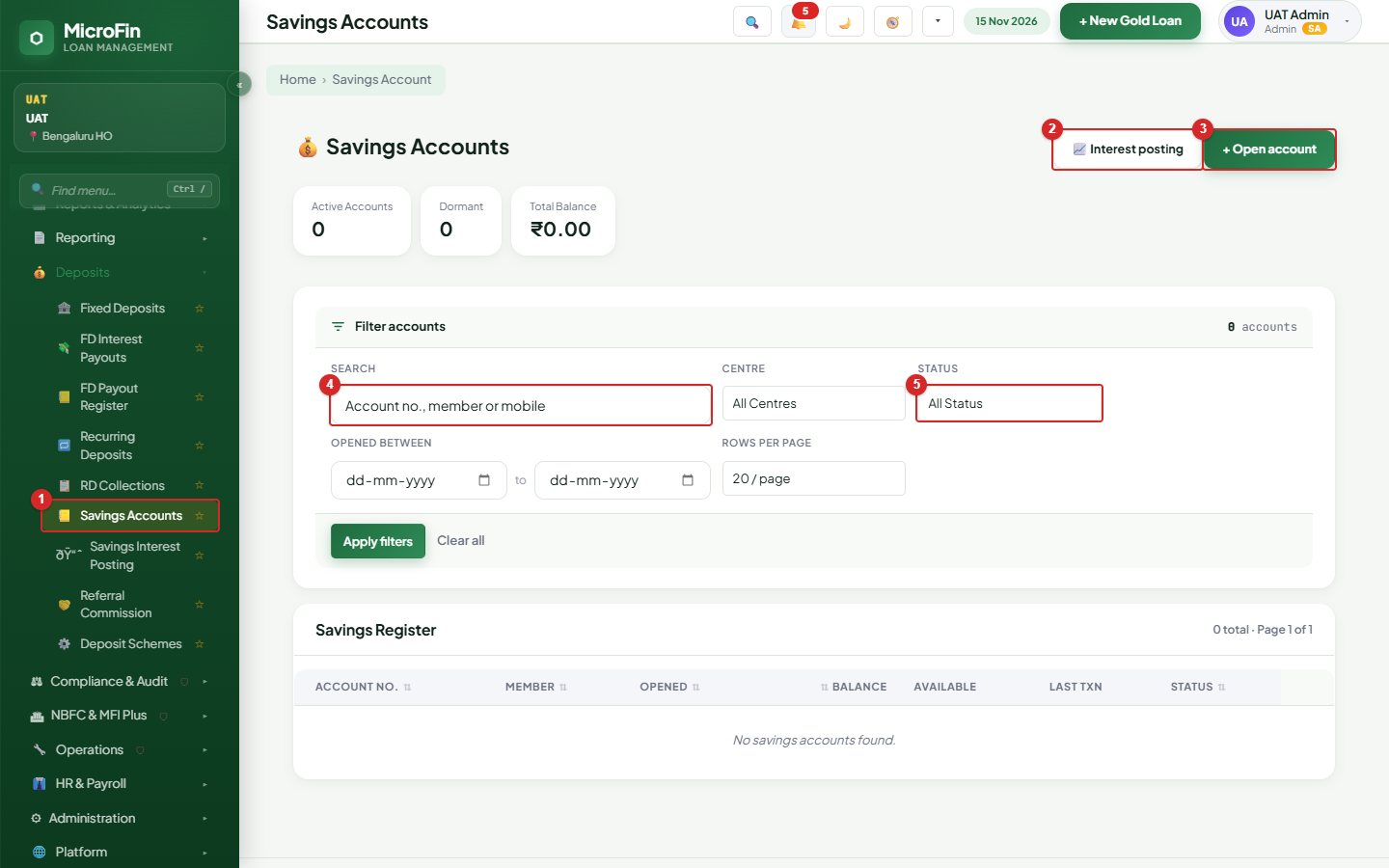
- Deposits > Savings Accounts
- Interest posting
- Open account
- Search by account number, member or mobile
- Status filter
3. Before you start
- Permissions.
- Opening an account, taking a deposit, paying a withdrawal and reading the passbook need only a signed-in user of the branch.
- Close (requesting, reviewing, approving or rejecting) needs the sensitive-data right (
CanViewSensitiveData). - Interest posting needs Access Vouchers (
CanAccessVouchers) and Manage Loans (CanManageLoans). - Adjust opening is for Admin or SuperAdmin only.
- A branch user works on their own branch only: “This account belongs to another branch.”
- The member must be active and must not already have a savings account. The member list offers only such members.
- For a deposit or withdrawal have the payment mode and the Cash / bank account ready.
- Enter the real date. The Opening date and the Date on the deposit and withdrawal forms are not checked against a back-date or future-date window. Only a locked day or closed period stops you, so type the date the money actually moved.
4. Step-by-step instructions
Open a savings account
- Open
Deposits > Savings Accountsand click + Open account. - Choose the Member under Account holder (HO users also choose Branch).
- Check the Opening date.
- Under Terms check Interest rate (% p.a.), Interest posting (Quarterly, Half-yearly, Yearly or None — no interest) and Minimum balance. These start from company defaults and are then stored on this account; a later change of the company default does not touch it.
- (Optional) Enter Nominee and Relationship.
- (Optional) Enter an Opening deposit with Amount, Payment mode, Cash / bank account and Reference no. (reference for non-cash modes). It must be at least the minimum balance.
- Click Open account and confirm. You see “Savings account opened.”
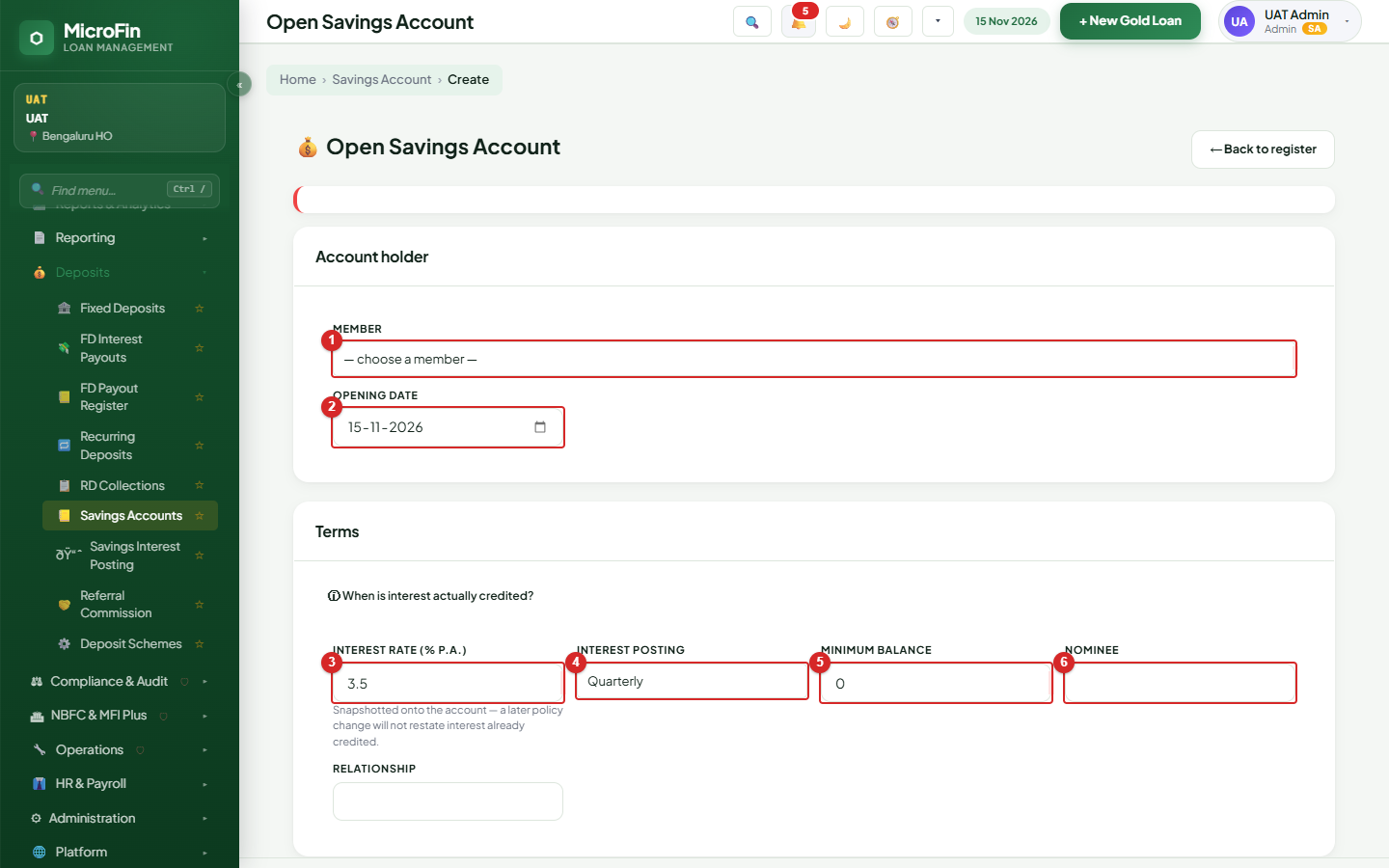
- Member
- Opening date
- Interest rate
- How often interest is posted
- Minimum balance
- Nominee name
Take a deposit at the counter
- On the register click Deposit on the member's row (or + Deposit on the passbook).
- Enter Amount, Date, Payment mode and Cash / bank account. Add Reference no. and a Narration (it prints on the passbook line) if needed.
- Click Post deposit and confirm “Post a deposit of … to this savings account?”. You see “₹x deposited.”
Pay a withdrawal
- Click Withdraw on the row. The tiles show Balance, Available, Awaiting approval and Minimum.
- Enter Amount, Date, Payment mode, Cash / bank account, and optional Reference no. and Narration.
- If your company does not use withdrawal approval for this amount, click Pay out and confirm. You see “₹x paid out.”
- If your company uses withdrawal approval and the amount reaches its minimum, the button reads Submit for approval. Confirm the message “This does NOT pay anything out yet…”. You see “₹x submitted for approval (request #n) — nothing has been paid out yet.” Do not hand over cash yet.
- The approvers sign off in the Approval Inbox. When the last approver approves, the withdrawal is posted automatically, as if you had done it, using the date you entered. Hand over cash only after that.
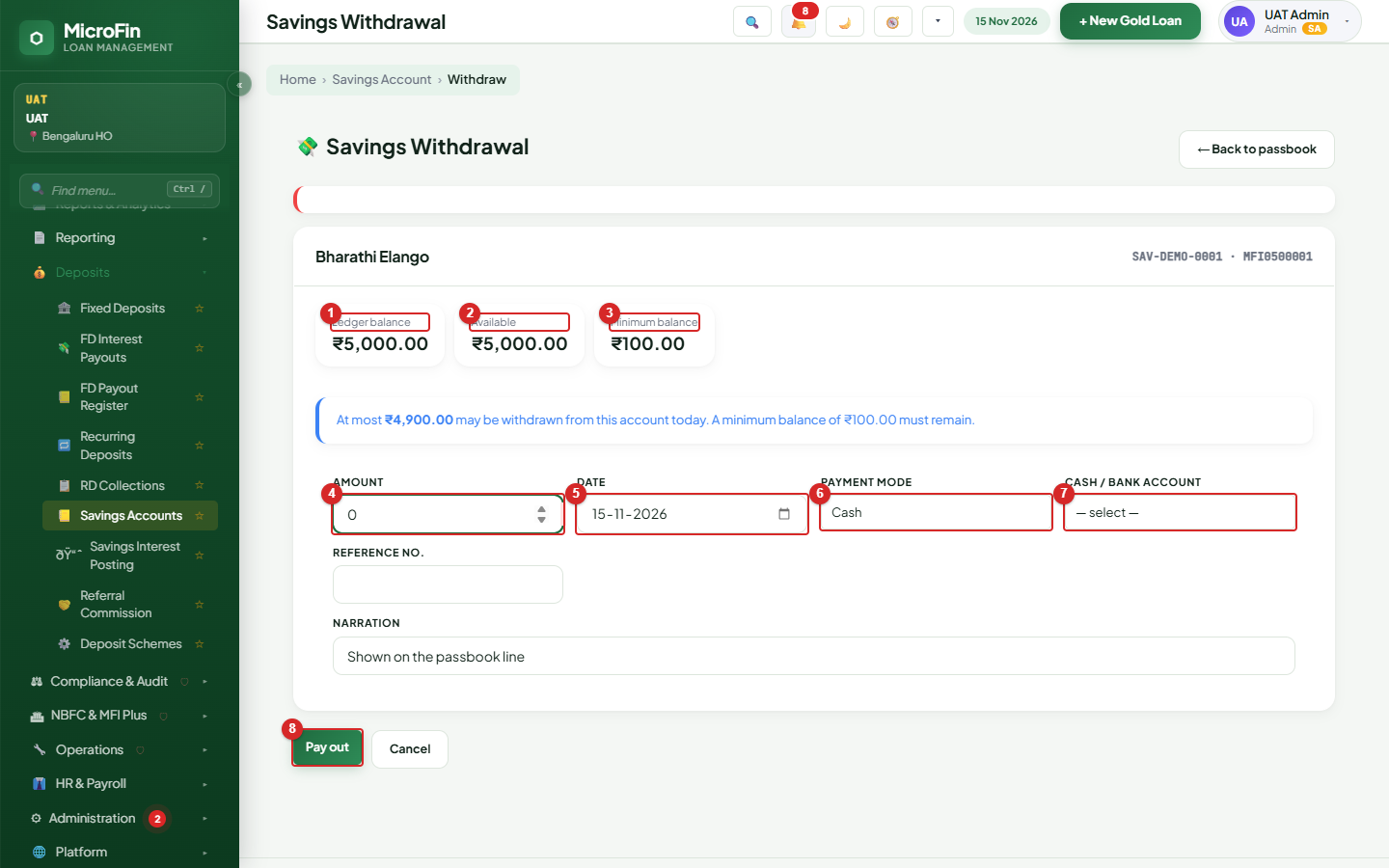
- Ledger balance
- Available to withdraw
- Minimum balance that must remain
- Amount
- Date
- Payment mode
- Cash / bank account
- Pay out (or Submit for approval when approval is on)
Post interest
- Automatically: a nightly job posts interest on the last day of each posting period.
- Manually: open
Deposits > Savings Interest Posting(or 📈 Interest posting on the register). Choose Period end (it starts at the last quarter end) and optionally Branch, then click Preview. - Check the table (Account No., Member, Balance, Rate, Interest). Click Post interest for this period and confirm “Credit ₹x of interest to n account(s)?”. You see “Interest credited to n account(s) — ₹x in total.”
Close a savings account (two people)
- First user (maker): on the register click Close, give the reason (placeholder “Why is this account being closed?”) and click Request closure. The account becomes
PendingClosureand is frozen — no deposit or withdrawal until it is decided. - A different user (checker): open the register, click Review on that row (or Review closure on the passbook). Choose Payment mode and Cash / bank account (and Reference no. for non-cash).
- Click Pay … and close and confirm “Pay ₹x and close this account?”. The whole balance is paid out and the account becomes
Closed. Or enter a reason in “Why is this being sent back?” and click Reject request; the account becomesActiveagain.
Correct an opening balance (Admin only)
- Open the member's Passbook and click ⚖ Adjust opening.
- Enter the Corrected opening balance (₹), the Effective date and a Reason (5 to 120 characters).
- Click Post correction. The system adds the difference to the passbook. “No cash moved.”
Read or print the passbook
- Click Passbook on the row. Filter by Period and Transaction type (All types, Deposit, Withdrawal, Interest credit, Reversal).
- Click 🖨️ Print passbook for a printable statement (Date, Particulars, Reference, Withdrawal, Deposit, Balance).
Follow up unclaimed savings
- Open
Reports & Analytics > Portfolio > Unclaimed Savings. - Use the filters: Unclaimed for (age), New loan request, Savings vs centre outstanding, Within ₹ of centre outstanding, plus Search, Branch and Centre. Click Apply filters.
- Open the member's Passbook (row button) to settle the money with a withdrawal or a closure, or open Customer 360°. Use ⬇ Excel to export.
- The report itself pays nothing.
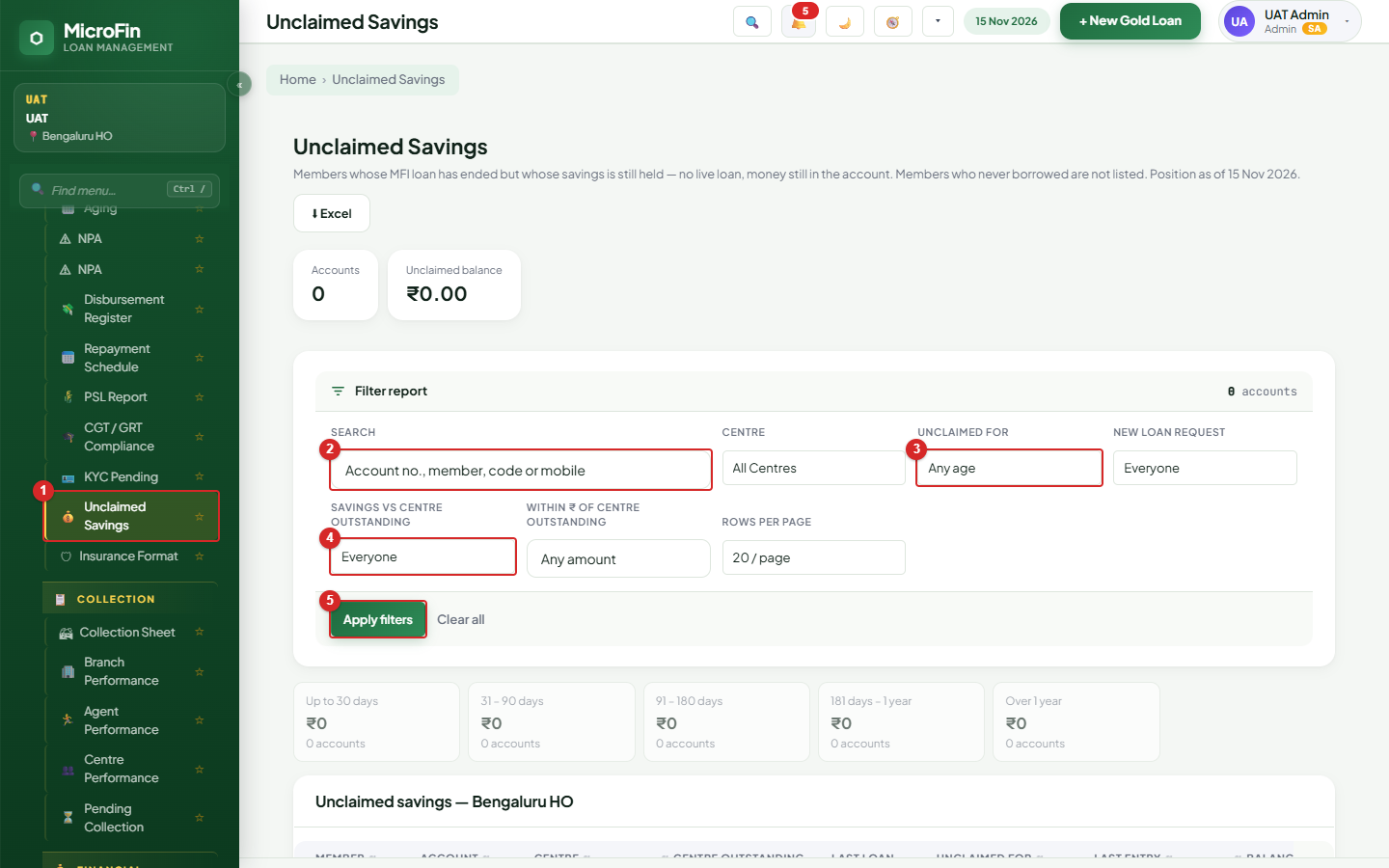
- Reports & Analytics > Portfolio > Unclaimed Savings
- Search by account number or member
- Age of the unclaimed balance
- Whether the savings cover the centre outstanding
- Apply filters
5. Field explanation
| Field | Purpose | Required? | Expected input | Validation | Example |
|---|---|---|---|---|---|
| Member | Account holder | Yes | Pick an active member without an account | “Choose the member this account belongs to.” / “<name> already has a savings account. A member may hold only one.” | Lakshmi Devi |
| Opening date | Start of the account | Yes | Date | Not checked against a back-date window — enter the real date | 15-11-2026 |
| Interest rate (% p.a.) | Rate earned | Yes | 0–25 | “Interest rate must be between 0 and 25% p.a.” | 3.5 |
| Interest posting | How often interest is credited | Yes | Quarterly / Half-yearly / Yearly / None | One of these | Quarterly |
| Minimum balance | Balance that must stay in the account | Yes | Rupees, not negative | “Minimum balance cannot be negative.” | 0 |
| Nominee / Relationship | Person named on the account | Optional | Text | — | — |
| Opening deposit | First deposit | Optional | Amount of at least the minimum balance | “An opening deposit must be at least the minimum balance of ₹x.” Needs mode and account when entered | 500 |
| Amount (deposit / withdrawal) | Money moved | Yes | Above 0, up to 10,000,000 | “Enter an amount greater than zero.” | 1,000 |
| Date | Date of the entry | Yes | Date | Not checked against a back-date window — enter the real date | 15-11-2026 |
| Payment mode / Cash / bank account | How the money moves | Yes | Cash, UPI, NEFT / IMPS, Cheque, Transfer; matching account | “Payment mode is required.” “Select the Cash/Bank account.” “A reference number is required for non-cash payments.” | Cash |
| Reference no. | Cheque / UTR number | Non-cash modes | Up to 60 characters | As above | — |
| Narration | Text on the passbook line | Optional | Up to 200 characters | — | Cash deposit |
| Reason (closure) | Why the account is closed | Yes | Up to 300 characters | “Give a reason for closing this account.” | Member moved away |
| Rejection reason | Why a closure is sent back | Optional | Up to 200 characters | — | Balance to be checked |
| Period end (interest) | Last day of the period | Yes | Date | Nothing checks it is a real quarter / half-year / year end — pick it carefully | 31-12-2026 |
| Corrected opening balance / Effective date / Reason | Admin correction | Yes | Rupees ≥ 0; date; 5–120 characters | “Give a reason of at least 5 characters.” “The effective date cannot be in the future.” | — |
6. Buttons and actions
| Button | What it does |
|---|---|
| + Open account | Opens the new-account form. |
| Open account | Saves the account (and the opening deposit if entered). |
| Passbook / 🖨️ Print passbook | Shows or prints the statement. |
| Deposit / + Deposit | Opens the counter deposit form; Post deposit saves it. |
| Withdraw / − Withdraw | Opens the withdrawal form; Pay out pays immediately, Submit for approval parks it. |
| Close | Starts a closure request (Request closure). |
| Review / Review closure | Lets a different user decide the closure. |
| Pay … and close / Reject request | Pays the whole balance and closes, or returns the account to Active. |
| ⚖ Adjust opening | Admin only: corrects the opening balance (Post correction). |
| 📈 Interest posting / Preview / Post interest for this period | Manual interest run. |
| ⬇ Excel (Unclaimed Savings) | Exports the report. |
7. Business rules and validations
CanViewSensitiveData; interest posting needs Access Vouchers and Manage Loans; Adjust opening is for Admin / SuperAdmin.8. Expected result
- Opened: “Savings account opened.”; status
Active; balance 0 or the opening deposit. - Deposit: “₹x deposited.”; passbook shows a Deposit line; balance rises; cash is booked in.
- Withdrawal: “₹x paid out.” and a Withdrawal line, or the “submitted for approval (request #n)” message with no change to the balance until approval.
- Interest: an Interest line dated the period end; no cash entry.
- Closure: after the checker pays, the balance is paid out in full and the status is
Closed. - Adjust opening: “Opening balance corrected — ₹x added to / taken off the passbook. No cash moved.”
9. Troubleshooting
| Message or problem | Likely cause | What to do |
|---|---|---|
| Member not in the list | Member inactive, or already has an account | Activate the member, or open the existing account's passbook. |
| “<name> already has a savings account. A member may hold only one.” | Account exists | Use the existing account. |
| “Only ₹x is available in this account.” | Amount above the available balance | Withdraw no more than Available. |
| “Only ₹x is available — ₹y of the ₹z available balance is already committed to a withdrawal or a loan closure awaiting approval…” | Money is reserved by a waiting request | Approve or reject the waiting request first. |
| “Only ₹x is available — ₹y of the ₹z balance is held against a live loan.” | A lien from a live loan | Wait until the loan allows release. |
| “This exact withdrawal is already waiting for approval (request #n)…” | Same withdrawal submitted twice | Wait for request #n; change a detail if a second payout is really needed. |
| Withdrawal approved but nothing posted | The chosen date is now in a locked day | Ask the approver to reject it and submit again with an open date. |
| “A closure is pending approval on this account.” | Closure waiting for a checker | Ask a different authorised user to Review. |
| “A different user must approve this closure (4-eyes).” | The requester tried to approve | Ask another user, or an Admin. |
| “<₹x> … is still promised to a withdrawal or a loan closure awaiting approval…” | Reserved money | Approve or reject that request before closing. |
| “The cash ledger rejected this entry — nothing was saved…” | Locked period or the chosen cash account is not linked | Check the period / EOD lock and the chosen account, then retry. |
| “Interest posting is switched off for this company.” | Company posting frequency is None | Ask your administrator. |
| “Nothing to post for the period ending …” | No account is due interest for that period | Check the period end date. |
| A member is missing from Unclaimed Savings | Never had a loan, loan still live, or loan cancelled | Check the member's loans in Customer 360°. |
| Error page on Deposit / Withdraw / Close | Savings script (359) missing on the database | Tell your MicroFin administrator. |
11. Related modules
- Fixed and recurring deposits (previous chapter) — the other products under the Deposits menu.
- Collection entry — compulsory savings are collected with loan instalments there.
- Foreclosure / closing a loan — a loan closure may offer to settle the member's savings.
- Approvals — the withdrawal-approval chain is worked in the Approval Inbox.
- Customer 360° — shows a member's savings next to their loans.
வைப்புகளும் சேமிப்பும்
சேமிப்புக் கணக்குகளும் passbook-உம்
1. அறிமுகம்
சேமிப்புக் கணக்கு என்பது உங்கள் நிறுவனத்தில் ஒரு உறுப்பினரின் சொந்தக் கணக்கு. ஒரு உறுப்பினருக்கு ஒரே ஒரு சேமிப்புக் கணக்கு மட்டுமே இருக்கலாம். அதற்கு ஒரு passbook (ஒவ்வொரு வரவு, பணம் எடுப்பு, வட்டி வரவு, திருத்தம் ஆகியவற்றின் தொடர் அறிக்கை), வட்டி விகிதம், வட்டி வரவு இடைவெளி, குறைந்தபட்ச இருப்பு ஆகியவை உண்டு.
இந்த அத்தியாயத்தில் கணக்கைத் தொடங்குவது, வரவு பெறுவது, எடுப்புத் தொகையை வழங்குவது (நேரடியாக அல்லது ஒப்புதல் வழியாக), வட்டி வரவு வைப்பது, இரண்டாம் நபருடன் பாதுகாப்பாகக் கணக்கை முடிப்பது, தொடக்க இருப்பைத் திருத்துவது, உறுப்பினர்கள் விட்டுச் சென்ற சேமிப்பைப் பின்தொடர Unclaimed Savings அறிக்கையைப் பயன்படுத்துவது ஆகியவற்றைக் கற்பீர்கள்.
2. வழிசெலுத்தல்
Deposits > Savings Accounts— Savings Register (பட்டியல், வடிகட்டிகள், + Open account, 📈 Interest posting).- வரிசையில்: Passbook, Deposit, Withdraw, Close, மற்றும் முடிப்புக் கோரிக்கை காத்திருந்தால் Review.
Deposits > Savings Interest Posting— கைமுறையாக வட்டி வரவு வைத்தல் (இடப்புற மெனுவில் இந்த வரி HO பயனர்களுக்குத் தெரியும்).Reports & Analytics > Portfolio > Unclaimed Savings— நுண்கடன்கள் முடிந்த பின் விட்டுச் செல்லப்பட்ட சேமிப்பு (MFI profile-களில்).
- வைப்புகள் > சேமிப்புக் கணக்குகள்
- வட்டி பதிவேற்றம்
- கணக்கைத் தொடங்கு
- கணக்கு எண், உறுப்பினர் அல்லது கைபேசி மூலம் தேடு
- நிலை வடிகட்டி
3. தொடங்குவதற்கு முன்
- அனுமதிகள்.
- கணக்கு தொடங்க, வரவு பெற, எடுப்புத் தொகையை வழங்க, passbook பார்க்க கிளையில் உள்நுழைந்த பயனர் போதும்.
- Close (கோரிக்கை, மதிப்பாய்வு, ஒப்புதல், நிராகரிப்பு) செய்ய முக்கியத் தரவு உரிமை (
CanViewSensitiveData) தேவை. - வட்டி வரவு வைக்க Access Vouchers (
CanAccessVouchers) மற்றும் Manage Loans (CanManageLoans) தேவை. - Adjust opening Admin அல்லது SuperAdmin-க்கு மட்டும்.
- கிளைப் பயனர் தம் கிளையில் மட்டுமே பணிபுரிவார்: “This account belongs to another branch.”
- உறுப்பினர் செயலில் இருக்க வேண்டும்; ஏற்கெனவே சேமிப்புக் கணக்கு இருக்கக்கூடாது. உறுப்பினர் பட்டியல் அத்தகையவர்களை மட்டுமே காட்டும்.
- வரவு அல்லது எடுப்புக்கு payment mode, Cash / bank கணக்கைத் தயாராக வைக்கவும்.
- உண்மையான தேதியை உள்ளிடுங்கள். Opening date மற்றும் வரவு/எடுப்புப் படிவங்களின் Date ஆகியவை பின்தேதி அல்லது எதிர்காலத் தேதி வரம்புடன் ஒப்பிட்டுச் சரிபார்க்கப்படுவதில்லை. பூட்டப்பட்ட நாள் அல்லது மூடிய காலம் மட்டுமே தடுக்கும்; எனவே பணம் உண்மையில் நகர்ந்த தேதியை உள்ளிடவும்.
4. படிப்படியான வழிமுறைகள்
சேமிப்புக் கணக்கைத் தொடங்குதல்
Deposits > Savings Accountsதிறந்து + Open account சொடுக்கவும்.- Account holder-இல் Member தேர்வு செய்யவும் (HO பயனர் Branch-உம்).
- Opening date-ஐச் சரிபார்க்கவும்.
- Terms-இல் Interest rate (% p.a.), Interest posting (Quarterly, Half-yearly, Yearly அல்லது None — no interest), Minimum balance சரிபார்க்கவும். இவை நிறுவனத்தின் இயல்பு மதிப்புகளுடன் தொடங்கி, பின் இந்தக் கணக்கிலேயே சேமிக்கப்படும்; பிறகு நிறுவன இயல்பை மாற்றினாலும் இக்கணக்கு மாறாது.
- (விருப்பம்) Nominee, Relationship உள்ளிடவும்.
- (விருப்பம்) Opening deposit — Amount, Payment mode, Cash / bank account, பணமல்லாததற்கு Reference no. உள்ளிடவும். அது குறைந்தபட்ச இருப்புக்குக் குறையக்கூடாது.
- Open account சொடுக்கி உறுதிப்படுத்தவும். “Savings account opened.” என வரும்.
- உறுப்பினர்
- தொடங்கிய தேதி
- வட்டி விகிதம்
- வட்டி எவ்வளவு இடைவெளியில் பதிவாகும்
- குறைந்தபட்ச இருப்பு
- வாரிசுதாரர் பெயர்
கவுண்டரில் வரவு பெறுதல்
- பதிவேட்டில் உறுப்பினரின் வரிசையில் Deposit (அல்லது passbook-இல் + Deposit) சொடுக்கவும்.
- Amount, Date, Payment mode, Cash / bank account உள்ளிடவும். தேவையெனில் Reference no., Narration (passbook வரியில் அச்சாகும்).
- Post deposit சொடுக்கி “Post a deposit of … to this savings account?” உறுதிப்படுத்தவும். “₹x deposited.” என வரும்.
எடுப்புத் தொகையை வழங்குதல்
- வரிசையில் Withdraw சொடுக்கவும். Balance, Available, Awaiting approval, Minimum கட்டங்கள் தெரியும்.
- Amount, Date, Payment mode, Cash / bank account, விருப்பமாக Reference no., Narration உள்ளிடவும்.
- இந்தத் தொகைக்கு உங்கள் நிறுவனம் எடுப்பு ஒப்புதலைப் பயன்படுத்தவில்லை எனில் Pay out சொடுக்கி உறுதிப்படுத்தவும். “₹x paid out.” என வரும்.
- எடுப்பு ஒப்புதலை நிறுவனம் பயன்படுத்தி, தொகை அதன் குறைந்தபட்சத்தை எட்டினால் பொத்தான் Submit for approval எனக் காட்டும். “This does NOT pay anything out yet…” என்பதை உறுதிப்படுத்தவும். “₹x submitted for approval (request #n) — nothing has been paid out yet.” என வரும். இன்னும் பணம் கொடுக்காதீர்கள்.
- அங்கீகாரிகள் Approval Inbox-இல் ஒப்புதல் அளிப்பார்கள். கடைசி அங்கீகாரி ஒப்புதல் அளித்தவுடன், நீங்கள் உள்ளிட்ட தேதியில், நீங்களே செய்ததுபோல் எடுப்பு தானாகப் பதிவாகும். அதன் பிறகே பணம் கொடுக்கவும்.
- கணக்குப் பேரேட்டு இருப்பு
- எடுக்கக்கூடிய தொகை
- இருக்க வேண்டிய குறைந்தபட்ச இருப்பு
- தொகை
- தேதி
- செலுத்தும் முறை
- ரொக்க / வங்கிக் கணக்கு
- Pay out (ஒப்புதல் இயக்கப்பட்டிருந்தால் Submit for approval)
வட்டி வரவு வைத்தல்
- தானாக: ஒவ்வொரு வரவு காலத்தின் கடைசி நாளில், இரவில் தானாக இயங்கும் பணி (nightly job) வட்டியை வரவு வைக்கும்.
- கைமுறையாக:
Deposits > Savings Interest Posting(அல்லது பதிவேட்டில் 📈 Interest posting) திறக்கவும். Period end (கடைசிக் காலாண்டு முடிவிலிருந்து தொடங்கும்), தேவையெனில் Branch தேர்வு செய்து Preview சொடுக்கவும். - அட்டவணையைப் (Account No., Member, Balance, Rate, Interest) பார்க்கவும். Post interest for this period சொடுக்கி “Credit ₹x of interest to n account(s)?” உறுதிப்படுத்தவும். “Interest credited to n account(s) — ₹x in total.” என வரும்.
சேமிப்புக் கணக்கை முடித்தல் (இரண்டு பேர்)
- முதல் பயனர் (maker): பதிவேட்டில் Close சொடுக்கி, காரணத்தை (“Why is this account being closed?”) எழுதி Request closure சொடுக்கவும். கணக்கு
PendingClosureஆகி முடக்கப்படும் — முடிவு எடுக்கப்படும் வரை வரவு, எடுப்பு இல்லை. - வேறொரு பயனர் (checker): பதிவேட்டில் அந்த வரிசையில் Review (அல்லது passbook-இல் Review closure) சொடுக்கவும். Payment mode, Cash / bank account (பணமல்லாததற்கு Reference no.) தேர்வு செய்யவும்.
- Pay … and close சொடுக்கி “Pay ₹x and close this account?” உறுதிப்படுத்தவும். முழு இருப்பும் வழங்கப்பட்டு கணக்கு
Closedஆகும். அல்லது “Why is this being sent back?” பெட்டியில் காரணம் எழுதி Reject request சொடுக்கவும்; கணக்கு மீண்டும்Activeஆகும்.
தொடக்க இருப்பைத் திருத்துதல் (Admin மட்டும்)
- உறுப்பினரின் Passbook திறந்து ⚖ Adjust opening சொடுக்கவும்.
- Corrected opening balance (₹), Effective date, Reason (5 முதல் 120 எழுத்துகள்) உள்ளிடவும்.
- Post correction சொடுக்கவும். வித்தியாசம் passbook-இல் சேர்க்கப்படும். “No cash moved.”
Passbook பார்க்க அல்லது அச்சிட
- வரிசையில் Passbook சொடுக்கவும். Period, Transaction type (All types, Deposit, Withdrawal, Interest credit, Reversal) மூலம் வடிகட்டவும்.
- அச்சிடக்கூடிய அறிக்கைக்கு 🖨️ Print passbook (Date, Particulars, Reference, Withdrawal, Deposit, Balance).
உரிமை கோரப்படாத சேமிப்பைப் பின்தொடர்தல்
Reports & Analytics > Portfolio > Unclaimed Savingsதிறக்கவும்.- வடிகட்டிகள்: Unclaimed for (எவ்வளவு காலமாக), New loan request, Savings vs centre outstanding, Within ₹ of centre outstanding, மேலும் Search, Branch, Centre. Apply filters சொடுக்கவும்.
- வரிசையின் Passbook பொத்தான் மூலம் உறுப்பினரின் passbook-ஐத் திறந்து, எடுப்பு அல்லது முடிப்பு மூலம் பணத்தைத் தீர்வு செய்யவும்; அல்லது Customer 360° திறக்கவும். ஏற்றுமதிக்கு ⬇ Excel.
- இந்த அறிக்கை எதையும் செலுத்தாது.
- அறிக்கைகள் & பகுப்பாய்வு > போர்ட்ஃபோலியோ > உரிமை கோரப்படாத சேமிப்பு
- கணக்கு எண் அல்லது உறுப்பினர் மூலம் தேடு
- உரிமை கோரப்படாத இருப்பின் வயது
- சேமிப்பு மையத்தின் நிலுவையை ஈடுகட்டுகிறதா
- வடிகட்டிகளைப் பயன்படுத்து
5. புல விளக்கம்
| புலம் | நோக்கம் | கட்டாயமா? | உள்ளீடு | சரிபார்ப்பு | எடுத்துக்காட்டு |
|---|---|---|---|---|---|
| Member | கணக்குதாரர் | ஆம் | கணக்கு இல்லாத, செயலில் உள்ள உறுப்பினரைத் தேர்வு செய்யவும் | “Choose the member this account belongs to.” / “<name> already has a savings account. A member may hold only one.” | Lakshmi Devi |
| Opening date | கணக்குத் தொடக்கம் | ஆம் | தேதி | பின்தேதி வரம்புடன் ஒப்பிட்டுச் சரிபார்க்கப்படாது — உண்மையான தேதியை உள்ளிடவும் | 15-11-2026 |
| Interest rate (% p.a.) | வட்டி விகிதம் | ஆம் | 0–25 | “Interest rate must be between 0 and 25% p.a.” | 3.5 |
| Interest posting | வட்டி வரவு இடைவெளி | ஆம் | Quarterly / Half-yearly / Yearly / None | இவற்றில் ஒன்று | Quarterly |
| Minimum balance | கணக்கில் இருக்க வேண்டிய இருப்பு | ஆம் | ரூபாய்; எதிர்மறையாக இருக்கக்கூடாது | “Minimum balance cannot be negative.” | 0 |
| Nominee / Relationship | கணக்கில் குறிப்பிட்ட நபர் | விருப்பம் | உரை | — | — |
| Opening deposit | முதல் வரவு | விருப்பம் | குறைந்தபட்ச இருப்புக்குக் குறையாத தொகை | “An opening deposit must be at least the minimum balance of ₹x.” உள்ளிட்டால் mode, கணக்கு தேவை | 500 |
| Amount (வரவு / எடுப்பு) | நகரும் பணம் | ஆம் | 0-க்கு மேல், 10,000,000 வரை | “Enter an amount greater than zero.” | 1,000 |
| Date | பதிவுத் தேதி | ஆம் | தேதி | பின்தேதி வரம்புடன் ஒப்பிட்டுச் சரிபார்க்கப்படாது — உண்மையான தேதியை உள்ளிடவும் | 15-11-2026 |
| Payment mode / Cash / bank account | பணம் நகரும் முறை | ஆம் | Cash, UPI, NEFT / IMPS, Cheque, Transfer; பொருந்தும் கணக்கு | “Payment mode is required.” “Select the Cash/Bank account.” “A reference number is required for non-cash payments.” | Cash |
| Reference no. | காசோலை / UTR எண் | பணமல்லாத முறைக்கு | 60 எழுத்துகள் வரை | மேலே உள்ளபடி | — |
| Narration | passbook வரியில் உரை | விருப்பம் | 200 எழுத்துகள் வரை | — | Cash deposit |
| Reason (முடிப்பு) | கணக்கை ஏன் முடிக்கிறோம் | ஆம் | 300 எழுத்துகள் வரை | “Give a reason for closing this account.” | Member moved away |
| Rejection reason | முடிப்பு ஏன் திருப்பப்படுகிறது | விருப்பம் | 200 எழுத்துகள் வரை | — | Balance to be checked |
| Period end (வட்டி) | காலத்தின் கடைசி நாள் | ஆம் | தேதி | அது உண்மையான காலாண்டு / அரையாண்டு / ஆண்டு முடிவுதானா என்பதை மென்பொருள் சரிபார்ப்பதில்லை — கவனமாகத் தேர்வு செய்யுங்கள் | 31-12-2026 |
| Corrected opening balance / Effective date / Reason | Admin திருத்தம் | ஆம் | ரூபாய் ≥ 0; தேதி; 5–120 எழுத்துகள் | “Give a reason of at least 5 characters.” “The effective date cannot be in the future.” | — |
6. பொத்தான்களும் செயல்களும்
| பொத்தான் | செய்வது |
|---|---|
| + Open account | புதிய கணக்குப் படிவத்தைத் திறக்கும். |
| Open account | கணக்கையும் (உள்ளிட்டிருந்தால்) தொடக்க வரவையும் சேமிக்கும். |
| Passbook / 🖨️ Print passbook | அறிக்கையைக் காட்டும் அல்லது அச்சிடும். |
| Deposit / + Deposit | கவுண்டர் வரவுப் படிவத்தைத் திறக்கும்; Post deposit சேமிக்கும். |
| Withdraw / − Withdraw | எடுப்புப் படிவத்தைத் திறக்கும்; Pay out உடனே செலுத்தும், Submit for approval ஒப்புதலுக்காக நிறுத்தி வைக்கும். |
| Close | முடிப்புக் கோரிக்கையைத் தொடங்கும் (Request closure). |
| Review / Review closure | வேறொரு பயனர் முடிப்பை முடிவு செய்ய உதவும். |
| Pay … and close / Reject request | முழு இருப்பையும் செலுத்தி முடிக்கும், அல்லது கணக்கை Active-க்குத் திருப்பும். |
| ⚖ Adjust opening | Admin மட்டும்: தொடக்க இருப்பைத் திருத்தும் (Post correction). |
| 📈 Interest posting / Preview / Post interest for this period | கைமுறையாக வட்டி வரவு வைத்தல். |
| ⬇ Excel (Unclaimed Savings) | அறிக்கையை ஏற்றுமதி செய்யும். |
7. வணிக விதிகளும் சரிபார்ப்புகளும்
CanViewSensitiveData; வட்டி வரவுக்கு Access Vouchers + Manage Loans; Adjust opening Admin / SuperAdmin-க்கு.8. எதிர்பார்க்கும் முடிவு
- தொடங்கியது: “Savings account opened.”; நிலை
Active; இருப்பு 0 அல்லது தொடக்க வரவு. - வரவு: “₹x deposited.”; passbook-இல் Deposit வரி; இருப்பு உயரும்; பணம் வரவாகப் பதிவு.
- எடுப்பு: “₹x paid out.” மற்றும் Withdrawal வரி; அல்லது “submitted for approval (request #n)” செய்தி — ஒப்புதல் வரை இருப்பு மாறாது.
- வட்டி: காலத்தின் கடைசித் தேதியிட்ட Interest வரி; பணப் பதிவு இல்லை.
- முடிப்பு: checker செலுத்திய பின் முழு இருப்பும் வழங்கப்பட்டு நிலை
Closed. - Adjust opening: “Opening balance corrected — ₹x added to / taken off the passbook. No cash moved.”
9. சிக்கல் தீர்வு
| செய்தி அல்லது சிக்கல் | சாத்தியமான காரணம் | செய்ய வேண்டியது |
|---|---|---|
| பட்டியலில் உறுப்பினர் இல்லை | உறுப்பினர் செயலற்றவர், அல்லது ஏற்கெனவே கணக்கு உள்ளது | உறுப்பினரைச் செயல்படுத்துங்கள், அல்லது உள்ள கணக்கின் passbook-ஐத் திறவுங்கள். |
| “<name> already has a savings account. A member may hold only one.” | கணக்கு ஏற்கெனவே உள்ளது | உள்ள கணக்கைப் பயன்படுத்துங்கள். |
| “Only ₹x is available in this account.” | தொகை Available-ஐ மிஞ்சுகிறது | Available-க்கு மிகாமல் எடுக்கவும். |
| “Only ₹x is available — ₹y of the ₹z available balance is already committed to a withdrawal or a loan closure awaiting approval…” | காத்திருக்கும் கோரிக்கையால் பணம் ஒதுக்கப்பட்டுள்ளது | முதலில் காத்திருக்கும் கோரிக்கைக்கு ஒப்புதல் அளியுங்கள் அல்லது அதை நிராகரியுங்கள். |
| “Only ₹x is available — ₹y of the ₹z balance is held against a live loan.” | செயலில் உள்ள கடனின் lien | கடன் விடுவிக்க அனுமதிக்கும் வரை காத்திருங்கள். |
| “This exact withdrawal is already waiting for approval (request #n)…” | அதே எடுப்பு இருமுறை அனுப்பப்பட்டது | கோரிக்கை #n-க்குக் காத்திருங்கள்; உண்மையில் இரண்டாம் செலுத்தல் தேவையெனில் ஒரு விவரத்தை மாற்றுங்கள். |
| எடுப்புக்கு ஒப்புதல் கிடைத்தும் எதுவும் பதிவாகவில்லை | தேர்ந்த தேதி இப்போது பூட்டப்பட்ட நாளில் உள்ளது | அங்கீகாரியை நிராகரிக்கச் சொல்லி, திறந்த தேதியுடன் மீண்டும் அனுப்புங்கள். |
| “A closure is pending approval on this account.” | முடிப்பு checker-க்காகக் காத்திருக்கிறது | வேறொரு அதிகாரமுள்ள பயனரை Review செய்யச் சொல்லுங்கள். |
| “A different user must approve this closure (4-eyes).” | கோரியவரே ஒப்புதல் அளிக்க முயன்றார் | வேறொரு பயனர் அல்லது Admin-ஐக் கேளுங்கள். |
| “<₹x> … is still promised to a withdrawal or a loan closure awaiting approval…” | ஒதுக்கப்பட்ட பணம் | முடிக்கும் முன் அந்தக் கோரிக்கைக்கு ஒப்புதல் அளியுங்கள் அல்லது அதை நிராகரியுங்கள். |
| “The cash ledger rejected this entry — nothing was saved…” | பூட்டிய காலம், அல்லது தேர்ந்த Cash கணக்கு இணைக்கப்படவில்லை | காலம் / EOD பூட்டையும் தேர்ந்த கணக்கையும் சரிபார்த்து மீண்டும் முயலவும். |
| “Interest posting is switched off for this company.” | நிறுவன வரவு இடைவெளி None | நிர்வாகியிடம் கேளுங்கள். |
| “Nothing to post for the period ending …” | அந்தக் காலத்துக்கு வட்டிக்குத் தகுதியான கணக்கு இல்லை | Period end தேதியைச் சரிபாருங்கள். |
| Unclaimed Savings-இல் உறுப்பினர் இல்லை | கடன் வாங்கவில்லை, கடன் இன்னும் செயலில், அல்லது ரத்து செய்யப்பட்டது | Customer 360°-இல் உறுப்பினரின் கடன்களைப் பாருங்கள். |
| Deposit / Withdraw / Close-இல் பிழைப் பக்கம் | தரவுத்தளத்தில் சேமிப்பு ஸ்கிரிப்ட் (359) இல்லை | உங்கள் MicroFin நிர்வாகியிடம் தெரிவியுங்கள். |
10. தமிழ் விளக்கம்
இந்த அத்தியாயம் உறுப்பினரின் சேமிப்புக் கணக்கு, passbook, வரவு, எடுப்பு, வட்டி, இருவர் முடிப்பு, உரிமை கோரப்படாத சேமிப்பு அறிக்கை ஆகியவற்றை விளக்குகிறது. திரையிலுள்ள ஆங்கில லேபிள்கள், மெனு வழிகள், பொத்தான் பெயர்கள் மாறாமல் ஆங்கிலத்திலேயே தரப்பட்டுள்ளன.
11. தொடர்புடைய தொகுதிகள்
- நிலை மற்றும் தொடர் வைப்புகள் (முந்தைய அத்தியாயம்) — Deposits மெனுவின் பிற திட்டங்கள்.
- வசூல் பதிவு — கட்டாயச் சேமிப்பு கடன் தவணையுடன் அங்கே வசூலிக்கப்படுகிறது.
- முன்கூட்டிய முடிப்பு / கடனை முடித்தல் — கடன் முடிப்பின்போது உறுப்பினரின் சேமிப்பைத் தீர்க்க வாய்ப்பு அளிக்கப்படலாம்.
- ஒப்புதல்கள் — எடுப்பு ஒப்புதல் சங்கிலி Approval Inbox-இல் செயல்படுகிறது.
- Customer 360° — உறுப்பினரின் சேமிப்பைக் கடன்களுடன் சேர்த்துக் காட்டும்.