Loan Disbursement
Disbursing MFI loans: Bulk Disbursement and HO Disbursement
1. Overview
Disbursement is the step where an approved loan is paid out of a cash drawer or bank account. It is the moment a loan becomes Active (this is what "account activation" means in MicroFin). Several loans can be paid in one go, which is why the screen is called Bulk Disbursement.
Cash moves only at disbursement. Requesting, KYC checks, approving, rejecting and editing terms never post anything to the accounts.
There are two entry points:
- Bulk Disbursement — a branch pays from its own cash drawer or bank account.
- HO Disbursement — the Head Office pays from a Head-Office account. It is the same MFI screen in "HO mode".
2. Navigation
- Branch:
Loan Management > Bulk Disbursement(alsoNBFC & MFI Plus > Operations > Bulk Disbursement). - Head Office:
Loan Management > HO Disbursement. The page has tabs MFI, Gold and Vehicle; this chapter covers the MFI tab. [TBC] Whether this menu row is present depends on how your company's menu was set up.
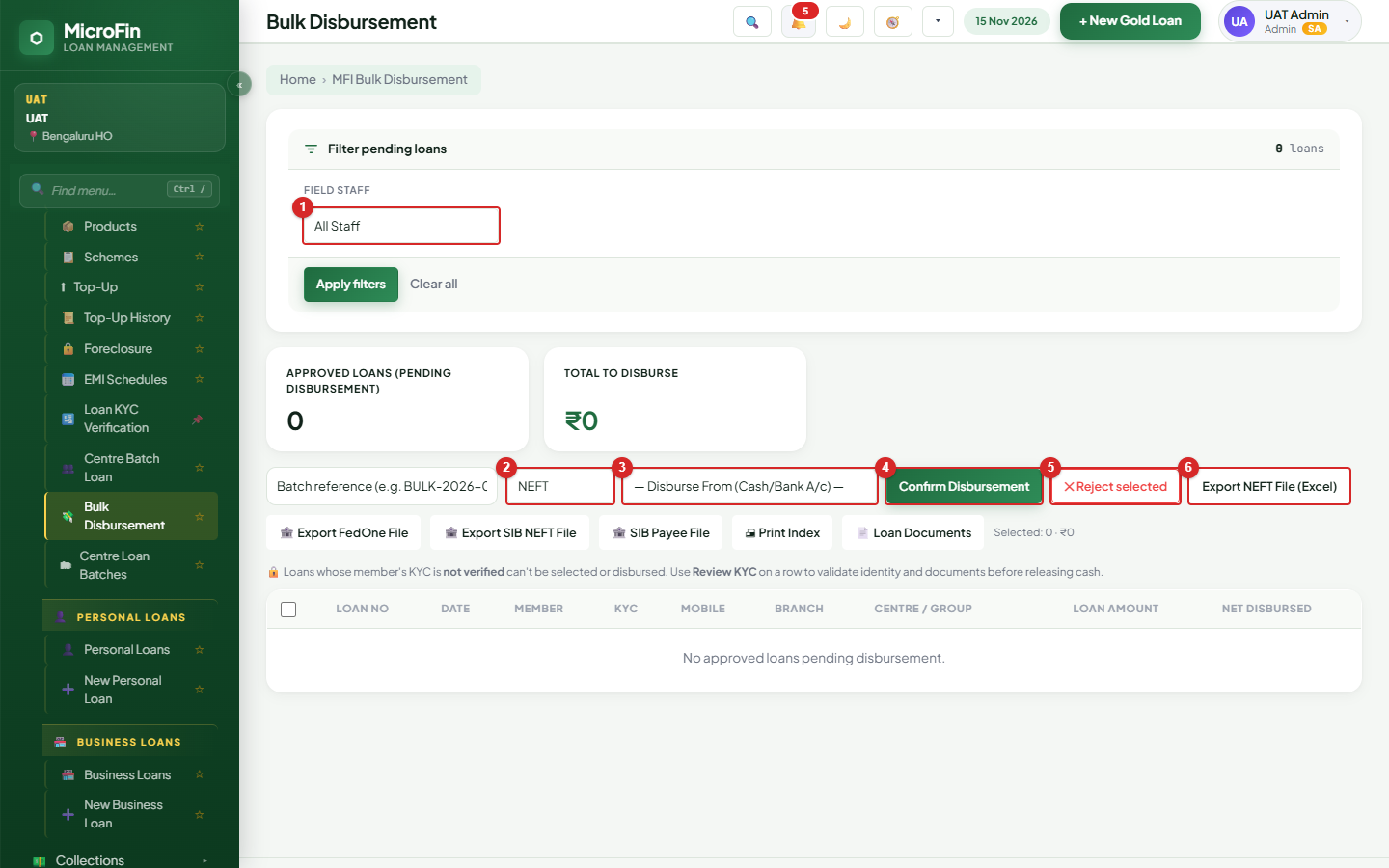
- Filter by field staff
- Payment mode
- Disburse-from cash or bank account
- Confirm Disbursement
- Reject selected loans
- Export NEFT file
3. Before you start
- Permission: loan-management right (
CanManageLoans). A field officer sees and acts on loans assigned to them only. - The loans must be approved (chapter 21). The queue lists only loans whose status is Approved and whose application is Approved.
- The member's KYC must be Verified for every loan you tick.
- You need the account the cash will leave from, a Cash drawer for Cash or a bank account for NEFT, RTGS or UPI, with enough balance.
- All loans in one batch must belong to one branch.
- For HO Disbursement: you must be an HO user or an Admin / SuperAdmin, and your administrator must have ticked "Allow bulk disbursement from a Head-Office account" in
Settings > Accounting Policy(Head-Office Funding).
4. Step-by-step instructions
Disburse a batch
- Open
Loan Management > Bulk Disbursement. Use the filters Branch, Centre, Group, Field staff and click Apply filters to narrow the list. - Check each row: Loan No, Date, Member, KYC, Mobile, Branch, Centre / Group, Product, Loan Amount and Net Disbursed (what the borrower actually receives after fees). A fee shown as "⚠ Not calculated" is still ₹0; do not release until you understand why.
- Optional: open Review KYC to inspect the member's KYC (identity numbers are masked) or Preview to see the loan's figures.
- Tick the loans to pay, or use Select all / Clear.
- If a loan looks identical to one already disbursed (same member, amount and loan date) you must tick Separate loan on that row to confirm it is a genuine second loan.
- Choose the Cash / Bank account and the Payment mode (default NEFT). Optionally enter a batch reference.
- Click Confirm Disbursement and confirm the "Confirm payment" dialog.
- Read the result message. The whole batch succeeds or none of it does.
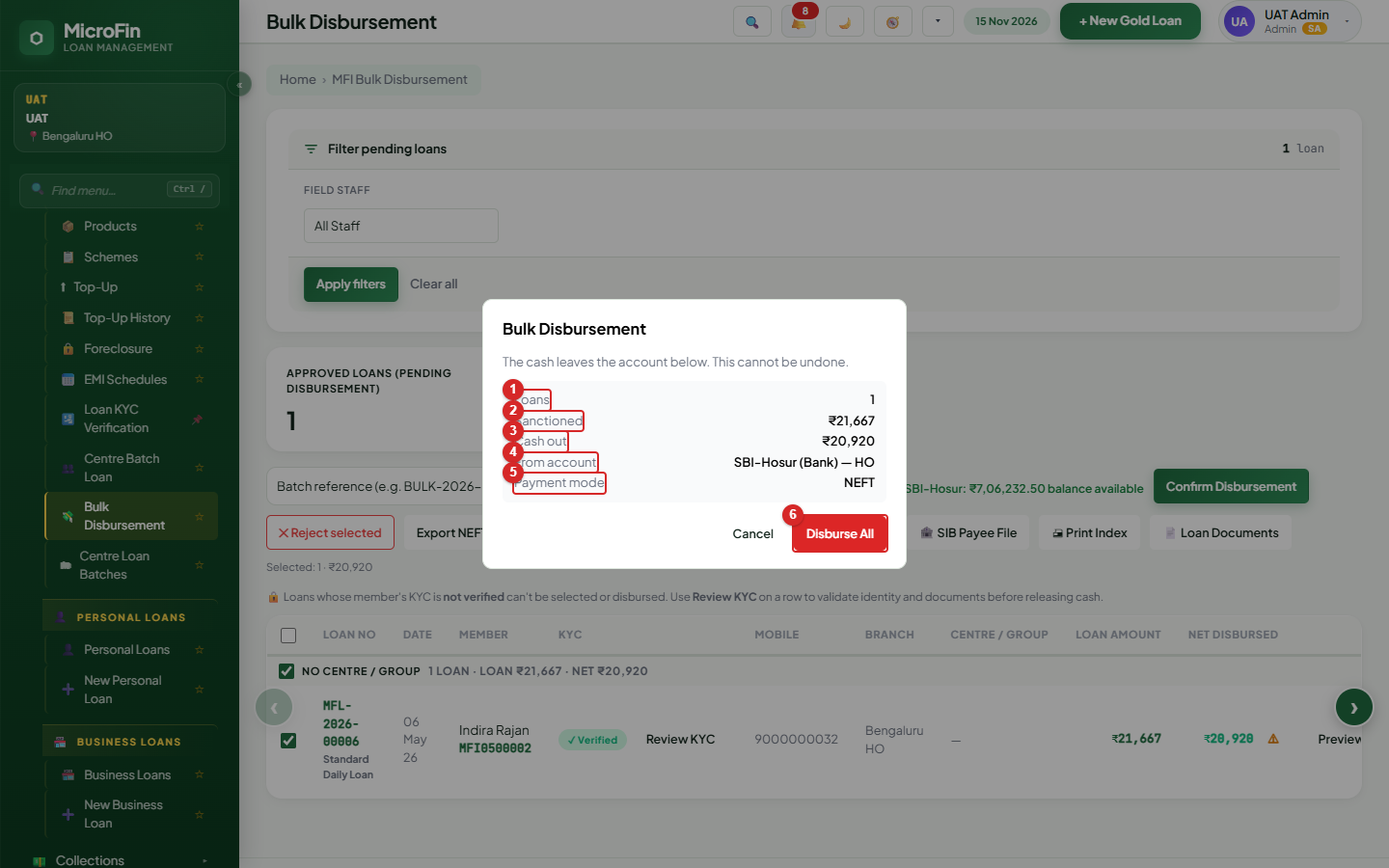
- Number of loans in the batch
- Gross (sanctioned) amount
- Net cash that leaves the account
- The cash or bank account it is paid from
- Payment mode
- Disburse All: this cannot be undone
Bank payment files
Use NEFT File, FedOne File or SIB Payee File to download the payment list for the ticked loans for your bank. Exporting posts nothing and the figures use the same charges as the screen. Upload the file at the bank; then do the disbursement here.
Reject a loan from the queue
- Click ✕ Reject on the row, or tick several loans and click Reject selected.
- A dialog "Reject N Loan(s)" restates the loans. Type a reason of at least 5 characters and confirm.
- The loans are rejected and cancelled. No cash moves because none had gone out. A skipped loan is named with the reason.
Disburse from Head Office
- Open
Loan Management > HO Disbursementand stay on the MFI tab. - The grid and steps are the same as Bulk Disbursement, but the account list holds Head-Office accounts only.
- Tick the loans, pick the HO account and click Confirm Disbursement.
- HO moves the net amount to the branch's account and the branch pays out. Fees stay as the branch's income.
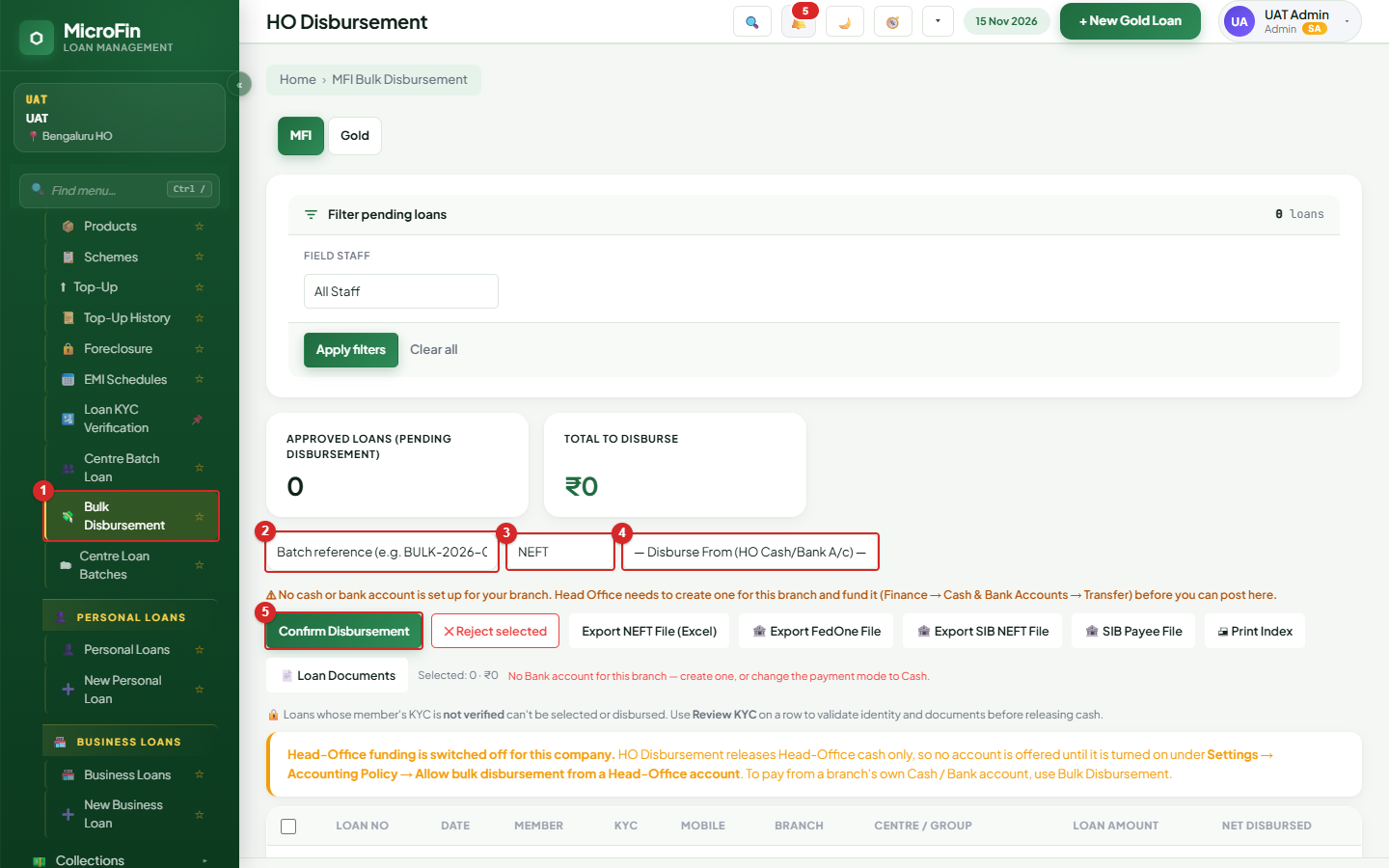
- Loan Management > HO Disbursement
- Batch reference
- Payment mode
- Head Office cash or bank account to pay from
- Confirm Disbursement
5. Field explanation
| Field | Purpose | Required? | Expected input | Validation | Example |
|---|---|---|---|---|---|
| Branch, Centre, Group, Field staff | Narrow the queue | Optional | Pick | Branch users see their own branch | — |
| Loan tick | Choose the loans to pay | At least one | Tick | "Select at least one loan." | — |
| Separate loan | Confirm a loan that looks identical to a disbursed one is genuine | Only on a twin | Tick | The loan is refused until ticked | — |
| Cash / Bank account | Account the cash leaves from | Yes | Pick | "Pick the Cash / Bank account to disburse from." | Main Cash Drawer |
| Payment mode | How the cash is paid | Yes | Pick; default NEFT | Must match the account kind | NEFT |
| Batch reference | A reference stored on each loan | Optional | Text | — | NEFT-0001 |
| Reject reason | Why a queued loan is rejected | Yes (on reject) | At least 5 characters, up to 500 | "A rejection reason of at least 5 characters is required." | Borrower withdrew |
| Head-Office account (HO mode) | HO account to fund from | Yes | Pick | Head-Office accounts only | HO Bank |
6. Buttons and actions
| Button | What it does |
|---|---|
| Apply filters | Filters the queue. |
| Select all / Clear | Ticks or clears all rows. |
| Confirm Disbursement | Pays the ticked loans and posts the accounts. |
| ✕ Reject / Reject selected | Declines approved loans before cash goes out. |
| NEFT File / FedOne File / SIB Payee File | Downloads bank payment lists. |
| Review KYC | Opens the member's KYC for a quick check or edit. |
| Preview | Shows the loan's figures and, where the company uses product fields, the goods details. |
| Print Index / Loan Documents / Jewel Forms | Prints the batch index, loan documents or the jewel receipt form for gold-product loans. |
7. Business rules and validations
Refusal order. The checks run in this order; the first failure stops the whole batch:
- No loan ticked.
- No account chosen.
- A member's KYC is not Verified: "Cannot disburse — KYC not verified for N loan(s)".
- An identical-twin loan is not ticked Separate loan.
- The renewal rule (when on): the member's old loan must be closed.
- Loans from more than one branch: "Select loans from a single branch per batch — cash is branch-scoped. Filter by branch first."
- The missed end-of-day block, and then the branch working-date check (SuperAdmin is exempt).
- The account is not the branch's own (or, in HO mode, not a Head-Office account).
- Not enough balance: "Insufficient balance in {account} — available ₹X, need ₹Y" (the balance is shown only if your company allows it).
- Any database failure: "Bulk disbursement failed and was rolled back". Nothing is paid.
finance.AllowHoDisbursement on. The screen otherwise says "Head-Office funded disbursement is switched off for this company. Enable it under Settings → Accounting Policy → Allow bulk disbursement from a Head-Office account." A branch account is refused in HO mode: "HO Disbursement releases cash only from a Head-Office account."8. Expected result
- Each paid loan becomes Active with the disbursement date set to today and the disbursed amount equal to the loan amount.
- A Centre Batch changes to Disbursed when all its approved loans are Active.
- In the accounts (in plain words): the full loan amount goes out of the chosen account, and the processing fee, insurance, document charge, GST on them, any advance interest and the goods value come back in to the same account. So the cash that really leaves is the Net Disbursed. A journal entry is also posted to the books, but a failure there does not stop the disbursement.
- In HO mode the Head Office first moves the net amount to the branch account; the branch then pays out. Fee income is the branch's.
- A "loan disbursed" SMS / WhatsApp message may reach the borrower, and for goods loans a purchase-register entry is made.
- After a reject: no entries at all, and the member can apply again.
9. Troubleshooting
| Message or problem | Likely cause | What to do |
|---|---|---|
| Loan missing from the queue | Not approved yet; parked in a Disbursement approval; assigned to another field officer; other branch filter | Check chapter 21; check Approvals; clear the filters. |
| "Cannot disburse — KYC not verified for N loan(s)" | Member KYC not Verified | Use Review KYC or the Member page to fix the KYC, then retry. |
| Identical loan will not pay | Same member, amount and loan date already disbursed | Tick Separate loan if it is a real second loan; otherwise reject it. |
| "Select loans from a single branch per batch …" | Several branches ticked | Filter by branch and disburse each branch separately. |
| "Insufficient balance in … — available ₹X, need ₹Y" | Account too low | Use another account or fund the account. |
| Blocked by the end-of-day or working date | A previous day is not closed, or the date is not allowed | Close the missed day's end-of-day; ask a manager. |
| "Bulk disbursement failed and was rolled back" | A database or accounting error | Nothing was paid. Retry once; if it repeats, report to support with the loan numbers. |
| HO account not in the list | HO funding is off, or you are not HO / Admin | Ask your administrator. |
| Reject refused "reject that request first" | Loan is in a disbursement approval request | Reject or recall that request in the Approval Inbox. |
| "⚠ Not calculated" beside a fee | The fee is still ₹0 | Confirm the scheme or product fee; the screen re-prices charges at payment. |
11. Related modules
- Chapter 20 — Loan request.
- Chapter 21 — Loan approval.
- Chapter 23 — Servicing and closure (void a loan paid in error).
- Cash Book and Day Book chapters (to see the postings).
- End-of-day chapter.
கடன் வழங்கல்
கடன் வழங்கல்: Bulk Disbursement மற்றும் HO Disbursement
1. அறிமுகம்
கடன் வழங்கல் (Disbursement) என்பது ஒப்புதல் பெற்ற கடனைப் பணப்பெட்டி அல்லது வங்கிக் கணக்கிலிருந்து வழங்கும் படி. இதுவே கடன் Active ஆகும் தருணம் (MicroFin-ல் "account activation" என்பது இதுவே). ஒரே நேரத்தில் பல கடன்களை வழங்கலாம்; அதனால்தான் திரைக்கு Bulk Disbursement என்று பெயர்.
பணம் வழங்கலின்போது மட்டுமே நகரும். கோரிக்கை, KYC சரிபார்ப்பு, ஒப்புதல், நிராகரிப்பு, விதிமுறைத் திருத்தம் ஆகிய எதுவும் கணக்குகளில் எதையும் பதிவு செய்யாது.
இதற்கு இரண்டு வழிகள் உள்ளன:
- Bulk Disbursement — கிளை தன் சொந்தப் பணப்பெட்டி / வங்கிக் கணக்கிலிருந்து வழங்கும்.
- HO Disbursement — தலைமை அலுவலகம் Head-Office கணக்கிலிருந்து வழங்கும். இது "HO mode"-ல் உள்ள அதே MFI திரை.
2. வழிசெலுத்தல்
- கிளை:
Loan Management > Bulk Disbursement(மேலும்NBFC & MFI Plus > Operations > Bulk Disbursement). - தலைமை அலுவலகம்:
Loan Management > HO Disbursement. பக்கத்தில் MFI, Gold, Vehicle தாவல்கள் உள்ளன; இந்த அத்தியாயம் MFI தாவலை விளக்குகிறது. [TBC] இந்த மெனு வரி இருக்குமா என்பது உங்கள் நிறுவனத்தின் மெனு அமைக்கப்பட்ட விதத்தைப் பொறுத்தது.
- கள ஊழியர் வடிகட்டி
- செலுத்தும் முறை
- பணம் வழங்கும் ரொக்க அல்லது வங்கிக் கணக்கு
- வழங்கலை உறுதி செய்
- தேர்ந்தெடுத்த கடன்களை நிராகரி
- NEFT கோப்பை ஏற்றுமதி செய்
3. தொடங்கும் முன்
- அனுமதி: கடன் மேலாண்மை உரிமை (
CanManageLoans). களப்பணி அலுவலர் தமக்கு ஒதுக்கப்பட்ட கடன்களை மட்டுமே பார்க்கவும் வழங்கவும் முடியும். - கடன்கள் ஒப்புதல் பெற்றவையாக இருக்க வேண்டும் (அத்தியாயம் 21). நிலை, விண்ணப்பம் இரண்டும் Approved ஆக உள்ள கடன்கள் மட்டுமே வரிசையில் இருக்கும்.
- நீங்கள் டிக் செய்யும் ஒவ்வொரு கடனிலும் உறுப்பினரின் KYC Verified ஆக இருக்க வேண்டும்.
- பணம் செல்லும் கணக்கு தேவை: Cash-க்குப் பணப்பெட்டி, NEFT / RTGS / UPI-க்கு வங்கிக் கணக்கு; அதில் போதிய இருப்பு இருக்க வேண்டும்.
- ஒரு தொகுப்பின் அனைத்துக் கடன்களும் ஒரே கிளையைச் சேர்ந்தவையாக இருக்க வேண்டும்.
- HO Disbursement-க்கு: நீங்கள் HO பயனர் அல்லது Admin / SuperAdmin ஆக இருக்க வேண்டும்; நிர்வாகி
Settings > Accounting Policy(Head-Office Funding)-ல் "Allow bulk disbursement from a Head-Office account" என்பதை டிக் செய்திருக்க வேண்டும்.
4. படிப்படியான வழிமுறைகள்
ஒரு தொகுப்பை வழங்குதல்
Loan Management > Bulk Disbursementதிறக்கவும். Branch, Centre, Group, Field staff வடிகட்டிகளை அமைத்து Apply filters அழுத்திப் பட்டியலைச் சுருக்கவும்.- ஒவ்வொரு வரியையும் சரிபார்க்கவும்: Loan No, Date, Member, KYC, Mobile, Branch, Centre / Group, Product, Loan Amount, Net Disbursed (கட்டணங்களுக்குப் பின் கடன் பெறுபவருக்குச் செல்லும் தொகை). கட்டணம் "⚠ Not calculated" என்று இருந்தால் அது இன்னும் ₹0; ஏன் என்று புரியும் வரை வழங்க வேண்டாம்.
- விருப்பம்: Review KYC மூலம் உறுப்பினரின் KYC-ஐப் பார்க்கலாம் (அடையாள எண்கள் மறைக்கப்பட்டிருக்கும்); Preview மூலம் கடனின் தொகை விவரங்களைப் பார்க்கலாம்.
- வழங்க வேண்டிய கடன்களை டிக் செய்யவும்; அல்லது Select all / Clear பயன்படுத்தவும்.
- ஒரு கடன் ஏற்கனவே வழங்கிய கடனை அப்படியே ஒத்திருந்தால் (அதே உறுப்பினர், தொகை, கடன் தேதி), அது உண்மையான இரண்டாம் கடன் என்பதை உறுதிசெய்ய அந்த வரியில் Separate loan டிக் செய்ய வேண்டும்.
- Cash / Bank account, Payment mode (இயல்பு NEFT) தேர்வு செய்யவும். விரும்பினால் தொகுப்புக் குறிப்பு எண்ணை (batch reference) உள்ளிடலாம்.
- Confirm Disbursement அழுத்தி, "Confirm payment" உரையாடலை உறுதிசெய்யவும்.
- முடிவுச் செய்தியைப் படிக்கவும். முழுத் தொகுப்பும் வெற்றி பெறும்; இல்லையெனில் எந்தக் கடனும் வழங்கப்படாது.
- தொகுப்பில் உள்ள கடன்களின் எண்ணிக்கை
- மொத்த (அனுமதிக்கப்பட்ட) தொகை
- கணக்கிலிருந்து வெளியேறும் நிகர ரொக்கம்
- பணம் வழங்கப்படும் ரொக்க அல்லது வங்கிக் கணக்கு
- செலுத்தும் முறை
- Disburse All: இதைத் திரும்பப் பெற முடியாது
வங்கிக்கான பணம் செலுத்தும் கோப்புகள்
டிக் செய்த கடன்களுக்கான பணம் செலுத்தும் பட்டியலை உங்கள் வங்கிக்காகப் பதிவிறக்க NEFT File, FedOne File அல்லது SIB Payee File பயன்படுத்தவும். கோப்பை ஏற்றுமதி செய்வதால் எதுவும் பதிவாகாது; அதிலுள்ள தொகைகள் திரையில் உள்ள அதே கட்டணங்களின்படி இருக்கும். கோப்பை வங்கியில் பதிவேற்றிய பிறகு இங்கே வழங்கலைச் செய்யவும்.
வரிசையிலிருந்து கடனை நிராகரித்தல்
- வரியில் ✕ Reject அழுத்தவும்; அல்லது பல கடன்களை டிக் செய்து Reject selected அழுத்தவும்.
- "Reject N Loan(s)" உரையாடல் அந்தக் கடன்களை மீண்டும் காட்டும். குறைந்தது 5 எழுத்துகளில் காரணத்தை உள்ளிட்டு உறுதிசெய்யவும்.
- கடன்கள் நிராகரிக்கப்பட்டு ரத்தாகும். பணம் எதுவும் வழங்கப்படாததால் பணம் நகராது. தவிர்க்கப்பட்ட கடன் இருந்தால் அது காரணத்துடன் குறிப்பிடப்படும்.
தலைமை அலுவலகத்திலிருந்து வழங்குதல்
Loan Management > HO Disbursementதிறந்து MFI தாவலில் இருங்கள்.- பட்டியலும் படிகளும் Bulk Disbursement போலவே இருக்கும்; ஆனால் கணக்குப் பட்டியலில் Head-Office கணக்குகள் மட்டும் இருக்கும்.
- கடன்களை டிக் செய்து, HO கணக்கைத் தேர்வு செய்து Confirm Disbursement அழுத்தவும்.
- HO நிகரத் தொகையைக் கிளையின் கணக்குக்கு மாற்றும்; கிளை அதை வழங்கும். கட்டணங்கள் கிளையின் வருமானமாகவே இருக்கும்.
- கடன் மேலாண்மை > தலைமை அலுவலக வழங்கல்
- தொகுப்புக் குறிப்பு
- செலுத்தும் முறை
- பணம் வழங்கும் தலைமை அலுவலக ரொக்க அல்லது வங்கிக் கணக்கு
- வழங்கலை உறுதி செய்
5. புல விளக்கம்
| புலம் | நோக்கம் | கட்டாயமா? | உள்ளீடு | சரிபார்ப்பு | எடுத்துக்காட்டு |
|---|---|---|---|---|---|
| Branch, Centre, Group, Field staff | வரிசையைச் சுருக்க | விருப்பம் | தேர்வு | கிளைப் பயனருக்குத் தன் கிளை மட்டும் | — |
| கடன் டிக் பெட்டி | வழங்க வேண்டிய கடன்களைத் தேர்வு செய்ய | குறைந்தது ஒன்று | டிக் | "Select at least one loan." | — |
| Separate loan | வழங்கிய கடனை ஒத்த கடன் உண்மையான இரண்டாம் கடன் என்று உறுதிசெய்ய | ஒத்த கடனுக்கு மட்டும் | டிக் | டிக் செய்யும் வரை கடன் மறுக்கப்படும் | — |
| Cash / Bank account | பணம் செல்லும் கணக்கு | ஆம் | தேர்வு | "Pick the Cash / Bank account to disburse from." | Main Cash Drawer |
| Payment mode | பணம் வழங்கும் முறை | ஆம் | தேர்வு; இயல்பு NEFT | கணக்கு வகைக்குப் பொருந்த வேண்டும் | NEFT |
| Batch reference | ஒவ்வொரு கடனிலும் சேமிக்கப்படும் குறிப்பு | விருப்பம் | உரை | — | NEFT-0001 |
| நிராகரிப்புக் காரணம் | வரிசையில் உள்ள கடன் நிராகரிப்புக் காரணம் | நிராகரிக்கும்போது ஆம் | குறைந்தது 5, அதிகபட்சம் 500 எழுத்துகள் | "A rejection reason of at least 5 characters is required." | கடன் பெறுபவர் விலகினார் |
| Head-Office account (HO mode) | நிதி வழங்கும் HO கணக்கு | ஆம் | தேர்வு | Head-Office கணக்குகள் மட்டும் | HO Bank |
6. பொத்தான்களும் செயல்களும்
| பொத்தான் | செய்வது |
|---|---|
| Apply filters | வரிசையை வடிகட்டும். |
| Select all / Clear | அனைத்து வரிகளையும் டிக் செய்யும் / டிக்கை நீக்கும். |
| Confirm Disbursement | டிக் செய்த கடன்களை வழங்கி, கணக்குகளில் பதிவு செய்யும். |
| ✕ Reject / Reject selected | பணம் வழங்கப்படும் முன் ஒப்புதல் பெற்ற கடன்களை நிராகரிக்கும். |
| NEFT File / FedOne File / SIB Payee File | வங்கிக்கான பணம் செலுத்தும் பட்டியல்களைப் பதிவிறக்கும். |
| Review KYC | விரைவாகச் சரிபார்க்க அல்லது திருத்த உறுப்பினரின் KYC-ஐத் திறக்கும். |
| Preview | கடனின் தொகை விவரங்களையும், (நிறுவனம் product fields பயன்படுத்தினால்) பொருள் விவரங்களையும் காட்டும். |
| Print Index / Loan Documents / Jewel Forms | தொகுப்புச் சுட்டி, கடன் ஆவணங்கள், தங்கப் பொருள் கடன்களுக்கான நகை ஒப்புதல் படிவம் ஆகியவற்றை அச்சிடும். |
7. வணிக விதிகளும் சரிபார்ப்புகளும்
மறுப்பு வரிசை. சரிபார்ப்புகள் இந்த வரிசையில் நடக்கும்; முதலில் தோல்வியடைவது முழுத் தொகுப்பையும் நிறுத்தும்:
- கடன் எதுவும் டிக் செய்யப்படவில்லை.
- கணக்கு தேர்வு செய்யப்படவில்லை.
- ஒரு உறுப்பினரின் KYC Verified ஆக இல்லை: "Cannot disburse — KYC not verified for N loan(s)".
- ஒத்த கடனுக்கு Separate loan டிக் செய்யப்படவில்லை.
- Renewal விதி (இயக்கத்தில் இருந்தால்): உறுப்பினரின் பழைய கடன் முடிக்கப்பட்டிருக்க வேண்டும்.
- ஒன்றுக்கு மேற்பட்ட கிளைகளின் கடன்கள்: "Select loans from a single branch per batch — cash is branch-scoped. Filter by branch first."
- தவறவிட்ட நாள் முடிவு (EOD) தடை; பிறகு கிளை வேலைத் தேதிச் சோதனை (SuperAdmin-க்கு விலக்கு).
- கணக்கு கிளையின் சொந்தக் கணக்கு இல்லை (HO mode-ல் Head-Office கணக்கு இல்லை).
- இருப்பு போதாது: "Insufficient balance in {account} — available ₹X, need ₹Y" (நிறுவனம் அனுமதித்தால் மட்டும் இருப்பு காட்டப்படும்).
- ஏதேனும் தரவுத்தளப் பிழை: "Bulk disbursement failed and was rolled back". எதுவும் வழங்கப்படாது.
finance.AllowHoDisbursement இயக்கத்தில் இருக்க வேண்டும். இல்லையெனில் திரை சொல்வது: "Head-Office funded disbursement is switched off for this company. Enable it under Settings → Accounting Policy → Allow bulk disbursement from a Head-Office account." HO mode-ல் கிளைக் கணக்கு மறுக்கப்படும்: "HO Disbursement releases cash only from a Head-Office account."8. எதிர்பார்க்கும் முடிவு
- வழங்கப்பட்ட ஒவ்வொரு கடனும் Active ஆகும்; வழங்கல் தேதி இன்றைய தேதியாகவும், வழங்கிய தொகை கடன் தொகைக்குச் சமமாகவும் இருக்கும்.
- Centre Batch-ன் அனைத்து ஒப்புதல் பெற்ற கடன்களும் Active ஆனதும் தொகுப்பு Disbursed ஆகும்.
- கணக்குகளில் (எளிய சொற்களில்): தேர்ந்தெடுத்த கணக்கிலிருந்து முழுக் கடன் தொகையும் வெளியே செல்லும்; processing fee, insurance, document charge, அவற்றின் GST, முன்கூட்டிய வட்டி, பொருள் மதிப்பு ஆகியவை அதே கணக்குக்குள் திரும்ப வரும். எனவே உண்மையில் வெளியே செல்லும் பணம் Net Disbursed. கணக்குப் புத்தகங்களில் ஒரு journal பதிவும் செய்யப்படும்; அது தோல்வியடைந்தாலும் வழங்கல் நிற்காது.
- HO mode-ல் தலைமை அலுவலகம் முதலில் நிகரத் தொகையைக் கிளைக் கணக்குக்கு மாற்றும்; பிறகு கிளை வழங்கும். கட்டண வருமானம் கிளைக்கு.
- கடன் பெறுபவருக்கு "loan disbursed" SMS / WhatsApp செல்லலாம்; பொருள் சார்ந்த கடன்களுக்கு கொள்முதல் பதிவேட்டில் பதிவு நடக்கும்.
- நிராகரிப்புக்குப் பின்: கணக்குப் பதிவு எதுவும் இல்லை; உறுப்பினர் மீண்டும் விண்ணப்பிக்கலாம்.
9. சிக்கல் தீர்வு
| செய்தி / சிக்கல் | சாத்தியக் காரணம் | செய்ய வேண்டியது |
|---|---|---|
| கடன் வரிசையில் இல்லை | இன்னும் ஒப்புதல் பெறவில்லை; Disbursement ஒப்புதலில் நிறுத்தி வைக்கப்பட்டுள்ளது; வேறு களப்பணி அலுவலருக்கு ஒதுக்கப்பட்டுள்ளது; வேறு கிளை வடிகட்டி உள்ளது | அத்தியாயம் 21-ஐப் பாருங்கள்; Approvals-ஐப் பாருங்கள்; வடிகட்டிகளை நீக்குங்கள். |
| "Cannot disburse — KYC not verified for N loan(s)" | உறுப்பினர் KYC Verified இல்லை | Review KYC அல்லது உறுப்பினர் பக்கத்தில் சரிசெய்து மீண்டும் முயலுங்கள். |
| ஒத்த கடன் வழங்கப்படவில்லை | அதே உறுப்பினர், தொகை, தேதியில் கடன் ஏற்கனவே வழங்கப்பட்டுள்ளது | உண்மையான இரண்டாம் கடன் எனில் Separate loan டிக் செய்யுங்கள்; இல்லையெனில் நிராகரிக்கவும். |
| "Select loans from a single branch per batch …" | பல கிளைகளின் கடன்கள் டிக் செய்யப்பட்டுள்ளன | கிளை வாரியாக வடிகட்டி, ஒவ்வொரு கிளைக்கும் தனித்தனியாக வழங்குங்கள். |
| "Insufficient balance in … — available ₹X, need ₹Y" | கணக்கில் இருப்பு குறைவு | வேறு கணக்கைப் பயன்படுத்தவும் அல்லது கணக்கில் நிதி சேர்க்கவும். |
| நாள் முடிவு (EOD) அல்லது வேலைத் தேதியால் தடை | முந்தைய நாள் மூடப்படவில்லை; அல்லது தேதி அனுமதிக்கப்படவில்லை | தவறவிட்ட நாளின் End of Day-ஐ முடியுங்கள்; மேலாளரிடம் கேளுங்கள். |
| "Bulk disbursement failed and was rolled back" | தரவுத்தளம் அல்லது கணக்குப் பிழை | எதுவும் வழங்கப்படவில்லை. ஒருமுறை மீண்டும் முயலுங்கள்; தொடர்ந்தால் கடன் எண்களுடன் ஆதரவுக்குத் தெரிவியுங்கள். |
| பட்டியலில் HO கணக்கு இல்லை | HO நிதி இயக்கம் இல்லை, அல்லது நீங்கள் HO / Admin இல்லை | நிர்வாகியிடம் கேளுங்கள். |
| Reject மறுக்கப்படுகிறது: "reject that request first" | கடன் ஒரு வழங்கல் ஒப்புதல் கோரிக்கையில் உள்ளது | Approval Inbox-ல் அந்தக் கோரிக்கையை நிராகரிக்கவும்/திரும்பப் பெறவும். |
| கட்டணத்தின் அருகில் "⚠ Not calculated" | கட்டணம் இன்னும் ₹0 | திட்டம் / product கட்டணத்தை உறுதிசெய்யுங்கள்; பணம் வழங்கும்போது திரை கட்டணங்களை மீண்டும் கணக்கிடும். |
10. தமிழ் விளக்கம்
கடன் வழங்கலே பணம் வெளியே செல்லும் ஒரே படி. வழங்கலில் முழுக் கடன் தொகை வெளியே சென்று, கட்டணங்கள் உள்ளே வருவதால் உண்மையில் கடன் பெறுபவர் பெறுவது "Net Disbursed" தொகை.
11. தொடர்புடைய தொகுதிகள்
- அத்தியாயம் 20 — கடன் கோரிக்கை.
- அத்தியாயம் 21 — கடன் ஒப்புதல்.
- அத்தியாயம் 23 — கடன் பராமரிப்பும் முடிப்பும் (தவறாக வழங்கிய கடனை Void செய்தல்).
- Cash Book, Day Book அத்தியாயங்கள் (பதிவுகளைப் பார்க்க).
- End of Day அத்தியாயம்.